“Only 3 Left in Stock”: Add a Low-Stock Message to OpenCart 4 Product Pages (Free Extension)
A small OpenCart 4 extension that replaces the Availability text with "Only X left in stock" when a product's quantity drops below a threshold you set.
 Rupak NepaliPublished Nov 11, 2026
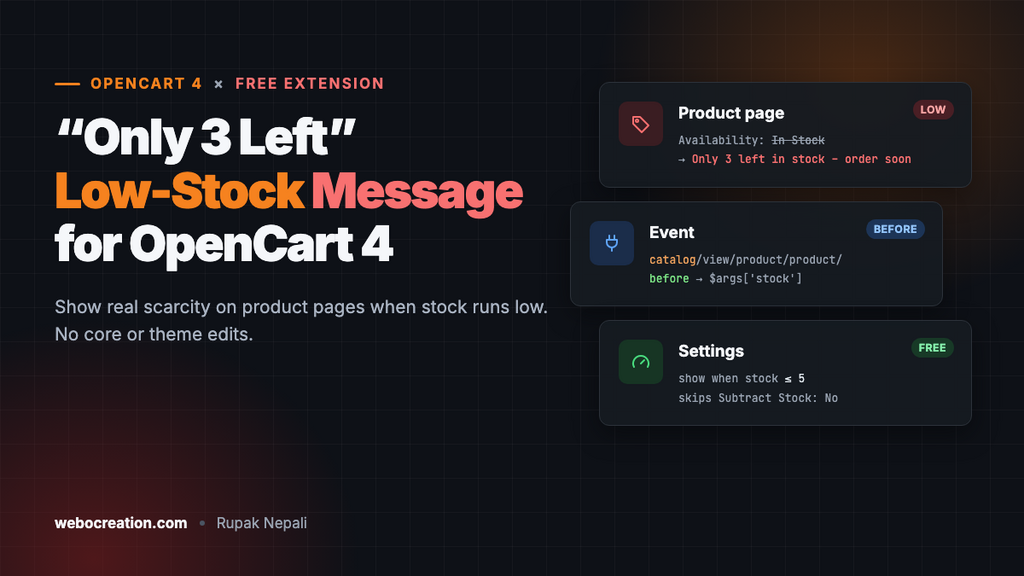
OpenCart 4 can show stock on the product page in only two ways: a plain “In Stock”, or the exact quantity, such as “Availability: 247”. Neither helps sell. Shoppers don’t care that you have 247, but they do care when there are only 3 left. A short, honest “Only 3 left in stock” message on low-stock products gives them a reason to buy now instead of later.
This free extension adds that message. When a product’s quantity falls to a threshold you choose (5 by default), the Availability line on the product page changes to “Only 3 left in stock – order soon”. Above the threshold, OpenCart’s normal text stays. It uses an event, so there are no core edits, no OCMOD and no theme changes.
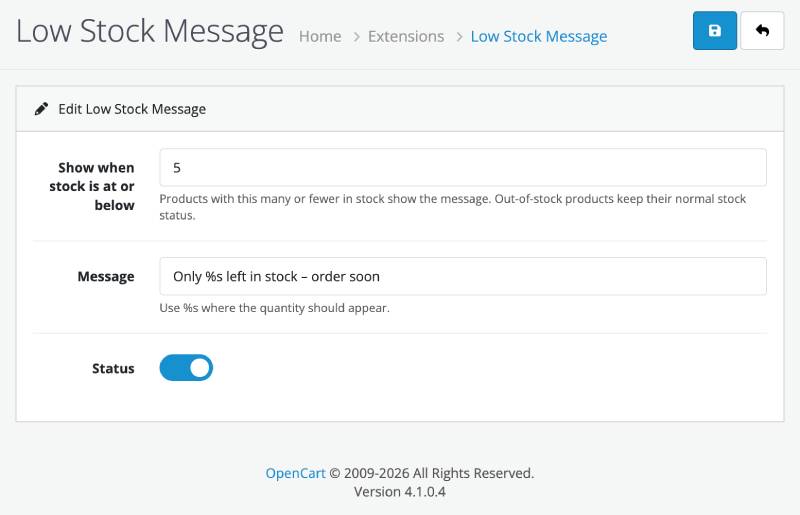
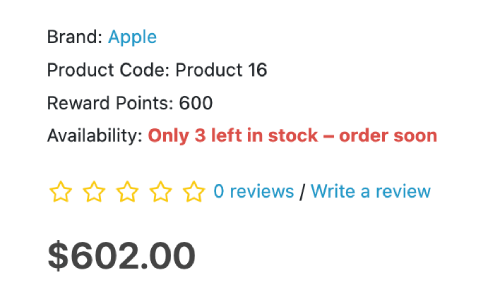
It’s built the same way as our automatic related products extension. If you’ve made that one, this will look familiar.
How it works
The product page controller puts the availability text in a template variable called stock, and every theme prints it next to “Availability”. Just before the template is rendered, OpenCart 4 fires a view event:
catalog/view/product/product/beforeThe extension listens for it, looks up the product’s quantity, and if it’s at or below your threshold, replaces stock with the low-stock message. Because it only changes a variable the theme already shows, it works with the default theme and most third-party themes without touching their files.
It’s written for OpenCart 4.0.2.x and 4.1.x.
The files
lowstock.ocmod.zip
├── install.json
├── admin/
│   ├── controller/module/lowstock.php
│   ├── language/en-gb/module/lowstock.php
│   └── view/template/module/lowstock.twig
└── catalog/
    ├── controller/event/lowstock.php
    └── controller/module/lowstock.php
install.json
{
    "name": "Low Stock Message",
    "version": "1.0.0",
    "author": "Webocreation",
    "link": "https://webocreation.com/"
}
admin/controller/module/lowstock.php
<?php
namespace Opencart\Admin\Controller\Extension\Lowstock\Module;

class Lowstock extends \Opencart\System\Engine\Controller {
	public function index(): void {
		$this->load->language('extension/lowstock/module/lowstock');

		$this->document->setTitle($this->language->get('heading_title'));

		$token = 'user_token=' . $this->session->data['user_token'];

		$data['breadcrumbs'] = [];
		$data['breadcrumbs'][] = [
			'text' => $this->language->get('text_home'),
			'href' => $this->url->link('common/dashboard', $token)
		];
		$data['breadcrumbs'][] = [
			'text' => $this->language->get('text_extension'),
			'href' => $this->url->link('marketplace/extension', $token . '&type=module')
		];
		$data['breadcrumbs'][] = [
			'text' => $this->language->get('heading_title'),
			'href' => $this->url->link('extension/lowstock/module/lowstock', $token)
		];

		$data['save'] = $this->url->link('extension/lowstock/module/lowstock.save', $token);
		$data['back'] = $this->url->link('marketplace/extension', $token . '&type=module');

		$data['module_lowstock_status'] = $this->config->get('module_lowstock_status');
		$data['module_lowstock_threshold'] = $this->config->get('module_lowstock_threshold') ?: 5;
		$data['module_lowstock_text'] = $this->config->get('module_lowstock_text') ?: $this->language->get('text_default_message');

		$data['header'] = $this->load->controller('common/header');
		$data['column_left'] = $this->load->controller('common/column_left');
		$data['footer'] = $this->load->controller('common/footer');

		$this->response->setOutput($this->load->view('extension/lowstock/module/lowstock', $data));
	}

	public function save(): void {
		$this->load->language('extension/lowstock/module/lowstock');

		$json = [];

		if (!$this->user->hasPermission('modify', 'extension/lowstock/module/lowstock')) {
			$json['error']['warning'] = $this->language->get('error_permission');
		}

		if ((int)($this->request->post['module_lowstock_threshold'] ?? 0) < 1) {
			$json['error']['threshold'] = $this->language->get('error_threshold');
		}

		if (!str_contains($this->request->post['module_lowstock_text'] ?? '', '%s')) {
			$json['error']['text'] = $this->language->get('error_text');
		}

		if (!$json) {
			$this->load->model('setting/setting');

			$this->model_setting_setting->editSetting('module_lowstock', $this->request->post);

			$json['success'] = $this->language->get('text_success');
		}

		$this->response->addHeader('Content-Type: application/json');
		$this->response->setOutput(json_encode($json));
	}

	public function install(): void {
		$this->load->model('setting/event');

		$this->model_setting_event->addEvent([
			'code'        => 'lowstock',
			'description' => 'Show "Only X left" on product pages when stock is low',
			'trigger'     => 'catalog/view/product/product/before',
			'action'      => 'extension/lowstock/event/lowstock',
			'status'      => 1,
			'sort_order'  => 0
		]);
	}

	public function uninstall(): void {
		$this->load->model('setting/event');

		$this->model_setting_event->deleteEventByCode('lowstock');
	}
}
admin/language/en-gb/module/lowstock.php
<?php
$_['heading_title']        = 'Low Stock Message';

$_['text_extension']       = 'Extensions';
$_['text_success']         = 'Success: You have modified Low Stock Message!';
$_['text_edit']            = 'Edit Low Stock Message';
$_['text_default_message'] = 'Only %s left in stock – order soon';

$_['entry_status']         = 'Status';
$_['entry_threshold']      = 'Show when stock is at or below';
$_['entry_text']           = 'Message';

$_['help_threshold']       = 'Products with this many or fewer in stock show the message. Out-of-stock products keep their normal stock status.';
$_['help_text']            = 'Use %s where the quantity should appear.';

$_['error_permission']     = 'Warning: You do not have permission to modify Low Stock Message!';
$_['error_threshold']      = 'Enter a number of 1 or more.';
$_['error_text']           = 'The message must contain %s for the quantity.';
admin/view/template/module/lowstock.twig
{{ header }}{{ column_left }}
<div id="content">
  <div class="page-header">
    <div class="container-fluid">
      <div class="float-end">
        <button type="submit" form="form-module" data-bs-toggle="tooltip" title="{{ button_save }}" class="btn btn-primary"><i class="fa-solid fa-floppy-disk"></i></button>
        <a href="{{ back }}" data-bs-toggle="tooltip" title="{{ button_back }}" class="btn btn-light"><i class="fa-solid fa-reply"></i></a>
      </div>
      <h1>{{ heading_title }}</h1>
      <ol class="breadcrumb">
        {% for breadcrumb in breadcrumbs %}
          <li class="breadcrumb-item"><a href="{{ breadcrumb.href }}">{{ breadcrumb.text }}</a></li>
        {% endfor %}
      </ol>
    </div>
  </div>
  <div class="container-fluid">
    <div class="card">
      <div class="card-header"><i class="fa-solid fa-pencil"></i> {{ text_edit }}</div>
      <div class="card-body">
        <form id="form-module" action="{{ save }}" method="post" data-oc-toggle="ajax">
          <div class="row mb-3">
            <label for="input-threshold" class="col-sm-2 col-form-label">{{ entry_threshold }}</label>
            <div class="col-sm-10">
              <input type="number" name="module_lowstock_threshold" value="{{ module_lowstock_threshold }}" min="1" id="input-threshold" class="form-control"/>
              <div id="error-threshold" class="invalid-feedback"></div>
              <div class="form-text">{{ help_threshold }}</div>
            </div>
          </div>
          <div class="row mb-3">
            <label for="input-text" class="col-sm-2 col-form-label">{{ entry_text }}</label>
            <div class="col-sm-10">
              <input type="text" name="module_lowstock_text" value="{{ module_lowstock_text }}" id="input-text" class="form-control"/>
              <div id="error-text" class="invalid-feedback"></div>
              <div class="form-text">{{ help_text }}</div>
            </div>
          </div>
          <div class="row mb-3">
            <label for="input-status" class="col-sm-2 col-form-label">{{ entry_status }}</label>
            <div class="col-sm-10">
              <div class="form-check form-switch form-switch-lg">
                <input type="hidden" name="module_lowstock_status" value="0"/>
                <input type="checkbox" name="module_lowstock_status" value="1" id="input-status" class="form-check-input"{% if module_lowstock_status %} checked{% endif %}/>
              </div>
            </div>
          </div>
        </form>
      </div>
    </div>
  </div>
</div>
{{ footer }}
catalog/controller/event/lowstock.php
<?php
namespace Opencart\Catalog\Controller\Extension\Lowstock\Event;

class Lowstock extends \Opencart\System\Engine\Controller {
	/**
	 * Trigger: catalog/view/product/product/before
	 *
	 * @param string $route 'product/product'
	 * @param array  $args  the template data the product controller built
	 */
	public function index(string &$route, array &$args): void {
		if (!$this->config->get('module_lowstock_status') || empty($args['product_id'])) {
			return;
		}

		$this->load->model('catalog/product');

		$product = $this->model_catalog_product->getProduct((int)$args['product_id']);

		if (!$product) {
			return;
		}

		// "Subtract Stock: No" means the quantity isn't tracked, so it means nothing.
		if (isset($product['subtract']) && !$product['subtract']) {
			return;
		}

		$quantity  = (int)$product['quantity'];
		$threshold = (int)$this->config->get('module_lowstock_threshold') ?: 5;

		// Out of stock keeps OpenCart's stock status ("Out Of Stock", "2-3 Days", "Pre-Order").
		if ($quantity <= 0 || $quantity > $threshold) {
			return;
		}

		$text = $this->config->get('module_lowstock_text') ?: 'Only %s left in stock – order soon';

		$args['stock'] = '<span class="text-danger fw-bold">'
			. htmlspecialchars(sprintf($text, $quantity), ENT_QUOTES, 'UTF-8')
			. '</span>';
	}
}
Notes on the choices in this code:
- Out of stock is left alone. At zero, OpenCart shows the stock status you set for the product, such as “Out Of Stock”, “Pre-Order” or “2-3 Days”. That text is more useful than “Only 0 left”, so the extension doesn’t touch it.
- Untracked products are skipped. If a product has Subtract Stock set to No (Data tab), its quantity never goes down, so a low-stock message would be false and would stay forever.
- The message is escaped with
htmlspecialchars(), so any text an admin types can’t break the page. The red bold styling comes from the Bootstrap 5 classes the default theme already loads.
catalog/controller/module/lowstock.php
Because this is a “module” type extension, OpenCart also lists it under Design → Layouts. It isn’t a layout block, but if someone adds it to a layout, OpenCart looks for this file and throws “Could not load controller” when it’s missing. This empty module makes that harmless:
<?php
namespace Opencart\Catalog\Controller\Extension\Lowstock\Module;

class Lowstock extends \Opencart\System\Engine\Controller {
	/**
	 * This extension works through the catalog/view/product/product/before event,
	 * not as a layout block. If someone adds it to a layout anyway, render nothing
	 * instead of throwing "Could not load controller".
	 */
	public function index(): string {
		return '';
	}
}
Install it
- Zip the contents of the folder (with
install.jsonat the top level) aslowstock.ocmod.zip. - Go to Extensions → Installer, upload the zip, and click the green + next to it.
- Go to Extensions → Extensions → Modules, find Low Stock Message and click the green + to install it. This registers the event.
- Click Edit, set the threshold and message, turn Status on, and save.
- Open a product with a quantity at or below the threshold. The Availability line now shows your message.
To test quickly, edit any product, set its quantity to 3 on the Data tab, save, and view it in the store.
If the message shows as HTML code
OpenCart’s default theme prints {{ stock }} without escaping, so the <span> works. A few third-party themes escape it, and then you’d see the tag as text. If that happens, remove the <span> wrapper from the last line of the event so it only returns the text:
$args['stock'] = sprintf($text, $quantity);You can then style it from your theme’s CSS instead.
Things to keep honest
Scarcity messages only work if they’re true. Shoppers notice when “Only 2 left” never changes, and some countries’ consumer laws treat fake scarcity as misleading advertising. This extension reads the real quantity from your database, so the message is accurate as long as your stock is. A few habits keep it that way:
- Keep quantities up to date. If you sell on other channels too, sync stock between them. Our guide to bulk updating stock with CSV helps with large catalogs.
- Pick a threshold that means something for your store. “Only 5 left” is useful for a product that sells ten a week, and meaningless for one that sells one a year.
- When products do sell out, let customers ask to be told when they’re back. See back-in-stock notifications in OpenCart 4.
Limitations
- Options with their own stock. If a T-shirt has 50 in total but only 2 in size XL, the message uses the product’s total quantity, not the chosen size’s. Showing per-option stock needs JavaScript that updates the message when the shopper picks an option.
- Product page only. Category and search pages don’t show stock in the default theme. To add a badge there, you’d listen to
catalog/view/product/category/beforeand add a field to each product in$args['products'], which also needs a small theme change. - Stock checks at checkout are separate. To stop customers ordering more than you have, go to System → Settings → edit your store → Option tab, and set Stock Checkout to No. Our OpenCart 4 settings guide explains the other stock options, and stock statuses in OpenCart 4 covers the out-of-stock texts.
Both extensions in this series, this one and automatic related products, follow the same pattern: listen to an event, change the data, and leave the core and the theme alone. It’s the safest way to customize OpenCart 4, because nothing breaks when you update OpenCart or switch themes.

Author of four Opencart book.
The recent are Opencart 4 developer book and Opencart 4 user manual