Show Related Products Automatically by Category in OpenCart 4 (Free Extension, No Core Edits)
A small OpenCart 4 extension that fills the Related Products block with items from the product's own category whenever you haven't picked related products by hand.
 Rupak NepaliPublished Nov 11, 2026
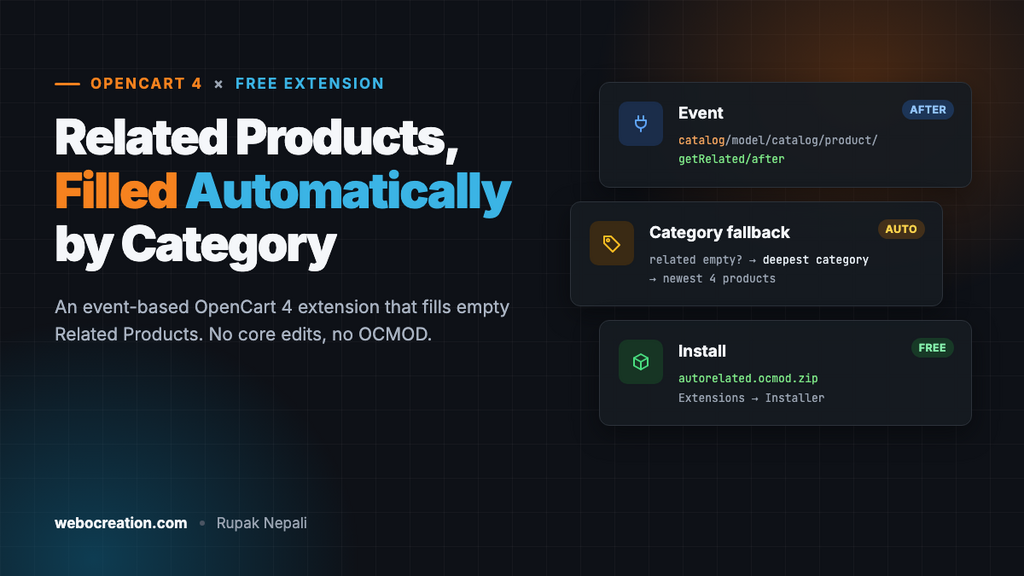
OpenCart 4 shows a Related Products block on the product page, but only for products where you’ve picked the related items by hand in the admin (Catalog → Products → edit → Links → Related Products). On a store with hundreds of products, almost nobody does that, so most product pages end with nothing to click next.
This free extension fixes it. When a product has no related products set, it fills the block with other products from the same category. Products where you did pick related items by hand keep your choice. It uses OpenCart’s event system, so there are no core file edits and no OCMOD, and it works with any theme that shows the normal Related Products block.
How it works
On the product page, OpenCart calls the model method getRelated() to load related products. OpenCart 4 fires an event after every model method runs, so the extension listens for:
catalog/model/catalog/product?getRelated/afterThe ? matters. OpenCart 4.0.2.x names this event catalog/model/catalog/product/getRelated/after, but 4.1 separates the model and the method with a dot: catalog/model/catalog/product.getRelated/after. An extension that registers the 4.0 name silently does nothing on 4.1, with no error. In event triggers, ? matches any single character, so one trigger works on both versions.
If the result is empty, the extension finds the product’s most specific category (the deepest one, so “Laptops” rather than “Computers”), loads the newest products from it, removes the current product, and puts that list in place of the empty result. The product page and the theme never know the difference. If you’re new to events, OpenCart 4 Events by Examples explains them in more detail.
The code is written for OpenCart 4.0.2.x and 4.1.x and tested on 4.1.0.4 with the default theme. See the notes at the end for 4.0.0 and 4.0.1.
The files
An OpenCart 4 extension is a zip file named <code>.ocmod.zip. The folder structure inside it mirrors where the files end up. This one is called autorelated:
autorelated.ocmod.zip
├── install.json
├── admin/
│   ├── controller/module/autorelated.php
│   ├── language/en-gb/module/autorelated.php
│   └── view/template/module/autorelated.twig
└── catalog/
    ├── controller/event/autorelated.php
    ├── controller/module/autorelated.php
    ├── language/en-gb/module/autorelated.php
    └── view/template/module/autorelated.twig
When you install it, OpenCart copies these into extension/autorelated/.
install.json
{
    "name": "Auto Related Products",
    "version": "1.0.0",
    "author": "Webocreation",
    "link": "https://webocreation.com/"
}
admin/controller/module/autorelated.php
The admin controller shows a small settings page, saves the settings, and registers the event when you install the extension. When you uninstall it, it removes the event again.
<?php
namespace Opencart\Admin\Controller\Extension\Autorelated\Module;

class Autorelated extends \Opencart\System\Engine\Controller {
	public function index(): void {
		$this->load->language('extension/autorelated/module/autorelated');

		$this->document->setTitle($this->language->get('heading_title'));

		$token = 'user_token=' . $this->session->data['user_token'];

		$data['breadcrumbs'] = [];
		$data['breadcrumbs'][] = [
			'text' => $this->language->get('text_home'),
			'href' => $this->url->link('common/dashboard', $token)
		];
		$data['breadcrumbs'][] = [
			'text' => $this->language->get('text_extension'),
			'href' => $this->url->link('marketplace/extension', $token . '&type=module')
		];
		$data['breadcrumbs'][] = [
			'text' => $this->language->get('heading_title'),
			'href' => $this->url->link('extension/autorelated/module/autorelated', $token)
		];

		$data['save'] = $this->url->link('extension/autorelated/module/autorelated.save', $token);
		$data['back'] = $this->url->link('marketplace/extension', $token . '&type=module');

		$data['module_autorelated_status'] = $this->config->get('module_autorelated_status');
		$data['module_autorelated_limit'] = $this->config->get('module_autorelated_limit') ?: 4;

		$data['header'] = $this->load->controller('common/header');
		$data['column_left'] = $this->load->controller('common/column_left');
		$data['footer'] = $this->load->controller('common/footer');

		$this->response->setOutput($this->load->view('extension/autorelated/module/autorelated', $data));
	}

	public function save(): void {
		$this->load->language('extension/autorelated/module/autorelated');

		$json = [];

		if (!$this->user->hasPermission('modify', 'extension/autorelated/module/autorelated')) {
			$json['error']['warning'] = $this->language->get('error_permission');
		}

		$limit = (int)($this->request->post['module_autorelated_limit'] ?? 0);

		if ($limit < 1 || $limit > 24) {
			$json['error']['limit'] = $this->language->get('error_limit');
		}

		if (!$json) {
			$this->load->model('setting/setting');

			$this->model_setting_setting->editSetting('module_autorelated', $this->request->post);

			$json['success'] = $this->language->get('text_success');
		}

		$this->response->addHeader('Content-Type: application/json');
		$this->response->setOutput(json_encode($json));
	}

	public function install(): void {
		$this->load->model('setting/event');

		$this->model_setting_event->addEvent([
			'code'        => 'autorelated',
			'description' => 'Fill empty related products with products from the same category',
			// "?" matches one character: "/" in OpenCart 4.0.2.x, "." in 4.1.x
			'trigger'     => 'catalog/model/catalog/product?getRelated/after',
			'action'      => 'extension/autorelated/event/autorelated',
			'status'      => 1,
			'sort_order'  => 0
		]);
	}

	public function uninstall(): void {
		$this->load->model('setting/event');

		$this->model_setting_event->deleteEventByCode('autorelated');
	}
}
admin/language/en-gb/module/autorelated.php
<?php
$_['heading_title']    = 'Auto Related Products';

$_['text_extension']   = 'Extensions';
$_['text_success']     = 'Success: You have modified Auto Related Products!';
$_['text_edit']        = 'Edit Auto Related Products';

$_['entry_status']     = 'Status';
$_['entry_limit']      = 'Number of products';

$_['help_limit']       = 'How many products to show when a product has no related products set by hand.';

$_['error_permission'] = 'Warning: You do not have permission to modify Auto Related Products!';
$_['error_limit']      = 'Enter a number from 1 to 24.';
admin/view/template/module/autorelated.twig
This uses the same layout as OpenCart 4’s own modules, so the page looks native. The form saves over Ajax because of data-oc-toggle="ajax".
{{ header }}{{ column_left }}
<div id="content">
  <div class="page-header">
    <div class="container-fluid">
      <div class="float-end">
        <button type="submit" form="form-module" data-bs-toggle="tooltip" title="{{ button_save }}" class="btn btn-primary"><i class="fa-solid fa-floppy-disk"></i></button>
        <a href="{{ back }}" data-bs-toggle="tooltip" title="{{ button_back }}" class="btn btn-light"><i class="fa-solid fa-reply"></i></a>
      </div>
      <h1>{{ heading_title }}</h1>
      <ol class="breadcrumb">
        {% for breadcrumb in breadcrumbs %}
          <li class="breadcrumb-item"><a href="{{ breadcrumb.href }}">{{ breadcrumb.text }}</a></li>
        {% endfor %}
      </ol>
    </div>
  </div>
  <div class="container-fluid">
    <div class="card">
      <div class="card-header"><i class="fa-solid fa-pencil"></i> {{ text_edit }}</div>
      <div class="card-body">
        <form id="form-module" action="{{ save }}" method="post" data-oc-toggle="ajax">
          <div class="row mb-3">
            <label for="input-limit" class="col-sm-2 col-form-label">{{ entry_limit }}</label>
            <div class="col-sm-10">
              <input type="number" name="module_autorelated_limit" value="{{ module_autorelated_limit }}" min="1" max="24" id="input-limit" class="form-control"/>
              <div id="error-limit" class="invalid-feedback"></div>
              <div class="form-text">{{ help_limit }}</div>
            </div>
          </div>
          <div class="row mb-3">
            <label for="input-status" class="col-sm-2 col-form-label">{{ entry_status }}</label>
            <div class="col-sm-10">
              <div class="form-check form-switch form-switch-lg">
                <input type="hidden" name="module_autorelated_status" value="0"/>
                <input type="checkbox" name="module_autorelated_status" value="1" id="input-status" class="form-check-input"{% if module_autorelated_status %} checked{% endif %}/>
              </div>
            </div>
          </div>
        </form>
      </div>
    </div>
  </div>
</div>
{{ footer }}
catalog/controller/event/autorelated.php
This is the part that does the work on the storefront.
<?php
namespace Opencart\Catalog\Controller\Extension\Autorelated\Event;

class Autorelated extends \Opencart\System\Engine\Controller {
	/**
	 * Trigger: catalog/model/catalog/product?getRelated/after
	 * (fires as .../product/getRelated/after in 4.0.2.x and .../product.getRelated/after in 4.1.x)
	 *
	 * @param string $route  'catalog/product/getRelated' or 'catalog/product.getRelated'
	 * @param array  $args   [0 => product_id]
	 * @param mixed  $output the related products OpenCart found (empty if none set)
	 */
	public function index(string &$route, array &$args, mixed &$output): void {
		// Off, or the store owner picked related products by hand: leave it alone.
		if (!$this->config->get('module_autorelated_status') || !empty($output)) {
			return;
		}

		$product_id = (int)($args[0] ?? 0);

		if (!$product_id) {
			return;
		}

		$limit = (int)$this->config->get('module_autorelated_limit');

		if ($limit < 1) {
			$limit = 4;
		}

		// The product's deepest category: "Laptops" rather than "Computers".
		$query = $this->db->query("SELECT p2c.`category_id`
			FROM `" . DB_PREFIX . "product_to_category` p2c
			LEFT JOIN `" . DB_PREFIX . "category_path` cp ON (cp.`category_id` = p2c.`category_id`)
			WHERE p2c.`product_id` = '" . $product_id . "'
			GROUP BY p2c.`category_id`
			ORDER BY MAX(cp.`level`) DESC
			LIMIT 1");

		if (!$query->num_rows) {
			return;
		}

		// getProducts() already filters by store, status, date available and customer group.
		$this->load->model('catalog/product');

		$results = $this->model_catalog_product->getProducts([
			'filter_category_id' => (int)$query->row['category_id'],
			'sort'               => 'p.date_added',
			'order'              => 'DESC',
			'start'              => 0,
			'limit'              => $limit + 1 // one extra, in case the current product is in the list
		]);

		$related = [];

		foreach ($results as $result) {
			if ((int)$result['product_id'] === $product_id) {
				continue;
			}

			$related[$result['product_id']] = $result;

			if (count($related) >= $limit) {
				break;
			}
		}

		$output = $related;
	}
}
A few details worth knowing:
- It uses
getProducts(), the same method category pages use, so disabled products, products from other stores and products not yet available never appear. The results have the same fields as normal related products (name, image, price, special price, rating), so the theme displays them without changes. - Only the empty case is touched. The
!empty($output)check means hand-picked related products always win. - The product ID is cast to an integer before it goes into SQL, so the query is safe.
Install it
- Create the files above in a folder, then zip the contents of the folder (not the folder itself) as
autorelated.ocmod.zip.install.jsonmust be at the top level of the zip. - In the admin, go to Extensions → Installer, click Upload and choose the zip. Then click the green + (Install) button next to it in the list.
- Go to Extensions → Extensions, choose Modules from the filter, find Auto Related Products and click its green + button. This step registers the event.
- Click the blue Edit (pencil) button, set the number of products, turn Status on, and save.
- Open a product that has no related products set. The Related Products block now shows products from the same category.
- Optional: add it to the Cart layout (see “Show related products on the cart page” below).
To check the event was registered, open Extensions → Events and look for autorelated. It should be enabled.
Customize it
Change which products appear
The extension shows the newest products in the category. To show the best-rated ones instead, change the sort in the getProducts() call:
'sort'  => 'rating',
'order' => 'DESC',
Other sort values getProducts() accepts are p.sort_order, pd.name, p.price, p.model and p.quantity.
Hide out-of-stock products
Add this inside the foreach, before the product is added to $related:
if ((int)$result['quantity'] <= 0) {
	continue;
}
If you do this, raise the extra in 'limit' => $limit + 1 to something like $limit * 3, so there are still enough products left after filtering.
Show related products on the cart page
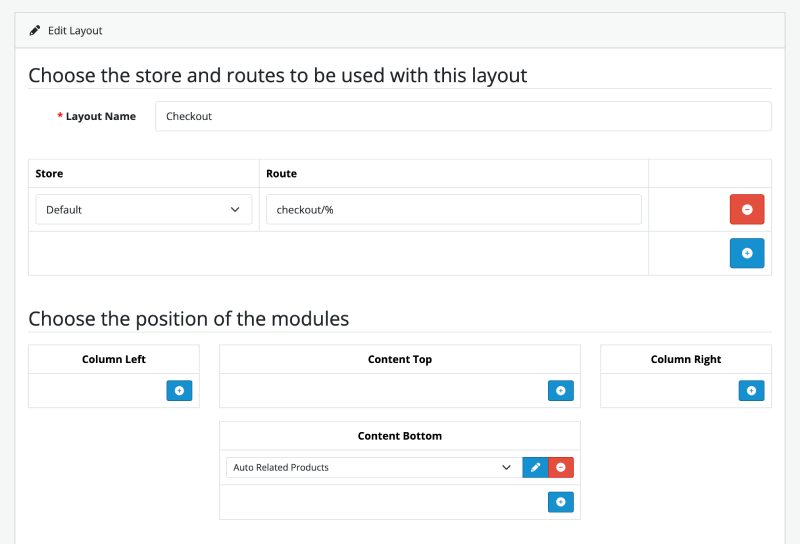
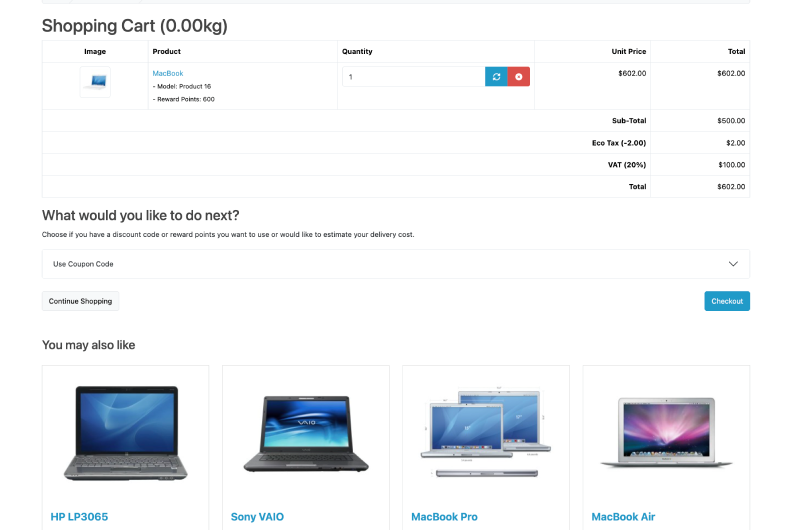
The event above only changes the product page. To show related products on the cart page as well (“You may also like”), the extension also includes a small layout module. It collects the related products of the items in the cart, skips anything already in the cart, and shows them with the same product cards your theme uses everywhere else. Products without hand-picked related items use the category fallback, because the module calls the same getRelated() method.
catalog/controller/module/autorelated.php
<?php
namespace Opencart\Catalog\Controller\Extension\Autorelated\Module;

class Autorelated extends \Opencart\System\Engine\Controller {
	/**
	 * Layout module: Design -> Layouts -> Cart (or any layout) -> Content Top/Bottom.
	 *
	 * Shows products related to what's in the cart. Products without hand-picked
	 * related items fall back to their category through the getRelated event.
	 */
	public function index(): string {
		// The product page already shows its own Related Products block.
		if (($this->request->get['route'] ?? '') == 'product/product') {
			return '';
		}

		if (!$this->cart->hasProducts()) {
			return '';
		}

		$limit = (int)$this->config->get('module_autorelated_limit');

		if ($limit < 1) {
			$limit = 4;
		}

		$this->load->language('extension/autorelated/module/autorelated');

		$this->load->model('catalog/product');
		$this->load->model('tool/image');

		$in_cart = [];

		foreach ($this->cart->getProducts() as $product) {
			$in_cart[(int)$product['product_id']] = true;
		}

		// Related products of the first few cart items, skipping anything already in the cart.
		$results = [];

		foreach (array_slice(array_keys($in_cart), 0, 5) as $product_id) {
			foreach ($this->model_catalog_product->getRelated($product_id) as $result) {
				$id = (int)$result['product_id'];

				if (!isset($in_cart[$id]) && !isset($results[$id])) {
					$results[$id] = $result;
				}
			}

			if (count($results) >= $limit) {
				break;
			}
		}

		if (!$results) {
			return '';
		}

		$width = (int)$this->config->get('config_image_related_width') ?: 200;
		$height = (int)$this->config->get('config_image_related_height') ?: 200;

		$data['products'] = [];

		foreach (array_slice($results, 0, $limit) as $result) {
			if ($result['image'] && is_file(DIR_IMAGE . html_entity_decode($result['image'], ENT_QUOTES, 'UTF-8'))) {
				$image = $this->model_tool_image->resize(html_entity_decode($result['image'], ENT_QUOTES, 'UTF-8'), $width, $height);
			} else {
				$image = $this->model_tool_image->resize('placeholder.png', $width, $height);
			}

			if ($this->customer->isLogged() || !$this->config->get('config_customer_price')) {
				$price = $this->currency->format($this->tax->calculate($result['price'], $result['tax_class_id'], $this->config->get('config_tax')), $this->session->data['currency']);
			} else {
				$price = false;
			}

			if ((float)$result['special']) {
				$special = $this->currency->format($this->tax->calculate($result['special'], $result['tax_class_id'], $this->config->get('config_tax')), $this->session->data['currency']);
			} else {
				$special = false;
			}

			if ($this->config->get('config_tax')) {
				$tax = $this->currency->format((float)$result['special'] ? $result['special'] : $result['price'], $this->session->data['currency']);
			} else {
				$tax = false;
			}

			$description = trim(strip_tags(html_entity_decode($result['description'], ENT_QUOTES, 'UTF-8')));

			$product_data = [
				'product_id'  => $result['product_id'],
				'thumb'       => $image,
				'name'        => $result['name'],
				'description' => mb_substr($description, 0, (int)$this->config->get('config_product_description_length') ?: 100) . '..',
				'price'       => $price,
				'special'     => $special,
				'tax'         => $tax,
				'minimum'     => $result['minimum'] > 0 ? $result['minimum'] : 1,
				'rating'      => $result['rating'],
				'href'        => $this->url->link('product/product', 'language=' . $this->config->get('config_language') . '&product_id=' . $result['product_id'])
			] + $result; // 4.1's product/thumb reads extra fields from the product row

			// Same product card the theme uses everywhere else.
			$data['products'][] = $this->load->controller('product/thumb', $product_data);
		}

		return $this->load->view('extension/autorelated/module/autorelated', $data);
	}
}
catalog/view/template/module/autorelated.twig
<h3 class="mt-5 mb-4">{{ heading_title }}</h3>
<div class="row row-cols-1 row-cols-sm-2 row-cols-md-3 row-cols-xl-4">
  {% for product in products %}
    <div class="col mb-3">{{ product }}</div>
  {% endfor %}
</div>
catalog/language/en-gb/module/autorelated.php
<?php
$_['heading_title'] = 'You may also like';
To turn it on, go to Design → Layouts, edit the Cart layout, add Auto Related Products to Content Bottom, and save. The block only appears when the cart has items and at least one of them has related products. On the product page it shows nothing, because the theme’s own Related Products block is already there.
For a version that edits the cart template directly instead, see our earlier tutorial Show related products at the cart page.
Troubleshooting
| Problem | Fix |
|---|---|
| Nothing changes on the product page | Check that Status is on, that the autorelated event is listed and enabled in Extensions → Events with the trigger catalog/model/catalog/product?getRelated/after (an older copy with /getRelated never fires on 4.1; uninstall and reinstall the module to fix it), and that the product has no hand-picked related products. Then clear the theme cache: Dashboard → the gear icon → refresh Theme and SASS. |
Could not load controller extension/autorelated/module/autorelated on the cart page | You added the module to a layout with an older copy of the extension that didn’t include catalog/controller/module/autorelated.php. Upload the current zip again in Extensions → Installer, or remove the module from the layout. |
| “Warning: You do not have permission” | Go to System → Users → User Groups, edit Administrator, and tick extension/autorelated/module/autorelated under both Access and Modify. |
| The settings page is blank or 404 | The zip has an extra folder level. install.json must be at the top of the zip, not inside autorelated/. |
| Only one or two products appear | The category is small. Assign more products to it, or change the query to use the parent category. |
| Your theme shows no Related Products block at all | Some themes remove the block or load related products their own way. The extension only works when the theme uses the standard getRelated() call. |
OpenCart 4.0.0 and 4.0.1
Two things differ in the first 4.0 releases:
- Method names in routes use
|instead of., so the save URL isextension/autorelated/module/autorelated|save. addEvent()takes separate arguments instead of an array:addEvent('autorelated', 'Fill empty related products...', 'catalog/model/catalog/product?getRelated/after', 'extension/autorelated/event/autorelated', 1, 0).
Those versions also have bugs fixed in 4.0.2, so upgrading is the better fix.
Want more extensions like this? See our OpenCart 4 extension tutorial, and the next post in this series, which shows an “Only 3 left” low-stock message on product pages.

Author of four Opencart book.
The recent are Opencart 4 developer book and Opencart 4 user manual