How to Upgrade Drupal 10 to Drupal 11: Step-by-Step With Composer, Drush and Upgrade Status
A step-by-step Drupal 10 to 11 upgrade: requirements, Upgrade Status, removed core modules, contrib modules without Drupal 11 releases, and the Composer and Drush commands.
 Rupak NepaliPublished Nov 11, 2026
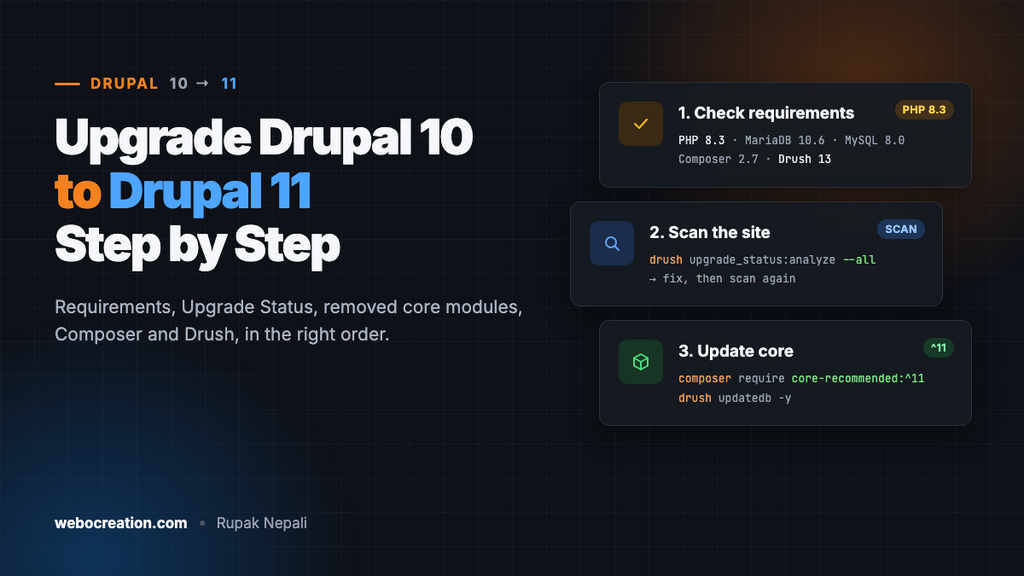
Moving from Drupal 10 to Drupal 11 is not a migration. Your content, configuration and URLs stay as they are. It works like a large Composer update: you raise the server requirements, make sure every module and theme supports Drupal 11, replace the few modules that left core, and then update. On a site that’s kept up to date, the update itself takes under an hour. The preparation is where the time goes.
This guide walks through the whole upgrade in order. Do every step on a local copy or a staging site first, never straight on production.
Step 1: Check the requirements
Drupal 11 needs newer software than Drupal 10. Check your hosting before anything else:
| Component | Drupal 11 minimum |
|---|---|
| PHP | 8.3 |
| MySQL / Percona | 8.0 |
| MariaDB | 10.6 |
| PostgreSQL | 16 |
| SQLite | 3.45 |
| Composer | 2.7 |
| Drush | 13 |
| Starting Drupal version | 10.3 or later |
Check what you have with:
php -v
composer --version
drush status --fields=drupal-version,php-version,db-driver
drush sql:query "SELECT VERSION();"
Two points about the order of work:
- Upgrade PHP first. Drupal 10.3 and later already run on PHP 8.3, so switch PHP while you’re still on Drupal 10, check the site works, and only then upgrade Drupal. That way, if something breaks, you know which change caused it. With DDEV, run
ddev config --php-version=8.3 && ddev restart; with Lando, setphp: '8.3'in.lando.ymland runlando rebuild. - Get to the latest Drupal 10 release. Drupal 11 only accepts sites coming from 10.3 or later, and the latest 10.x release has the fewest surprises. Run
composer update "drupal/core-*" --with-all-dependencies, thendrush updatedb.
Step 2: Back up
drush sql:dump --gzip --result-file=../backup-before-d11.sql
tar -czf ../files-before-d11.tar.gz web/sites/default/files
git status   # commit or stash anything uncommitted
git switch -c drupal-11-upgrade
Work on a branch, so going back is one git switch plus a database import.
Step 3: Scan the site with Upgrade Status
The Upgrade Status module checks every installed module and theme, including your custom code, and lists what has to change.
composer require --dev drupal/upgrade_status
drush en upgrade_status -y
Open Reports → Upgrade status (/admin/reports/upgrade-status). Select all projects and click Scan selected. You can also scan from the command line, which is handy for custom modules:
drush upgrade_status:analyze --all
drush upgrade_status:analyze my_custom_module
The report puts every project in one of a few groups:
- Environment: problems with PHP, the database or removed core modules. Fix these first.
- Contributed projects with a Drupal 11 release: update to that release while you’re still on Drupal 10.
- Contributed projects without one: see Step 5.
- Custom projects: your own code, with each deprecated function call listed by file and line. See Step 6.
Run the scan again after each fix until the report is clean.
Step 4: Replace the modules that left core
Six modules were removed from core in Drupal 11. They still exist, but as separate contributed projects you install with Composer:
| Module | Machine name | Composer command |
|---|---|---|
| Book | book | composer require drupal/book |
| Forum | forum | composer require drupal/forum |
| Statistics | statistics | composer require drupal/statistics |
| Tour | tour | composer require drupal/tour |
| Activity Tracker | tracker | composer require drupal/tracker |
| Actions UI | action | see the project page on drupal.org |
Check which of them are enabled:
drush pm:list --status=enabled --core | grep -E "book|forum|statistics|tour|tracker|action"For each one that’s enabled, choose:
- Still using it: install the contrib version now, while on Drupal 10. It has the same machine name, so Drupal switches to it without losing data.
- Not using it: uninstall it with
drush pm:uninstall tour -y. Tour and Statistics are often enabled on old sites without anyone using them. Statistics also slows sites down, because it writes to the database on every page view.
Step 5: Contrib modules without a Drupal 11 release
By now most popular modules support Drupal 11. For the ones that don’t, look at the module’s issue queue on drupal.org for an issue named like “Automated Drupal 11 compatibility fixes”. There’s often a patch or merge request that only changes the core_version_requirement line and a few deprecated calls.
Composer refuses to install a module that says it doesn’t support Drupal 11, even with the patch. The composer-drupal-lenient plugin works around that for the modules you name:
composer require mglaman/composer-drupal-lenient
composer config --merge --json extra.drupal-lenient.allowed-list '["drupal/some_module"]'
Then apply the patch with cweagans/composer-patches, so the module’s code actually works on Drupal 11:
"extra": {
    "patches": {
        "drupal/some_module": {
            "Drupal 11 compatibility": "https://git.drupalcode.org/project/some_module/-/merge_requests/12.diff"
        }
    }
}
If a module has no patch and no activity, decide whether you still need it. Often core or a better-maintained module does the same job now. Our list of the best Drupal 11 modules shows which old modules core has replaced.
Step 6: Fix your custom code
Upgrade Status lists every deprecated call in your custom modules and themes. Drupal Rector fixes many of them automatically:
composer require --dev palantirnet/drupal-rector
cp vendor/palantirnet/drupal-rector/rector.php .
vendor/bin/rector process web/modules/custom --dry-run
vendor/bin/rector process web/modules/custom
Review the changes with git diff before you commit them. Then fix whatever Rector left by hand, and update each custom module’s and theme’s .info.yml so it accepts both versions:
core_version_requirement: ^10.3 || ^11Supporting both lets you deploy the code changes to production before the core upgrade, which keeps the upgrade day small.
For custom themes, check the base theme. stable9 is still in core, but themes based on the old classy or stable need those as contrib projects, or a switch to stable9 or starterkit_theme.
Step 7: Update core with Composer
When Upgrade Status shows no more problems, make the settings folder writable (the scaffold step updates files there) and change the version constraints:
chmod u+w web/sites/default web/sites/default/*.php

composer require 'drupal/core-recommended:^11' \
  'drupal/core-composer-scaffold:^11' \
  'drupal/core-project-message:^11' \
  'drush/drush:^13' \
  --no-update

# Only if your composer.json has it:
composer require --dev 'drupal/core-dev:^11' --no-update
Do a dry run first. If anything blocks the update, Composer tells you here without changing your files:
composer update --with-all-dependencies --dry-runWhen it fails, ask Composer why:
composer why-not drupal/core-recommended ^11The answer is almost always a contrib module whose constraint stops at ^10. Update that module, add it to the lenient list, or remove it. When the dry run succeeds, run it for real:
composer update --with-all-dependenciesIf your project still uses drupal/core directly instead of drupal/core-recommended, change that package’s constraint instead. Using core-recommended is better, because it pins Drupal’s dependencies to tested versions.
Step 8: Run the database updates
drush updatedb -y
drush cache:rebuild
drush config:export -y
drush status --fields=drupal-version
config:export matters. Update hooks often change configuration, and if you don’t export it, your next drush config:import on deploy will undo those changes. Commit composer.json, composer.lock and the exported configuration together.
Then remove the upgrade tools and put the folder permissions back:
drush pm:uninstall upgrade_status -y
composer remove --dev drupal/upgrade_status palantirnet/drupal-rector
chmod a-w web/sites/default web/sites/default/settings.php
Step 9: Test before you deploy
Go through the site the way your editors and visitors do:
- Check Reports → Status report for errors and Reports → Recent log messages for new PHP warnings.
- Log in, create and edit a node with images, and publish it.
- Submit every form: contact, webform, search, login and password reset.
- Open pages that use Views, especially ones with exposed filters.
- Check the front-end theme and the admin theme on a phone.
- Run cron with
drush cronand check that queued work and emails still go out.
Step 10: Deploy to production
Production needs PHP 8.3 and a supported database before the code arrives. Then deploy as usual:
drush state:set system.maintenance_mode 1 --input-format=integer
git pull
composer install --no-dev --optimize-autoloader
drush updatedb -y
drush config:import -y
drush cache:rebuild
drush state:set system.maintenance_mode 0 --input-format=integer
Take a fresh database backup right before you start. If something goes wrong, restore it and deploy the previous commit.
Common errors
| Error | Cause and fix |
|---|---|
Your requirements could not be resolved... drupal/xyz requires drupal/core ^9 || ^10 | A contrib module without a Drupal 11 release. Update it, use the lenient plugin with a patch (Step 5), or remove it. |
Root composer.json requires php ^8.1 but your php version (8.3.x) does not satisfy... or the reverse | The config.platform.php setting in composer.json is pinned to an old PHP version. Change it to 8.3 or remove it. |
The website encountered an unexpected error after the update | Run drush updatedb and drush cache:rebuild again, then check drush watchdog:show for the real message. |
Module X has been removed from Drupal core in the Status report | One of the six modules from Step 4 is still enabled without its contrib version. Install the contrib project or uninstall the module. |
| Drush commands fail with class-not-found errors | Drush 12 is still installed. Drupal 11 needs Drush 13: composer require drush/drush:^13. |
How long do I have?
Drupal 10 keeps getting security fixes until Drupal 12 comes out, and the Drupal 12 release is planned for 2026. Check the dates on drupal.org’s release schedule page. The work you do now isn’t wasted either: once you’re on Drupal 11 and keep removing deprecated code, the move to Drupal 12 is the same process, only smaller.
Once you’re upgraded, put the site behind the edge rules in Cloudflare Rules for Drupal. For a local environment to test upgrades in, see how to set up a local environment with Lando.

Author of four Opencart book.
The recent are Opencart 4 developer book and Opencart 4 user manual