Drupal Recipes in Drupal 10.3+ and 11: Apply Ready-Made Recipes and Write Your Own (With Drush)
Tested on Drupal 11.4: apply core and contributed recipes with Drush and Composer, write your own recipe.yml with inputs and config actions, and avoid the gotchas, from missing configuration to "exists already and does not match".
 Rupak NepaliPublished Nov 18, 2026
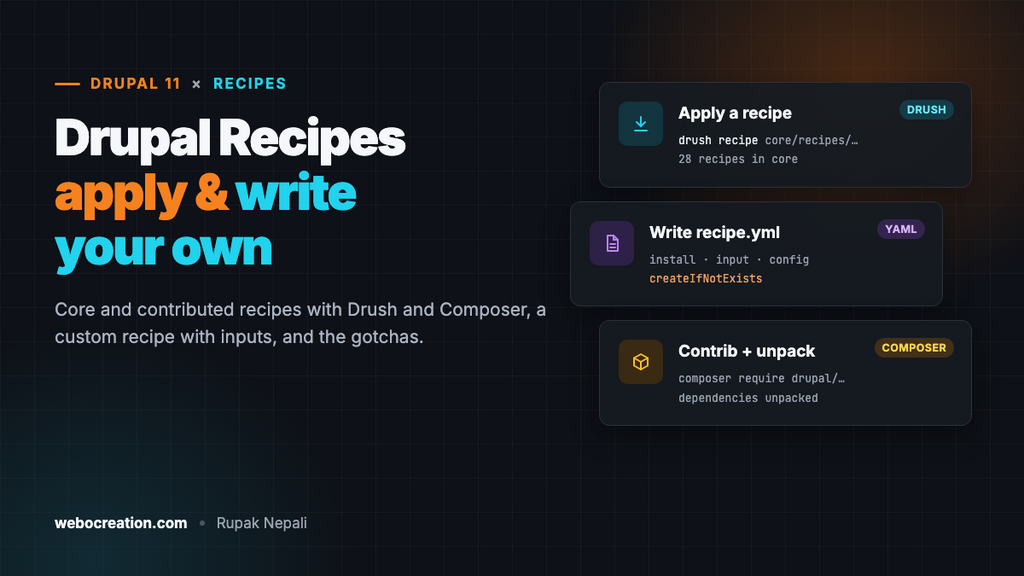
Setting up a Drupal site used to mean an install profile you could only use once, or an afternoon of clicking: enable modules, create content types, add fields, set permissions, configure the editor. Then the same again on the next site. Recipes replace that. A recipe is a folder with a recipe.yml file that installs modules, imports configuration and changes settings, and you can apply it to a site at any time, not only at install.
Recipes have been in core since Drupal 10.3, and Drupal CMS is built entirely from them. This guide shows how to apply core and contributed recipes, how to write your own, and the gotchas we hit doing it. We tested everything on Drupal 11.4.13 with Drush 13.8.1, PHP 8.5 and Composer 2.11, on a site installed with the Minimal profile.
Recipes, modules and install profiles
| Module | Install profile | Recipe | |
|---|---|---|---|
| Adds code | Yes | Sometimes | No, only configuration |
| When | Any time | Only at install | Any time, as often as you like |
| Stays on the site | Yes, until uninstalled | Yes, forever | No. Once applied, the site doesn’t depend on it |
| Combine several | Yes | One per site | Yes, and recipes can include other recipes |
That last row is the important one. After a recipe runs, what’s left is ordinary modules and configuration, exactly as if you had clicked through it. There’s nothing to keep updated and nothing to uninstall, and also no undo: Drupal doesn’t record which recipes were applied. Keep your configuration in git (drush config:export) before and after.
The recipes in core
Drupal 11.4 ships 28 recipes in web/core/recipes/. The ones you’ll use most:
| Recipe | What it sets up |
|---|---|
page_content_type, article_content_type | The Basic page and Article content types, with their fields and displays |
article_tags, tags_taxonomy, article_comment | Tags and comments for articles |
image_media_type, document_media_type, remote_video_media_type, audio_media_type, local_video_media_type | Media types |
basic_html_format_editor, full_html_format_editor, restricted_html_format | Text formats with CKEditor 5 |
content_editor_role, administrator_role | Roles with sensible permissions |
editorial_workflow | Content Moderation with Draft, Published and Archived |
core_recommended_admin_theme, core_recommended_front_end_theme, core_recommended_performance, core_recommended_maintenance | Claro and Olivero, caching and aggregation, logging and update status |
standard | Everything the Standard install profile gives you, as a recipe |
example is a commented template, and worth reading once.
Applying a recipe
With Drush, from your project root:
vendor/bin/drush recipe core/recipes/editorial_workflow -yOn our site that printed “Installed 2 modules: Workflows, Content Moderation” and “Editorial workflow applied successfully”, and the Editorial workflow was ready to use. Without Drush, core’s own script does the same:
cd web
php core/scripts/dr recipe core/recipes/editorial_workflow
Two things we tripped over:
- Paths are relative to the
web/folder, even when you run Drush from the project root. Core recipes arecore/recipes/...and your own are../recipes/....recipes/small_business_starterfails with “The supplied path recipes/small_business_starter is not a directory”. - The script is now called
dr. In Drupal 11.4,core/scripts/drupalstill works but prints “Calling drupal is deprecated in drupal:11.4.0 and is removed from drupal:13.0.0. Use the dr script instead”.
To see what a recipe will ask for before applying it, use recipe:info (it’s in the dr script; Drush 13.8 doesn’t have it):
cd web
php core/scripts/dr recipe:info ../recipes/small_business_starter
Contributed recipes with Composer
Recipes on drupal.org are Composer packages of type drupal-recipe. The drupal/recommended-project template puts them in a recipes/ folder next to web/, outside core, so core updates never touch them. We added the SEO Tools recipe from Drupal CMS:
composer require drupal/drupal_cms_seo_tools
vendor/bin/drush recipe ../recipes/drupal_cms_seo_tools -y
It installed Metatag, Simple XML Sitemap, Yoast SEO, the SEO Checklist and their dependencies (ECA, Token, Focal Point and more), and configured them.
Something you’ll notice in composer.json afterwards: the recipe itself isn’t listed, but its dependencies are. That’s the recipe unpack plugin (drupal/core-recipe-unpack, included and allowed in the current project template), which printed “drupal/drupal_cms_seo_tools unpacked.” A recipe is applied once and then doesn’t matter, but the modules it installed do, so unpacking moves them into your own requirements where you can update or remove them like any other module. On our site, unpacking added 11 lines, including drupal/metatag, drupal/simple_sitemap and drupal/yoast_seo. The recipe files stay in recipes/.
Writing your own recipe
Our example sets up a small business site: Basic pages, a contact form that sends to an address you choose, and a content editor role that can manage pages. It lives in recipes/small_business_starter/recipe.yml:
name: 'Small business starter'
description: 'Basic pages, a contact form, a content editor role and sensible defaults.'
type: 'Site'
recipes:
  - core/recipes/page_content_type
  - core/recipes/content_editor_role
install:
  - contact
  - path
input:
  site_name:
    data_type: string
    description: 'The name of the site.'
    prompt:
      method: ask
      arguments:
        question: 'Site name?'
    default:
      source: config
      config: ['system.site', 'name']
  contact_email:
    data_type: email
    description: 'Where contact form messages go.'
    constraints:
      NotBlank: []
    prompt:
      method: ask
      arguments:
        question: 'Which address should receive contact form messages?'
    default:
      source: config
      config: ['system.site', 'mail']
config:
  strict: false
  actions:
    system.site:
      simpleConfigUpdate:
        name: ${site_name}
        slogan: 'Local repairs, done right'
    contact.form.feedback:
      # The Contact module doesn't ship this form (the Standard profile does), so create it.
      createIfNotExists:
        label: 'Contact us'
        recipients:
          - ${contact_email}
        reply: ''
        weight: 0
        message: ''
        redirect: ''
      # If it already existed, still point it at the right address.
      setRecipients:
        - ${contact_email}
      setMessage: 'Thanks, we will reply within one business day.'
    user.role.content_editor:
      grantPermissions:
        - 'create page content'
        - 'edit any page content'
        - 'delete own page content'
Section by section:
recipesapplies other recipes first. Here, two core recipes provide the content type and the role.installinstalls modules (and themes) if they aren’t already. Only their simple configuration is created, so the recipe stays in control of the rest.inputasks for values when the recipe is applied. Each input has a type, a description, optional validation (constraints), how to ask for it on the command line (prompt, using a Symfony console method such asaskorconfirm) and a default, either a fixed value or an existing setting. Use the value anywhere below as${site_name}.config: import(not used here) imports configuration that modules ship, by name or'*'for all of a module’s config. A recipe can also have its ownconfig/folder of YAML files.config: actionschanges configuration:simpleConfigUpdatefor settings,createIfNotExistsfor config entities,grantPermissionsfor roles, and methods that entities expose, such assetRecipientsandsetMessageon a contact form. Core also has actions likeplaceBlock,cloneAsandsetProperties.
Apply it, passing the inputs on the command line (useful in scripts and CI) or leaving them out to be asked:
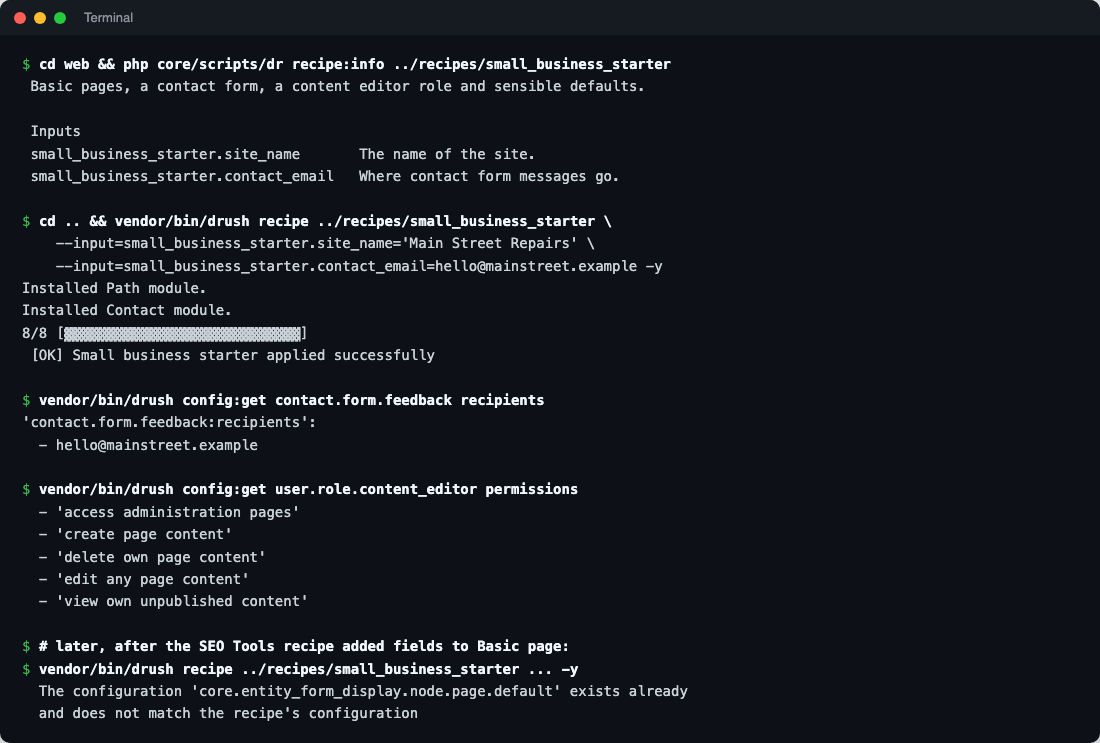
vendor/bin/drush recipe ../recipes/small_business_starter \
  --input=small_business_starter.site_name='Main Street Repairs' \
  --input=small_business_starter.contact_email=hello@mainstreet.example -y
Input names are prefixed with the recipe’s folder name. Afterwards the site name and slogan were set, the contact form sent to hello@mainstreet.example with our message, and the content editor role had its two original permissions plus our three.
Gotchas we hit
Configuration you expect may not exist
Our first version imported contact.form.feedback from the Contact module and failed with “Entity contact.form.feedback does not exist”. The site-wide feedback form comes with the Standard install profile, not the Contact module, so on a Minimal site it isn’t there. The fix was createIfNotExists. Test recipes on a Minimal site: if they work there, they work anywhere.
When it failed, the site was left as it was: the site name was unchanged and Contact and Path weren’t installed. Still, don’t count on that for a recipe that fails halfway through a long list; back up first.
“Exists already and does not match”
Re-applying our recipe worked fine, until we applied the SEO Tools recipe, which adds fields to Basic page. After that, re-applying ours failed:
The configuration 'core.entity_form_display.node.page.default' exists already
and does not match the recipe's configuration
By default, a recipe compares configuration it would import with what’s on the site and refuses to overwrite differences. Our recipe has strict: false, but the core page_content_type recipe it includes doesn’t. So recipes are safest on new sites, or applied in a planned order. If you include core recipes, apply yours before others change the same content types. In your own recipes, strict: false accepts whatever is there, and strict: with a list of config names checks only those.
No undo, no record
There’s no “un-apply”. Uninstall the modules or restore your exported configuration if you need to go back. Core also doesn’t log which recipes were applied (we checked: there’s no recipe entry in the logs or state), so note it in your commit message.
Where recipes fit in a workflow
- Starting sites. Keep a company recipe in a git repository or private Composer package, and every new site starts the same way:
drush site:install minimal, then your recipe. - Adding features to live sites. “Add a blog” or “add events” as a recipe, applied on staging, exported and deployed through configuration management like any change.
- Drupal CMS. Its features, from SEO tools to forms and search, are recipes you can add to any Drupal 11 site with Composer, as we did above.
Before you start, make sure you’re on a current release: upgrading Drupal 10 to Drupal 11 with Composer and Drush. And once the site is live, put Cloudflare’s security and cache rules for Drupal in front of it.

Rupak Nepali is a web developer, manage Webocreation website and the author of six books:
Getting Started with OpenCart Module Development (Packt, 2013),
OpenCart Theme and Module Development (Packt, 2015),
OpenCart 4: Dev Guide for Themes & Extensions (2024),
OpenCart 4: User Manual (2025),
Cloudflare for the Enterprise Website (2026) and
The Technical Web Guide for Marketers (2026).
Rupak has built OpenCart stores and extensions since 2010, has published more than 600 tutorials on Webocreation, and shares free OpenCart extensions on GitHub.
Find Rupak on
GitHub | Amazon | LinkedIn | X | YouTube.