Coupon Links for OpenCart 4: Apply a Discount Code From a URL in Emails and Ads (Free Extension)
A free OpenCart 4 extension that makes discount codes clickable: add ?coupon=CODE to any store link and the coupon is saved for the visitor and applied at checkout, with a one-time confirmation message.
 Rupak NepaliPublished Nov 16, 2026
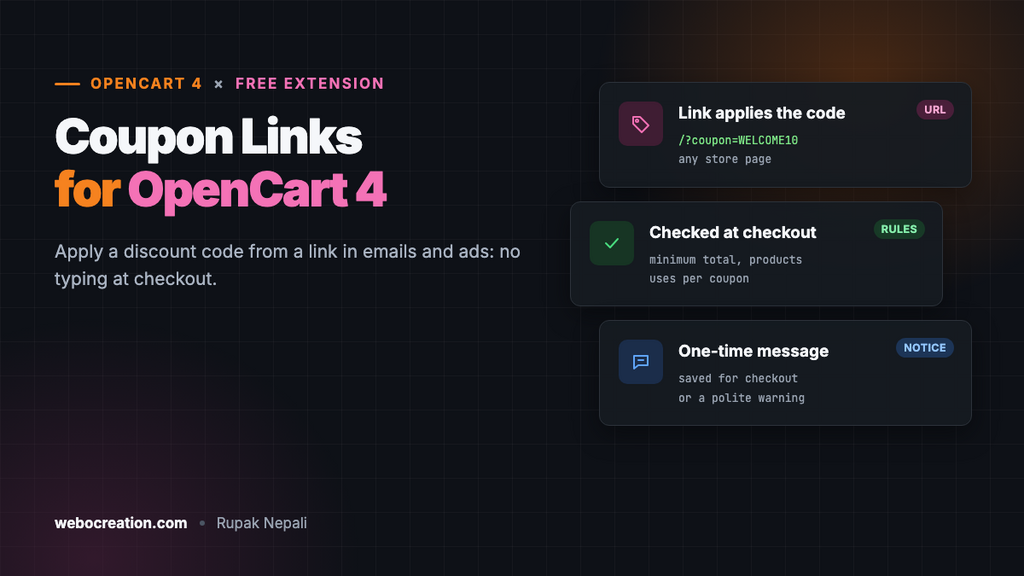
Every email campaign with a discount code loses some customers at the same spot: checkout, where they have to remember the code, find the coupon box and type it in. Some forget, some mistype it, and some leave the store to search for “your store coupon code” and find a different one.
Shopify and WooCommerce stores have long used links that apply the code for you. OpenCart 4 doesn’t have them, so this free extension adds them: put ?coupon=WELCOME10 on any link to your store, and the coupon is saved for that visitor and applied at checkout.
Download Coupon Links for OpenCart 4 (free, tested on OpenCart 4.1.0.4)
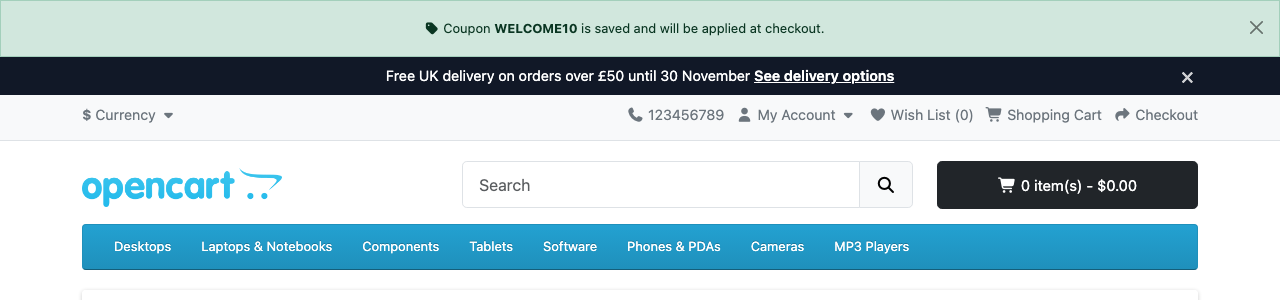
https://example.com/?coupon=WELCOME10: a one-time message confirms the code.What it does
- Works on any store link. Home page, a category, a product, a landing page:
/index.php?route=product/product&product_id=43&coupon=WELCOME10works as well as/?coupon=WELCOME10. - Uses your existing coupons from Marketing → Coupons. Nothing new to manage.
- Applies the code the normal way. It saves the code exactly where OpenCart’s own coupon box does, so the discount appears in the cart and checkout, and all of OpenCart’s coupon rules still apply.
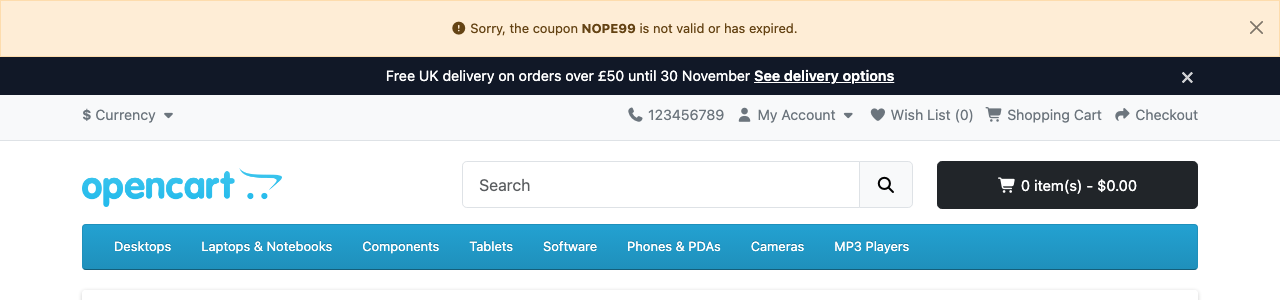
- Tells the shopper. A message confirms the code once, including any minimum order. Invalid or expired codes get a polite warning instead.
- Your own parameter name, such as
?promo=or?code=.
Install it
- Download
couponlink.ocmod.zip. - Go to Extensions → Installer, upload it, and click the green +.
- Go to Extensions → Extensions → Modules and install Coupon Links.
- Click Edit, turn Status on and save.
- Make sure the Coupon order total is installed and enabled (Extensions → Extensions → Order Totals). It is on a default install.
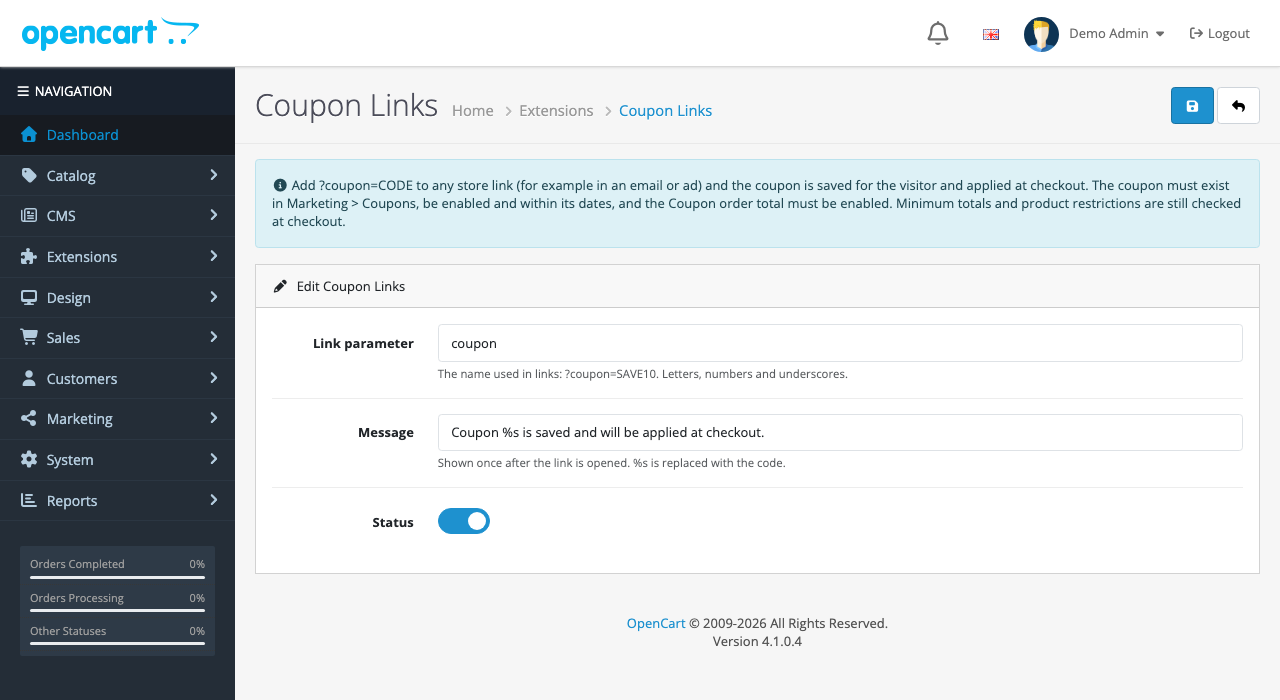
%s in the message becomes the code.| Setting | What it does |
|---|---|
| Link parameter | The name in links: coupon gives ?coupon=CODE. Letters, numbers and underscores, up to 32 characters |
| Message | Shown once after a valid link is opened. %s is replaced with the code in bold |
| Status | On or off |
Making a coupon link
- Create the coupon in Marketing → Coupons as usual: code, discount, dates, status Enabled. Our coupon management guide explains every field.
- Add
?coupon=YOURCODEto the link, or&coupon=YOURCODEif it already has a?. - Open the link in a private window to check the message, then add a product and look at the cart.
| Where | Example link |
|---|---|
| Welcome email | https://example.com/?coupon=WELCOME10 |
| Abandoned cart email | https://example.com/index.php?route=checkout/cart&coupon=COMEBACK5 |
| Instagram ad for one product | https://example.com/index.php?route=product/product&product_id=43&coupon=INSTA15 |
| A top bar | Point the link of our announcement bar at /?coupon=WELCOME10 |
Use a different code for each channel (email, Instagram, partners) and you can see which one sells in the Coupons Report (Reports → Reports) without any extra tracking. Keep the UTM tags for analytics on the same link: ?coupon=INSTA15&utm_source=instagram.
At checkout

The cart is usually empty when someone clicks a link, so the extension only checks what it can at that moment: the coupon exists, is enabled and is within its dates. Everything that depends on the cart (minimum total, product or category restrictions, uses per customer, total uses) is checked by OpenCart at checkout, exactly as if the shopper had typed the code. If a coupon has a minimum total, the message says so, for example “(Minimum order $100.00.)”.
How it’s built
| Part | Where | What it does |
|---|---|---|
| Event | catalog/view/common/header/after | Reads the parameter, saves the coupon and shows the message |
| Session | coupon | The same key OpenCart’s coupon box uses |
| Session | couponlink_notice | The message, shown once and then removed |
Checking and saving the code
OpenCart’s catalog model getCouponByCode() returns only enabled coupons, so the extension adds the date check and saves the code:
$this->load->model('marketing/coupon');

$coupon = $this->model_marketing_coupon->getCouponByCode($code);

$now = time();

$valid = $coupon
	&& ($coupon['date_start'] == '0000-00-00' || strtotime($coupon['date_start']) < $now)
	&& ($coupon['date_end'] == '0000-00-00' || strtotime($coupon['date_end']) > $now);

if ($valid) {
	$this->session->data['coupon'] = $coupon['code'];

	// Payment methods can depend on the total: let checkout recalculate them, as OpenCart does.
	unset($this->session->data['payment_method'], $this->session->data['payment_methods']);
}
We don’t call OpenCart’s full getCoupon() here, because it also checks the cart subtotal and products; with an empty cart, every coupon with a minimum total would be rejected.
Showing the message once
The message is kept in the session and removed as soon as it’s shown, so it appears on the first page only, not on every page the shopper visits afterwards. The code from the URL is escaped before it’s displayed, so a link like ?coupon=<script> just shows a warning with that text.
Testing
| Test | Result |
|---|---|
?coupon=WELCOME10 (10%, enabled) | Success message; −$50.00 on a $500 MacBook in the cart |
?coupon=NOPE99 (doesn’t exist) | Warning, nothing saved |
?coupon=2222 (a disabled coupon) | Warning, nothing saved |
| Reloading the page after a success | No message the second time; the coupon stays in the cart |
Security and abuse
- A coupon link is as public as the code in it. Anyone who sees the email can share it, and coupon sites collect them. Set an end date and a Uses Per Coupon limit on codes you put in links.
- For one-per-customer codes, set Uses Per Customer to 1 and tick Customer Login. OpenCart only counts uses per customer for logged-in customers, so without the login requirement a guest can use the code again.
- The link only saves a code that exists; it can’t create discounts.
Troubleshooting
| Problem | Cause and fix |
|---|---|
| Message says the code isn’t valid | Check the coupon is Enabled, the dates include today, and the code is spelled exactly the same |
| Message appears, but no discount at checkout | A cart rule failed: minimum total, product restriction or uses. Try typing the code in the cart’s coupon box to see OpenCart’s exact error |
| No message at all | Check Status, the parameter name in the link, and that the Coupon order total is enabled. A full-page cache can also serve a cached page; exclude URLs with the parameter |
More free OpenCart 4 extensions: announcement bar, sticky add to cart, request a quote and age verification.

Rupak Nepali is a web developer, manage Webocreation website and the author of six books:
Getting Started with OpenCart Module Development (Packt, 2013),
OpenCart Theme and Module Development (Packt, 2015),
OpenCart 4: Dev Guide for Themes & Extensions (2024),
OpenCart 4: User Manual (2025),
Cloudflare for the Enterprise Website (2026) and
The Technical Web Guide for Marketers (2026).
Rupak has built OpenCart stores and extensions since 2010, has published more than 600 tutorials on Webocreation, and shares free OpenCart extensions on GitHub.
Find Rupak on
GitHub | Amazon | LinkedIn | X | YouTube.