
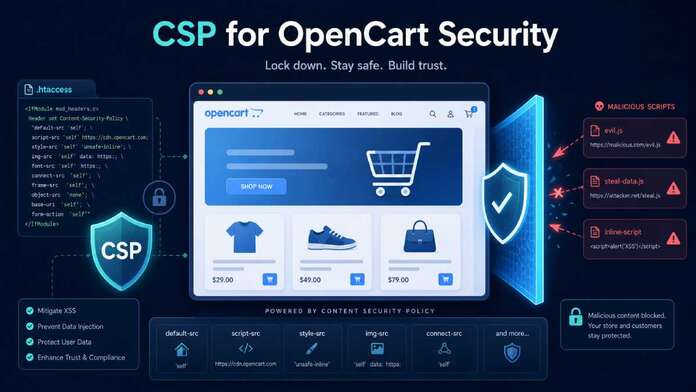

Modern OpenCart stores run a mix of core code, themes, extensions, analytics, ads, and third‑party scripts. That complexity creates opportunities for cross‑site scripting (XSS), clickjacking, and data‑injection attacks—especially on checkout and account pages where sensitive data lives. Read about Opencart security tips.
Content Security Policy (CSP) is one of the strongest browser‑level defenses you can add: it lets you explicitly control which scripts, styles, images, and frames the browser is allowed to load. In this guide, we’ll walk through:
- What CSP is and how it mitigates XSS.
- A secure
.htaccessexample for OpenCart (with CSP + other headers). And a PHP code that you can add at the top of index.php - How to test and debug CSP safely.
- How to combine CSP with Subresource Integrity (SRI) for third‑party scripts.
What CSP is and why it matters for OpenCart
Content Security Policy is an HTTP response header that tells the browser which sources are allowed for scripts, styles, images, fonts, frames, and more. Instead of the browser executing any script it finds in the HTML, CSP acts like a whitelist:
- If a script or stylesheet comes from an allowed origin, it runs.
- If it’s injected from somewhere else, the browser blocks it.
For ecommerce and payment pages, CSP is increasingly treated as a requirement, not a nice‑to‑have, because it helps enforce “only trusted scripts on checkout” and aligns with PCI‑style guidance around script authorization and integrity.
On an OpenCart store, CSP can significantly reduce the impact of:
- Stored and reflected XSS via product reviews, contact forms, or vulnerable extensions.
- Malicious third‑party script injection (compromised CDNs, ad scripts, or tag managers).
- Clickjacking and data‑exfiltration from injected iframes or forms.
How CSP mitigates XSS in practice
XSS works when an attacker can cause the browser to execute arbitrary JavaScript in the context of your domain. CSP reduces that risk by:
- Restricting
script-srcto trusted origins (your domain, specific CDNs). - Blocking inline scripts and
javascript:URLs unless explicitly allowed. - Preventing dynamic script injection via functions
eval()in strict configurations.
MDN’s CSP docs emphasize that properly configured script-src and default-src Directives can “reduce or eliminate” many XSS injection paths by only allowing scripts from trusted domains and disallowing inline/event‑handler JavaScript.
CSP does not fix the underlying bug, but it turns many XSS exploits into harmless, blocked requests instead of executed code.
Step 1: Start with CSP in report‑only mode
Never deploy a strict CSP in one shot on a production OpenCart store—you will break checkout and extensions. The safer pattern (also used in Adobe Commerce/Magento and other platforms) is:
- Start with
Content-Security-Policy-Report-Onlythe browser logs violations without enforcing them. - Collect and review violations.
- Adjust your policy until the noise drops and only the necessary sources are allowed.
- Switch to enforcing
Content-Security-Policyonce the policy is stable.
This phased approach is widely recommended to avoid blank pages and broken functionality while tuning your directives.
Step 2: A secure .htaccess baseline for OpenCart
Assuming you’re running OpenCart on Apache, you can add CSP and other security headers via .htaccess in your web root.
Example .htaccess snippet with report‑only CSP
<IfModule mod_headers.c>
  # Strict transport security (only if you are fully on HTTPS)
  Header always set Strict-Transport-Security "max-age=31536000; includeSubDomains; preload"

  # Clickjacking protection
  Header always set X-Frame-Options "SAMEORIGIN"

  # XSS filter (legacy, still harmless)
  Header always set X-XSS-Protection "1; mode=block"

  # MIME sniffing protection
  Header always set X-Content-Type-Options "nosniff"

  # Referrer policy
  Header always set Referrer-Policy "strict-origin-when-cross-origin"

  # Basic CSP in REPORT-ONLY mode
  Header set Content-Security-Policy-Report-Only "
    default-src 'self';
    script-src 'self' 'unsafe-inline' 'unsafe-eval' https://www.google-analytics.com https://www.googletagmanager.com;
    style-src  'self' 'unsafe-inline' https://fonts.googleapis.com;
    img-src    'self' data: https://www.google-analytics.com;
    font-src   'self' https://fonts.gstatic.com;
    connect-src 'self' https://www.google-analytics.com https://www.googletagmanager.com;
    frame-ancestors 'self';
    object-src 'none';
  "
</IfModule>
Notes:
- This is intentionally permissive (
'unsafe-inline','unsafe-eval') because many OpenCart themes and extensions still rely on inline JS and dynamic code. - The goal here is to observe violations, not enforce yet.
- Add or remove domains for your own analytics, payment providers, CDNs, and chat tools as needed.
Later, once you’re ready, you replace the Report-Only header with an enforcing Content-Security-Policy header and start tightening the policy.
PHP Code for index.php
Here is one PHP example you can add directly after <?php in index.php.
header(
    "Content-Security-Policy-Report-Only: " .
    // Core restrictions
    "default-src 'self'; " .
    "base-uri 'self'; " .
    "object-src 'none'; " .
    "frame-ancestors 'self'; " .
    "form-action 'self' https://remediadigital.us16.list-manage.com; " .
    "upgrade-insecure-requests; " .

    // Scripts: OpenCart + jQuery + GTM/GA + FB Pixel + Mailchimp
    "script-src 'self' 'unsafe-inline' 'unsafe-eval' " .
        "https://cdnjs.cloudflare.com https://cdn.jsdelivr.net " .
        "https://www.googletagmanager.com " .
        "https://connect.facebook.net " .
        "https://chimpstatic.com " .
        "https://www.google-analytics.com ".
        "https://form-assets.mailchimp.com " .
        "https://static.cloudflareinsights.com " .
        "https://s3.amazonaws.com " .

    // Styles: theme CSS + Google Fonts + cdnjs
    "style-src 'self' 'unsafe-inline' " .
        "https://fonts.googleapis.com " .
        "https://cdn-images.mailchimp.com https://cdn.jsdelivr.net ".
        "https://cdnjs.cloudflare.com; " .

    // Fonts: local + Google Fonts
    "font-src 'self'  https://cdnjs.cloudflare.com https://fonts.gstatic.com data:; " .

    // Images: products, logos, social pixels, Mailchimp, etc.
    "img-src 'self' data: " .
        "https://www.facebook.com https://connect.facebook.net https://form-assets.mailchimp.com " .
        "https://www.googletagmanager.com https://www.google-analytics.com " .
        "https://merging.rempub.com " .
        "https://remediadigital.us16.list-manage.com; " .

    // Frames/embeds: YouTube, Facebook widgets if used
    "frame-src https://www.youtube.com https://www.facebook.com; " .

    // XHR / fetch: GTM/GA, FB, Mailchimp, etc.
    "connect-src 'self' " .
        "https://www.googletagmanager.com https://www.google-analytics.com https://form-assets.mailchimp.com https://cdn.jsdelivr.net " .
        "https://connect.facebook.net " .
        "https://chimpstatic.com https://eventcollector.mcf-prod.a.intuit.com " .
        "https://cdnjs.cloudflare.com; "
);
Step 3: Tightening CSP for real protection
Once you’ve watched report‑only violations and cleaned up obvious issues, you can move toward a stricter-enforced policy.
A more secure, enforced CSP might look like this:
<IfModule mod_headers.c>
  Header set Content-Security-Policy "
    default-src 'self';
    script-src 'self' https://www.google-analytics.com https://www.googletagmanager.com;
    style-src  'self' https://fonts.googleapis.com;
    img-src    'self' data: https://www.google-analytics.com;
    font-src   'self' https://fonts.gstatic.com;
    connect-src 'self' https://www.google-analytics.com https://www.googletagmanager.com;
    frame-ancestors 'self';
    object-src 'none';
    base-uri 'self';
    form-action 'self';
  "
</IfModule>
Key improvements:
- Removed
'unsafe-inline'and'unsafe-eval'fromscript-srcto stop inline scripts andevalfrom running. object-src 'none'blocks legacy plugins.frame-ancestors 'self'replacesX-Frame-Optionsin modern CSP, preventing clickjacking.form-action 'self'ensures that forms (including checkout) can only post back to your domain.
You’ll only be able to enforce something this strict after you’ve:
- Moved inline scripts into external
.jsfiles. - Updated extensions that inject inline code or rely on
eval. - Whitelisted the exact third‑party domains you really need.
SecurityScorecard and other security checks explicitly warn against “broad” CSP directives; they recommend specific domain whitelists instead of wildcards or overly permissive settings.
Step 4: Testing and debugging your CSP
1. Use browser DevTools
All modern browsers log CSP violations to the console. In DevTools, you’ll see messages like “Refused to load script from … because it violates the Content Security Policy.”
Use those messages to:
- List all scripts, styles, images, or fonts being blocked.
- Decide whether to whitelist the source, refactor your code, or drop the dependency.
2. Report‑only and reporting endpoints
You can enhance debugging by adding a report endpoint, for example:
Header set Content-Security-Policy-Report-Only "
  default-src 'self';
  script-src 'self' https://www.google-analytics.com;
  report-uri /csp-report-endpoint;
"
The browser will POST JSON violations to /csp-report-endpoint, which you can log.
Many organizations also use external CSP reporting services or log pipelines so they can analyze violations over time.
3. Use external scanners
Tools like Mozilla Observatory and CSP‑testing tools can scan your site and offer recommendations around missing or weak directives. They’re especially useful for:
- Catching mixed content (HTTP vs HTTPS).
- Spotting overly broad patterns like
*or entire TLDs inscript-src.
Step 5: Reducing inline JS and OpenCart‑specific challenges
Realistically, most OpenCart themes and modules still add inline scripts—for example, small snippets in header.twig or templates that use inline event handlers. CSP’s biggest win comes from blocking all inline JS, but that means you’ll need to refactor:
- Move inline
<script>tags into separate.jsfiles served from your domain (allowed byscript-src 'self'). - Replace
onclick="..."and other inline handlers with event listeners bound in external scripts. - Avoid
eval()and similar dynamic evaluation.
If you absolutely must keep some inline scripts, you can use nonces or hashes in CSP ('nonce-...' or 'sha256-...') to authorize specific blocks, but that adds complexity and often requires application changes to output unique nonces per request. It’s usually better to clean the theme.
Step 6: Add Subresource Integrity (SRI) for third‑party scripts
CSP limits where scripts can load from; Subresource Integrity (SRI) verifies what you got from those sources.
SRI lets the browser check that a script or stylesheet from a CDN matches a known cryptographic hash. If the file is tampered with, the browser refuses to load it.
MDN explains SRI as a mechanism where you add an integrity attribute with a sha256/sha384/sha512 hash value to your <script> or <link> element.
Example with a CDN script:
<script
  src="https://cdn.example.com/js/library.min.js"
  integrity="sha384-BASE64_ENCODED_HASH_HERE"
  crossorigin="anonymous">
</script>
If the file at cdn.example.com changes in a way that doesn’t match the hash, the browser blocks it.
You can generate SRI hashes using:
- Online SRI hash generators.
- OpenSSL or
shasumon the command line, as MDN demonstrates.
Best practice for OpenCart:
- Use SRI on all third‑party CDN scripts and styles that are critical to your store (e.g., a main UI library or payment widget scripts that you don’t self‑host).
- Combine SRI with a tight
script-srcCSP that only whitelists those CDNs and your own domain.
This way, even if a whitelisted CDN is compromised, your store refuses to run the modified script.
Bringing it all together: CSP + SRI as a baseline
For an OpenCart store, a solid security baseline on the frontend looks like this:
- CSP in enforce mode with:
default-src 'self'plus minimal third‑party domains.- Strict
script-src,style-src,img-src,font-src,form-action,frame-ancestors, andobject-src 'none'.
- No inline JS or CSS in new development; refactor legacy inline code over time.
- SRI on critical third‑party scripts and styles from CDNs.
- Hardened
.htaccess, including HSTS, X-Frame-Options (orframe-ancestors),X-Content-Type-Options, and a sensibleReferrer-Policy. - Report‑only and logging during rollout to avoid breaking checkout and to monitor violations.
CSP and SRI won’t replace secure coding, patch management, or strong access control—but they significantly shrink the attack surface for XSS and third‑party script compromise. For any serious OpenCart operation, that’s now table stakes.