OpenCart MCP Server: Bring AI-Powered Store Management to OpenCart
 Rupak NepaliPublished Jul 26, 2026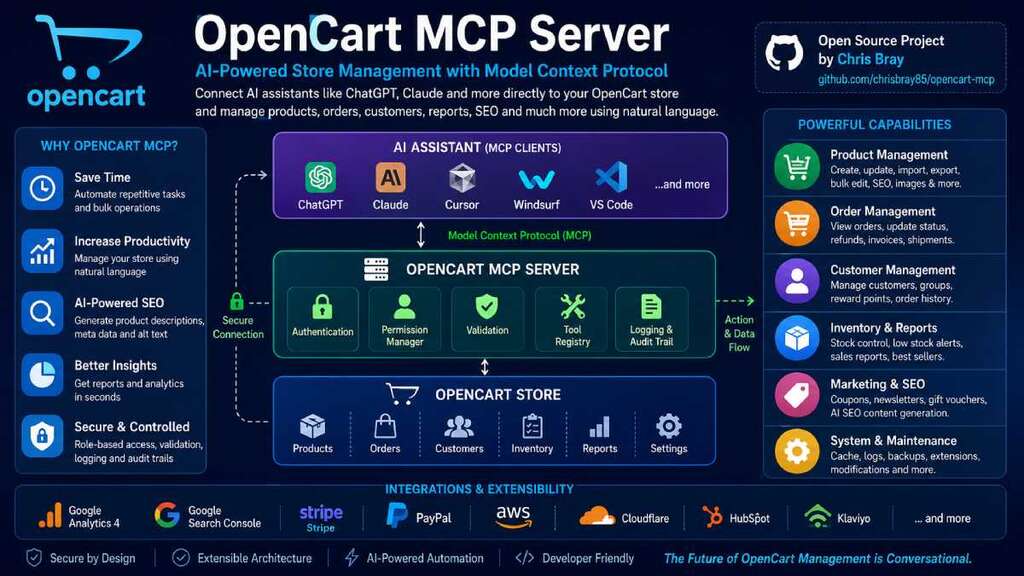
Artificial Intelligence is rapidly changing how developers build software and how merchants manage online stores. Instead of switching between multiple dashboards, writing SQL queries, or manually updating products, AI assistants are becoming capable of interacting directly with business systems.
One of the technologies making this possible is the Model Context Protocol (MCP).
Imagine asking an AI assistant:
- “Create a new product for the latest iPhone.”
- “Show me all products that are out of stock.”
- “Generate SEO descriptions for every product missing metadata.”
- “Summarize today’s sales.”
- “Find customers who spent more than $1,000 this year.”
Instead of simply answering questions, the AI performs these actions safely inside your OpenCart store.
In this article, we’ll explore what an OpenCart MCP Server is, why it matters, and how it can transform store management.
What is MCP?
Model Context Protocol (MCP) is an open standard that enables AI assistants to securely connect with external applications, databases, APIs, and business systems.
Rather than training an AI on your store’s data, MCP gives the AI controlled access to perform specific actions through approved tools.
This means AI can:
- Read your catalog
- Update products
- Process orders
- Generate reports
- Create coupons
- Optimize SEO
- Manage inventory
—all while respecting permissions and authentication rules.
Why OpenCart Needs an MCP Server
OpenCart powers thousands of online stores worldwide. While it offers excellent flexibility, many day-to-day management tasks are repetitive and time-consuming.
Store owners frequently need to:
- Update hundreds of product prices
- Generate product descriptions
- Optimize SEO metadata
- Find low-stock products
- Process orders
- Analyze sales reports
- Export customer information
- Refresh caches
- Install extensions
An MCP server allows these tasks to be completed through natural language conversations.
Instead of navigating multiple admin pages, you simply ask your AI assistant.
How an OpenCart MCP Server Works
AI Assistant
(ChatGPT, Claude, Cursor)

        │
        ▼

OpenCart MCP Server

        │
 ├── Authentication
 ├── Permission Manager
 ├── Validation
 ├── Tool Registry
 └── Logging

        │
        ▼

OpenCart Database & APIs
The MCP server acts as a secure bridge between your AI assistant and your OpenCart store.
Every request is authenticated, validated, logged, and executed only if the user has the required permissions.
Existing OpenCart MCP Projects
The OpenCart MCP ecosystem is still in its early stages, but there are already promising community projects that developers can build upon.
One example is the open-source OpenCart MCP project by Chris Bray:
GitHub Repository
This project demonstrates how an MCP server can expose OpenCart functionality to AI assistants, making it possible to interact with an OpenCart store using natural language. It provides a solid foundation for developers interested in experimenting with AI-powered store management and can serve as a starting point for building custom integrations.
While this project is an excellent proof of concept, there are many opportunities to extend it with enterprise-ready capabilities, such as:
- Complete product, category, order, and customer management
- AI-powered SEO generation
- Inventory automation
- Sales and analytics dashboards
- Bulk product operations
- Extension and theme management
- Multi-store support
- Role-based access control (RBAC)
- Audit logging
- Cloudflare, AWS, Stripe, and Google Analytics integrations
These enhancements could evolve an OpenCart MCP server from a developer utility into a comprehensive AI management platform for OpenCart stores.
Core Features
Product Management
Instead of editing products one by one, you can simply ask: Create a new gaming keyboard product.
The MCP server can:
- Create products
- Update prices
- Update inventory
- Upload images
- Generate SEO metadata
- Create product options
- Assign categories
- Duplicate products
- Bulk update products
Example:
You:
Increase all Samsung product prices by 5%.

AI:
Updated 84 products successfully.
Order Management
Managing orders becomes conversational.
Examples:
Show today's pending orders.

Refund Order #10245.

Generate today's invoices.

Find orders awaiting shipment.
The server can:
- View orders
- Update order status
- Process refunds
- Generate invoices
- Add tracking numbers
- Search customer orders
Inventory Management
Inventory tasks become much easier.
Ask:
Which products will run out within seven days?

Show products with inventory below five.

Restock all gaming laptops.
The MCP server can generate inventory reports instantly.
Customer Management
Examples:
Show my top customers.

Find customers who haven't purchased in six months.

Create a wholesale customer.

Disable fraudulent accounts.
Marketing Automation
Marketing teams can work faster.
Examples:
Create a Black Friday coupon.

Generate newsletter content.

Show coupon usage.

Create gift vouchers.
AI-Powered SEO
One of the most exciting features is automatic SEO optimization.
Instead of manually writing descriptions, the AI can generate:
- Meta titles
- Meta descriptions
- Product descriptions
- ALT text
- Product tags
- Search keywords
Example: Generate SEO metadata for Product #238.
Result:
Meta Title
Apple AirPods Pro (2nd Generation) Wireless Earbuds
Meta Description
Buy Apple AirPods Pro (2nd Generation) with Active Noise Cancellation, USB-C charging, fast shipping, and manufacturer warranty.
This can save countless hours when managing large catalogs.
Sales Reports in Seconds
Instead of opening multiple reports, simply ask:
Summarize today's store activity.
Example response:
- Revenue: $8,420
- Orders: 96
- New Customers: 17
- Refunds: 2
- Best Seller: Gaming Mouse Pro
- Low Stock Products: 14
Business insights become immediately accessible.
Bulk Operations
Bulk updates are one of the biggest productivity gains.
Examples:
Increase prices by 3%.

Move all Dell laptops into the Business category.

Disable discontinued products.

Generate descriptions for every product missing content.
Instead of multiple admin pages, a single AI command completes the work.
System Administration
Developers can also automate maintenance tasks.
Examples include:
- Refresh modifications
- Clear image cache
- Clear theme cache
- Backup database
- View PHP configuration
- Review system logs
- Enable maintenance mode
This makes OpenCart administration faster and less error-prone.
Security Comes First
An MCP server should never expose unrestricted access to your store.
A production-ready implementation should include:
- API authentication
- Role-based permissions
- Audit logging
- Rate limiting
- Input validation
- Tool-level authorization
- Read-only mode
- Confirmation for destructive operations
Every action should be recorded for auditing purposes.
Future Integrations
An OpenCart MCP Server can extend beyond the store itself.
Potential integrations include:
- Google Analytics 4
- Google Search Console
- Stripe
- PayPal
- AWS
- Cloudflare
- HubSpot
- Klaviyo
- Mailchimp
- ShipStation
- Amazon Marketplace
- eBay
- Etsy
The AI becomes a central assistant capable of managing your entire eCommerce ecosystem.
Benefits for Store Owners
Implementing an OpenCart MCP Server can provide significant advantages:
- Reduce repetitive administrative work
- Improve catalog quality with AI-generated SEO
- Speed up inventory management
- Simplify reporting
- Enable natural language interaction with store data
- Automate marketing tasks
- Improve operational efficiency
- Create a foundation for AI-powered workflows
Whether you’re managing hundreds or tens of thousands of products, conversational automation can dramatically reduce the time spent on routine tasks.
Looking Ahead
The OpenCart MCP ecosystem is already beginning to grow, with community projects like Chris Bray’s OpenCart MCP server demonstrating what’s possible. As adoption of the Model Context Protocol accelerates, there’s an exciting opportunity for the OpenCart community to collaborate on a feature-rich, open-source MCP platform that supports merchants, developers, and agencies alike. At Webocreation, we’re excited to contribute ideas, enhancements, and integrations that help make AI-powered OpenCart management a reality.
AI assistants are evolving from tools that answer questions into systems that can safely perform real work. Model Context Protocol provides a standardized way to connect those assistants with business applications, and OpenCart is an excellent candidate for this approach.
As AI adoption continues to grow, an OpenCart MCP Server could become an essential part of every modern store, enabling merchants and developers to manage products, process orders, optimize SEO, monitor sales, and maintain their stores using simple, natural language.
The future of eCommerce management isn’t clicking through dozens of admin pages—it’s having a trusted AI assistant that understands your store and helps you run it more efficiently.
At Webocreation, we’re exploring what an open-source, extensible OpenCart MCP Server could look like for the community. By combining OpenCart’s flexibility with MCP’s standardized AI connectivity, we can unlock new possibilities for developers, agencies, and merchants alike.
If you’re interested in contributing ideas or following the project’s progress, stay tuned for future updates as we work toward bringing AI-native store management to the OpenCart ecosystem.

Author of four Opencart book.
The recent are Opencart 4 developer book and Opencart 4 user manual