Add an AI Shopping Assistant to OpenCart 4 That Searches Your Real Catalog (Free Extension Using Claude)
A chat assistant for OpenCart 4 that answers shoppers by searching your actual products with Claude tool use: no invented products or prices, read-only access, rate limits, store facts for shipping and returns, and a log of what customers ask. Setup, costs and safety.
 Rupak NepaliPublished Oct 26, 2026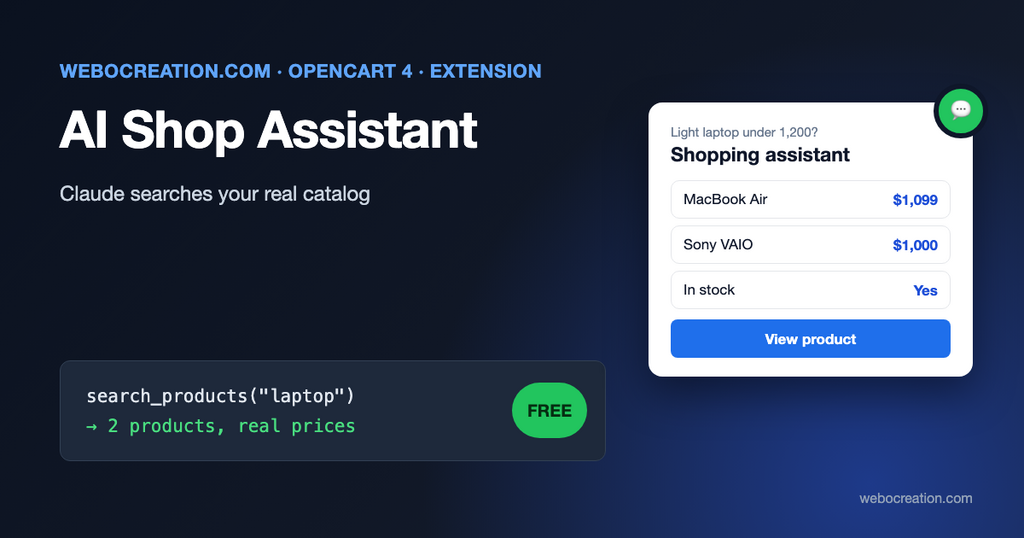
Shoppers increasingly ask for products the way they’d ask a person: “a waterproof jacket for hiking under 150”, “which of your laptops has the longest battery”, “do you have this in a smaller size”. OpenCart’s search box matches words in product names. It can’t answer questions.
A chatbot that only knows what a language model learned from the internet is worse: it confidently recommends products you don’t sell, at prices you don’t charge. The useful version is an assistant that looks things up in your catalog before answering. That’s what this free extension does, using Claude’s tool use.
How it works
The extension adds a chat button to every page. When a visitor asks something, OpenCart sends the conversation to Claude along with two tools, which are functions Claude can ask your store to run:
search_products(query, max_price): runs OpenCart’s own product search and returns up to six matches with name, price (with tax, in the visitor’s currency), sale status and stock.get_product(product_id): returns one product’s description, attributes, options, rating and stock.
A typical exchange:
- Visitor: “I need a laptop for travel, light, under 1,200.”
- Claude decides to call
search_productswith{"query": "laptop", "max_price": 1200}. - OpenCart runs the search and sends back the matching products.
- Claude calls
get_producton two of them to compare weight and battery. - Claude answers in two or three sentences and names the best one or two. The extension shows those products as cards with image, price and link under the answer.
Claude never sees your database or admin. It sees only what the two tools return, which is information already public on your product pages. Prices and stock come from OpenCart at the moment of the question, not from the model’s memory.
Why read-only tools matter
Anyone can type anything into a chat box, including attempts to make the assistant do something else. Security people call this prompt injection:
A Prompt Injection Vulnerability occurs when user prompts alter the LLM’s behavior or output in unintended ways.
OWASP, LLM01:2025 Prompt Injection
You can reduce it with careful instructions, but not eliminate it. What limits the damage is what the model is allowed to do. OWASP’s first mitigation advice is to “Restrict the model’s access privileges to the minimum necessary for its intended operations.” This extension follows that strictly: the assistant can’t see customers, carts, orders, coupons or admin settings, and its tools can’t change anything. The worst a determined visitor can achieve is an off-topic or silly reply, which they’ll see alone in their own chat.
Product descriptions can also contain text that looks like instructions (or a malicious supplier could plant some). The system prompt tells Claude to treat tool results as product information, not instructions, and again, the tools give it nothing harmful to do.
What it costs
You pay Anthropic for API usage with your own API key. Each question is one request plus one more per round of tool calls, usually two or three requests. A rough estimate for a question that uses three requests of about 4,000 input tokens each and 400 output tokens in total, at Anthropic’s list prices per million tokens in October 2026:
| Model | Input / output price per 1M tokens | Rough cost per question |
|---|---|---|
| Claude Opus 5.5 (default) | $4 / $20 | about $0.06 |
| Claude Sonnet 5.5 | $2 / $10 | about $0.03 |
| Claude Haiku 5.5 | $0.10 / $0.50 | under $0.01 |
Real costs depend on your catalog and how chatty visitors are. Claude also thinks before answering, and those thinking tokens are billed as output; the extension uses the lowest effort setting to keep that small, but expect actual costs somewhat above the table. The system prompt and tool definitions are sent with every request; the extension marks them for prompt caching, so repeated parts are billed at a lower rate when the cache is used. The admin page shows the tokens used in the last 30 days, and the Claude Console shows the bill. Set a monthly spend limit in the Console before you go live, and start with the default model on a few days of traffic to see the quality you can expect before trying cheaper ones.
Installation
- Create an API key in the Claude Console under API Keys (it starts with
sk-ant-). Set a spend limit under billing. - Download ai_shop_assistant.ocmod.zip with the button above.
- Extensions > Installer, upload, and click the green Install button in the list.
- Extensions > Extensions > Modules, find AI Shop Assistant, click +, then the pencil.
- Paste the API key, fill in Store facts (below), switch Status on and save.
- Open your store in another browser and ask a few questions.
Installing creates one table for the question log, one event (the chat widget is added to the footer) and a daily cron job that deletes old questions. Uninstalling removes them.
Settings
| Setting | What it does |
|---|---|
| Anthropic API key | Used for all requests, stored in your OpenCart settings |
| Model | claude-opus-5-5 (default), claude-sonnet-5-5 or claude-haiku-5-5 |
| Chat title, welcome message, color | How the widget looks |
| Store facts | Plain text the assistant can rely on for non-product questions |
| Questions per visitor per hour | Default 20 |
| Questions per IP address per hour | Default 60 |
| Keep questions for (days) | Default 90; the daily cron deletes older ones |
Store facts is where you prevent made-up answers about policies. Write it like a short FAQ:
Shipping: free in the US on orders over $75, otherwise $6.95. Ships in 1-2 business days.
International shipping: Canada and the UK only, rates shown at checkout.
Returns: 30 days, unused items in original packaging. Customer pays return shipping unless the item is faulty.
Contact: support@example.com or the contact page, Monday to Friday 9am-5pm EST.
We don't offer gift wrapping.
Anything not in the store facts or the tools, the assistant is told to refer to your contact page instead of guessing.
The questions log: free market research
The Questions tab lists every question with the products that were shown. Two kinds of rows are worth reading every week:
- Questions that showed no products (marked “none”): either you don’t sell it, which is a buying idea, or you do and the search didn’t find it, which means your product names or descriptions are missing the words customers use. Add those words.
- Repeated policy questions: if many visitors ask about delivery times, make them more visible on product pages.
The same log helps with your regular search and SEO. The words shoppers type to an assistant are close to what they type into Google and ChatGPT.
Under the hood (for developers)
- The extension calls the Claude Messages API directly with cURL. An OpenCart extension zip can’t install Composer packages, so it doesn’t use Anthropic’s PHP SDK; the client is one small class in
system/library/claude.php. - The conversation is kept in the visitor’s session and only ever appended to. Claude’s responses, including its thinking blocks, are sent back unchanged on the next turn, as the API requires. After 10 questions the conversation starts fresh rather than being trimmed.
- Server-side fallbacks are enabled (
fallbacks: "default") for the Opus and Sonnet models: if a safety classifier declines a request, the API retries it on a suitable model in the same call. A declined question gets a polite “I can’t help with that” and is removed from the conversation. - Tool rounds are capped at four per question. On the last round the tools are withdrawn so Claude must answer with what it has.
- All answer text is inserted into the page with
textContent, never as HTML.
Privacy and transparency
- Visitor questions and the product data the tools return are sent to Anthropic’s API. Mention this in your privacy policy.
- Questions are stored in your database with a hashed session ID and the IP address, for rate limiting and the log, and deleted after the retention period.
- The widget says that answers are written by AI and can be wrong. Keep that; several countries require AI chat to be disclosed.
- Don’t paste personal data into Store facts.
Limitations
- Search quality depends on OpenCart’s search, which matches words in names, descriptions and tags. A product described only as “Model X-200” won’t be found by “running shoes”. Improving product text helps both the assistant and regular search.
- The assistant can’t add to cart, check order status or apply coupons, by design.
- Answers come in one piece after a few seconds; there’s no word-by-word streaming.
- Built for OpenCart 4.1.0.x.
AI assistants on your site are one side of AI shopping; the other is being found by assistants elsewhere. See AI shopping product feeds for OpenCart, making an OpenCart store agent-ready and the OpenCart MCP server. The code is on GitHub with our other free OpenCart extensions.

Author of four Opencart book.
The recent are Opencart 4 developer book and Opencart 4 user manual