Free Social Share Module for OpenCart 4: Share Buttons and Open Graph Tags Without Third-Party Scripts
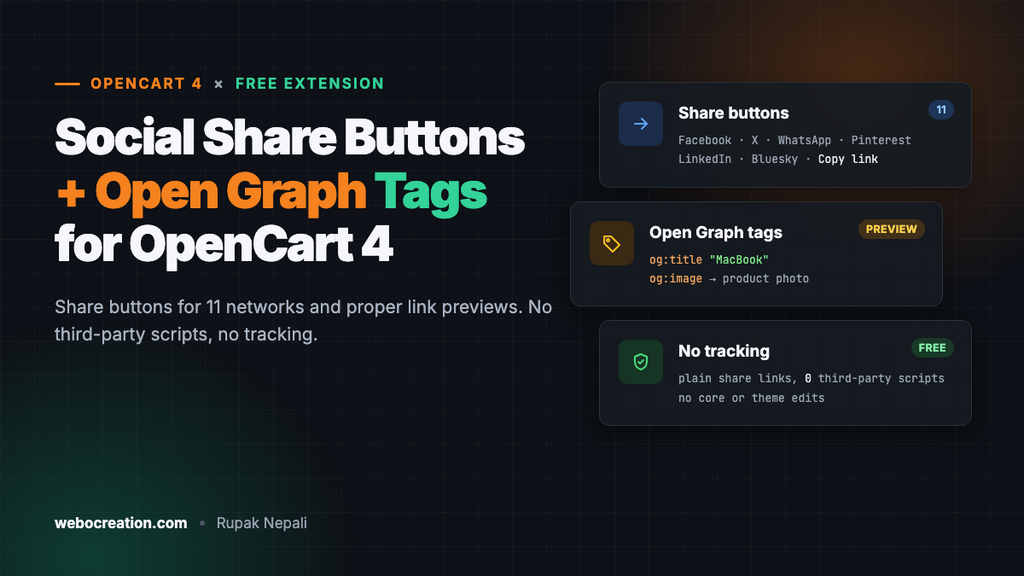
A free OpenCart 4 extension that adds share buttons for 11 networks and the Open Graph tags that make shared links show the right title, description and image.
 Rupak NepaliPublished Nov 11, 2026
When a customer shares one of your products, two things decide whether anyone clicks: an easy share button, and a good preview with the right product name, photo and description. OpenCart 4 has neither. There are no share buttons, and the default theme doesn’t output Open Graph tags, so Facebook, WhatsApp and LinkedIn guess at the preview and often show your logo or nothing at all.
This free extension adds both. It puts share buttons for up to 11 networks anywhere in your layouts, and it adds the Open Graph and Twitter Card tags that control the link preview. It loads no scripts from Facebook, X or anyone else, so it doesn’t track your visitors and doesn’t slow your pages down.
What you get
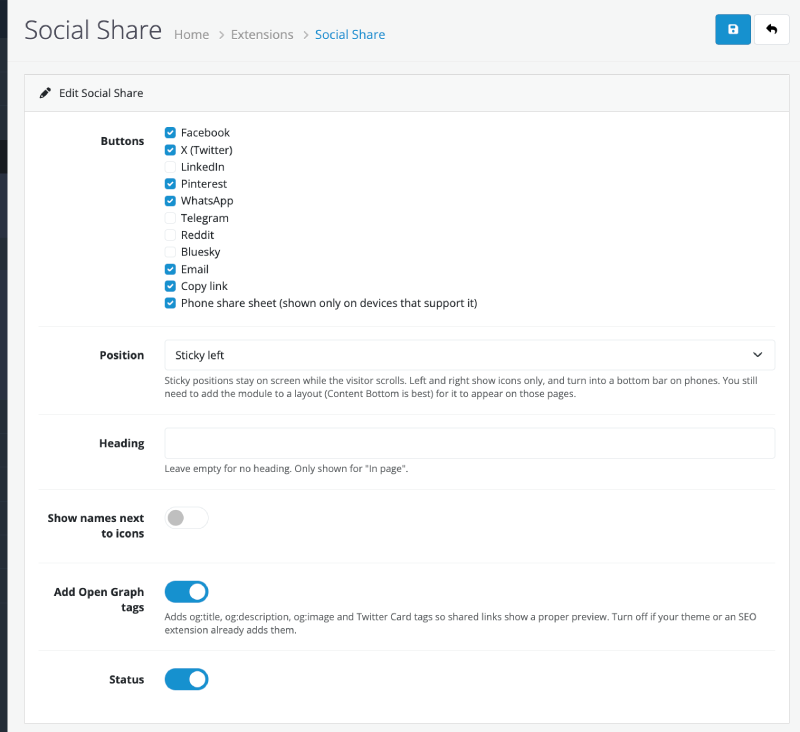
- Share buttons for Facebook, X, LinkedIn, Pinterest, WhatsApp, Telegram, Reddit, Bluesky and email, plus Copy link and the phone’s own share sheet. You choose which ones to show.
- Open Graph tags (
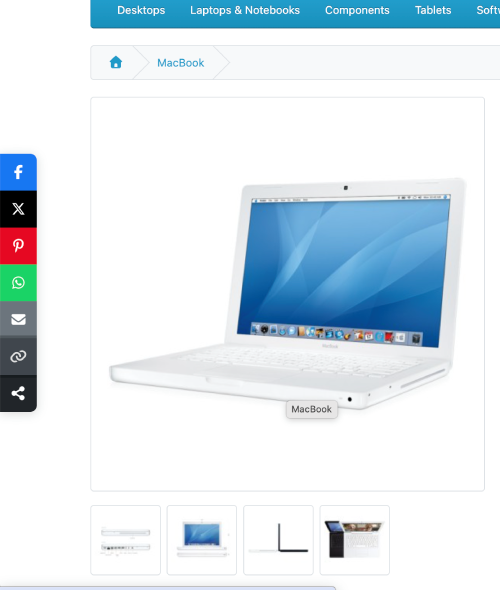
og:title,og:description,og:image,og:url) and a Twitter Card on every page, so shared links show the product name, photo and description. - Five positions: in the page where you place it, or sticky on the left, right, top or bottom of the screen so the buttons stay visible while the visitor scrolls.
- Works on any page: product, category, information and the home page. Place it with Design → Layouts like any other module.
- No third-party code. Each button is a plain link to the network’s share page. Nothing loads from the network until the visitor clicks.
- No core or theme edits. It uses a layout module and an event.
Why not AddThis or ShareThis?
For years, most stores added share buttons with a widget such as AddThis or ShareThis. AddThis shut down in 2023, which broke share buttons on thousands of sites overnight. Widgets like these also load extra JavaScript on every page, set cookies, and track your visitors for advertising, which you then have to disclose in your cookie banner.
Share buttons don’t need any of that. Every network has a public “share this URL” address. A button is just a link to it with your page’s address added. That’s all this extension does, which is why it’s fast and has nothing to break.
How it works
The extension has three parts:
- A layout module that shows the buttons wherever you place it.
- An event on
catalog/view/common/header/afterthat adds the Open Graph tags just before</head>. View events have the same name in OpenCart 4.0.2.x and 4.1, unlike model events (see our auto related products post for that trap). - A small model, used by both, that works out what’s being shared. On product and category pages it uses the name, image and canonical URL. On other pages it uses the page title and meta description, with your store logo as the image.
The code is written for OpenCart 4.0.2.x and 4.1.x and tested on 4.1.0.4 with the default theme.
The files
socialshare.ocmod.zip
├── install.json
├── admin/
│   ├── controller/module/socialshare.php
│   ├── language/en-gb/module/socialshare.php
│   └── view/template/module/socialshare.twig
└── catalog/
    ├── controller/event/socialshare.php
    ├── controller/module/socialshare.php
    ├── language/en-gb/module/socialshare.php
    ├── model/module/socialshare.php
    └── view/template/module/socialshare.twig
install.json
{
    "name": "Social Share",
    "version": "1.0.0",
    "author": "Webocreation",
    "link": "https://webocreation.com/"
}
admin/controller/module/socialshare.php
The settings page, saving, and registering the Open Graph event on install. The network list is checked against known codes when it’s saved, so nothing unexpected gets stored.
<?php
namespace Opencart\Admin\Controller\Extension\Socialshare\Module;

class Socialshare extends \Opencart\System\Engine\Controller {
	private array $networks = ['facebook', 'x', 'linkedin', 'pinterest', 'whatsapp', 'telegram', 'reddit', 'bluesky', 'email', 'copy', 'native'];

	private array $positions = ['inline', 'left', 'right', 'top', 'bottom'];

	public function index(): void {
		$this->load->language('extension/socialshare/module/socialshare');

		$this->document->setTitle($this->language->get('heading_title'));

		$token = 'user_token=' . $this->session->data['user_token'];

		$data['breadcrumbs'] = [];
		$data['breadcrumbs'][] = [
			'text' => $this->language->get('text_home'),
			'href' => $this->url->link('common/dashboard', $token)
		];
		$data['breadcrumbs'][] = [
			'text' => $this->language->get('text_extension'),
			'href' => $this->url->link('marketplace/extension', $token . '&type=module')
		];
		$data['breadcrumbs'][] = [
			'text' => $this->language->get('heading_title'),
			'href' => $this->url->link('extension/socialshare/module/socialshare', $token)
		];

		$data['save'] = $this->url->link('extension/socialshare/module/socialshare.save', $token);
		$data['back'] = $this->url->link('marketplace/extension', $token . '&type=module');

		$data['networks'] = [];

		foreach ($this->networks as $code) {
			$data['networks'][] = [
				'code' => $code,
				'name' => $this->language->get('text_network_' . $code)
			];
		}

		$data['positions'] = [];

		foreach ($this->positions as $code) {
			$data['positions'][] = [
				'code' => $code,
				'name' => $this->language->get('text_position_' . $code)
			];
		}

		// First time on the page: a sensible default selection.
		$selected = $this->config->get('module_socialshare_networks');

		$data['module_socialshare_networks'] = is_array($selected) ? $selected : ['facebook', 'x', 'pinterest', 'whatsapp', 'email', 'copy', 'native'];
		$data['module_socialshare_heading'] = $this->config->get('module_socialshare_heading') ?? $this->language->get('text_default_heading');
		$data['module_socialshare_position'] = $this->config->get('module_socialshare_position') ?: 'inline';
		$data['module_socialshare_label'] = $this->config->get('module_socialshare_label');
		$data['module_socialshare_og'] = $this->config->get('module_socialshare_og') ?? 1;
		$data['module_socialshare_status'] = $this->config->get('module_socialshare_status');

		$data['header'] = $this->load->controller('common/header');
		$data['column_left'] = $this->load->controller('common/column_left');
		$data['footer'] = $this->load->controller('common/footer');

		$this->response->setOutput($this->load->view('extension/socialshare/module/socialshare', $data));
	}

	public function save(): void {
		$this->load->language('extension/socialshare/module/socialshare');

		$json = [];

		if (!$this->user->hasPermission('modify', 'extension/socialshare/module/socialshare')) {
			$json['error']['warning'] = $this->language->get('error_permission');
		}

		if (!$json) {
			$post = $this->request->post;

			// Only known networks; keep an empty list when every box is unticked.
			$post['module_socialshare_networks'] = array_values(array_intersect($this->networks, (array)($post['module_socialshare_networks'] ?? [])));

			if (!in_array($post['module_socialshare_position'] ?? '', $this->positions)) {
				$post['module_socialshare_position'] = 'inline';
			}

			$this->load->model('setting/setting');

			$this->model_setting_setting->editSetting('module_socialshare', $post);

			$json['success'] = $this->language->get('text_success');
		}

		$this->response->addHeader('Content-Type: application/json');
		$this->response->setOutput(json_encode($json));
	}

	public function install(): void {
		$this->load->model('setting/event');

		$this->model_setting_event->addEvent([
			'code'        => 'socialshare',
			'description' => 'Social Share: add Open Graph and Twitter Card tags to the page head',
			'trigger'     => 'catalog/view/common/header/after',
			'action'      => 'extension/socialshare/event/socialshare',
			'status'      => 1,
			'sort_order'  => 0
		]);
	}

	public function uninstall(): void {
		$this->load->model('setting/event');

		$this->model_setting_event->deleteEventByCode('socialshare');
	}
}
admin/language/en-gb/module/socialshare.php
<?php
$_['heading_title']          = 'Social Share';

$_['text_extension']         = 'Extensions';
$_['text_success']           = 'Success: You have modified Social Share!';
$_['text_edit']              = 'Edit Social Share';
$_['text_default_heading']   = 'Share this';

$_['text_network_facebook']  = 'Facebook';
$_['text_network_x']         = 'X (Twitter)';
$_['text_network_linkedin']  = 'LinkedIn';
$_['text_network_pinterest'] = 'Pinterest';
$_['text_network_whatsapp']  = 'WhatsApp';
$_['text_network_telegram']  = 'Telegram';
$_['text_network_reddit']    = 'Reddit';
$_['text_network_bluesky']   = 'Bluesky';
$_['text_network_email']     = 'Email';
$_['text_network_copy']      = 'Copy link';
$_['text_network_native']    = 'Phone share sheet (shown only on devices that support it)';

$_['text_position_inline']   = 'In page (where you place it in the layout)';
$_['text_position_left']     = 'Sticky left';
$_['text_position_right']    = 'Sticky right';
$_['text_position_top']      = 'Sticky top (appears after scrolling down)';
$_['text_position_bottom']   = 'Sticky bottom';

$_['entry_networks']         = 'Buttons';
$_['entry_position']         = 'Position';
$_['entry_heading']          = 'Heading';
$_['entry_label']            = 'Show names next to icons';
$_['entry_og']               = 'Add Open Graph tags';
$_['entry_status']           = 'Status';

$_['help_heading']           = 'Leave empty for no heading. Only shown for "In page".';
$_['help_position']          = 'Sticky positions stay on screen while the visitor scrolls. Left and right show icons only, and turn into a bottom bar on phones. You still need to add the module to a layout (Content Bottom is best) for it to appear on those pages.';
$_['help_og']                = 'Adds og:title, og:description, og:image and Twitter Card tags so shared links show a proper preview. Turn off if your theme or an SEO extension already adds them.';

$_['error_permission']       = 'Warning: You do not have permission to modify Social Share!';
admin/view/template/module/socialshare.twig
{{ header }}{{ column_left }}
<div id="content">
  <div class="page-header">
    <div class="container-fluid">
      <div class="float-end">
        <button type="submit" form="form-module" data-bs-toggle="tooltip" title="{{ button_save }}" class="btn btn-primary"><i class="fa-solid fa-floppy-disk"></i></button>
        <a href="{{ back }}" data-bs-toggle="tooltip" title="{{ button_back }}" class="btn btn-light"><i class="fa-solid fa-reply"></i></a>
      </div>
      <h1>{{ heading_title }}</h1>
      <ol class="breadcrumb">
        {% for breadcrumb in breadcrumbs %}
          <li class="breadcrumb-item"><a href="{{ breadcrumb.href }}">{{ breadcrumb.text }}</a></li>
        {% endfor %}
      </ol>
    </div>
  </div>
  <div class="container-fluid">
    <div class="card">
      <div class="card-header"><i class="fa-solid fa-pencil"></i> {{ text_edit }}</div>
      <div class="card-body">
        <form id="form-module" action="{{ save }}" method="post" data-oc-toggle="ajax">
          <div class="row mb-3">
            <label class="col-sm-2 col-form-label">{{ entry_networks }}</label>
            <div class="col-sm-10">
              <input type="hidden" name="module_socialshare_networks[]" value=""/>
              {% for network in networks %}
                <div class="form-check">
                  <input type="checkbox" name="module_socialshare_networks[]" value="{{ network.code }}" id="input-network-{{ network.code }}" class="form-check-input"{% if network.code in module_socialshare_networks %} checked{% endif %}/>
                  <label for="input-network-{{ network.code }}" class="form-check-label">{{ network.name }}</label>
                </div>
              {% endfor %}
            </div>
          </div>
          <div class="row mb-3">
            <label for="input-position" class="col-sm-2 col-form-label">{{ entry_position }}</label>
            <div class="col-sm-10">
              <select name="module_socialshare_position" id="input-position" class="form-select">
                {% for position in positions %}
                  <option value="{{ position.code }}"{% if position.code == module_socialshare_position %} selected{% endif %}>{{ position.name }}</option>
                {% endfor %}
              </select>
              <div class="form-text">{{ help_position }}</div>
            </div>
          </div>
          <div class="row mb-3">
            <label for="input-heading" class="col-sm-2 col-form-label">{{ entry_heading }}</label>
            <div class="col-sm-10">
              <input type="text" name="module_socialshare_heading" value="{{ module_socialshare_heading }}" id="input-heading" class="form-control"/>
              <div class="form-text">{{ help_heading }}</div>
            </div>
          </div>
          <div class="row mb-3">
            <label for="input-label" class="col-sm-2 col-form-label">{{ entry_label }}</label>
            <div class="col-sm-10">
              <div class="form-check form-switch form-switch-lg">
                <input type="hidden" name="module_socialshare_label" value="0"/>
                <input type="checkbox" name="module_socialshare_label" value="1" id="input-label" class="form-check-input"{% if module_socialshare_label %} checked{% endif %}/>
              </div>
            </div>
          </div>
          <div class="row mb-3">
            <label for="input-og" class="col-sm-2 col-form-label">{{ entry_og }}</label>
            <div class="col-sm-10">
              <div class="form-check form-switch form-switch-lg">
                <input type="hidden" name="module_socialshare_og" value="0"/>
                <input type="checkbox" name="module_socialshare_og" value="1" id="input-og" class="form-check-input"{% if module_socialshare_og %} checked{% endif %}/>
              </div>
              <div class="form-text">{{ help_og }}</div>
            </div>
          </div>
          <div class="row mb-3">
            <label for="input-status" class="col-sm-2 col-form-label">{{ entry_status }}</label>
            <div class="col-sm-10">
              <div class="form-check form-switch form-switch-lg">
                <input type="hidden" name="module_socialshare_status" value="0"/>
                <input type="checkbox" name="module_socialshare_status" value="1" id="input-status" class="form-check-input"{% if module_socialshare_status %} checked{% endif %}/>
              </div>
            </div>
          </div>
        </form>
      </div>
    </div>
  </div>
</div>
{{ footer }}
catalog/model/module/socialshare.php
This works out the URL, title, description and image for the current page. A few details matter here:
- It prefers the page’s canonical URL, so a product shared from a search result or a filtered page still points to the clean product URL.
- OpenCart returns links HTML-encoded (
&instead of&) and also encodes$_SERVERvalues, so both are decoded before they’re used. Otherwise share links andog:urlend up with a broken, double-encoded address. - If a product has no meta description, it uses the first 200 characters of the product description, so the preview is never empty.
<?php
namespace Opencart\Catalog\Model\Extension\Socialshare\Module;

class Socialshare extends \Opencart\System\Engine\Model {
	/**
	 * What is being shared on the current page: URL, title, description, image and type.
	 * Used by the share buttons (layout module) and by the Open Graph tags (header event).
	 *
	 * All values are plain text (HTML entities decoded); escape them when you output them.
	 */
	public function getPage(): array {
		$route = (string)($this->request->get['route'] ?? 'common/home');

		$title = $this->document->getTitle();
		$description = $this->document->getDescription();
		$image = '';
		$type = 'website';

		if ($route == 'product/product' && !empty($this->request->get['product_id'])) {
			$this->load->model('catalog/product');

			$product_info = $this->model_catalog_product->getProduct((int)$this->request->get['product_id']);

			if ($product_info) {
				$title = $product_info['name'];
				$image = (string)$product_info['image'];
				$type = 'product';

				// No meta description: use the start of the product description.
				if (!trim($description)) {
					$description = $this->excerpt((string)$product_info['description']);
				}
			}
		} elseif ($route == 'product/category' && !empty($this->request->get['path'])) {
			$parts = explode('_', (string)$this->request->get['path']);

			$this->load->model('catalog/category');

			$category_info = $this->model_catalog_category->getCategory((int)end($parts));

			if ($category_info) {
				$title = $category_info['name'];
				$image = (string)$category_info['image'];

				if (!trim($description)) {
					$description = $this->excerpt((string)$category_info['description']);
				}
			}
		}

		// No product or category image: fall back to the store logo.
		if (!$image || !is_file(DIR_IMAGE . html_entity_decode($image, ENT_QUOTES, 'UTF-8'))) {
			$image = (string)$this->config->get('config_logo');
		}

		$image_url = '';

		if ($image && is_file(DIR_IMAGE . html_entity_decode($image, ENT_QUOTES, 'UTF-8'))) {
			$path = implode('/', array_map('rawurlencode', explode('/', html_entity_decode($image, ENT_QUOTES, 'UTF-8'))));

			$image_url = $this->config->get('config_url') . 'image/' . $path;
		}

		return [
			'url'         => $this->getUrl(),
			'title'       => $this->clean($title),
			'description' => $this->clean($description),
			'image'       => $image_url,
			'type'        => $type,
			'site_name'   => $this->clean((string)$this->config->get('config_name'))
		];
	}

	/**
	 * The canonical URL if the page set one (product, category), otherwise the current URL.
	 */
	private function getUrl(): string {
		foreach ($this->document->getLinks() as $link) {
			if ($link['rel'] == 'canonical') {
				return html_entity_decode($link['href'], ENT_QUOTES, 'UTF-8');
			}
		}

		// Build from the store URL's scheme and host, not from the Host header.
		$base = parse_url((string)$this->config->get('config_url'));

		$scheme = $base['scheme'] ?? 'https';
		$host = ($base['host'] ?? '') . (isset($base['port']) ? ':' . $base['port'] : '');

		// OpenCart's Request class HTML-encodes $_SERVER values, so decode REQUEST_URI first.
		$uri = html_entity_decode((string)($this->request->server['REQUEST_URI'] ?? '/'), ENT_QUOTES, 'UTF-8');

		return $scheme . '://' . $host . $uri;
	}

	private function excerpt(string $html, int $length = 200): string {
		$text = $this->clean($html);

		if (mb_strlen($text) > $length) {
			$text = rtrim(mb_substr($text, 0, $length - 1)) . '…';
		}

		return $text;
	}

	private function clean(string $text): string {
		$text = trim(strip_tags(html_entity_decode($text, ENT_QUOTES, 'UTF-8')));

		return preg_replace('/\s+/', ' ', $text);
	}
}
catalog/controller/module/socialshare.php
The buttons. Each one is a link built from the page URL and title. Pinterest is skipped when there’s no image, because a pin needs one.
<?php
namespace Opencart\Catalog\Controller\Extension\Socialshare\Module;

class Socialshare extends \Opencart\System\Engine\Controller {
	/**
	 * Layout module: Design -> Layouts -> Product (or any layout) -> a position.
	 *
	 * Plain share links, no third-party scripts: nothing loads from Facebook, X or
	 * Pinterest until the visitor clicks, so there is no tracking and no slowdown.
	 */
	public function index(): string {
		$selected = (array)$this->config->get('module_socialshare_networks');

		if (!$selected) {
			return '';
		}

		$this->load->language('extension/socialshare/module/socialshare');

		$this->load->model('extension/socialshare/module/socialshare');

		$page = $this->model_extension_socialshare_module_socialshare->getPage();

		$url = rawurlencode($page['url']);
		$title = rawurlencode($page['title']);
		$image = rawurlencode($page['image']);

		// code => [label, icon, share URL]. An empty URL means a button handled by JavaScript.
		$all = [
			'facebook'  => ['Facebook', 'fa-brands fa-facebook-f', 'https://www.facebook.com/sharer/sharer.php?u=' . $url],
			'x'         => ['X', 'fa-brands fa-x-twitter', 'https://x.com/intent/tweet?url=' . $url . '&text=' . $title],
			'linkedin'  => ['LinkedIn', 'fa-brands fa-linkedin-in', 'https://www.linkedin.com/sharing/share-offsite/?url=' . $url],
			'pinterest' => ['Pinterest', 'fa-brands fa-pinterest-p', 'https://pinterest.com/pin/create/button/?url=' . $url . '&media=' . $image . '&description=' . $title],
			'whatsapp'  => ['WhatsApp', 'fa-brands fa-whatsapp', 'https://wa.me/?text=' . $title . '%20' . $url],
			'telegram'  => ['Telegram', 'fa-brands fa-telegram', 'https://t.me/share/url?url=' . $url . '&text=' . $title],
			'reddit'    => ['Reddit', 'fa-brands fa-reddit-alien', 'https://www.reddit.com/submit?url=' . $url . '&title=' . $title],
			'bluesky'   => ['Bluesky', 'fa-brands fa-bluesky', 'https://bsky.app/intent/compose?text=' . $title . '%20' . $url],
			'email'     => [$this->language->get('text_email'), 'fa-solid fa-envelope', 'mailto:?subject=' . $title . '&body=' . $url],
			'copy'      => [$this->language->get('text_copy'), 'fa-solid fa-link', ''],
			'native'    => [$this->language->get('text_share'), 'fa-solid fa-share-nodes', '']
		];

		$data['networks'] = [];

		foreach ($all as $code => [$label, $icon, $href]) {
			if (!in_array($code, $selected)) {
				continue;
			}

			// Pinterest needs an image to pin.
			if ($code == 'pinterest' && !$page['image']) {
				continue;
			}

			$data['networks'][] = [
				'code'  => $code,
				'label' => $label,
				'icon'  => $icon,
				'href'  => $href,
				'popup' => str_starts_with($href, 'https://')
			];
		}

		if (!$data['networks']) {
			return '';
		}

		$position = (string)$this->config->get('module_socialshare_position');

		if (!in_array($position, ['inline', 'left', 'right', 'top', 'bottom'])) {
			$position = 'inline';
		}

		$data['position'] = $position;

		// Headings only make sense in the page; side bars have room for icons only.
		$data['share_heading'] = $position == 'inline' ? (string)$this->config->get('module_socialshare_heading') : '';
		$data['show_label'] = !in_array($position, ['left', 'right']) && $this->config->get('module_socialshare_label');
		$data['url'] = $page['url'];
		$data['title'] = $page['title'];

		return $this->load->view('extension/socialshare/module/socialshare', $data);
	}
}
catalog/view/template/module/socialshare.twig
The buttons use Bootstrap 5 and Font Awesome, which the default theme already loads, plus some CSS for the brand colors and the sticky positions. The colors are set through Bootstrap’s --bs-btn-* variables rather than a plain background. Bootstrap’s .btn:hover rule reads those variables, and without them the button turns transparent on hover: with white icons, it simply disappears. The JavaScript opens share links in a popup window instead of a new tab, copies the link to the clipboard, shows the Share button only on devices with a native share sheet (most phones), and handles the sticky bars (see “Sticky positions” below).
<div class="socialshare socialshare-{{ position }}{% if position == 'inline' %} mb-4{% endif %}">
  {% if share_heading %}
    <h5 class="mb-2">{{ share_heading|e }}</h5>
  {% endif %}
  <div class="socialshare-list d-flex flex-wrap gap-2">
    {% for network in networks %}
      {% if network.href %}
        <a href="{{ network.href|e }}"{% if network.popup %} target="_blank" rel="noopener nofollow"{% endif %} class="btn btn-sm socialshare-btn socialshare-{{ network.code }}" title="{{ network.label|e }}" aria-label="{{ network.label|e }}"><i class="{{ network.icon }}"></i>{% if show_label %} <span>{{ network.label|e }}</span>{% endif %}</a>
      {% else %}
        <button type="button" class="btn btn-sm socialshare-btn socialshare-{{ network.code }}{% if network.code == 'native' %} d-none{% endif %}" data-url="{{ url|e }}" data-title="{{ title|e }}" title="{{ network.label|e }}" aria-label="{{ network.label|e }}"><i class="{{ network.icon }}"></i>{% if show_label %} <span>{{ network.label|e }}</span>{% endif %}</button>
      {% endif %}
    {% endfor %}
  </div>
</div>
<style>
/* Bootstrap's .btn:hover/:active read these variables; set them all so hover keeps the brand color */
.socialshare-btn{--bs-btn-color:#fff;--bs-btn-hover-color:#fff;--bs-btn-active-color:#fff;--bs-btn-bg:var(--ss);--bs-btn-hover-bg:var(--ss);--bs-btn-active-bg:var(--ss);--bs-btn-border-width:0;--bs-btn-focus-box-shadow:0 0 0 .2rem rgba(0,0,0,.25);background-color:var(--ss);color:#fff;min-width:2.25rem;transition:filter .15s,width .15s}
.socialshare-btn:hover,.socialshare-btn:focus-visible{filter:brightness(.88)}
.socialshare-btn:active{filter:brightness(.78)}
.socialshare-facebook{--ss:#1877f2}.socialshare-x{--ss:#000}.socialshare-linkedin{--ss:#0a66c2}
.socialshare-pinterest{--ss:#e60023}.socialshare-whatsapp{--ss:#25d366}.socialshare-telegram{--ss:#26a5e4}
.socialshare-reddit{--ss:#ff4500}.socialshare-bluesky{--ss:#0085ff}.socialshare-email{--ss:#6c757d}
.socialshare-copy{--ss:#495057}.socialshare-native{--ss:#212529}
.socialshare-x:hover,.socialshare-native:hover{filter:none;--ss:#3a3a3a}
/* Sticky left / right: vertical icon bar on the screen edge */
.socialshare-left,.socialshare-right{position:fixed;top:50%;transform:translateY(-50%);z-index:1030}
.socialshare-left{left:0}.socialshare-right{right:0}
.socialshare-left .socialshare-list,.socialshare-right .socialshare-list{flex-direction:column;flex-wrap:nowrap!important;gap:0!important;overflow:hidden;box-shadow:0 2px 12px rgba(0,0,0,.15)}
.socialshare-left .socialshare-list{border-radius:0 .5rem .5rem 0}.socialshare-right .socialshare-list{border-radius:.5rem 0 0 .5rem}
.socialshare-left .socialshare-btn,.socialshare-right .socialshare-btn{border-radius:0;width:2.75rem;height:2.75rem;display:flex;align-items:center;justify-content:center;font-size:1.05rem}
.socialshare-left .socialshare-btn:hover,.socialshare-right .socialshare-btn:hover{width:3.25rem}
/* Sticky top / bottom: full-width bar */
.socialshare-top,.socialshare-bottom{position:fixed;left:0;right:0;z-index:1030;background:#fff;box-shadow:0 0 12px rgba(0,0,0,.15);padding:.5rem}
.socialshare-top{top:0;transform:translateY(-110%);transition:transform .25s}
.socialshare-top.is-visible{transform:none}
.socialshare-bottom{bottom:0}
.socialshare-top .socialshare-list,.socialshare-bottom .socialshare-list{justify-content:center}
body:has(.socialshare-bottom){padding-bottom:3.25rem}
/* Phones: side bars would cover the text, so they become a bottom bar */
@media (max-width:767.98px){
.socialshare-left,.socialshare-right{top:auto;bottom:0;left:0;right:0;transform:none;background:#fff;box-shadow:0 0 12px rgba(0,0,0,.15);padding:.5rem}
.socialshare-left .socialshare-list,.socialshare-right .socialshare-list{flex-direction:row;flex-wrap:wrap!important;justify-content:center;gap:.5rem!important;border-radius:0;box-shadow:none}
.socialshare-left .socialshare-btn,.socialshare-right .socialshare-btn{border-radius:var(--bs-border-radius-sm,.25rem);width:2.5rem;height:2.25rem}
body:has(.socialshare-left),body:has(.socialshare-right){padding-bottom:3.25rem}
}
@media print{.socialshare{display:none!important}}
</style>
<script type="text/javascript">
if (!window.socialshareReady) {
  window.socialshareReady = true;

  // Share links open in a small window instead of a new tab.
  $(document).on('click', '.socialshare a[target="_blank"]', function(e) {
    // Not "noopener" in the features: with it, window.open() returns null and we can't tell if it opened.
    var popup = window.open(this.href, 'socialshare', 'width=640,height=560');

    if (popup) {
      popup.opener = null;
      e.preventDefault();
    }
  });

  // Copy link
  $(document).on('click', '.socialshare-copy', function() {
    var button = this;
    var url = button.getAttribute('data-url');

    var done = function() {
      button.setAttribute('title', '{{ text_copied|e('js') }}');
      $('#alert').prepend('<div class="alert alert-success alert-dismissible"><i class="fa-solid fa-circle-check"></i> {{ text_copied|e('js') }} <button type="button" class="btn-close" data-bs-dismiss="alert"></button></div>');
    };

    if (navigator.clipboard && window.isSecureContext) {
      navigator.clipboard.writeText(url).then(done);
    } else {
      var input = document.createElement('textarea');
      input.value = url;
      document.body.appendChild(input);
      input.select();
      document.execCommand('copy');
      document.body.removeChild(input);
      done();
    }
  });

  $(function() {
    // Sticky bars: move to <body> so a hidden column (side columns are hidden on phones)
    // or a transformed theme wrapper can't hide them or break position: fixed.
    $('.socialshare-left, .socialshare-right, .socialshare-top, .socialshare-bottom').appendTo('body');

    // The phone's own share sheet, only where the browser supports it.
    if (navigator.share) {
      $('.socialshare-native').removeClass('d-none');
    }

    // Sticky top: slide in after scrolling, so it doesn't cover the store header on load.
    var top = $('.socialshare-top');

    if (top.length) {
      var toggle = function() {
        top.toggleClass('is-visible', window.scrollY > 300);
      };

      $(window).on('scroll', toggle);

      toggle();
    }
  });

  $(document).on('click', '.socialshare-native', function() {
    navigator.share({title: this.getAttribute('data-title'), url: this.getAttribute('data-url')}).catch(function() {});
  });
}
</script>
catalog/language/en-gb/module/socialshare.php
<?php
$_['text_email']  = 'Email';
$_['text_copy']   = 'Copy link';
$_['text_copied'] = 'Link copied to your clipboard.';
$_['text_share']  = 'Share';
catalog/controller/event/socialshare.php
The Open Graph tags. If the page already has an og:title tag, from your theme or an SEO extension, it adds nothing, so you never get two conflicting sets.
<?php
namespace Opencart\Catalog\Controller\Extension\Socialshare\Event;

class Socialshare extends \Opencart\System\Engine\Controller {
	/**
	 * Trigger: catalog/view/common/header/after
	 *
	 * Adds Open Graph and Twitter Card tags before </head>, so shared links show
	 * the right title, description and image on Facebook, LinkedIn, WhatsApp, X...
	 *
	 * @param string $route  'common/header'
	 * @param array  $args   the header template data
	 * @param string $output the rendered header HTML
	 */
	public function index(string &$route, array &$args, string &$output): void {
		if (!$this->config->get('module_socialshare_status') || !$this->config->get('module_socialshare_og')) {
			return;
		}

		// The theme or another extension already prints Open Graph tags.
		if (str_contains($output, 'property="og:title"')) {
			return;
		}

		$pos = stripos($output, '</head>');

		if ($pos === false) {
			return;
		}

		$this->load->model('extension/socialshare/module/socialshare');

		$page = $this->model_extension_socialshare_module_socialshare->getPage();

		$tags = [
			'og:type'        => $page['type'],
			'og:site_name'   => $page['site_name'],
			'og:title'       => $page['title'],
			'og:description' => $page['description'],
			'og:url'         => $page['url'],
			'og:image'       => $page['image']
		];

		$html = '';

		foreach ($tags as $property => $content) {
			if ($content !== '') {
				$html .= '  <meta property="' . $property . '" content="' . htmlspecialchars($content, ENT_QUOTES, 'UTF-8') . '"/>' . "\n";
			}
		}

		$html .= '  <meta name="twitter:card" content="' . ($page['image'] ? 'summary_large_image' : 'summary') . '"/>' . "\n";

		$output = substr_replace($output, $html, $pos, 0);
	}
}
Install it
- Zip the contents of the folder (with
install.jsonat the top level) associalshare.ocmod.zip. - Go to Extensions → Installer, upload the zip, and click the green + next to it.
- Go to Extensions → Extensions, choose Modules, find Social Share and click the green +. This registers the Open Graph event.
- Click Edit. Tick the buttons you want, choose a Position, set a heading (or leave it empty), choose whether to show names next to the icons, turn Status on, and save.
- Go to Design → Layouts, edit the Product layout, add Social Share to Content Bottom (or Column Right), and save.
Repeat step 5 for any other layouts where you want buttons, such as Information, Category or Blog. The Open Graph tags don’t depend on the layout: once the module is enabled, every page gets them.
Sticky positions
The Position setting decides where the buttons appear:
| Position | How it looks | Good for |
|---|---|---|
| In page | A row of buttons with an optional heading, exactly where you put the module in the layout. | Under the product description, or in a sidebar. |
| Sticky left / Sticky right | A vertical bar of icons on the edge of the screen, centered vertically. Each icon widens slightly on hover. Names are never shown here, because there’s no room. | Blog posts and information pages, where people read for a while. |
| Sticky top | A slim white bar across the top. It stays hidden when the page loads, so it doesn’t cover your header, and slides in once the visitor scrolls down 300 pixels. | Long product pages. |
| Sticky bottom | A slim white bar across the bottom, always visible. The page gets matching padding at the bottom, so the bar never hides your footer. | Mobile-heavy stores, since it sits where thumbs reach. |
Two details make the sticky positions reliable:
- On phones, left and right become a bottom bar. A side bar would cover the text on a narrow screen, so below 768 pixels wide it switches to the bottom bar automatically.
- The bar is moved to the end of the page body when the page loads. This matters more than it sounds. The default theme hides the side columns on phones, and a fixed-position element inside a hidden column is hidden too. Some themes also wrap content in elements with CSS transforms, which break fixed positioning. Moving the bar to
<body>avoids both, so it works wherever you place the module.
For sticky positions, add the module to Content Bottom rather than a side column. The bar leaves its spot either way, but if it was the only module in Column Left or Column Right, the empty column still takes up space and makes your page content narrower.
Check the link previews
After installing, check what the networks actually see. Paste a product URL into:
- Facebook Sharing Debugger, which also covers WhatsApp and Messenger, since they read the same tags.
- LinkedIn Post Inspector.
Both show the title, description and image they found. They also refresh their cache, which matters if someone shared the page before you installed the extension, because the networks remember old previews for days. These tools need a public URL; they can’t read a store running on localhost.
For the best previews, use product images at least 1200 pixels wide. Facebook and LinkedIn crop to about 1.91:1, and small images show as a tiny thumbnail instead of a large card. Product structured data is a separate thing that controls Google’s search results rather than social previews; see Product Structured Data (JSON-LD) in OpenCart 4.
Customize it
Round buttons
Add this to the <style> block in catalog/view/template/module/socialshare.twig for circular icon buttons (with names turned off):
.socialshare-btn{border-radius:50%;width:2.5rem;height:2.5rem;display:inline-flex;align-items:center;justify-content:center}Add another network
Add a line to the $all array in catalog/controller/module/socialshare.php, add the code to the $networks list and a text_network_... name in the admin files, and add a color in the CSS. For example, Threads:
'threads' => ['Threads', 'fa-brands fa-threads', 'https://www.threads.net/intent/post?text=' . $title . '%20' . $url],Change when the top bar appears
Change 300 in window.scrollY > 300 in the template to the number of pixels the visitor should scroll first.
Change the order
The buttons appear in the order of the $all array. Move lines up or down to reorder them.
Troubleshooting
| Problem | Fix |
|---|---|
| No buttons appear | Check that Status is on, at least one button is ticked, and the module is added to the layout for that page in Design → Layouts. The Share button only appears on devices that support it, so on a desktop browser it’s normally hidden. |
| The X or Bluesky icon is blank | Your theme loads an older Font Awesome that doesn’t have these icons (X needs 6.4.2 or later, Bluesky 6.5 or later). OpenCart 4.1 ships a version that has both. Turn on “Show names next to icons”, or update Font Awesome in your theme. |
| Facebook shows an old title or image | Facebook caches previews. Paste the URL into the Sharing Debugger and click Scrape Again. |
| Two sets of og: tags in the page source | Something else adds them in a way the extension can’t detect. Turn off “Add Open Graph tags” in the module settings. |
| Copy link does nothing | Browsers only allow the clipboard on HTTPS pages. The extension falls back to an older copy method on HTTP, but some browsers block that too. Use HTTPS, which you need for a store anyway. |
| “Warning: You do not have permission” | In System → Users → User Groups, edit Administrator and tick extension/socialshare/module/socialshare under Access and Modify. |
OpenCart 4.0.0 and 4.0.1
In these early releases, method names in routes use | instead of . (so the save URL is extension/socialshare/module/socialshare|save), and addEvent() takes separate arguments instead of an array. Upgrading to 4.0.2.3 or 4.1 is the better fix.
This is the third free extension in the series, after automatic related products and the “Only 3 left” low-stock message. All three use the same approach: events and layout modules instead of core edits, so they keep working when you update OpenCart or change themes. To learn the pattern, start with OpenCart 4 Events by Examples.

Author of four Opencart book.
The recent are Opencart 4 developer book and Opencart 4 user manual