Cloudflare Rules for WordPress: The Security, Redirect, and Cache Rules Every Site Needs
 Rupak NepaliPublished Oct 24, 2026
A handful of Cloudflare rules stop most of the junk traffic that hits a WordPress site: login guessing, vulnerability scanners, content scrapers, and requests that skip your cache. When we looked at the uncached requests on webocreation.com, the top entry was not a real page. It was /wp-login.php, with 186k hits from bots, followed by admin-ajax.php, wp-cron.php, the REST API and scanners looking for .env files.
This guide lists the rules we use, ready to copy. Each one has the expression to paste, the action to pick, and what it might break. Replace example.com with your own domain.
Where the rules live
All the rules below are created in the Cloudflare dashboard for your domain. The menu names have moved over the years, so look for these:
| Rule type | Dashboard location | Free plan allowance (at the time of writing) |
|---|---|---|
| Custom rules (security) | Security → Security rules (older: Security → WAF → Custom rules) | 5 rules |
| Rate limiting rules | Security → Security rules (older: Security → WAF → Rate limiting rules) | 1 rule |
| Redirect rules | Rules → Redirect Rules | 10 rules |
| Cache rules | Caching → Cache Rules (or Rules → Cache Rules) | 10 rules |
| Configuration rules | Rules → Configuration Rules | 10 rules |
Page Rules, the old all-in-one rule type, is being retired. If you still have Page Rules, move them to the rule types above.
To paste an expression, open a new rule and click Edit expression under the expression builder.
Before you start: check what your plugins need
Some WordPress files look like attack targets but are used by real features. Check this list before you block anything:
| Path | Used by | Safe to block? |
|---|---|---|
/xmlrpc.php | Jetpack, the WordPress mobile app, some publishing tools | Yes, unless you use one of those |
/wp-json/ | Block editor, Yoast, WooCommerce Store API, Contact Form 7, many plugins | No. Block only the public wp/v2 routes for logged-out visitors (rule 3) |
/wp-admin/admin-ajax.php | Front-end features: view counters, live search, AJAX forms, WooCommerce | No. Never challenge it |
/wp-admin/admin-post.php | Front-end forms that post to WordPress | No. Never challenge it |
/wp-cron.php | Scheduled posts, backups, plugin tasks | Don’t block it; replace it with a real cron job (see the cache section) |
Two habits make every rule below safer:
- Deploy one rule at a time. After each one, browse the site, log in, and submit a form.
- Watch Security → Events for a day. Every request a rule blocks or challenges appears there with the rule name. If you see a real visitor or a service you use, add an exception.
Security rules
Three custom rules cover what most WordPress sites need, leaving two of the five Free plan slots for your own exceptions. Create them in this order, because Cloudflare runs custom rules from top to bottom.
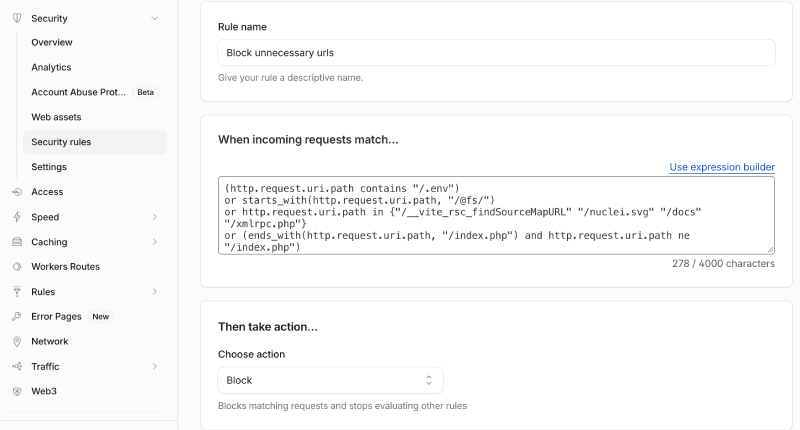
Rule 1: Block scanners and sensitive files
Bots constantly request files that should never be public: .env and .git folders, database dumps, backups, the WordPress installer, and PHP files inside the uploads folder. None of these are real pages on a WordPress site, so block them outright.
- Rule name:
Block scanners and sensitive files - Action: Block
(http.request.uri.path contains "/.env")
or (http.request.uri.path contains "/.git")
or starts_with(http.request.uri.path, "/@fs/")
or (http.request.uri.path in {"/xmlrpc.php" "/wp-config.php" "/wp-config-sample.php" "/readme.html" "/license.txt" "/wp-admin/install.php" "/wp-admin/setup-config.php"})
or (starts_with(http.request.uri.path, "/wp-content/uploads/") and ends_with(http.request.uri.path, ".php"))
or ends_with(http.request.uri.path, ".sql")
or ends_with(http.request.uri.path, ".bak")
or ends_with(http.request.uri.path, "/debug.log")
or (ends_with(http.request.uri.path, "/index.php") and http.request.uri.path ne "/index.php")
What each part stops:
.env,.git,/@fs/: scanners looking for passwords and source code left on the server.xmlrpc.php: password guessing that tries hundreds of passwords in one request. Remove it from the list if you use Jetpack or the WordPress mobile app.readme.html,license.txt: they reveal your WordPress version.- PHP in uploads: uploads should only ever hold images and documents. A PHP file there is almost always a backdoor.
.sql,.bak,debug.log: database dumps, backups and error logs that leak data./something/index.php: probes for old or vulnerable scripts. WordPress pages never end this way.
Rule 2: Challenge the login page and the admin area
Password-guessing bots hit wp-login.php thousands of times a month. A Managed Challenge stops them, while a real person clicks through once and logs in normally.
- Rule name:
Challenge login and admin - Action: Managed Challenge
(http.request.uri.path eq "/wp-login.php"
  or (starts_with(http.request.uri.path, "/wp-admin/")
      and not http.request.uri.path in {"/wp-admin/admin-ajax.php" "/wp-admin/admin-post.php"}))
and not ip.src in {203.0.113.10}- Replace
203.0.113.10with your own IP so you are never challenged. Find it athttps://example.com/cdn-cgi/trace, on the line startingip=. If your IP changes often, delete the last line of the expression. admin-ajax.phpandadmin-post.phpare left out on purpose. Visitors use them for front-end features and forms, and a challenge would break those.- If you are the only person who logs in and your IP is fixed, change the action to Block for even stronger protection.
Rule 3: Block the public REST API and username discovery
Scrapers read your whole site through /wp-json/wp/v2/posts, and attackers list your usernames through /wp-json/wp/v2/users or /?author=1. Those usernames are then used against wp-login.php. This rule blocks both for visitors who are not logged in, so the editor keeps working for you.
- Rule name:
Block public REST API - Action: Block
(starts_with(http.request.uri.path, "/wp-json/wp/v2/")
  or http.request.uri.query contains "rest_route="
  or http.request.uri.query contains "author=")
and not http.cookie contains "wordpress_logged_in"- Only the
wp/v2routes are blocked. Plugin routes such as/wp-json/wc/store/(WooCommerce) and/wp-json/contact-form-7/keep working, and so does/wp-json/oembed/, which other sites use to build link previews of your posts. - The
rest_route=part closes the second address WordPress answers to. Only use it if your site has pretty permalinks (Settings → Permalinks is not set to Plain). - A bot can send a fake cookie, so this is a filter, not a lock. That’s fine: everything the API returns is already public on your pages.
- If a plugin loads posts on the front end through
wp/v2(some live-search and “load more” plugins do), test it after deploying.
Use your two free slots for exceptions you discover in Security → Events, for example a Skip rule for an uptime monitor or a payment provider’s webhook.
Rate limiting rule
One rate limiting rule slows down anything that slips past the challenge: bots that pass it once and then hammer the login form, and comment spam. A real person never submits a login or a comment more than a few times in ten seconds.
- Rule name:
Limit login and comment posts - Counting by: IP
- Rate: 5 requests per 10 seconds
- Action: Block for 10 seconds (on the Free plan, 10 seconds is usually the only period and duration you can pick)
http.request.method eq "POST"
and http.request.uri.path in {"/wp-login.php" "/wp-comments-post.php" "/xmlrpc.php"}
On a paid plan, raise the block duration to 10 minutes or more. Keep comment spam filtering (Akismet or similar) switched on as well; the rate limit only slows bots down, it doesn’t judge content.
Redirect rules
Redirects at Cloudflare happen before the request reaches your server, so they are faster than a WordPress plugin and don’t load PHP. Use them for whole-domain and whole-section moves. Leave one-off post redirects to WordPress (see the table at the end of this section).
For every redirect below, use status 301 (permanent) and tick Preserve query string, so tracking links such as ?utm_source= survive the redirect.
Redirect 1: www to the bare domain
Pick one version of your domain and send the other to it. This example sends www.example.com to example.com. Your WordPress Address and Site Address (Settings → General) must use the same version.
- Rule name:
www to root - When incoming requests match:
http.host eq "www.example.com" - Then: Dynamic, with the expression
concat("https://example.com", http.request.uri.path)
The www DNS record must be proxied (orange cloud) for Cloudflare to see the request. To go the other way, swap the two host names.
Redirect 2: HTTP to HTTPS
You don’t need a rule for this. Turn on SSL/TLS → Edge Certificates → Always Use HTTPS. Set SSL/TLS → Overview to Full (strict) too: the Flexible mode is the usual cause of the “too many redirects” error on WordPress.
Redirect 3: An old domain or folder
When you move the whole site, or a section of it, use a wildcard redirect so every old URL lands on its new address.
- Old domain to new domain: request URL
https://olddomain.com/*, target URLhttps://example.com/${1} - Blog moved out of a folder: request URL
https://example.com/blog/*, target URLhttps://example.com/${1}
In the rule, choose Wildcard pattern as the matching type. The * in the request URL captures the rest of the path, and ${1} puts it back in the target.
Redirect 4: A renamed post or page
For a single URL, a static redirect works:
- When incoming requests match:
http.request.uri.path eq "/old-post-slug/" - Then: Static, URL
https://example.com/new-post-slug/
With ten rules on the Free plan, this doesn’t scale. For lists of old URLs, use Bulk Redirects (Rules → Redirect Rules → Bulk Redirects), which reads a list you upload as CSV.
What to leave to WordPress
| Redirect | Best place | Why |
|---|---|---|
| www ↔ bare domain, HTTP → HTTPS | Cloudflare | Applies to every URL, and runs before WordPress loads |
| Old domain or whole folder | Cloudflare wildcard rule | One rule covers thousands of URLs |
| Lists of old URLs | Cloudflare Bulk Redirects | Fast, and doesn’t use your ten rule slots |
| Single posts renamed in the editor | WordPress (it redirects changed slugs on its own) or the Redirection plugin | Editors can manage it without Cloudflare access, and the plugin logs 404s |
| Trailing slash, upper/lower case | WordPress | Its canonical redirects already handle these; a Cloudflare rule can cause loops |
Never redirect /wp-admin/, /wp-login.php or /wp-json/: a wrong redirect there can lock you out of your own site.
Cache rules
By default, Cloudflare caches images, CSS and JavaScript but not your HTML pages, so every page view still runs WordPress. Two cache rules fix that: one caches pages for visitors, and one keeps static files longer.
Cache rule 1: Cache pages for logged-out visitors
- Rule name:
Cache WordPress pages - Cache eligibility: Eligible for cache
- Edge TTL: Ignore cache-control header and use this TTL: 4 hours (raise to 1 day once purging on publish works)
- Browser TTL: Respect origin
(http.host eq "example.com")
and not starts_with(http.request.uri.path, "/wp-admin")
and not starts_with(http.request.uri.path, "/wp-json")
and not http.request.uri.path in {"/wp-login.php" "/xmlrpc.php" "/wp-cron.php" "/wp-comments-post.php"}
and not http.request.uri.query contains "preview="
and not http.cookie contains "wordpress_logged_in"
and not http.cookie contains "wp-postpass"
and not http.cookie contains "comment_author"- Why the cookies matter: logged-in users, visitors who unlocked a password-protected post, and commenters see personalised pages. Those must never be cached and shown to someone else.
- WooCommerce stores: add
and not http.cookie contains "woocommerce_items_in_cart"andand not http.cookie contains "wp_woocommerce_session", and leave out/cart/,/checkout/and/my-account/by path. - Purge when you publish. Without it, an updated post can take up to the Edge TTL to appear. The official Cloudflare plugin for WordPress purges automatically. Cloudflare’s paid APO add-on does all of this for you if you’d rather not maintain a rule.
Cache rule 2: Keep theme, plugin and core files longer
WordPress adds ?ver= to its CSS and JavaScript URLs, so a new version gets a new URL. That makes long caching safe.
- Rule name:
Cache static files longer - Cache eligibility: Eligible for cache
- Edge TTL: 1 month
- Browser TTL: 1 month
starts_with(http.request.uri.path, "/wp-content/")
or starts_with(http.request.uri.path, "/wp-includes/")
Check that caching works
Open a page in a private window, then look at the cf-cache-status response header in your browser’s developer tools (Network tab). Reload once:
| Value | Meaning |
|---|---|
HIT | Served from Cloudflare. Working |
MISS | Not cached yet. Reload and it should become HIT |
BYPASS | A rule or cookie skipped the cache. Expected when logged in |
DYNAMIC | Not cached. The rule didn’t match, or the page sends a Set-Cookie header (often a plugin starting a session for every visitor) |
Two fixes outside Cloudflare
- Replace WP-Cron. Every uncached visit can trigger
wp-cron.php. Adddefine( 'DISABLE_WP_CRON', true );towp-config.php, then create a cron job at your host that callshttps://example.com/wp-cron.phpevery 5 to 15 minutes. - Mind
admin-ajax.php. It can’t be cached. If it’s high in your uncached list, look for plugins calling it on every page load, such as view counters or live chat, and switch off the ones you don’t need.
Settings that aren’t rules
A few switches do as much as the rules above. Check each one once:
| Setting | Where | Recommended | Note |
|---|---|---|---|
| SSL mode | SSL/TLS → Overview | Full (strict) | Needs a valid certificate on your server; most hosts include one for free |
| Always Use HTTPS | SSL/TLS → Edge Certificates | On | Replaces any HTTP-to-HTTPS redirect rule |
| Minimum TLS version | SSL/TLS → Edge Certificates | TLS 1.2 | Older versions are insecure and almost unused |
| HSTS | SSL/TLS → Edge Certificates | On, only once HTTPS works everywhere | Browsers then refuse HTTP for the set time, so a mistake is hard to undo |
| Block AI bots | Security → Bots | Your choice | Stops AI crawlers that ignore robots.txt from copying your content |
| Bot Fight Mode | Security → Bots | Test before keeping | On the Free plan it can’t be skipped by a rule, so it may block payment webhooks or other services |
| Rocket Loader | Speed → Optimization | Off, unless tested | Changes how scripts load and often breaks inline scripts, forms and the block editor |
Checklist
- Security rule 1: Block scanners and sensitive files
- Security rule 2: Challenge login and admin
- Security rule 3: Block public REST API
- Rate limiting: Limit login and comment posts
- Redirect: www to root (or root to www)
- Always Use HTTPS on, SSL mode Full (strict)
- Cache rule 1: Cache WordPress pages, with purging on publish
- Cache rule 2: Cache static files longer
- WP-Cron replaced by a server cron job
How to test each rule
- Blocked paths: in a private window, open
https://example.com/.envandhttps://example.com/wp-json/wp/v2/users. Both should show a Cloudflare “blocked” page. - Login challenge: open
https://example.com/wp-login.phpin a private window. You should see a short “Verifying you are human” check, then the login form. - Your own access: log in, edit and save a post, upload an image, and submit a comment and any forms on the site.
- Redirects: open
http://www.example.com/some-post/?utm_source=test. You should land onhttps://example.com/some-post/?utm_source=testin a single hop. - Events: after a day, open Security → Events and filter by each rule name. Check that the blocked requests are bots, not visitors or services you use.
FAQ
Will these rules hurt my SEO? No. Search engines don’t request .env files or log in, and they read your pages, not the REST API. Cloudflare also recognises verified search engine bots. Your sitemap at /wp-sitemap.xml (or Yoast’s /sitemap_index.xml) is not affected.
I locked myself out of wp-admin. What now? In Cloudflare, open Security → Security rules and switch off the login rule with its toggle. Then add your current IP to the rule and switch it back on.
Do I still need a security plugin? The rules stop most attacks before they reach WordPress, so a plugin has less to do. Keep WordPress, themes and plugins updated, and use strong passwords with two-factor login. Rules don’t fix an outdated plugin.
Can I use these rules on the Free plan? Yes. Everything in this guide fits the Free plan: three of the five custom rules, the one rate limiting rule, and a few of the ten redirect and cache rules.

Author of four Opencart book.
The recent are Opencart 4 developer book and Opencart 4 user manual