Cloudflare OWASP Core Ruleset Explained: Anomaly Score Threshold, Paranoia Level, Action and Managed Rulesets (2026 Configuration Guide)
How Cloudflare's OWASP Core Ruleset works and how to configure it: what managed rulesets are and which plans get them, how the anomaly score and thresholds (Low 60, Medium 40, High 25) work, paranoia levels PL1 to PL4, which OWASP action to choose, tuning false positives with exceptions and overrides, and API examples.
 Rupak NepaliPublished Oct 28, 2026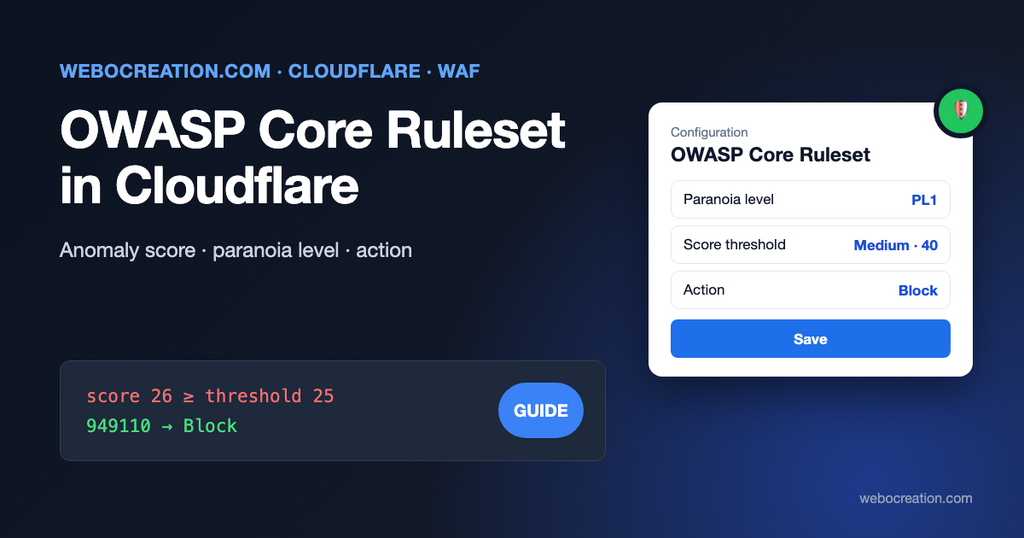
Turn on the Cloudflare OWASP Core Ruleset and you get three drop-down menus: OWASP Anomaly Score Threshold, OWASP Paranoia Level and OWASP Action. The defaults are reasonable, but the labels don’t explain much. “High” sensitivity actually means a lower number, and the wrong combination can block your own admin panel or a payment provider’s callbacks.
This guide explains what each setting does, how they work together, and how to roll the ruleset out without breaking checkout. It applies to any site behind Cloudflare: OpenCart, WordPress, Laravel or a custom app. For the broader Cloudflare setup (custom rules, rate limiting and bots), see our guide to Cloudflare security for OpenCart.
What are managed rulesets?
Cloudflare’s WAF (web application firewall) has two kinds of rules:
- Custom rules are ones you write: “block requests to
/adminfrom outside my country”, “challenge this ASN”. - Managed rulesets are collections of rules written and updated by Cloudflare. You turn them on, choose how strict they are, and Cloudflare keeps them current as new attacks and vulnerabilities appear.
Cloudflare’s managed rulesets in 2026:
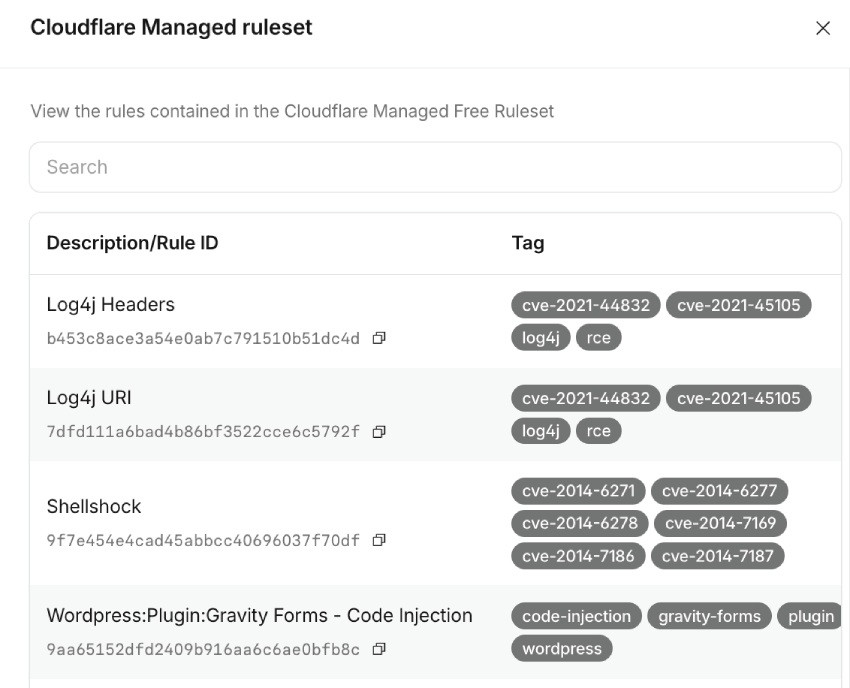
Cloudflare Free Managed Ruleset
Security >> Settings. Enabled by default for free:

You don’t need to worry, but you can view the rules contained in the Cloudflare Managed Free Ruleset
| Managed ruleset | What it does | Plans |
|---|---|---|
| Cloudflare Free Managed Ruleset | Protection against high-impact, widely exploited vulnerabilities | All, including Free |
| Cloudflare Managed Ruleset | Cloudflare’s main ruleset: known attack techniques, CMS and framework vulnerabilities, zero-days. Updated often | Pro, Business, Enterprise |
| Cloudflare OWASP Core Ruleset | Cloudflare’s implementation of the OWASP ModSecurity Core Rule Set: generic detection of attack patterns, with scoring | Pro, Business, Enterprise |
| Cloudflare Exposed Credentials Check | Checks login attempts against known leaked credentials. Deprecated; Cloudflare recommends leaked credentials detection instead | Pro, Business, Enterprise |
| Cloudflare Sensitive Data Detection | Watches responses for sensitive data such as card numbers leaving your site | Enterprise |
If you’re on the Free plan, the Free Managed Ruleset is what you get; the OWASP ruleset needs Pro or higher. If you deploy the full Cloudflare Managed Ruleset, you don’t need the Free one: it covers the same ground and more.
Cloudflare Managed Ruleset vs OWASP Core Ruleset
They work differently, and most sites should run both:
| Cloudflare Managed Ruleset | OWASP Core Ruleset | |
|---|---|---|
| Rules target | Specific, known attacks (for example, a particular plugin vulnerability) | Generic patterns: SQL injection, cross-site scripting, path traversal, command injection, protocol abuse |
| How a request is blocked | Each rule has its own action. One match is enough | Each matching rule adds points. One action for the whole ruleset, taken only when the total reaches a threshold |
| False positives | Rare | More common; needs tuning |
| Best at | Known vulnerabilities, including ones your software hasn’t patched yet | Unknown attacks and custom code nobody has written a specific rule for |
Where managed rules run
Managed rulesets run in the http_request_firewall_managed phase, after:
- HTTP DDoS protection
- Your custom rules
- Your rate limiting rules
If a custom rule or rate limit already blocked or challenged a request, the managed rules never see it. There’s no simple “allow” that lets a request through everything: to exclude traffic from managed rules, you use a skip, either as a managed rules exception (covered below) or a custom rule with the Skip action.
How the OWASP Core Ruleset decides: the anomaly score
The OWASP Core Rule Set was built for ModSecurity on Apache and Nginx, and Cloudflare runs its own implementation of it at the edge. Its key idea is anomaly scoring.
A single suspicious thing in a request isn’t proof of an attack. An apostrophe in a search box might be a name like “O’Brien”. So instead of blocking on one match, each OWASP rule that matches adds points to the request’s score. Cloudflare’s docs define the result as “the sum of the individual scores of all OWASP rules that matched the request”. Only when the total reaches your threshold does the ruleset act, through its last rule: 949110: Inbound Anomaly Score Exceeded.
Cloudflare’s own worked example: with paranoia level PL3 and a threshold of 25, a request matches six rules, worth +5, +5, +5, +3, +5 and +3 points. Total: 26. That’s at or above 25, so the action runs. With the default threshold of 40, the same request passes. Serious matches typically add 5 points and weaker signals 3, so it takes several matching rules, not just one, to reach a threshold.
In your logs, you’ll see rule 949110 as the one that blocked or challenged a request. The individual rules that added points are the ones to look at when tuning.
OWASP Anomaly Score Threshold
The threshold is the score at which the action runs:
| Setting | Score that triggers the action | Meaning |
|---|---|---|
| Low | 60 and higher | Least sensitive. Many rules must match. Fewest false positives, and lets more borderline attacks through |
| Medium (default) | 40 and higher | The balance Cloudflare chose as default |
| High | 25 and higher | Most sensitive. A few matching rules are enough. More false positives |
The naming trips people up: High sensitivity = low number. “High” doesn’t mean “high score needed”; it means “high chance of triggering”.
Cloudflare warns that with a High threshold, “file uploads may trigger the 949110: Inbound Anomaly Score Exceeded rule”, because uploaded file contents can easily match a few patterns. Product image uploads in your admin are a typical victim.
OWASP Paranoia Level
The paranoia level decides which rules run at all. Each OWASP rule belongs to a level from PL1 to PL4:
| Level | What it adds | Who it’s for |
|---|---|---|
| PL1 (default) | Rules that detect clear attack patterns with few false positives | Almost every site. The right starting point |
| PL2 | More rules, including ones that detect obfuscated attacks. Some false positives on forms with free text | Stores and sites handling personal or payment data, after you’ve tuned PL1 |
| PL3 | Stricter checks on special characters and request structure | Sites with simple, predictable input, and a team to tune it |
| PL4 | Very strict. Cloudflare notes it “will likely require disabling some rules for applications that accept complex input” | Rarely worth it for a CMS or store |
Levels are cumulative: PL2 runs PL1 and PL2 rules, PL3 runs PL1 to PL3, and so on. Rules above your level are skipped entirely and add nothing to the score.
How threshold and paranoia level work together
They’re two different knobs:
- Paranoia level = how many rules can add points.
- Threshold = how many points it takes to act.
Raising the paranoia level makes requests collect more points, so it pushes more requests over any threshold. Raising both at once (PL3 and High) is the fastest way to block legitimate customers. Change one at a time, and watch the logs for a week after each change.
OWASP Action
The action is what Cloudflare does when a request’s score reaches the threshold:
| Action | What the visitor sees | Use it for |
|---|---|---|
| Block (default) | A Cloudflare block page (HTTP 403) | Normal operation, once tuned |
| Managed Challenge | Usually nothing; Cloudflare decides whether to show a check | Rolling out a stricter setting: real people get through, automated attacks don’t |
| JS Challenge | A short browser check | Rarely better than Managed Challenge |
| Interactive Challenge | A check the visitor must click | Hardly ever; it costs real customers |
| Log | Nothing; the match is only recorded | Testing without any effect. Generally an Enterprise feature |
Two things to know before you choose a challenge:
- Challenges only work in browsers. Payment provider webhooks, mobile apps, API clients, and AJAX requests can’t solve one, so for them a challenge is the same as a block. Exclude those paths with exceptions (below) rather than relying on a challenge.
- Block is right once you’ve tuned. A request that reaches 40 points at PL1 is almost always an attack. Challenging it just gives the attacker a second chance.
Recommended starting configurations
| Site | Paranoia level | Threshold | Action |
|---|---|---|---|
| Most stores and blogs (OpenCart, WordPress, WooCommerce) | PL1 | Medium (40) | Block |
| You’re seeing false positives you can’t tune yet | PL1 | Low (60) | Block |
| Stores after a month of clean logs at PL1 | PL2 | Medium (40) | Managed Challenge for two weeks, then Block |
| Simple custom app with predictable input and an active security team | PL2 or PL3 | Medium (40) | Block |
Avoid High (25) together with PL3 or PL4 unless you have the time to tune dozens of rules.
Setting it up in the dashboard
In the current Cloudflare dashboard:
- Select your domain, then Security > Settings. Filter by Web application exploits and turn on Cloudflare managed ruleset and OWASP core ruleset. Save with the default settings for now.
- Go to Security > Security rules, filter by Managed rules, and open the rule that executes Cloudflare OWASP Core Ruleset.
- In the ruleset configuration, set OWASP Anomaly Score Threshold, OWASP Paranoia Level, and OWASP Action.
- Optional: Edit scope to run the ruleset on part of your traffic only, for example, one hostname while you test.
- Save.
(In older dashboards, the same settings are under Security > WAF > Managed rules, with a configure link next to the OWASP ruleset.)
To switch off individual rules, open the ruleset and choose Browse rules, find the rule by its ID or description, and use its Status toggle. When you disable rules by tag, Cloudflare asks whether to Include new rules; choose that if you want future rules with the same tag disabled too.
Finding false positives
After you enable or tighten the ruleset:
- Open Security > Analytics (or Events) and filter by the service Managed rules, or by rule ID 949110.
- For each blocked request, look at the path, the method, and the source. A pattern of blocks on
/admin/from your own IP, or on a payment callback URL from your payment provider, is a false positive. Random paths like/wp-login.phpor/.envfrom data-centre IPs are attacks doing their job. - Open a few events to see which OWASP rules matched and added points.
- Fix the cause with the narrowest tool: an exception for a path, or disabling one rule. Not by lowering protection for the whole site.
Typical false positives:
- Admin product and content editors. Rich text editors send HTML in POST requests, which looks like cross-site scripting. OpenCart’s product description editor and WordPress’s post editor are both common triggers.
- File uploads, especially at a High threshold.
- Payment and shipping webhooks: JSON from Stripe, PayPal or a carrier, sent by servers, not browsers.
- Search boxes and contact forms with code snippets, SQL-like text or unusual characters.
- Your own API, if it accepts JSON with HTML or code in it.
Exceptions: skipping rules for specific traffic
An exception is a rule with the Skip action, placed before the managed rulesets. Cloudflare evaluates exceptions in order, and “exceptions take priority over overrides”. Create them in Security > Security rules as a managed rules exception (in older dashboards, Add exception in the managed rules section).
Keep exceptions narrow: skip the OWASP ruleset, not all managed rules, and only for a path combined with something only legitimate traffic has.
Admin panel, from your own network only:
(starts_with(http.request.uri.path, "/admin") and ip.src in $office_ips)Action: skip Cloudflare OWASP Core Ruleset. Create the $office_ips list under Manage Account > Configurations > Lists. If you renamed OpenCart’s admin folder (and you should, see our OpenCart security guide), use that path. For WordPress, use /wp-admin and keep /wp-login.php protected.
Without fixed IPs, skip only the specific rules that trigger, rather than the whole ruleset, and keep the Cloudflare Managed Ruleset running on the admin in every case. Better still, put the admin behind Cloudflare Access, so only signed-in staff reach it at all.
A payment provider’s webhook (example route; use your extension’s):
(http.request.uri.path eq "/index.php" and http.request.uri.query contains "route=extension/stripe/payment/stripe.webhook" and http.request.method eq "POST")Use your payment extension’s actual callback URL (it’s in the extension’s settings or documentation), and verify webhook signatures in your code, as every serious payment extension does. The exception stops the firewall from blocking the provider; the signature check stops anyone else from using the URL.
Overrides: changing the ruleset’s behaviour
Where exceptions skip rules for some traffic, overrides change the rules themselves, at three levels:
- Ruleset override: applies to every rule. The OWASP threshold, paranoia level, and action are ruleset settings of this kind.
- Tag override: applies to every rule with a tag, such as
paranoia-level-3. It also covers rules Cloudflare adds later with that tag. - Rule override: applies to one rule, for example, disabling a rule that keeps matching your product editor.
Cloudflare’s advice: if you want a change to affect only today’s rules and not future ones, use rule overrides.
The same configuration with the API
If you manage Cloudflare with Terraform or scripts, the OWASP settings are overrides on the rule that executes the OWASP ruleset (ID 4814384a9e5d4991b9815dcfc25d2f1f) in your zone’s http_request_firewall_managed entry point.
The paranoia level is set by disabling the higher levels’ categories. PL2:
{
  "action": "execute",
  "action_parameters": {
    "id": "4814384a9e5d4991b9815dcfc25d2f1f",
    "overrides": {
      "categories": [
        {"category": "paranoia-level-3", "enabled": false},
        {"category": "paranoia-level-4", "enabled": false}
      ]
    }
  },
  "expression": "true",
  "enabled": true
}
The threshold and action are an override on the ruleset’s last rule, 6179ae15870a4bb7b2d480d4843b323c (949110: Inbound Anomaly Score Exceeded), whose default is block with score_threshold 40:
{
  "action": "execute",
  "action_parameters": {
    "id": "4814384a9e5d4991b9815dcfc25d2f1f",
    "overrides": {
      "categories": [
        {"category": "paranoia-level-3", "enabled": false},
        {"category": "paranoia-level-4", "enabled": false}
      ],
      "rules": [
        {"id": "6179ae15870a4bb7b2d480d4843b323c", "score_threshold": 40, "action": "managed_challenge"}
      ]
    }
  },
  "expression": "true",
  "enabled": true
}
Send it with PATCH /zones/{zone_id}/rulesets/{entry_point_ruleset_id}/rules/{execute_rule_id}. The action accepts block, managed_challenge, js_challenge, challenge and log. Cloudflare’s OWASP API guide has the calls to find the entry point and rule IDs.
A rollout plan
- Day 1: enable the Cloudflare Managed Ruleset and the OWASP Core Ruleset with defaults: PL1, Medium (40), Block.
- Days 1 to 7: check events for rule 949110 daily. Fix false positives with narrow exceptions or rule overrides. Test the things customers and staff do: search, account registration, checkout with each payment method, contact form, editing and saving a product, uploading an image.
- After a clean month: try PL2 with Managed Challenge for two weeks. Tune again. Switch to Block.
- After every major change to your site (new payment method, new extension, theme with new forms): test those flows and watch the events for a few days.
The WAF is one layer
The OWASP ruleset stops many attacks before they reach your server, but it doesn’t patch your software, and attackers can sometimes phrase a request so it scores below the threshold. Keep OpenCart, WordPress, plugins, and PHP updated, use strong admin passwords with two-factor authentication, and add a Content Security Policy. Make sure your server only accepts web traffic from Cloudflare, or attackers can bypass the WAF by going straight to your server’s IP address.
Related guides: Cloudflare rules for WordPress, blocking basic XSS attacks with Cloudflare Workers, and bot incidents and traffic spikes.

Author of four Opencart book.
The recent are Opencart 4 developer book and Opencart 4 user manual