Automated Vulnerability Scanning for Ecommerce Apps: Tools, Frequency, and Handling False Positives
 Rupak NepaliPublished Jun 30, 2026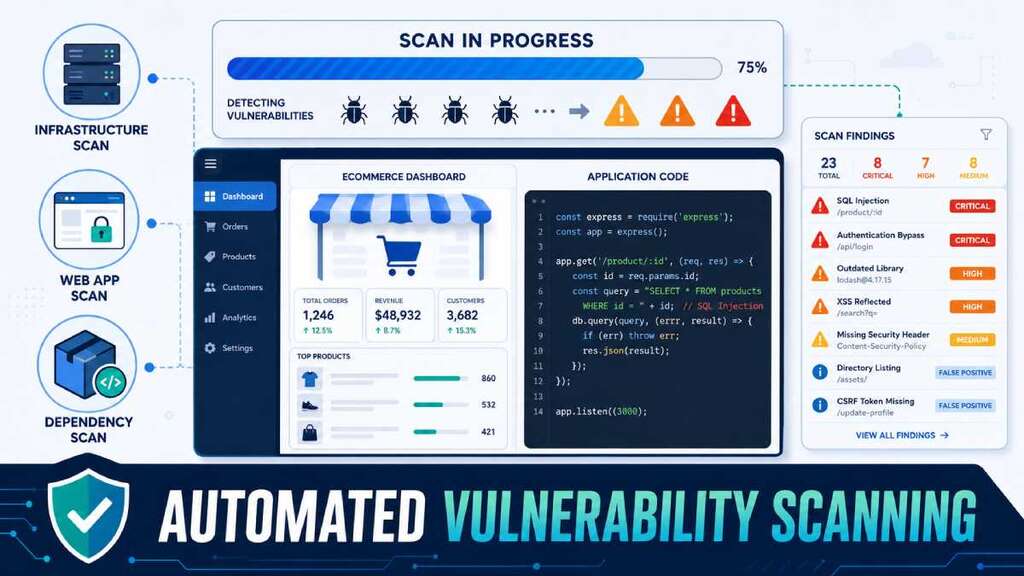
Automated vulnerability scanning is one of the easiest ways for ecommerce developers to catch security bugs early—if you choose good tools, scan often enough, and don’t drown in false positives. This post walks through what automated scanning does for your store, which tools and approaches make sense, how frequently to run scans, and how to handle noisy results without burning your team out.
Why automated vulnerability scanning matters for ecommerce
Ecommerce apps are a perfect target: they hold customer data, payment flows, and admin panels, and they often grow quickly with plugins, themes, and custom code. Every new dependency or feature can introduce vulnerabilities—SQL injection, XSS, insecure libraries, misconfigured servers—that attackers can exploit long before a manual security review happens.
Automated vulnerability scanners:
- Continuously check your app, infrastructure, or container images for known weaknesses and misconfigurations.
- Give you a prioritized list of issues to fix, often with CVE IDs, severities, and remediation hints.
- Integrate into CI/CD pipelines so new code and dependencies get scanned before hitting production.
For an ecommerce developer, this moves security from “once‑a‑year audit” to routine hygiene—part of the build, deploy, and maintenance cycle.
The main types of vulnerability scanning you’ll use
Different scanners look at different layers of your stack. For ecommerce, you usually want a mix, not just one tool.
1. Infrastructure and network scanning
Tools like Nessus, OpenVAS, and similar scanners look at servers, ports, and services to find:
- Outdated software (web servers, databases, OS packages)
- Misconfigurations (weak SSH, open management ports, missing patches)
These scans help ensure the boxes your ecommerce app runs on don’t expose easy openings.
2. Web application scanning (your store itself)
Web vulnerability scanners (for example, Acunetix, Invicti, and similar DAST tools) actively crawl and interact with your web app:
- They look for OWASP Top 10 issues like SQL injection, XSS, insecure cookies, and auth/session flaws.
- Many support authenticated scanning, so they can test logged‑in areas like admin and checkout flows.
Some vendors use “proof‑based” scanning—automatically verifying findings to reduce false positives, especially important when scanning complex ecommerce flows.
3. Dependency and container scanning
Your store depends on frameworks, libraries, and sometimes container images.
- Dependency scanners (for example, tools like Dependabot or similar) look at your package manifests to find libraries with known CVEs.
- Container scanners analyze images for vulnerable packages and misconfigurations.
Given how much ecommerce is built on PHP, JS, and CMS plugins, library/package scanning is a big part of keeping your app safe.
Choosing tools and where to integrate them
When picking scanners as a developer, look at:
- Coverage: Can it scan your web app, APIs, and containers, or only one layer?
- Accuracy and false positive rates: Does the tool verify findings or flood you with noise?
- Integration: Does it fit into your CI/CD, ticketing, and workflow easily?
- Usability: Can devs actually read and act on reports, or is it only for specialists?
For a typical ecommerce stack:
- Use an infrastructure scanner (Nessus/OpenVAS) for servers and networks.
- Use a web app scanner/DAST tool for the store and admin panels.
- Use dependency scanning (e.g., GitHub‑style tools, language‑specific scanners) for libraries and plugin ecosystems.
Then, hook at least some of these into:
- Your CI/CD pipeline (scan new code/builds).
- A regular scheduled job (scan production and staging environments).
How often should you scan? Frequency for ecommerce apps
There’s no single magic frequency, but ecommerce guidance tends to converge around routine scans plus deeper periodic assessments.
A practical schedule:
- On every major change:
- Run dependency and web app scans whenever you deploy big feature changes, new plugins/extensions, or framework upgrades.
- Weekly or biweekly for production web apps:
- Automated DAST scans against staging and production to catch newly introduced issues and new exposures.
- Monthly for infrastructure:
- Network and server scans to find missing patches or misconfigurations.
- At least annually for deep audits:
- Full security audits and penetration tests, often recommended at least once a year or after major updates.
The key idea: scanning should be regular and often, but you don’t need to scan heavy targets (e.g., full DAST with authentication) on every small CSS change. Tie scan frequency to risk and change—more scans when you’re changing code and dependencies more often.
Dealing with false positives (without ignoring real issues)
Every scanner produces some false positives—findings that look like vulnerabilities but aren’t actually exploitable or relevant. If you don’t manage them, you get alert fatigue, and developers start ignoring reports.
Common causes of false positives include:
- Cross‑ecosystem confusion: mapping a vulnerability from one package ecosystem onto a similarly named package in another.
- Limited information/unauthenticated scans: scanner cannot see enough of the system, so it flags “possible” issues based only on banners or partial config.
- Complex authentication and flows not modeled correctly: scanner misses the true state and misreads error messages or behavior.
Practical strategies for dev teams:
1. Tune scanners with proper authentication and scope
- Configure authenticated scans (credentials for admin and user roles) so tools see the real application behavior and configuration.
- Define clear scan scopes: which domains/routes, which environments (staging vs prod), and what’s out of bounds.
Better coverage reduces guesswork and false positives.
2. Use quality gates and baselines in CI/CD
- Set up quality gates: builds fail if new vulnerabilities above a certain severity appear, but known baseline issues are tracked separately.
- Maintain a list of accepted risks and known false positives so scans don’t constantly block on the same noise.
This helps keep scanning actionable without freezing development over non‑critical findings.
3. Configure matching behavior and ignore rules
Modern scanners often let you tune how they match vulnerabilities:
- Adjust matching per ecosystem (for example, turn off certain matching methods for Java, tweak for Python).
- Add ignore rules for specific packages or conditions known to be false positives, after careful review.
The goal isn’t to hide real problems; it’s to stop wasting time on alerts you’ve proven are not exploitable.
4. Combine automated scanning with manual review
- Use automation to find likely issues and keep up with new CVEs, but complement it with manual inspection for business logic flaws, complex flows, and high‑risk areas (checkout, account functions).
- Security experts or experienced devs can validate critical findings, especially those that would lead to data exposure or payment compromise.
False positives become manageable when you treat scanners as tools in a process, not as oracles.
Building a simple vulnerability management workflow for ecommerce devs
Automated scanning is just one piece; you need a lightweight workflow so findings actually get fixed.
A simple flow:
- Scan
- Run dependency, web app, and infra scans on a regular schedule and after major changes.
- Triage
- Categorize findings by severity, exploitability, and business impact (e.g., does it affect checkout or customer data?).
- Filter out obvious false positives using tuned rules and manual checks.
- Create tickets
- Turn validated vulnerabilities into issues in your tracker, linked to code, configs, or dependencies that need changes.
- Fix and verify
- Patch dependencies, update configs, or refactor vulnerable code.
- Re‑run scans and, for critical findings, manually verify that the vulnerability is gone.
- Monitor over time
- Track trends: are you introducing fewer critical vulnerabilities over time? Are scan results getting cleaner as your pipeline and configs improve?
For ecommerce developers, this flow aligns with existing dev practices: code → review → CI → deploy → monitor. Scanning becomes part of that loop, not a separate painful event.
The bottom line for ecommerce developers
Automated vulnerability scanning won’t replace manual security work, but it catches a huge class of bugs and misconfigurations early, especially in fast‑moving ecommerce environments. By choosing tools that fit your stack, scanning at sensible intervals tied to change and risk, and deliberately managing false positives, you can turn vulnerability scanning from noisy compliance into a practical part of your dev workflow.
For your ecommerce app, the aim is simple:
- Scan regularly.
- Fix what matters.
- Tune out the noise without ignoring the signal.
That way, your store stays faster and safer for customers—and the security work stays achievable for your development team rather than overwhelming.

Author of four Opencart book.
The recent are Opencart 4 developer book and Opencart 4 user manual