Last updated: October 2026
Thanks for picking up The Technical Web Guide for Marketers: What Every Marketer Should Know About Domains, Email, Tracking, Search and AI. This page keeps the book current. Tools change their names and prices, platforms add and remove features, and the AI chapters in Part 8 change fastest of all, so this is where you’ll find what has moved since the book went to print.
How to use this page:
- Check “What’s changed” first. Every update is dated and points to the chapter it affects, so you can note it in your copy.
- Use the tools directory as your shopping list. It follows the book’s nine parts, free tools first, with chapter numbers so you can read the background before you buy anything.
- Keep an eye on the AI tracker. AI crawlers, AI referral tracking, WebMCP, Agentic Browsing, ads inside AI answers and the GEO plan, all in one place.
- Grab the downloads. The checklists, templates, and prompt library from the book, in formats you can copy into your own documents and tools.
If you spot something out of date, or a tool that deserves a place here, tell me. Reader notes are how this page stays useful.
Buy the paperback on Amazon · Kindle edition · About the author
The book at a glance
56 chapters in nine parts, plus five appendices: a glossary, a DNS and email authentication cheat sheet, a pre-launch website checklist, a prompt library and a tools directory. Every chapter follows the same pattern: what it is, why marketers care, a story from the field, a checklist, a prompt to try, and free and paid tools.
| Part | Chapters |
|---|---|
| 1. How the Web Reaches Your Customer | 1 The Journey of a Page View · 2 Hosting and Servers · 3 Domains You Own (and Forget You Own) · 4 DNS Records Demystified · 5 URLs, Short Links and QR Codes · 6 SSL/TLS and Trust |
| 2. Email | 7 Email That Actually Lands · 8 Why Email Goes to Spam · 9 Email Templates, Rendering and Metrics |
| 3. Understanding Your Visitors | 10 How Visitors Think · 11 What Visitors Want · 12 User Journeys and Drop-Off · 13 Designing Pages Around Visitors |
| 4. Content Management | 14 Choosing a CMS · 15 Content Management and Governance · 16 Categories, Tags and Taxonomy · 17 Digital Asset Management · 18 Handling Requests and “Make It Like This Site” |
| 5. Speed and Delivery | 19 CDNs Explained · 20 Caching Without Tears · 21 Page Speed and Core Web Vitals · 22 Marketing’s Page Weight · 23 Uptime, Monitoring and Incidents |
| 6. Measurement | 24 Tracking Fundamentals · 25 UTMs and Attribution · 26 Google Ads Tracking · 27 Social Ads Tracking · 28 Consent and Privacy · 29 Measurement Without Cookies · 30 Forms That Work · 31 Marketing Automation Plumbing · 32 A/B Testing and Personalization · 33 Conversion Rate Optimization · 34 Search Console and Bing Webmaster Tools |
| 7. Being Found | 35 Technical SEO · 36 robots.txt · 37 Structured Data Deep Dive · 38 Migrations and Redirects · 39 Social Previews and Link Sharing · 40 Video and YouTube SEO · 41 Local and International Reach · 42 Accessibility |
| 8. The AI Era | 43 AI Crawlers and Bots · 44 AEO · 45 GEO · 46 Advertising Inside AI Answers · 47 llms.txt, WebMCP and Machine-Readable Sites · 48 When Agents Are Your Visitors · 49 Agentic Commerce · 50 AI Agents on Your Marketing Team · 51 AI Content, Trust and Disclosure · 52 Building Your Own AI Toolkit |
| 9. Operations | 53 Security for Marketers · 54 Working With IT and Developers · 55 Launching a New Landing Page · 56 A Full Website Health Audit |
What’s changed since the book
Newest first. Each line names the chapter it affects.
| Date | Chapter | What changed |
|---|---|---|
| October 2026 | All | Companion page launched. Lists match the first edition, including Lighthouse’s new Agentic Browsing category (Chapter 21) and Meta Ads Data Advisor, formerly Meta Pixel Helper (Chapters 24 and 27). |
For future entries, keep each line short and concrete, like this:
| 2027-01-15 | 43 | New AI search crawler added to the tracker; robots.txt sample updated. |
| 2027-02-03 | 21 | Tool X renamed to Y; pricing now starts at $Z/month. |
When a change alters the book’s advice, not just a name or a price, write a short blog post about it and link the post from this table.
Tools directory
The tools from the book, in book order, free options first. For most teams the free column covers the day-to-day checks. Mentions are not endorsements, and nobody paid to be listed.
Part 1: How the Web Reaches Your Customer
| Area | Free | Paid | Chapters |
|---|---|---|---|
| Page journey | Chrome DevTools, WebPageTest, REDbot, whatsmydns.net | Catchpoint, Pingdom, DebugBear, SpeedCurve | 1 |
| Hosting | Netlify, Vercel and Cloudflare Pages free tiers, GitHub Pages | AWS, Google Cloud, Microsoft Azure, DigitalOcean, Akamai Cloud (formerly Linode), WP Engine, Kinsta, WordPress VIP, Pantheon, Acquia, Upsun (formerly Platform.sh), Webflow, Shopify | 2 |
| Domains and DNS | ICANN Lookup, dnstwist, Google Admin Toolbox Dig, whatsmydns.net, dnschecker.org, httpstatus.io | Namecheap, GoDaddy, MarkMonitor, DNSimple, Route 53, NS1 | 3, 4 |
| Links and QR codes | Google Campaign URL Builder, static QR generators | Bitly, Rebrandly, Uniqode | 5 |
| Certificates | Let’s Encrypt, SSL Labs, crt.sh | DigiCert, Sectigo, DigiCert Trust Lifecycle Manager, Sectigo Certificate Manager, Venafi | 6 |
Part 2: Email
| Area | Free | Paid | Chapters |
|---|---|---|---|
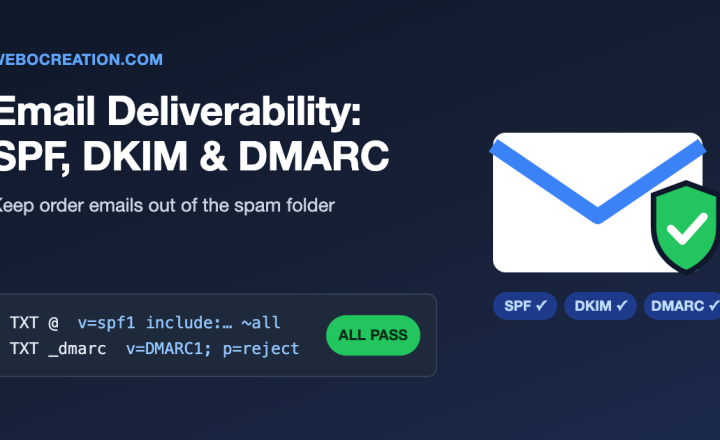
| Email authentication | MXToolbox, Google Postmaster Tools, mail-tester.com | dmarcian, Valimail, Red Sift OnDMARC | 7 |
| Deliverability | Google Postmaster Tools, Microsoft SNDS, MXToolbox blocklist check | Validity Everest, GlockApps, ZeroBounce, NeverBounce, SendGrid, Postmark, Amazon SES | 8 |
| Templates and metrics | Can I Email, mail-tester.com, platform previews, bot-click filtering in your email platform | Litmus, Email on Acid, Stripo, Beefree | 9 |
Part 3: Understanding Your Visitors
| Area | Free | Paid | Chapters |
|---|---|---|---|
| Visitor research and UX | Microsoft Clarity, Google Forms, Optimal Workshop free tier | Hotjar, Lyssna, UserTesting, Dovetail, Attention Insight | 10, 11 |
| Journeys | GA4 funnel and path explorations, Clarity | FullStory, Contentsquare, Mixpanel, Amplitude | 12 |
| Design and prototypes | Figma free plan and FigJam, Penpot, Canva free | Figma paid (Dev Mode, libraries), Maze, Lyssna, Miro, Whimsical, Webflow, Framer | 13 |
Part 4: Content Management
| Area | Free | Paid | Chapters |
|---|---|---|---|
| CMS and content | WordPress, Drupal, PublishPress, Screaming Frog | Webflow, Contentful, Sanity, Siteimprove | 14, 15 |
| Taxonomy and assets | CMS taxonomy tools, Google Sheets, Google Drive | PoolParty, Brandfolder, Canto, Adobe Experience Manager Assets, Cloudinary | 16, 17 |
| Requests and design systems | Google Forms, Jira free, Storybook, Notion | Jira Service Management, Asana, Zeroheight | 18 |
Part 5: Speed and Delivery
| Area | Free | Paid | Chapters |
|---|---|---|---|
| CDN and caching | Cloudflare free plan, REDbot | Akamai, Fastly, CloudFront | 19, 20 |
| Speed | PageSpeed Insights, Lighthouse, CrUX Vis, Squoosh, Request Map Generator | DebugBear, SpeedCurve, Calibre, ImageKit, TinyPNG Pro | 21, 22 |
| Uptime and incidents | UptimeRobot, Better Stack free | Pingdom, Better Stack, Atlassian Statuspage, PagerDuty | 23 |
Part 6: Measurement
| Area | Free | Paid | Chapters |
|---|---|---|---|
| Analytics and tags | GA4, Google Tag Manager, Looker Studio | GA4 360, Stape, Adobe Analytics, Supermetrics, Funnel | 24 |
| Tag-checking browser extensions | Tag Assistant, Meta Ads Data Advisor, TikTok Pixel Helper, Pinterest Tag Helper, Microsoft UET Tag Helper, Snap Pixel Helper, Adobe Experience Platform Debugger, Omnibug, dataslayer, ObservePoint TagDebugger, Wappalyzer | ObservePoint (automated tag audits) | 24, 27 |
| Attribution | Campaign URL Builder, first- and last-touch cookies with hidden fields | UTM.io, HubSpot, Dreamdata | 25 |
| Ads tracking | Google Ads, Tag Assistant, Meta Events Manager test events | Stape, Segment, Elevar | 26, 27 |
| Consent and privacy | Google Consent Mode, Klaro, CookieYes free | OneTrust, Cookiebot, Usercentrics, Osano, Ketch, TrustArc, ObservePoint | 28 |
| Measurement without cookies | Google Meridian, Meta Robyn, platform lift studies, “How did you hear about us?” fields | Haus, Recast, Measured, LiveRamp, Fairing, KnoCommerce | 29 |
| Forms | Google Forms, HubSpot free forms, reCAPTCHA, Cloudflare Turnstile, Microsoft Clarity | Gravity Forms, Typeform, Jotform, Formstack, Zuko, ZeroBounce, NeverBounce | 30 |
| Marketing automation | HubSpot free CRM, Mailchimp free, Zapier free | Salesforce Account Engagement (Pardot), Adobe Marketo Engage, Oracle Eloqua, HubSpot Marketing Hub, Make | 31 |
| Testing and CRO | GrowthBook, PostHog free, GA4 explorations, Clarity, sample-size calculators | Optimizely, VWO, AB Tasty, Kameleoon, Convert, Statsig, LaunchDarkly, Hotjar, Contentsquare | 32, 33 |
| Search data | Google Search Console, Bing Webmaster Tools, Screaming Frog free (500 URLs), free tiers of Semrush, Ahrefs Webmaster Tools and Similarweb | Semrush, Ahrefs, Similarweb, Screaming Frog, Sitebulb, SEOTesting | 34 |
Part 7: Being Found
| Area | Free | Paid | Chapters |
|---|---|---|---|
| Technical SEO and mobile-first | Search Console URL Inspection, PageSpeed Insights, Screaming Frog free | Sitebulb, Semrush Site Audit, Ahrefs Site Audit | 35 |
| robots.txt | Search Console robots.txt report, Bing Webmaster Tools, Screaming Frog free | Screaming Frog, Sitebulb, ContentKing, Little Warden | 36 |
| Structured data | Rich Results Test, Schema.org Validator, Search Console enhancement reports, Yoast or Rank Math | Schema App, WordLift, Sitebulb | 37 |
| Migrations | Screaming Frog free, Search Console, httpstatus.io | Screaming Frog, Sitebulb, Semrush, Ahrefs | 38 |
| Sharing and video | Sharing Debugger, Post Inspector, opengraph.xyz, YouTube Studio | Wistia, Vimeo, TubeBuddy, vidIQ | 39, 40 |
| Local and international | Google Business Profile, Bing Places, Apple Business Connect | BrightLocal, Yext, Weglot, Lokalise | 41 |
| Accessibility | WAVE, axe DevTools, Accessibility Insights for Web, Lighthouse, WebAIM Contrast Checker, NVDA, VoiceOver, Voice Control, Narrator, Voice Access, TalkBack | Siteimprove, Deque axe Monitor, Level Access, Stark, JAWS, Dragon | 42 |
Part 8: The AI Era
| Area | Free | Paid | Chapters |
|---|---|---|---|
| AI crawlers and visibility | robots.txt, server logs, Dark Visitors, AlsoAsked, AnswerThePublic, a manual prompt-testing log | Akamai Bot Manager, DataDome, HUMAN, Profound, Peec AI, Otterly.AI, Ahrefs Brand Radar, Semrush AI visibility tools | 43 to 45 |
| AI ads and commerce | Google Ads reporting, OpenAI ads pixel, Merchant Center | Adthena, StackAdapt, Stripe, Feedonomics | 46, 49 |
| Machine-readable sites and agents | llmstxt.org, Yoast llms.txt, Firecrawl free, NLWeb, WebMCP draft and Chrome trial | Firecrawl paid, verified-agent bot management | 47, 48 |
| AI for the team | GA4 and Google Ads MCP servers, Ask Advisor, n8n, free AI tiers | Claude, ChatGPT and Gemini business plans, Zapier, Make | 50, 52 |
| AI content trust | Content Credentials Verify, Adobe Content Authenticity | Adobe Firefly, Truepic, Reality Defender, Bolster | 51 |
Part 9: Operations
| Area | Free | Paid | Chapters |
|---|---|---|---|
| Security | Have I Been Pwned, dnstwist, reCAPTCHA, Cloudflare Turnstile, Bitwarden free, Google CSP Evaluator | 1Password Teams, Bitwarden Teams, BrandShield, Bolster, c/side, Jscrambler, Feroot, Report URI | 53 |
| Working with IT | Trello, Jira free, Loom free | Jira, Asana, Monday.com, Loom Business | 54 |
| Landing page launches | PageSpeed Insights, Tag Assistant, WAVE, httpstatus.io, UptimeRobot | Unbounce, Instapage, BrowserStack, LambdaTest, ObservePoint | 55 |
| Full audits | All free tools above | Siteimprove, Semrush Site Audit, Ahrefs Site Audit | 56 |
When you paste this into WordPress, link each tool name to its official site. If you join any affiliate programs, add a one-line disclosure above the first table.
AI search and agents tracker
Part 8 changes faster than anything else in the book, so this section is where we keep it current. Each table shows the date it was last checked. When a row changes, we update it here and add a line to the change log.
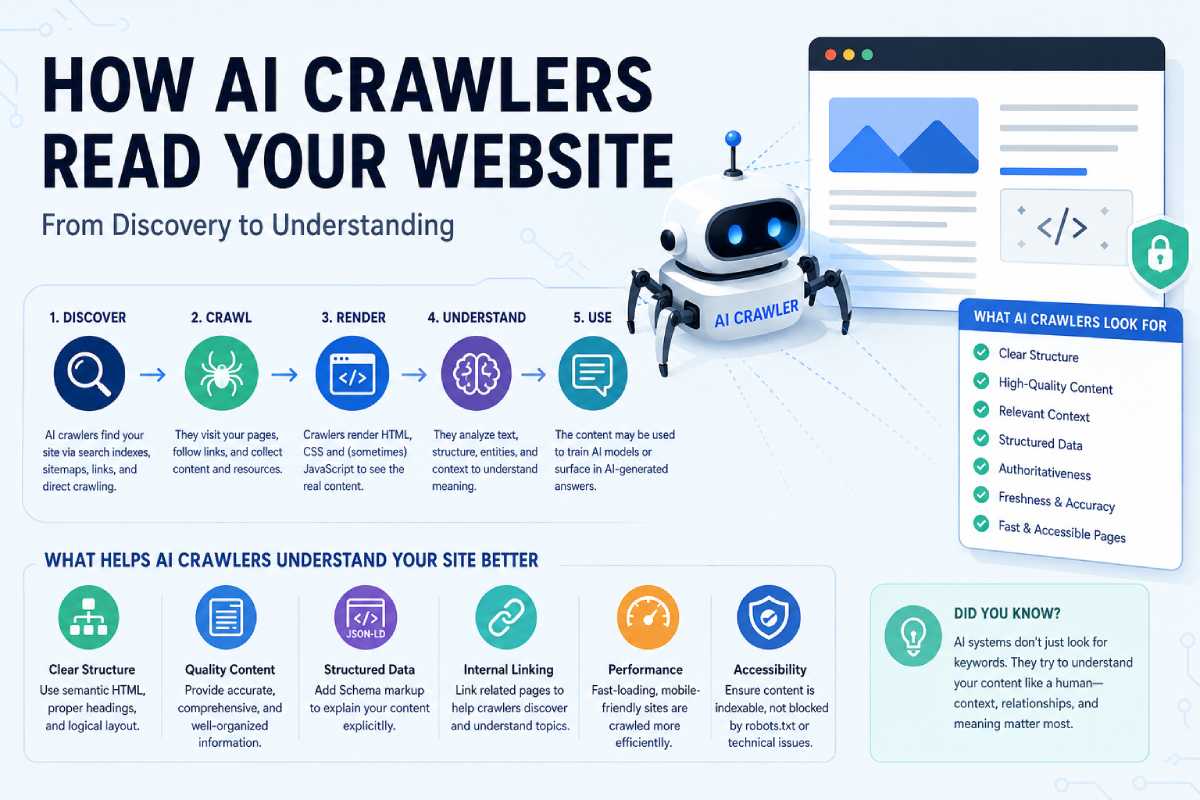
AI crawlers and user agents (Chapters 36 and 43)
Last checked: October 2026
| User agent | Company | Purpose | Blocking it means |
|---|---|---|---|
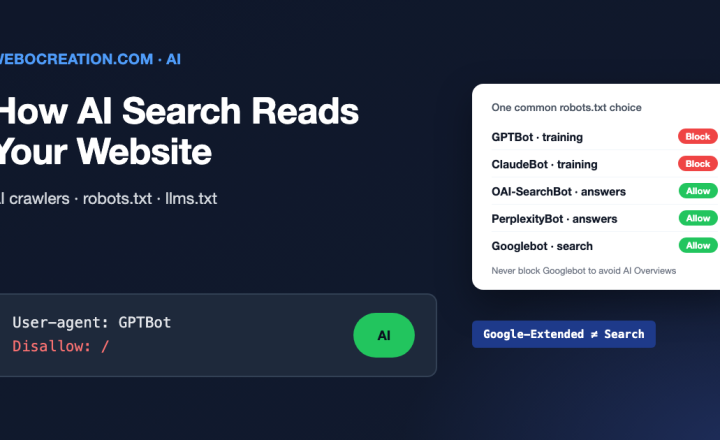
| GPTBot | OpenAI | Collects training data | Your content is left out of future OpenAI model training |
| OAI-SearchBot | OpenAI | Builds the ChatGPT search index | You may not appear in ChatGPT search answers |
| ChatGPT-User | OpenAI | Fetches a page when a user asks | ChatGPT cannot open your page for a user’s request |
| ClaudeBot | Anthropic | Collects training data | Your content is left out of future Claude training |
| Claude-SearchBot | Anthropic | Builds the Claude search index | You may not appear in Claude’s search results |
| Claude-User | Anthropic | Fetches a page when a user asks | Claude cannot open your page for a user’s request |
| PerplexityBot | Perplexity | Builds the Perplexity search index | You may not appear in Perplexity answers |
| Perplexity-User | Perplexity | Fetches a page when a user asks | Perplexity cannot open your page for a user’s request |
| Google-Extended | Gemini training and grounding (a control token, not a separate crawler) | No effect on Google Search or AI Overviews | |
| Applebot-Extended | Apple | Apple Intelligence training (a control token) | No effect on Siri or Spotlight search |
| CCBot | Common Crawl | Builds an open web archive that many AI labs train on | Your content is left out of a widely used training source |
| Bytespider | ByteDance | Collects training data | Reported to ignore robots.txt at times, so enforce it at the CDN |
The usual starting point is to allow the search and user-fetch agents (so AI answers can cite you) and decide separately about the training agents. Chapter 36 has the full worksheet.
# Allow AI search and user fetches
User-agent: OAI-SearchBot
User-agent: ChatGPT-User
User-agent: Claude-SearchBot
User-agent: Claude-User
User-agent: PerplexityBot
User-agent: Perplexity-User
Allow: /

# Training crawlers: our decision, reviewed quarterly
User-agent: GPTBot
User-agent: ClaudeBot
User-agent: CCBot
User-agent: Google-Extended
User-agent: Applebot-Extended
Disallow: /

Sitemap: https://www.example.com/sitemap.xml
To track visits from AI assistants in GA4 (Chapter 44), create a custom channel group with a channel called “AI assistants” and place it above Referral. Set it to match the session source with this regex:
chatgpt\.com|perplexity\.ai|claude\.ai|gemini\.google\.com|copilot\.microsoft\.comStandards for machine-readable sites and agents (Chapters 47 and 48)
Last checked: October 2026
| Standard | What it is | Status | What to do now |
|---|---|---|---|
| llms.txt | A Markdown file at your site root that points AI tools to your key pages | Proposal. Widely published, but no major AI company has confirmed it reads the file | Cheap to add. Do not expect a traffic change from it |
| WebMCP | A browser API that lets a page expose its actions as tools for AI agents (document.modelContext) | Chrome early preview from February 2026, then a trial. Form attributes are still being specified. Other browsers have not committed | Watch it. Developers can join the trial |
| Lighthouse Agentic Browsing | Lighthouse checks for how easy a page is for agents to use | Added in Lighthouse 13.3 (May 2026) with four checks. Rolling out to PageSpeed Insights | Run it next to your accessibility audit |
| MCP servers | A standard way for AI tools to connect to your data and actions | Widely adopted. GA4, Google Ads and many SaaS tools offer servers | Use the ones from vendors you already pay for. Follow Chapter 50’s access rules |
| NLWeb | Microsoft’s open project for adding a natural-language query endpoint to a site | Open source. Used in early trials | Optional for content-heavy sites |
| Web Bot Auth | Signed HTTP requests so a site can verify which agent is calling | IETF draft. Supported by some CDNs and agents | Ask your CDN whether it supports verified bots |
| ACP (Agentic Commerce Protocol) | OpenAI and Stripe’s protocol for checkout inside ChatGPT | Live with selected merchants | E-commerce teams: check eligibility with your platform |
| UCP (Universal Commerce Protocol) | Google’s open commerce protocol for agents (January 2026) | Early adoption across Google surfaces | Keep Merchant Center feeds clean and complete |
| AP2 (Agent Payments Protocol) | Google-led protocol for agent-initiated payments | Early | Watch it. Payments teams decide |
Ads in AI answers (Chapter 46)
Last checked: October 2026
| Surface | Ad format | Buying | Measurement |
|---|---|---|---|
| Google AI Overviews and AI Mode | Search and Shopping ads shown in or below AI answers | Existing Google Ads campaigns, mainly broad match, Performance Max and AI Max | Standard Google Ads conversion tracking |
| ChatGPT | Sponsored placements below answers (since February 2026) | CPC and CPM bidding through OpenAI’s ads platform | OpenAI ads pixel plus a server-side Conversions API |
| Microsoft Copilot | Ads inside Copilot answers | Microsoft Advertising campaigns | UET tag and Microsoft conversion goals |
| Perplexity | Sponsored follow-up questions | Limited, by direct sales | Platform reporting |
The terms (Chapter 44)
| Term | Stands for | What it means in practice |
|---|---|---|
| SEO | Search engine optimization | Ranking in classic search results |
| GEO | Generative engine optimization | Being cited or recommended in AI-generated answers |
| AEO | Answer engine optimization | Being the direct answer (snippets, voice, AI answers) |
| AIO | AI optimization | A loose umbrella term for all of the above |
| LLMO | Large language model optimization | The same idea, said by people who like acronyms |
The work overlaps heavily. Good technical SEO, clear answers, structured data and mentions on trusted third-party sites help with every one of these.
The 90-day GEO plan, in brief (Chapter 45)
- Days 1 to 30, baseline. Pick 30 to 50 prompts that buyers ask. Record which brands each AI tool names and cites. Set up the GA4 AI channel. Check robots.txt and server logs for AI crawlers.
- Days 31 to 60, fix and publish. Fix crawl and rendering gaps. Rewrite key pages so each one opens with a direct answer. Add structured data. Close the gaps where competitors are cited and you are not.
- Days 61 to 90, earn mentions and measure. Pitch the review sites, listicles and communities that AI tools cite. Re-run the prompt set, compare against the baseline and report the change in mentions, citations and AI referrals.
Free downloads
These are the worksheets, checklists and templates from the book. Each one is free and needs no sign-up. Copy them, edit them, and share them with your team.
| Download | What it helps with | Format | From |
|---|---|---|---|
| Website audit scorecard | Score a site across all nine parts and list the top fixes | Google Sheets / Excel | Chapter 56 |
| Pre-launch checklist | Check redirects, tags, speed, SEO, accessibility and security before anything goes live | Google Sheets / PDF | Appendix C |
| Landing page launch checklist | Launch one campaign page, from brief to the day-after review | Google Sheets / PDF | Chapter 55 |
| robots.txt decision worksheet | Decide what to allow and block, including AI crawlers | Google Docs / PDF | Chapter 36 |
| DNS and email cheat sheet | A one-page reference for record types, SPF, DKIM and DMARC | Appendix B | |
| Prompt library | Ready-to-use AI prompts for every part of the book | Google Docs / Markdown | Appendix D |
| Chapter checklists | The end-of-chapter checklists in one file | Google Sheets / PDF | All chapters |
| Measurement plan template | Map business goals to events, parameters and reports | Google Sheets | Chapter 24 |
| UTM naming convention | Shared rules and a builder sheet for campaign links | Google Sheets | Chapter 25 |
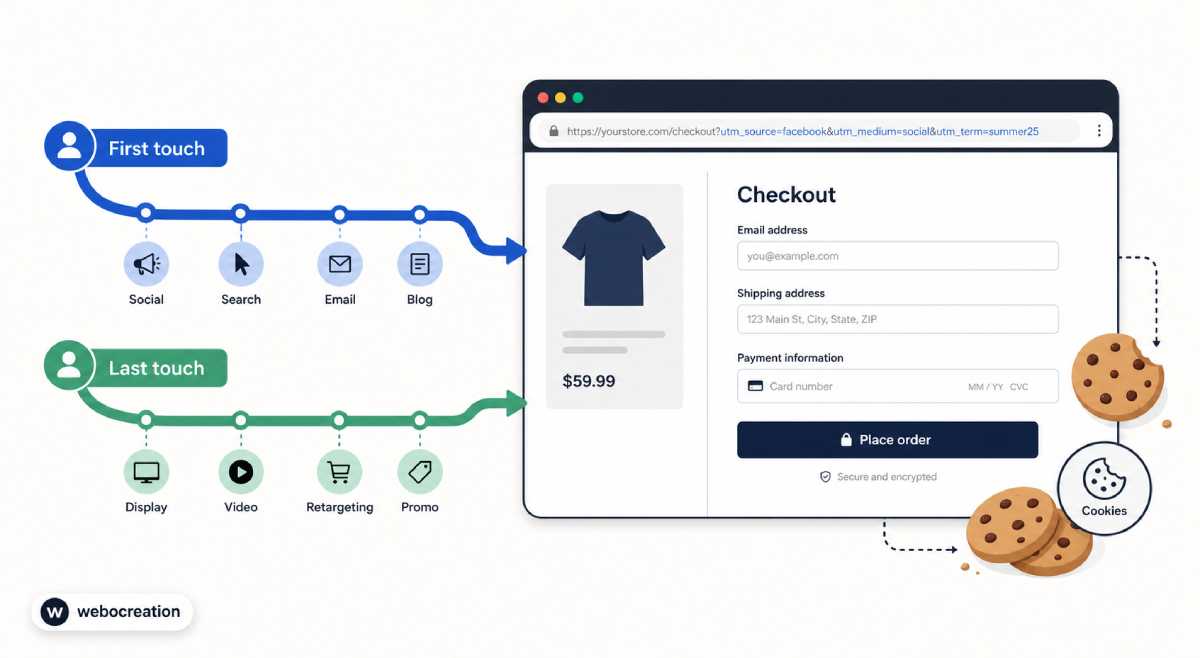
| First- and last-touch script walkthrough | Store first-touch and last-touch UTMs in cookies and pass them into form fields | Article on webocreation.com | Chapter 25 |
| Privacy review form | Check a new tool or tag before it goes on the site | Google Docs | Chapter 28 |
| A/B test plan template | Hypothesis, metric, sample size, run time and decision rule | Google Docs | Chapter 32 |
| Incident update template | Status messages for customers, leaders and support during an outage | Google Docs | Chapter 23 |
| GEO 90-day plan | The prompt set, baseline tracker and weekly tasks | Google Sheets | Chapter 45 |
| Web request intake form | The questions to answer before you send a request to IT or the web team | Google Forms / Docs | Chapter 18 |
The master prompt from Appendix D, for readers who want to start with AI right away:
You are a senior web specialist helping a marketer. I will describe a website problem or task. First ask me up to three questions you need answered. Then explain what is going on in plain language, list the checks I can do myself with free tools, and draft a short, specific request I can send to my web or IT team. Flag anything that needs security, legal or privacy review.
Corrections and reader questions
Corrections
If you find an error in the book, let us know and we will list it here with the fix. Please include the page or chapter number and the edition (paperback or Kindle).
| Chapter | Page | What it says | What it should say | Fixed in |
|---|---|---|---|---|
| None yet |
Reader questions
Do I need to be technical to use this book? No. The book is written for marketers. Each chapter explains the idea in plain language, then gives free checks you can run yourself and the request to send when something needs a developer.
Are the downloads really free? Yes. There is no sign-up and no email gate. If you want updates, the newsletter below is optional.
Why do some tools have new names? Vendors rename and merge products often. The tools directory on this page uses current names, and we update it when a name changes.
Should I block AI crawlers? It depends on your goals. Most marketing sites allow the AI search and user-fetch agents so that AI answers can cite them, and make a separate decision about training crawlers. Chapter 36 and the tracker above walk through it.
Can I use the checklists at work or with clients? Yes. Use them, adapt them and share them with your team. We only ask that you do not resell them.
Will there be a new edition? The book covers the basics that change slowly. The fast-moving parts, especially AI, are kept current on this page between editions.
I have a question that is not answered here. Use the contact form below. Good questions may be answered on this page or in a webocreation.com article.
Stay in touch
Newsletter. Get a short email when the AI tracker, tools directory or downloads change. It goes out only when there is something worth knowing, and you can unsubscribe at any time.
Contact. Send corrections, questions, and suggestions through the contact form on webocreation.com. We read every message.
More articles. webocreation.com has step-by-step guides on tracking, SEO, e-commerce and AI that go deeper than the book has room for.
Leave a review. If the book helped you, a short review on Amazon helps other marketers find it.

Author of four Opencart book.
The recent are Opencart 4 developer book and Opencart 4 user manual