How to Use Cloudflare’s AI Security Audit Skill to Find Vulnerabilities in Your Projects
 Rupak NepaliPublished Oct 22, 2026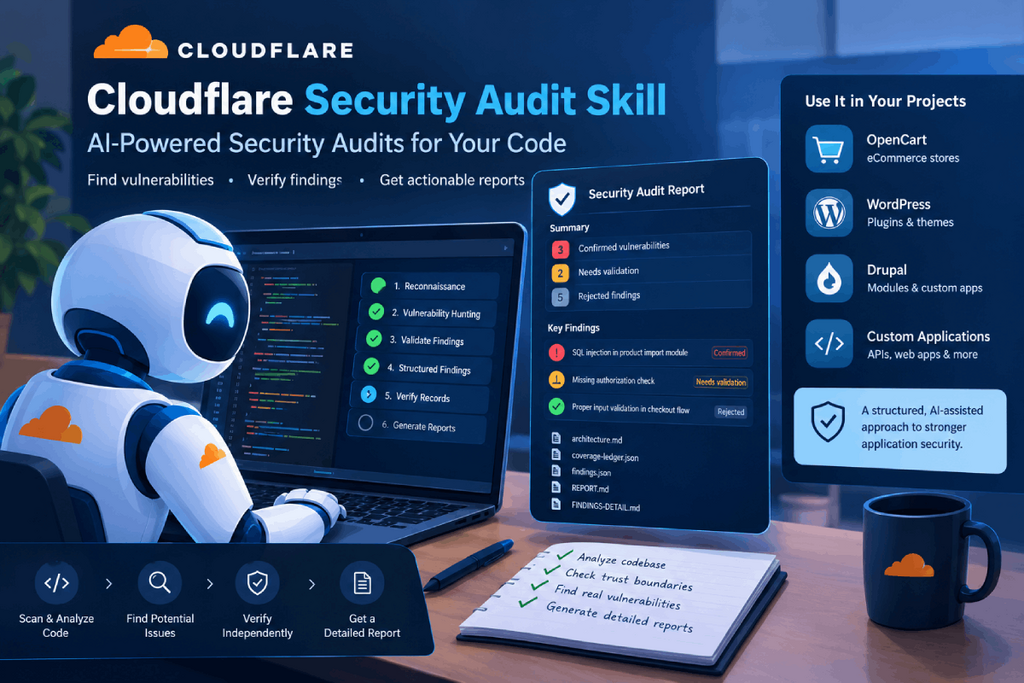
Security vulnerabilities can hide in application code, API endpoints, authentication systems, third-party integrations, and deployment configurations. Traditional security tools are valuable, but developers also need a way to examine how different parts of an application interact and whether those interactions create exploitable security weaknesses.
Cloudflare has open-sourced a project that takes an interesting approach to this problem: Security Audit Skill.
This tool equips compatible AI coding agents with a structured security auditing workflow. Instead of relying on a single AI-generated code review, it organizes the process into multiple stages, including application reconnaissance, vulnerability hunting, independent verification, and report generation.
For developers maintaining OpenCart stores, WordPress websites, Drupal applications, APIs, and custom web platforms, this approach can provide another layer of security review during development and maintenance.
In this guide, we’ll explain what Cloudflare’s security audit skill does, how to install it, how to use it in an existing project, and how to incorporate it into a practical security workflow.
What Is Cloudflare’s Security Audit Skill?
Cloudflare’s security-audit-skill is an open-source skill designed to help AI coding agents conduct structured security audits of software repositories.
It is not a hosted vulnerability scanner or a separate security dashboard. Instead, it provides instructions, methodologies, validation scripts, and reporting schemas that a compatible coding agent can use to examine a codebase.
The project’s central idea is that finding a possible vulnerability is only the beginning. An auditor should also investigate whether the issue crosses a genuine security boundary, establish evidence, and attempt to disprove the finding before treating it as confirmed.
According to the project’s README, the workflow was the starting point for a larger vulnerability-discovery system developed at Cloudflare. The repository is published under the MIT license.
What makes this approach different?
A basic AI code review might identify a suspicious database query and immediately label it as SQL injection. However, the query might use parameterized inputs elsewhere, or the relevant code path might not be reachable by an untrusted user.
Cloudflare’s approach encourages a more disciplined investigation:
- Map the application’s architecture and trust boundaries.
- Track which parts of the codebase have been examined.
- Investigate potential vulnerabilities using separate audit tasks.
- Ask an independent verifier to challenge each candidate finding.
- Record evidence and validation status in structured files.
- Generate reports from the resulting records.
This doesn’t guarantee that every vulnerability will be found or that every conclusion will be correct. It does, however, provide a more traceable process than relying on a single, unstructured prompt.
How Does the Security Audit Skill Work?
The skill organizes a full audit into six phases.
Phase 1: Reconnaissance
Before searching for vulnerabilities, the agent builds an understanding of the application.
It examines areas such as:
- Application architecture and component relationships
- Authentication and authorization boundaries
- User-controlled inputs
- API endpoints and external integrations
- Sensitive data flows
- Existing findings and previously examined code
The workflow records architectural information and a coverage ledger. These artifacts help the audit track which areas have been examined and where gaps remain.
For an OpenCart store, reconnaissance might identify the product catalog, customer accounts, checkout process, administrator routes, payment integrations, custom extensions, and import/export functionality as important areas to investigate.
Phase 2: Coverage-led vulnerability hunting
The agent divides the audit into focused investigation tasks rather than reviewing the entire codebase as one undifferentiated block.
Depending on the project, these tasks may examine:
- SQL injection and unsafe query construction
- Cross-site scripting (XSS)
- Broken authorization checks
- Authentication and session-handling flaws
- Insecure file uploads
- Unsafe deserialization or input processing
- API and webhook security
- Dependency and release risks
- Cloud configuration and tenant isolation
The skill also uses coverage critics to look for gaps in the investigation.
This is important because an audit that finds several issues in one controller may still miss a vulnerable extension, an overlooked API route, or a broken authorization check elsewhere.
Phase 3: Independent candidate validation
Potential vulnerabilities are passed to a fresh verifier that attempts to disprove them.
The verifier should examine the relevant source code and determine whether the suspected weakness actually exists and whether the claimed impact is supported by evidence.
For example, an initial investigator might flag a database query because it contains a user-controlled variable. The verifier should determine whether the value is properly parameterized, sanitized in a contextually appropriate way, or otherwise prevented from reaching an exploitable sink.
Separating discovery from verification helps reduce the risk of accepting an incorrect conclusion simply because the first agent proposed it.
Phase 4: Structured findings
The audit records its results in a machine-readable findings.json file.
The skill distinguishes among three verdicts:
- Confirmed: The evidence supports a specific security boundary failure and a bounded observed result.
- Needs validation: A credible lead remains unresolved because an exact fact is still missing.
- Rejected: The investigation disproved the candidate.
These distinctions are valuable because an unresolved suspicion should not automatically be presented as a confirmed vulnerability.
Phase 5: Independent record verification
The workflow performs another verification step against the final findings.
This stage checks whether the reported claims are supported by the source evidence. If a finding is materially changed, the replacement receives additional independent verification.
The repository includes validation scripts that check the findings and coverage ledger against their expected structures.
Phase 6: Report generation
Finally, the workflow generates reports from the verified records and coverage information.
The standard output includes:
| File | Purpose |
|---|---|
architecture.md | Documents the application’s architecture and trust boundaries. |
coverage-ledger.json | Tracks audit coverage and investigation units. |
findings.json | Stores structured findings and their verdicts. |
REPORT.md | Provides a high-level security audit report. |
FINDINGS-DETAIL.md | Presents detailed information about confirmed findings. |
NEEDS-VALIDATION.md | Lists unresolved leads requiring additional investigation. |
The reports make it easier for developers to prioritize remediation, investigate uncertain cases, and compare results across subsequent audit runs.
How to Install Cloudflare’s Security Audit Skill
The repository provides an installation method through the Skills CLI.
Step 1: Check your environment
Before installing, make sure you have:
- Node.js and npm available in your development environment.
- A compatible AI coding agent that supports tool use and parallel sub-agents.
- A local copy of the project you want to audit.
- An appropriately isolated environment for any target-controlled code execution.
The last requirement is particularly important. The project’s full audit workflow calls for an operating-system-enforced sandbox with external networking disabled, resource limits enforced, a sanitized environment, and restricted write access for running untrusted builds, tests, or other target-controlled processes.
If these safeguards are unavailable, do not execute untrusted project code just to complete an audit.
Step 2: Install the skill
Open a terminal and run:
npx skills add https://github.com/cloudflare/security-audit-skill \
  --skill security-audit
This installs the security-audit skill using the Skills CLI.
To install it at the user level for reuse across projects, use:
npx skills add https://github.com/cloudflare/security-audit-skill \
  --skill security-audit \
  --global
For agent-specific options and non-interactive installation instructions, consult the official repository.
Step 3: Open your project
Navigate to the repository you want to inspect and start your compatible coding agent with access to that codebase.
For example:
cd /path/to/your-projectReplace /path/to/your-project with your actual project directory.
Step 4: Request a security audit
You can begin with a request such as:
Security audit this codebase.

Identify potential vulnerabilities, verify findings
independently, and generate the full audit reports.

Prioritize authentication, authorization, input handling,
database queries, file uploads, API endpoints, and
third-party integrations.

Do not modify application code or apply fixes.
Keep unresolved findings separate from confirmed issues.
The skill’s activation behavior depends on the coding agent and the wording of the request. A full audit request invokes the complete workflow, whereas a focused security question may use only the relevant guidance.
For the most predictable results, explicitly request a full audit and report artifacts when that is your goal.
Practical Ways to Use the Skill in Your Projects
The real value of this tool becomes clearer when you apply it to a specific application and its actual security boundaries.
1. Auditing an OpenCart eCommerce store
OpenCart stores combine customer accounts, order processing, payment modules, shipping extensions, administrator functionality, and database operations. Custom extensions and modifications can introduce security problems that are not present in the core application.
You can use the security audit skill to investigate areas such as:
- Whether administrator actions consistently enforce authorization.
- Whether custom controllers validate and authorize requests correctly.
- Whether user-controlled values reach SQL queries safely.
- Whether file uploads and import operations restrict file types and paths.
- Whether customer data is protected across account and order endpoints.
- Whether webhook and payment callbacks verify their authenticity.
- Whether custom extensions expose sensitive operations to unauthorized users.
For example, consider a custom extension that lets administrators import products from a CSV file. The audit could investigate the upload handler, file storage, CSV parsing, database writes, and permission checks.
A useful prompt would be:
Audit this OpenCart extension for security vulnerabilities.

Focus on administrator permissions, request validation,
SQL query construction, file uploads, path traversal,
and unsafe handling of imported product data.

Trace each suspected issue from its source to the affected
security boundary. Independently verify each candidate.

Do not change any files. Generate a full audit report
and distinguish confirmed findings from unresolved leads.
Important: Review the extension together with the relevant OpenCart core code and configuration where necessary. A suspicious extension function cannot always be evaluated correctly in isolation.
2. Auditing WordPress plugins and themes
WordPress websites often depend on third-party plugins, custom themes, REST API endpoints, shortcodes, and AJAX handlers.
A targeted audit can investigate:
- Missing capability checks
- Incorrect use of nonces or other request protections
- Unsafe SQL query construction
- Stored and reflected XSS
- Insecure file uploads
- Exposed REST endpoints
- Improper handling of administrator settings
- Sensitive information disclosed through logs or responses
For example, a custom plugin might register an AJAX handler that updates product settings. The audit should trace who can invoke the handler, whether authorization is enforced, how the request is validated, and whether the resulting database operation is safe.
Example prompt:
Audit this WordPress plugin for security issues.

Focus on REST API routes, AJAX handlers, capability checks,
nonces, SQL queries, output escaping, file uploads,
and sensitive data exposure.

For each candidate, provide source evidence and explain
the affected user or security boundary. Do not assume that
a missing defense is exploitable without establishing impact.
A source-based audit is particularly useful for custom plugins because their implementation may not be covered by a scanner’s predefined rules.
3. Auditing Drupal modules and custom applications
Drupal applications frequently combine contributed modules, custom services, entity access checks, forms, controllers, and integrations with external systems.
Useful audit areas include:
- Route access requirements
- Entity and field access controls
- Input validation and output escaping
- Custom API endpoints
- File handling and media uploads
- Configuration exposure
- Secrets and credentials
- Custom database queries
- Access boundaries between user roles
For a Drupal module, ask the agent to trace sensitive operations from the route or form entry point to the underlying service and data operation.
Example prompt:
Review this Drupal module for security vulnerabilities.

Prioritize route access, entity access, permissions,
form validation, file handling, database queries,
configuration exposure, and custom API endpoints.

Trace each candidate through the relevant code paths.
Verify whether the issue is exploitable and identify the
smallest effective remediation. Do not modify source files.
The same general method applies to Laravel, Node.js, Python, and other application repositories. The audit should be tailored to the framework’s security model rather than relying on a generic checklist alone.
4. Reviewing API integrations and webhooks
APIs and webhooks create trust boundaries between your application and external systems.
For example, an eCommerce application might receive payment notifications, synchronize inventory, or send customer data to a CRM.
A security review can investigate whether the application:
- Verifies webhook signatures or other authentication mechanisms.
- Enforces authorization independently of client-supplied identifiers.
- Prevents one customer from accessing another customer’s records.
- Validates i

Author of four Opencart book.
The recent are Opencart 4 developer book and Opencart 4 user manual