Gift Vouchers in OpenCart 4.1: Removed From Core, and What to Use Instead (Tested With Real Carts)
OpenCart 4.1 has no gift vouchers. How coupons and store credit replace them, the tax difference we measured, selling gift cards, and upgrading a store that has vouchers.
 Rupak NepaliPublished Nov 23, 2026
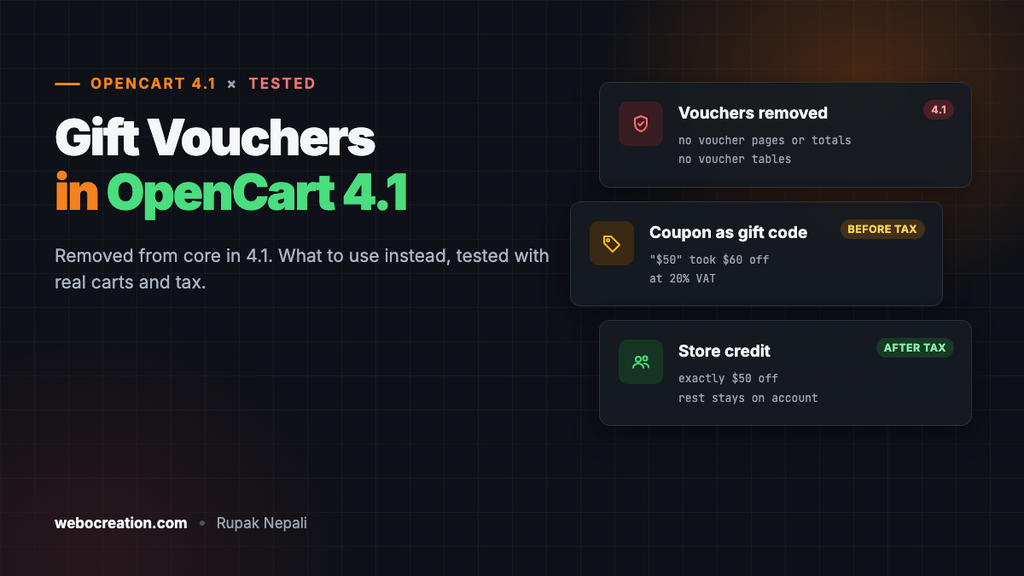
If you have looked for Sales > Gift Vouchers in OpenCart 4.1, it isn’t there. OpenCart 4.1 removed gift vouchers: there is no voucher list, no voucher themes, no “Gift Certificates” page in the store and no Gift Voucher order total. Our earlier guide to gift vouchers covers OpenCart 3 and 4.0; this one is for 4.1.
We checked a clean OpenCart 4.1.0.4 install and tested the two features that can stand in for vouchers, coupons and store credit, in real carts. They behave differently in one way that matters with tax, and this guide shows the numbers.
What changed in 4.1
- There is no voucher code anywhere in OpenCart 4.1.0.4: no admin pages, no storefront page, no order total and no voucher tables in a fresh install.
- Reports at the time of the 4.1.0.0 release give the reason as simplifying checkout.
- Coupons, store credit (customer transactions) and reward points are still there, and that’s what you build gift cards from now.
Option 1: a coupon as a gift code
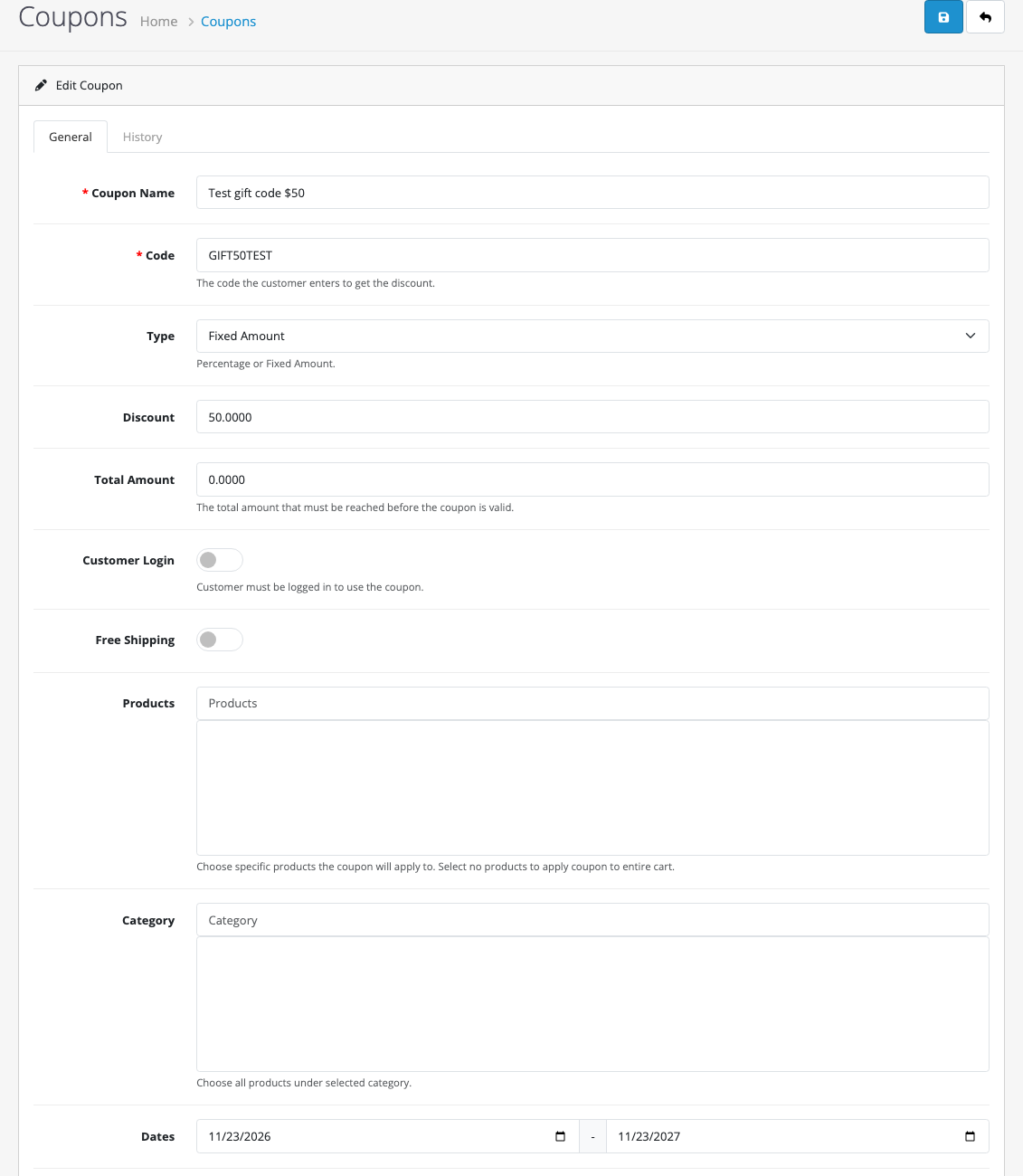
A fixed-amount coupon limited to one use works like a voucher code: you give someone a code, they enter it in the cart. Set it up under Marketing > Coupons:
- Type: Fixed Amount, Discount: the gift value (see the tax note below).
- Total Amount: 0, so any order can use it.
- Customer Login: off, so guests can use it too.
- Uses Per Coupon and Uses Per Customer: 1.
- Dates: today, and the day the gift expires (check your local law; some places require gift cards to last years).
The tax catch: a “$50” coupon took $60 off
OpenCart applies a fixed coupon to the product prices before tax and then reduces the tax to match. In our test store with 20% VAT, a $50 coupon on a $100 product (shown as $122 with tax) brought the total from $122.00 to $62.00: the customer saved $60, because the VAT went down by $10 as well.
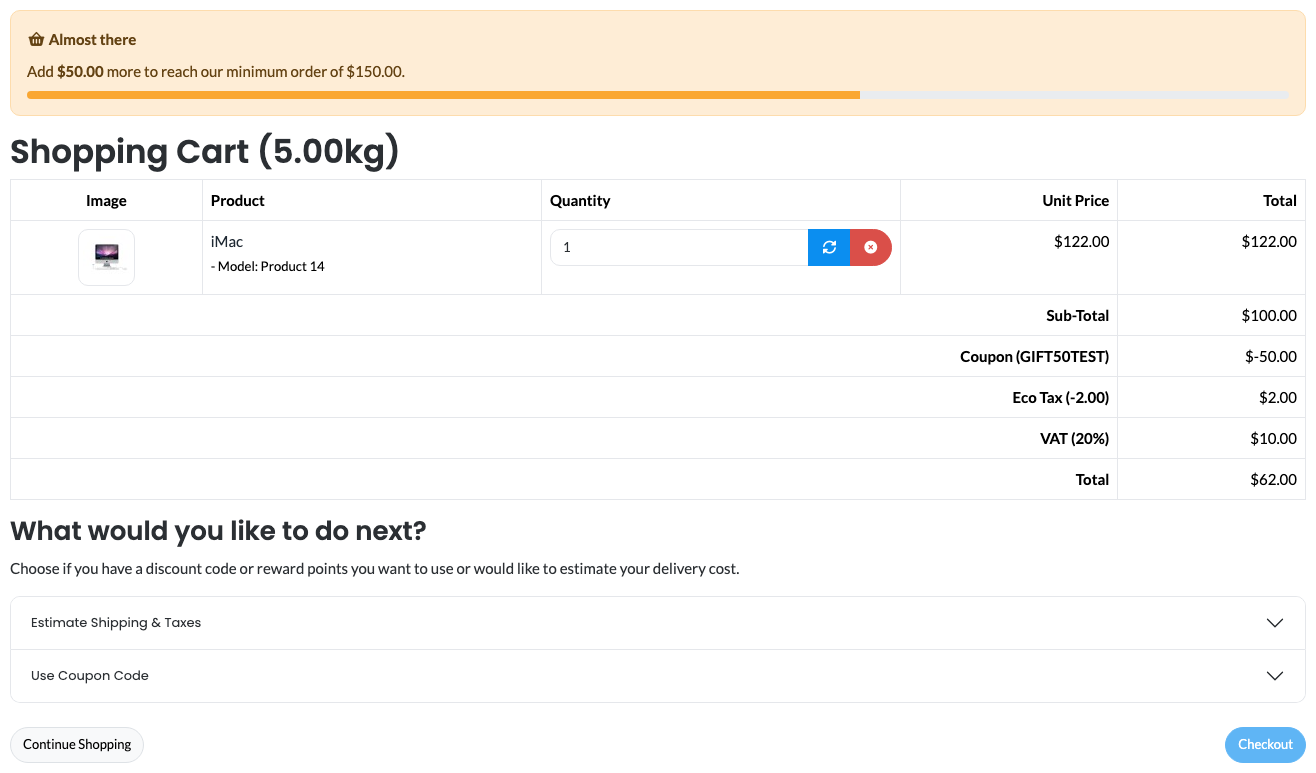
If your prices include tax and you sell a gift card worth $50 to the customer, set the discount to the pre-tax amount: $50 ÷ 1.2 = $41.67 at 20% VAT. Two more limits: the discount can’t exceed the products’ subtotal, and a single-use coupon is used up even if the order was smaller than the gift, so the rest is lost.
Option 2: store credit
Store credit is a balance on a customer account. Add it under Customers > Customers > edit > Transactions: a description (say, the gift card number) and an amount.
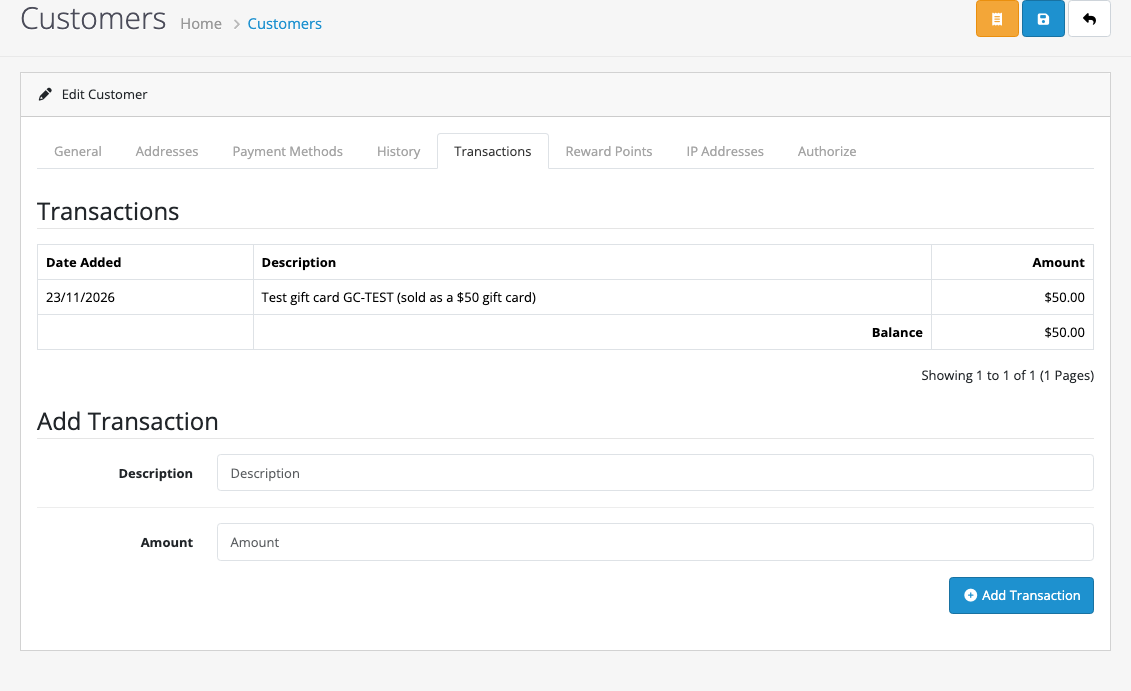
The Store Credit order total (Extensions > Extensions > Order Totals, enabled by default) applies the balance automatically when that customer checks out. It comes off the total after tax, so $50 of credit is worth exactly $50:
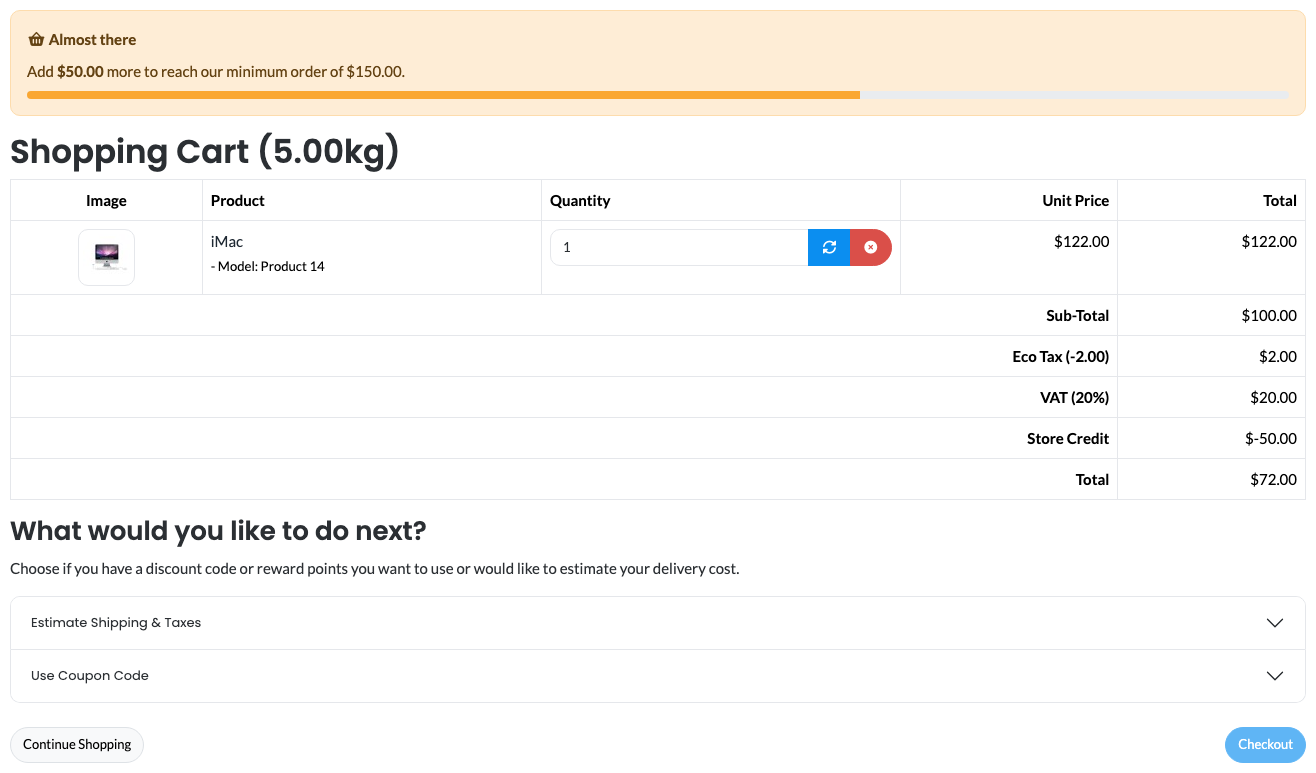
When an order is placed, OpenCart records a negative transaction for the credit used, so anything left stays on the account for the next order. The catch is that the recipient needs an account, and the balance is applied whether they want to use it on that order or not.
Coupon or store credit?
| Coupon as gift code | Store credit | |
|---|---|---|
| Works for guests | Yes (Customer Login off) | No, needs an account |
| How it’s redeemed | Customer enters the code in the cart | Applied automatically at checkout |
| Before or after tax | Before tax (worth more than its face value) | After tax (worth exactly its face value) |
| Partial use | Rest is lost on a single-use coupon | Rest stays on the account |
| Covers shipping | Only with “Free Shipping” ticked | Yes, it reduces the order total |
| Can be shared or gifted | Yes, it’s just a code | Only to the account holder |
For a gift a customer buys for someone else, a coupon is the closer fit; for refunds, apologies and loyalty rewards to an existing customer, store credit is better.
Selling gift cards in OpenCart 4.1
Without vouchers, selling a gift card takes a product and a manual step:
- Create a product such as “Gift card – $50” with Requires Shipping set to No and a tax class that matches how gift cards are taxed where you sell (in many countries they aren’t taxed until redeemed).
- Add a required text option for the recipient’s email, and optionally a textarea for a message.
- When the order is paid, create a single-use coupon (or add store credit to the recipient’s account) and email the code.
- To make the gift easy to redeem, send it as a link that applies the code automatically, as in our coupon links for OpenCart 4 guide.
If you sell many gift cards, that manual step is worth automating with an extension that creates the coupon when the order reaches a paid status.
Upgrading a store that has vouchers
If you are moving from OpenCart 3 or 4.0 to 4.1 (see upgrading OpenCart 3 to 4.1), OpenCart 4.1 won’t read your old vouchers. Before you upgrade:
- In the old admin, open Sales > Gift Vouchers and export or note every voucher with a remaining balance (the voucher history shows what has been used).
- After the upgrade, recreate each one as a single-use coupon with the same code and the remaining value, or as store credit if you know the customer.
- Remove any “Gift Certificates” links from your theme, menus and emails, and tell customers how to use their codes now.
Related
- How the Store Credit order total works
- Coupon links for OpenCart 4
- B2B and wholesale pricing in OpenCart 4

Rupak Nepali is a web developer, manage Webocreation website and the author of six books:
Getting Started with OpenCart Module Development (Packt, 2013),
OpenCart Theme and Module Development (Packt, 2015),
OpenCart 4: Dev Guide for Themes & Extensions (2024),
OpenCart 4: User Manual (2025),
Cloudflare for the Enterprise Website (2026) and
The Technical Web Guide for Marketers (2026).
Rupak has built OpenCart stores and extensions since 2010, has published more than 600 tutorials on Webocreation, and shares free OpenCart extensions on GitHub.
Find Rupak on
GitHub | Amazon | LinkedIn | X | YouTube.