Speed Booster for OpenCart 4: Full-Page Cache for Guests, Lazy Loading, Minified HTML and Missing Database Indexes (Free Extension)
Serve guests cached pages in milliseconds without breaking carts, logins or review forms, lazy-load images, minify HTML, fix slow settings and add the indexes OpenCart lacks.
 Rupak NepaliPublished Nov 22, 2026
Every time a visitor opens a page, OpenCart builds it from scratch: dozens of database queries for the menu, the products, the prices and the modules, then the templates. For a logged-in customer with a cart, that’s necessary. For the guest who just arrived from Google, and for Googlebot itself, it’s the same page as for the last thousand guests.
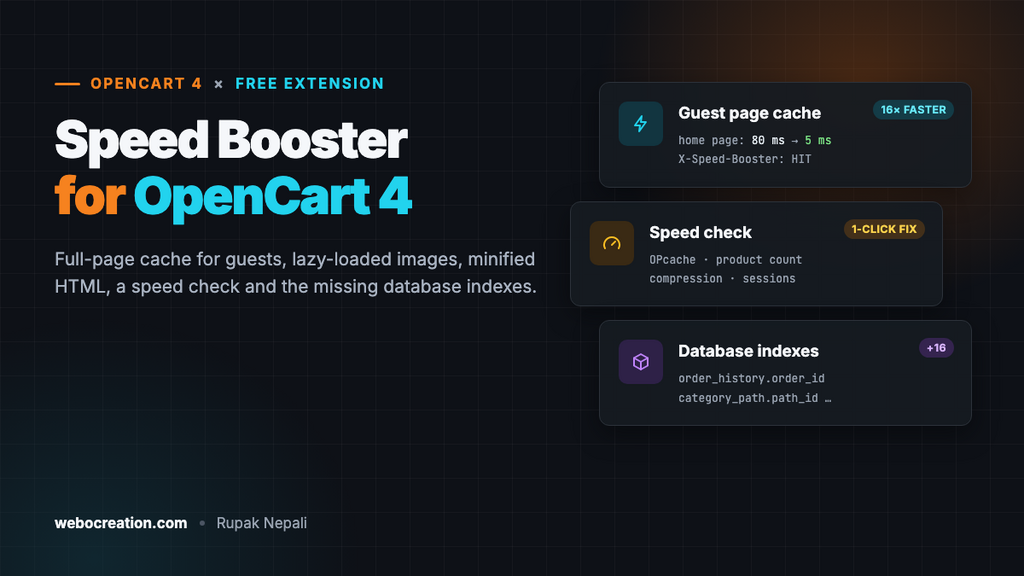
Speed Booster is a free extension that serves those guests a ready-made copy of the page instead, and fixes the other things that make OpenCart slow: images that all load at once, bloated HTML, settings that cost a query per category, and database indexes OpenCart never created.
Download Speed Booster for OpenCart 4 (free, tested on OpenCart 4.1.0.4)
What it does
- Full-page cache for guests. Pages are stored the first time and served in a few milliseconds after that. Logged-in customers, visitors with something in the cart, wishlist or compare list, and checkout and account pages always get a live page.
- Clears itself. Saving a product, category, information page, layout, setting or module empties the cache, and an order refreshes the pages of the products in it, so stock and prices are never stale.
- Lazy-loads images below the first few, and every iframe.
- Minifies HTML, leaving scripts, styles, pre and textarea blocks exactly as they are.
- Preconnect hints for font, CDN and payment script origins.
- Speed check of your server and settings, with one-click fixes.
- Adds the database indexes OpenCart is missing.
The results
Measured on our OpenCart 4.1.0.4 test store (PHP 8.3, OPcache on, the demo catalog plus a dozen extensions), with curl from the same machine:
| Page | Without cache | Cached (HIT) |
|---|---|---|
| Home page | 80 ms | 5 ms |
| Category (Desktops) | 40 ms | 4 ms |
That’s server time, the “waiting for server response” part of Time to First Byte. The demo store is tiny; on a store with thousands of products and a slow shared host, building a page takes hundreds of milliseconds, while a cached page still takes a few. The cached time hardly depends on the size of your catalog at all.
Minifying cut the home page HTML from 43.2 KB to 36.0 KB (17%) before compression.
Install
- Go to Extensions > Installer, upload
speedbooster.ocmod.zipand click the green + button next to it. - Go to Extensions > Extensions, choose Modules, and install Speed Booster.
- Click Edit, turn Status on and save.
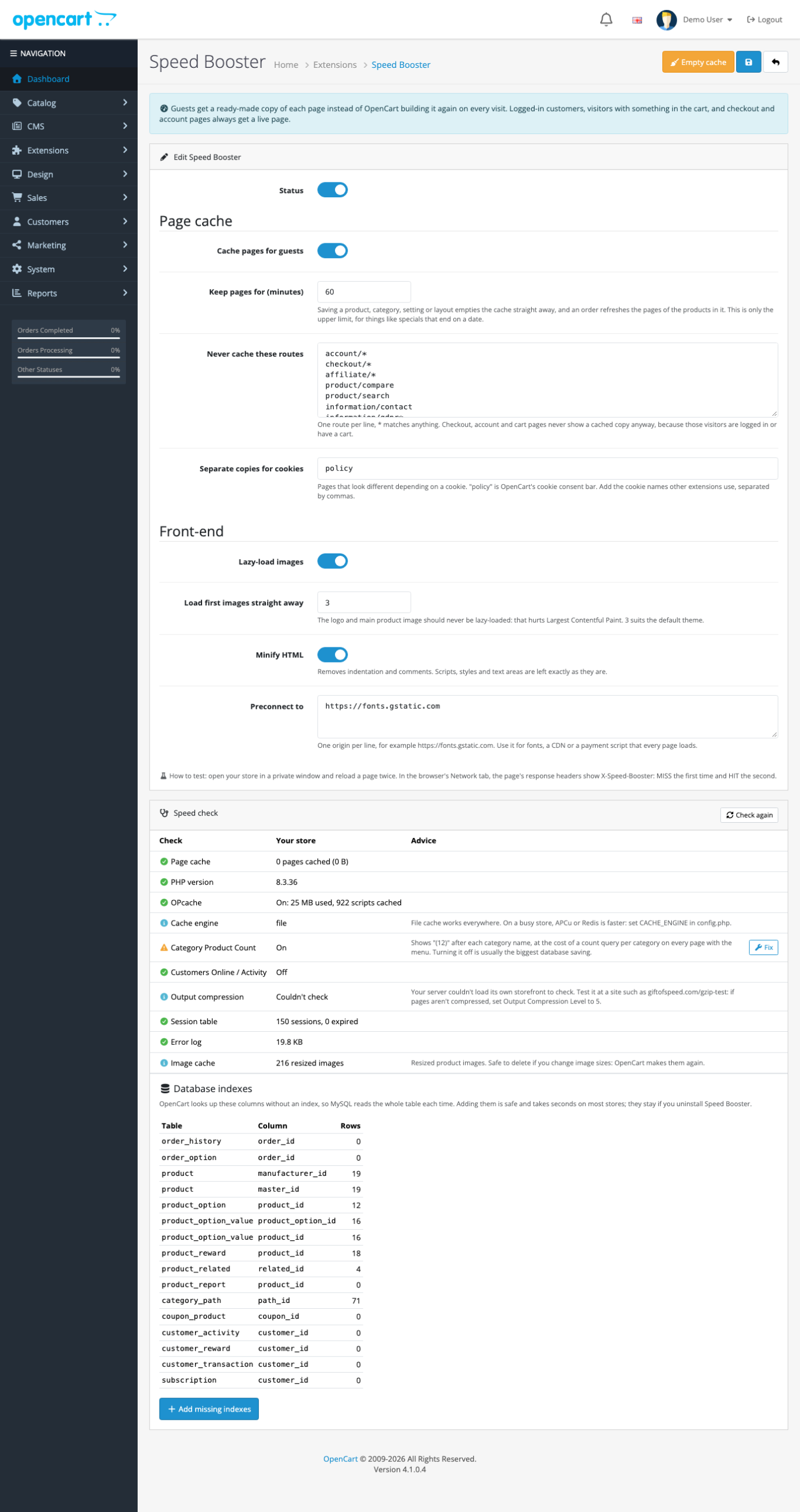
- Look at the Speed check at the bottom of the page and apply the fixes you want.
Test it: open your store in a private window, open the browser’s developer tools on the Network tab, and reload a page twice. Click the page request and look at the response headers: X-Speed-Booster: MISS the first time, HIT the second. From a terminal:
curl -s -o /dev/null -D - https://yourstore.com/ | grep -i x-speed
X-Speed-Booster: MISS; 59ms
curl -s -o /dev/null -D - https://yourstore.com/ | grep -i x-speed
X-Speed-Booster: HIT
The number after MISS is how long OpenCart took to build the page. BYPASS means the page was optimized but not cached, and why is explained below. Only GET requests are cached, so curl -I (a HEAD request) shows no header at all.
How the page cache stays correct
A page cache is only useful if nobody ever sees the wrong page. These are the rules Speed Booster follows.
Who gets a cached page
Only GET requests from visitors who aren’t logged in and have nothing in their cart, wishlist or compare list. Everyone else gets a live page. The cache is separate for each store, domain, language and currency, and for each value of the cookies you list in Separate copies for cookies (OpenCart’s cookie consent cookie, policy, is there by default, so visitors who accepted don’t get a page with the consent bar).
Tracking parameters such as utm_source, gclid and fbclid are ignored, so an ad click is served from the same cached copy as a normal visit. Affiliate links with tracking= always get a live page, so the affiliate cookie is set.
Which pages are stored
Only complete HTML pages with a 200 status. Redirects, 404s, AJAX responses and pages that set a cookie aren’t stored. That last rule matters: if a page sets its own cookie, a cached copy wouldn’t, and the feature behind it would stop working. On our test store, the Recently Viewed extension sets a cookie on product pages, so those pages showed BYPASS while everything else was cached. With that extension off, product pages were cached too.
The routes in Never cache these routes are always live. The defaults are account, checkout, affiliate, compare, search, contact, GDPR and the CMS (blog comments). Use * to match anything, for example extension/mytheme/*.
Forms keep working
OpenCart puts a one-time token in some forms: the review form on product pages has a review_token, and file upload options have an upload_token. A naively cached page would give every visitor the same token, and their review would fail with “Review token invalid”.
Speed Booster spots any token that was created while the page was built, stores a placeholder in its place, and gives each visitor a fresh token when the cached page is served. We tested it: a review sent from a cached page was accepted, and a review sent with the token from an earlier copy of the page was rejected, exactly as OpenCart intends.
When the cache is emptied
- Saving, adding, copying or deleting anything under Catalog, Design (layouts, banners, SEO URLs) or CMS.
- Saving settings or a module, editing currencies and other localisation data, and marketing changes.
- An order: the cached pages of the products in it are removed, so the stock status and price are fresh.
- The Empty cache button.
- Otherwise after Keep pages for minutes (60 by default), which covers things that change by date, like a special that ends at midnight.
If an extension you use changes the storefront in a way the cache doesn’t know about, click Empty cache after changing it, or add its route to the never-cache list.
Lazy loading done right
Lazy loading tells the browser to load an image only when it’s about to scroll into view, using the built-in loading="lazy" attribute. It saves bandwidth on long category pages. But lazy-loading the first images makes things worse: the logo and the main product or banner image are usually the Largest Contentful Paint element, and lazy-loading them delays it.
So Speed Booster leaves the first images alone (3 by default: the logo and the two banners on the default theme’s home page) and adds loading="lazy" decoding="async" to the rest:
<img src=".../opencart-logo.png" ... class="img-fluid"/>
<img src=".../iPhone6-1140x380.jpg" ... class="img-fluid"/>
<img src=".../MacBookAir-1140x380.jpg" ... class="img-fluid"/>
<img loading="lazy" decoding="async" src=".../macbook_1-200x200.jpg" ... />
Images that already have a loading attribute are left as they are. For more on LCP, INP and CLS, see Core Web Vitals for OpenCart themes.
The speed check
The speed check looks at what slows OpenCart down beyond page building, and fixes some of it with one click:
| Check | What it means | One-click fix |
|---|---|---|
| OPcache | Without it PHP compiles every file on every request. Ask your host to enable it. | No |
| PHP version | 8.2 or newer is noticeably faster. | No |
| Cache engine | File cache works everywhere; APCu or Redis is faster on busy stores (see OPcache, APCu and Redis for OpenCart 4). | No |
| Category Product Count | Shows “(12)” after each category name, at the cost of a count query per category on every page with the menu. | Turns it off in every store |
| Customers Online / Activity | A database write on every page view. | Turns both off |
| Output compression | The admin loads your home page and checks whether it arrives gzip- or Brotli-compressed. | Sets OpenCart’s level to 5 if the server doesn’t compress |
| Session table | Expired sessions slow down the session table. | Deletes expired sessions |
| Error log | A huge log means something logs on every request. | No |
| Image cache | How many resized images there are. | No |
On our test store, turning Category Product Count off took the uncached category page from 40 ms to 34 ms. With 38 categories that’s modest; with hundreds of categories and thousands of products it’s often the biggest single database saving.
If the server can’t load its own storefront (a firewall, basic auth or a Docker setup can prevent it), the compression check says “Couldn’t check” instead of guessing. Test your store at a gzip checker then.
Missing database indexes
OpenCart looks up several columns that have no index, so MySQL reads the whole table every time. On our OpenCart 4.1.0.4 test store the speed check found 16, among them:
order_history.order_id: every order page and every status change.category_path.path_id: category pages with subcategory products.product_option.product_idandproduct_option_value.product_option_id: every product page with options.product.manufacturer_id: brand pages.product_reward.product_id,product_related.related_id,customer_transaction.customer_idand others.
Add missing indexes creates them (named speedbooster_<column>). It’s safe and takes seconds on most stores; on a store with millions of order rows, run it at a quiet time. The indexes stay if you uninstall Speed Booster, because they only make OpenCart faster. To find other slow queries on your own store, see Finding slow queries in OpenCart.
How it works
OpenCart 4 has startup actions: controllers registered in the oc_startup table that run on every storefront request, after the session, language, currency, customer and cart are known but before the page controller. Speed Booster registers one:
$this->model_setting_startup->addStartup([
    'code'       => 'speedbooster',
    'action'     => 'catalog/extension/speedbooster/module/speedbooster.startup',
    'status'     => 1,
    'sort_order' => 0
]);
For a cached page, the startup switches the route to its own serve() method, so the page controller never runs, but maintenance mode and the other startups still do. For everything else, it registers an event on the page’s own route (for example controller/product/category/after) that optimizes the finished HTML and, when allowed, stores it in storage/cache/speedbooster/. Admin events such as admin/model/catalog/*.edit*/after empty the cache.
No core or theme files are changed, and maintenance mode always wins: while it’s on, nothing is cached or served from the cache.
Things to know
- Themes that show different HTML on phones (rather than one responsive page) need a live page: Speed Booster stores one copy per URL. The default theme and most modern themes are responsive.
- Blocks that change on every visit, such as a random banner or a “3 people are viewing this” counter, are cached like the rest of the page until it expires.
- Prices for customer groups are safe: customers in a group are logged in, so they get live prices.
- Combine it with a CDN for images and static files, and serve WebP images, for the biggest front-end gains.
Uninstall
Uninstalling removes the startup action, the events and the cached pages. Database indexes it added stay.
Related
- 10 ways to speed up OpenCart 3 and 4
- Speed up OpenCart 4 with OPcache, APCu and Redis
- Core Web Vitals for OpenCart themes
- Host OpenCart 4 on Nginx (LEMP)
- SEO Toolkit for OpenCart 4

Rupak Nepali is a web developer, manage Webocreation website and the author of six books:
Getting Started with OpenCart Module Development (Packt, 2013),
OpenCart Theme and Module Development (Packt, 2015),
OpenCart 4: Dev Guide for Themes & Extensions (2024),
OpenCart 4: User Manual (2025),
Cloudflare for the Enterprise Website (2026) and
The Technical Web Guide for Marketers (2026).
Rupak has built OpenCart stores and extensions since 2010, has published more than 600 tutorials on Webocreation, and shares free OpenCart extensions on GitHub.
Find Rupak on
GitHub | Amazon | LinkedIn | X | YouTube.