SEO Toolkit for OpenCart 4: Audit Your Catalog, Bulk SEO URLs and Meta Tags, Noindex Rules and Structured Data (Free Extension)
Find and fix missing SEO URLs, empty and duplicate meta tags and thin pages, fill the gaps with meta templates, noindex sorted pages and add Organization and breadcrumb schema.
 Rupak NepaliPublished Nov 22, 2026
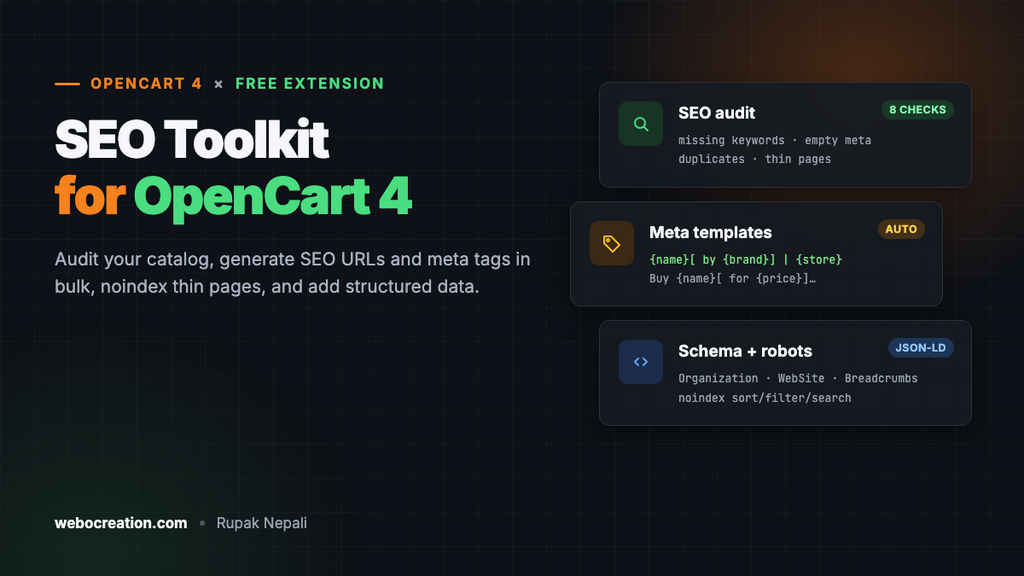
Most OpenCart SEO problems aren’t hard to fix, they’re hard to find. Products imported from a CSV with no SEO URL. Two hundred empty meta descriptions. Category pages that Google indexes ten times over, once for every sort order. This free extension finds all of that in one screen, fixes most of it in bulk, and stops it from coming back.
Download SEO Toolkit for OpenCart 4 (free, tested on OpenCart 4.1.0.4)
What’s in the toolkit
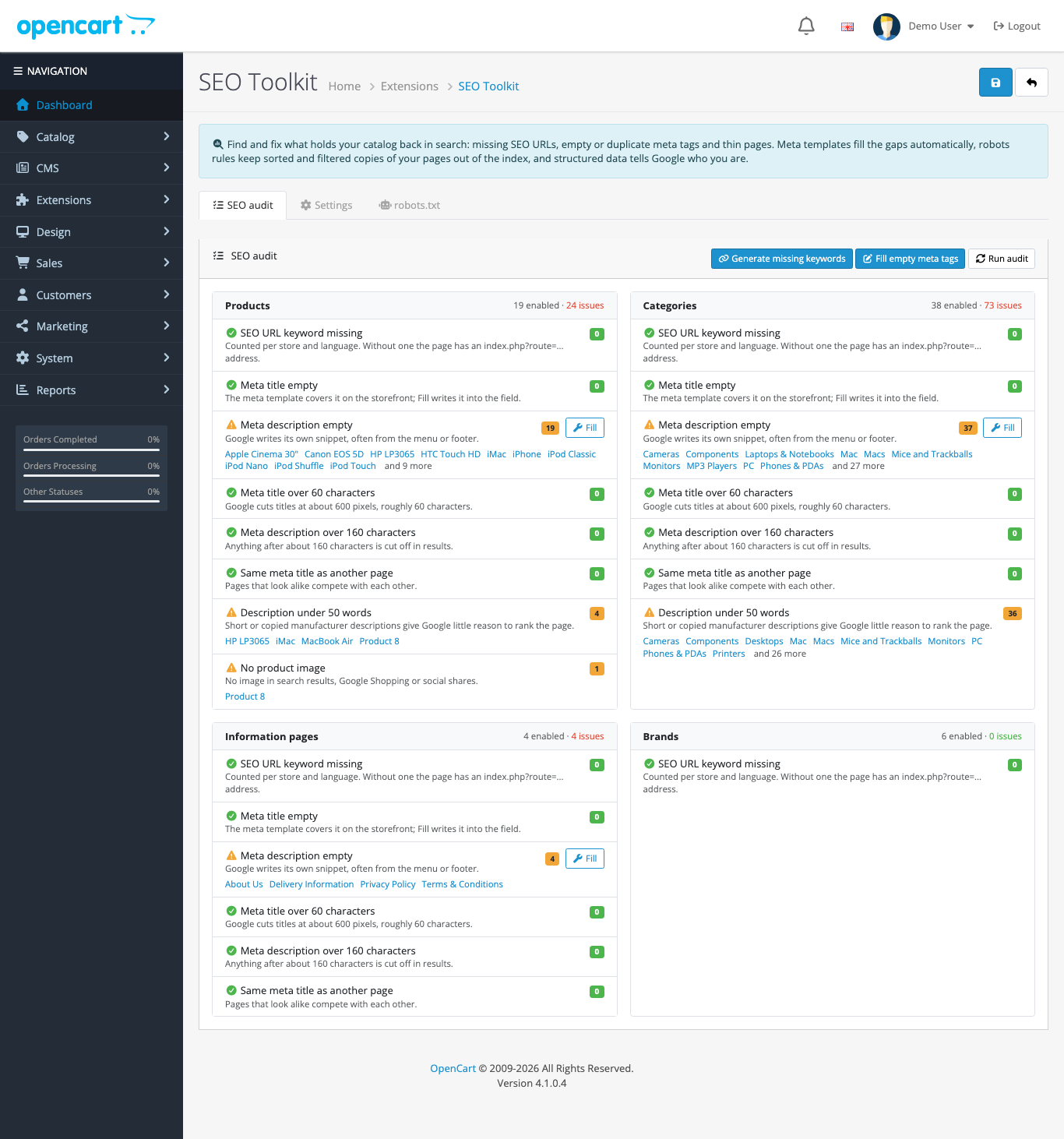
- SEO audit for products, categories, information pages and brands: missing SEO URL keywords (per store and language), empty meta titles and descriptions, meta titles over 60 characters, descriptions over 160, duplicate meta titles, thin descriptions (under 50 words) and products without an image. Each check lists the pages with a link to edit them.
- Generate missing keywords in one click, for every store and language an item is in.
- Meta templates such as
{name} | {store}andBuy {name}[ for {price}] at {store}. {description}, used on the storefront when a page’s own fields are empty. - Fill empty meta tags writes those templates into the empty fields, so they show in the admin and in feeds too.
- Noindex rules for search results, sorted and filtered copies of listings, page 2 and later, and account and checkout pages.
- Structured data: Organization and WebSite (with site search) on the home page, BreadcrumbList on product, category, information, brand and special pages.
- robots.txt editor with recommended rules.
- Keywords as you type: in the product, category, information and brand forms, the SEO keyword and meta title fill themselves in while you type the name.
Install
- Go to Extensions > Installer, upload
seotoolkit.ocmod.zipand click the green + button next to it. - Go to Extensions > Extensions, choose Modules, and install SEO Toolkit.
- Click Edit. On the Settings tab, turn Status on and save.
- Go back to the SEO audit tab and work down the list.
The audit, Generate and Fill work even while Status is off, so you can look before you change anything on the storefront.
The SEO audit
The audit reads your catalog straight from the database, so it covers products that are disabled for customers but enabled in the admin, imported products and items in a second store. These are the checks and why each one matters:
| Check | Why it matters | Fix |
|---|---|---|
| SEO URL keyword missing | The page lives at index.php?route=product/product&product_id=42 instead of a readable address. Counted per store and language, because a keyword in English doesn’t cover French. | Generate |
| Meta title empty | The browser tab and search result show nothing useful. | Template / Fill |
| Meta description empty | Google writes its own snippet, often from your menu or footer. | Template / Fill |
| Meta title over 60 characters | Google cuts titles at about 600 pixels. | Edit link |
| Meta description over 160 characters | The end is cut off in results. | Edit link |
| Same meta title as another page | Pages that look alike compete with each other. | Edit link |
| Description under 50 words | Thin or copied manufacturer text gives Google little reason to rank the page. | Edit link |
| No product image | No picture in search results, Google Shopping or social shares. | Edit link |
On the OpenCart demo store the audit found 19 of 19 products and 37 of 38 categories without a meta description, and 36 categories with almost no description. That’s typical: OpenCart requires a meta title to save a product, but not a description.
Generate missing SEO keywords
OpenCart 4.1 won’t save a product without an SEO keyword, but products created by CSV imports, the API or older extensions often have none. Generate missing keywords creates them for every item, store and language that’s missing one:
- The keyword comes from the name in that language (falling back to the default language):
Café Crème Espresso Maker & Grinderbecomescafe-creme-espresso-maker-and-grinder. - Accented, Cyrillic and Greek letters are turned into plain letters (
Футболкаbecomesfutbolka). Turn Plain letters in keywords off to keep them: OpenCart accepts Latin, Cyrillic and Greek letters in keywords. - Keywords are unique per store, using the same rule as OpenCart’s own forms, so the admin won’t later complain that the keyword exists. A clash gets
-2,-3and so on. - Subcategories get their parent’s keyword in front, like OpenCart saves them: we deleted the keyword of Laptops & Notebooks > Windows and the toolkit recreated it as
laptop-notebook/windows, in both stores.
Existing keywords are never changed, so links that already work keep working. If you rename keywords by hand later, add a redirect with the Redirects Manager.
Meta templates
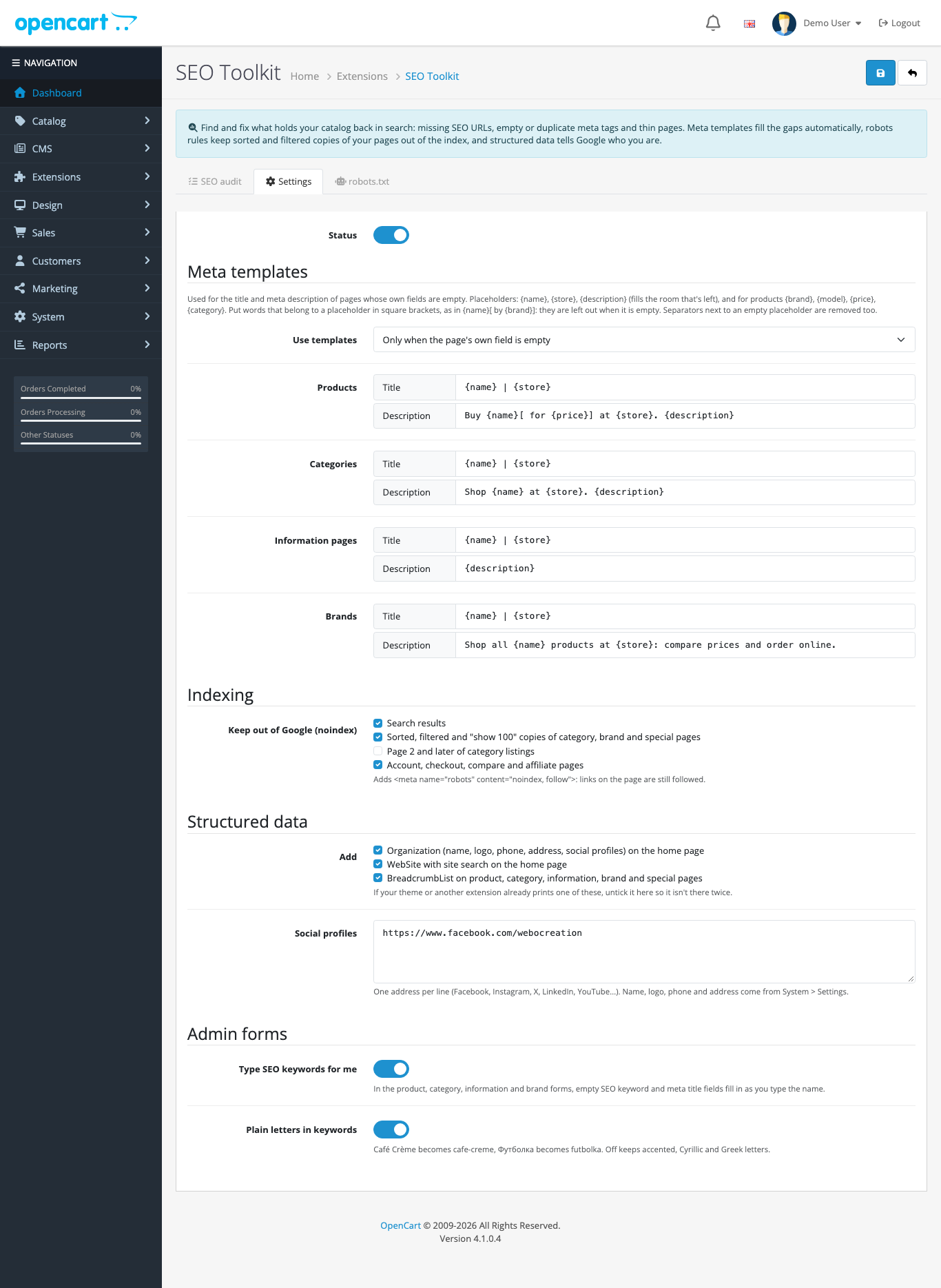
Templates write titles and descriptions for pages whose own fields are empty. They’re applied on the storefront as each page loads, so a new product is covered the moment you save it.
| Placeholder | Becomes |
|---|---|
{name} | Product, category or brand name, or information page title |
{store} | Store name |
{description} | The page’s description as plain text, cut at a word boundary to fill the room that’s left (70 characters for titles, 155 for descriptions) |
{brand}, {model}, {category} | Products only |
{price} | Products only: the current price (or special) with tax, in the visitor’s currency. Left empty if prices are hidden from guests. |
Put words that belong to a placeholder in square brackets and they disappear when it’s empty. {name}[ by {brand}] | {store} gives iPhone by Apple | Your Store, and Product 8 | Your Store for a product without a brand, instead of “Product 8 by | Your Store”. Separators next to an empty value are tidied up too.
With the default templates, the iPhone page of the demo store gets this description, which was empty before:
Buy iPhone for $123.20 at Your Store. iPhone is a revolutionary new mobile phone that allows you to make a call by simply tapping a name or number in…
Use templates has two modes. Only when the page’s own field is empty (the default) never overrides what you wrote. Always replaces every title or description with the template, which is useful when imported meta tags are worse than nothing. Brand pages in OpenCart 4 have no meta fields at all, so their title is always the brand name: in the default mode the toolkit treats that as empty and uses the brand template.
Fill empty meta tags
Fill empty meta tags writes the templates into the empty meta title and meta description fields of products, categories and information pages. Fields that already have text are never touched. Prices aren’t written into stored descriptions, because a stored price would be wrong after the next price change: that’s why the default product template puts [ for {price}] in brackets. On the storefront the price still shows, live.
Keep thin pages out of Google
Every category in OpenCart can be loaded sorted by name, price, rating or model, ascending or descending, with 15, 25, 50, 75 or 100 per page. That’s dozens of URLs with the same products. OpenCart adds a canonical link, but Google treats canonical as a hint. The toolkit adds a robots meta tag to these pages:
- Search results (on by default).
- Sorted, filtered and “show 100” copies of category, brand, special and search pages: any URL with
sort,order,limitorfilter(on by default). The plain category page stays indexable. - Page 2 and later of listings (off by default: Google can find products through paginated pages, so only turn this on if your products are well linked elsewhere).
- Account, checkout, compare and affiliate pages get
noindex, nofollow(on by default).
“follow” keeps links on the page working for Google, so products reached through a sorted page are still discovered.
Structured data
The home page gets Organization and WebSite JSON-LD built from System > Settings (store name, logo, telephone and address) plus the social profile links you add in the toolkit. WebSite includes a SearchAction pointing at your store search, built by OpenCart itself so it matches your search URLs:
{"@context":"https://schema.org","@type":"WebSite","@id":"https://yourstore.com/#website",
 "name":"Your Store","url":"https://yourstore.com/",
 "publisher":{"@id":"https://yourstore.com/#organization"},
 "potentialAction":{"@type":"SearchAction",
  "target":{"@type":"EntryPoint","urlTemplate":"https://yourstore.com/index.php?route=product/search&language=en-gb&search={search_term_string}"},
  "query-input":"required name=search_term_string"}}
Product, category, information, brand and special pages get a BreadcrumbList made from the breadcrumbs the page already shows (Home > Desktops > Mac > iMac), so search results can show the path instead of a long URL. The home icon becomes your store name.
Product structured data (price, stock, reviews) isn’t part of this toolkit: use the free Product JSON-LD extension for that, and the FAQ extension for FAQPage. If your theme already prints one of these schema types, untick it in the toolkit so it isn’t on the page twice. Check the result with Google’s Rich Results Test.
robots.txt editor
The robots.txt tab edits the file in your store’s root. Use recommended rules fills in a starting point that keeps crawlers out of account, checkout, affiliate, compare, search and tool URLs, with a line for your sitemap address. Change the sitemap line to the address your sitemap extension gives you.
One rule to remember: don’t block pages in robots.txt that you want removed from Google. Google has to crawl a page to see its noindex tag, which is why the sorted and filtered pages are handled with noindex and not with robots.txt. The recommended rules also leave out your admin folder on purpose: robots.txt is public, and listing the admin folder there tells everyone where it is.
SEO keywords as you type
In the product, category, information and brand forms, the SEO keyword fields and the meta title follow the name while you type it. Type “Café Crème Espresso Maker & Grinder” and the keyword becomes cafe-creme-espresso-maker-and-grinder in every store for that language, and the meta title copies the name.
As soon as you type in a keyword or meta title field yourself, it stops following. Fields that already had text when the form opened are never changed, so editing an existing product doesn’t rename its URL. Turn this off with Type SEO keywords for me.
How it works
The toolkit only uses OpenCart events, so no core or theme files are changed:
catalog/controller/common/header/beforeapplies the meta templates. The page controller has set the title and description by then, and the header hasn’t printed them yet.catalog/view/common/header/afteradds the robots tag and the home page schema before</head>.catalog/view/product/product/after(and the category, information, brand and special views) adds BreadcrumbList from the template’s ownbreadcrumbsdata.admin/view/catalog/product_form/after(and the other three forms) adds the small script that types the keywords.
If you’re new to events, OpenCart events by examples explains how they work.
Uninstall
Uninstalling removes the events and settings. SEO keywords, meta tags and robots.txt written by the toolkit stay, because they’re your store’s data now.
Related
- 25 SEO best practices for OpenCart
- Multi-language SEO for OpenCart 4: hreflang and canonical tags
- How to remove en-gb from the SEO URL of OpenCart 4
- Crawlability and indexability: robots.txt, sitemaps, canonical
- Speed Booster for OpenCart 4: page speed is part of SEO too

Rupak Nepali is a web developer, manage Webocreation website and the author of six books:
Getting Started with OpenCart Module Development (Packt, 2013),
OpenCart Theme and Module Development (Packt, 2015),
OpenCart 4: Dev Guide for Themes & Extensions (2024),
OpenCart 4: User Manual (2025),
Cloudflare for the Enterprise Website (2026) and
The Technical Web Guide for Marketers (2026).
Rupak has built OpenCart stores and extensions since 2010, has published more than 600 tutorials on Webocreation, and shares free OpenCart extensions on GitHub.
Find Rupak on
GitHub | Amazon | LinkedIn | X | YouTube.