FAQ Accordion With FAQPage Schema for OpenCart 4: Add FAQs to Product, Category and Information Pages (Free Extension)
A free OpenCart 4 extension for questions and answers on product, category and information pages: an FAQ tab on products, shared FAQs for every page of a type, an accessible accordion and FAQPage JSON-LD, plus what Google's 2026 end of FAQ rich results means.
 Rupak NepaliPublished Nov 18, 2026
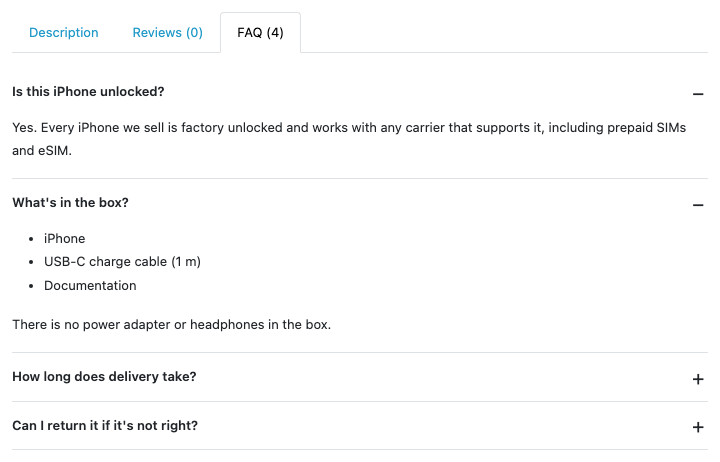
Most shoppers have the same few questions before they buy. Is it unlocked? What’s in the box? How long does delivery take? Can I return it? If the product page doesn’t answer them, the shopper emails you, opens a chat, or leaves. A short FAQ on the page answers them for everyone, once.
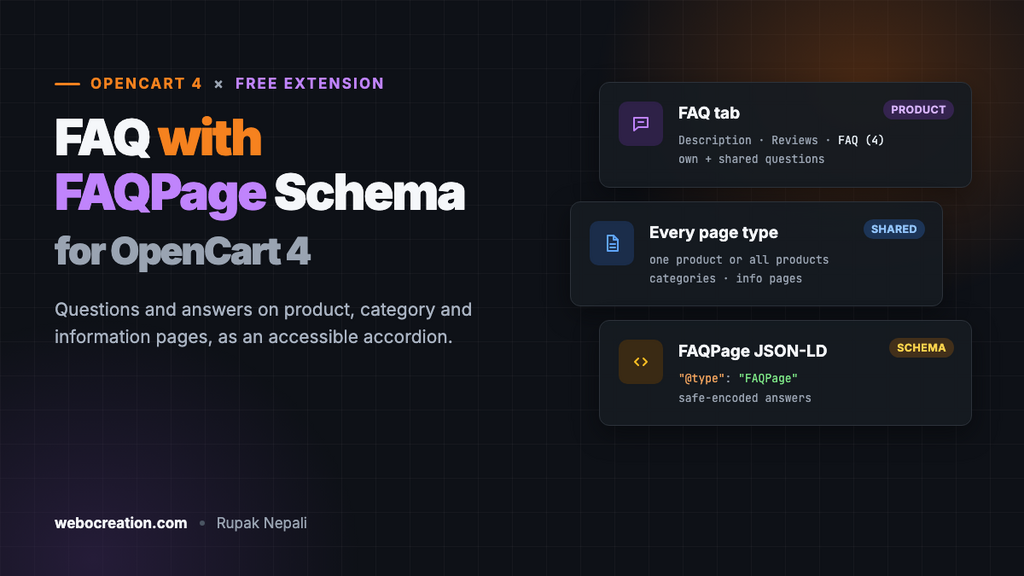
This free extension adds questions and answers to OpenCart 4 product, category and information pages. They appear as an accessible accordion (an “FAQ” tab on product pages), with FAQPage structured data. You can attach a question to one page, or to every page of a type, so your shipping and returns answers appear on every product without copying them 500 times.
Download FAQ with Schema for OpenCart 4 (free, tested on OpenCart 4.1.0.4)
First, a word about Google and FAQ rich results
For years, FAQPage markup could add expandable questions under your listing in Google. Google limited that to well-known government and health sites in August 2023, and on 7 May 2026 stopped showing FAQ rich results altogether. Its FAQ structured data documentation now says the feature is no longer shown in Google Search, and Search Console’s FAQ report is being removed.
So this extension won’t get you a rich snippet in Google, and no FAQ extension can. That’s not why FAQs are worth having:
- They answer the shopper on the page. That’s fewer support emails and fewer “I’ll check later” exits.
- They’re the questions people type into search and AI assistants. A clear question with a direct answer in your page text is exactly what answer engines quote. The visible text is what matters here, more than the markup.
- The markup is still valid. FAQPage is a normal schema.org type. Google says structured data it doesn’t use causes no problems, and other search engines and AI tools can read it. The extension adds it by default, and you can turn it off.
What it does
- Product pages: an “FAQ (4)” tab next to Description and Reviews.
- Category and information pages: a “Frequently asked questions” section at the end of the page content.
- One page or all pages of a type. Shared questions (for example “All products”) come after the page’s own questions.
- A native
<details>accordion. It needs no JavaScript, works with the keyboard and screen readers, and the answers are in the page HTML, so search engines see them. The first question is open. - Basic HTML in answers: paragraphs, links, bold, italics and lists. Plain text gets its line breaks kept.
- Multi-language. Each FAQ has a question and answer per store language.
- FAQPage JSON-LD with exactly the questions shown on the page.
Install it
- Download
faqschema.ocmod.zip. - Go to Extensions → Installer, upload it, and click the green +.
- Go to Extensions → Extensions → Modules and install FAQ with Schema.
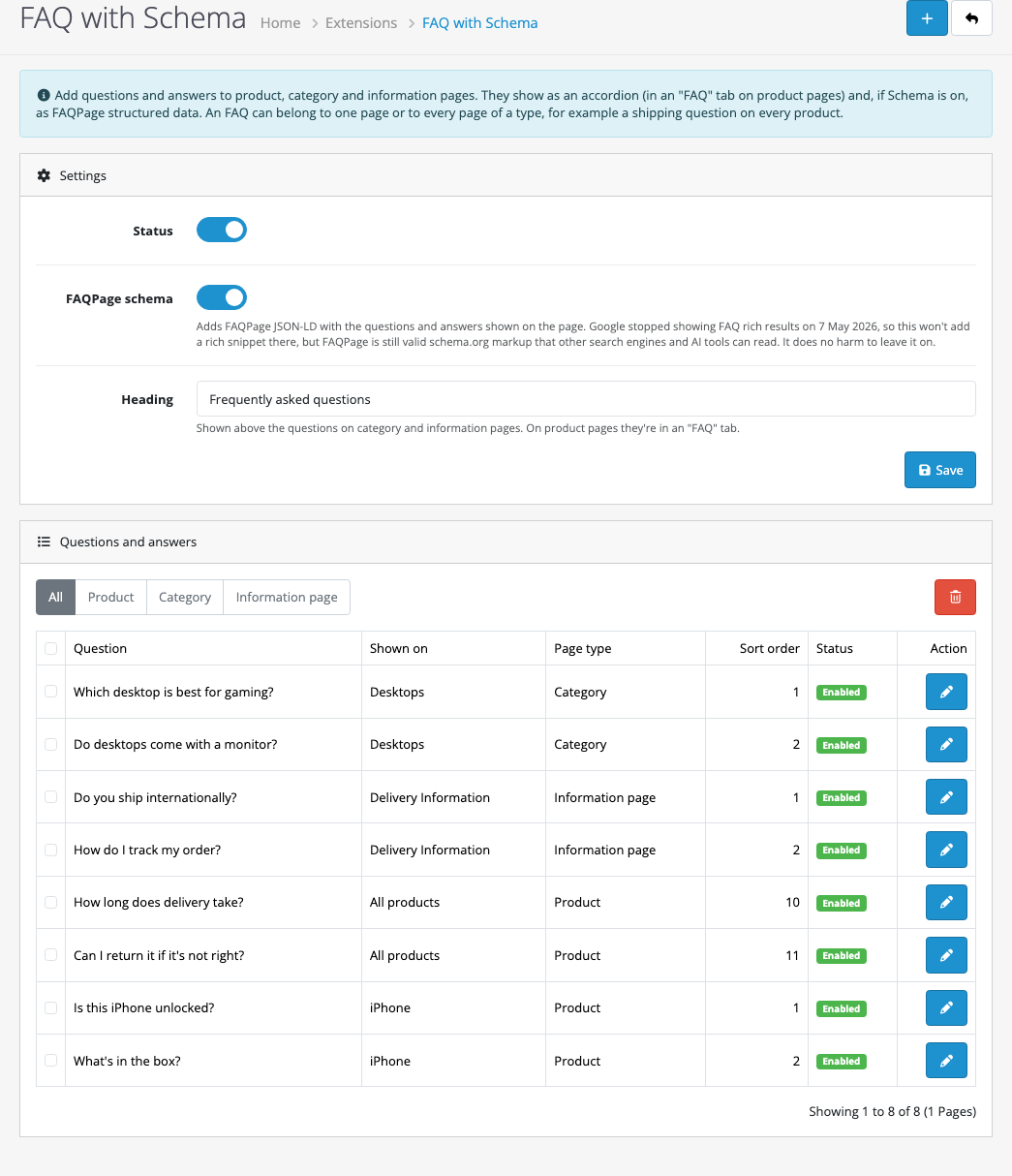
- Click Edit, turn Status on and click Save.
The same page lists your FAQs. Click + at the top to add one.
Adding a question
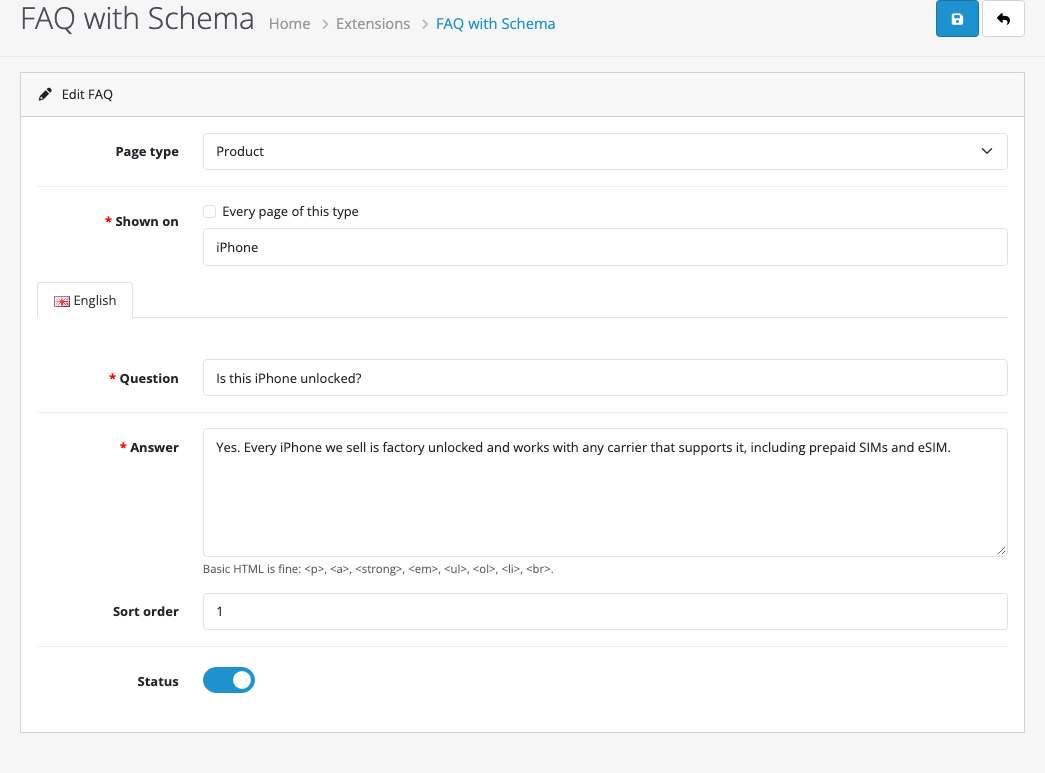
- Choose the Page type: Product, Category or Information page.
- Under Shown on, start typing a product or category name and pick it from the list, or choose an information page. Or tick Every page of this type.
- Write the Question and Answer for each language.
- Set the Sort order (lower numbers come first) and save.
Good questions come from your inbox. Look at the last month of customer emails and chats, and at the questions shoppers ask with the Product Questions & Answers extension if you use it. The difference: Q&A is for questions shoppers ask about one product, while this FAQ is for the answers you write once and want everyone to see.
Some ideas by page type:
| Page type | Good questions |
|---|---|
| All products | Delivery times and costs, returns, warranty, payment methods, gift wrapping |
| One product | Compatibility, sizing, what’s in the box, care, “is it the 2026 model?” |
| Category | How to choose between products, what the differences between ranges are |
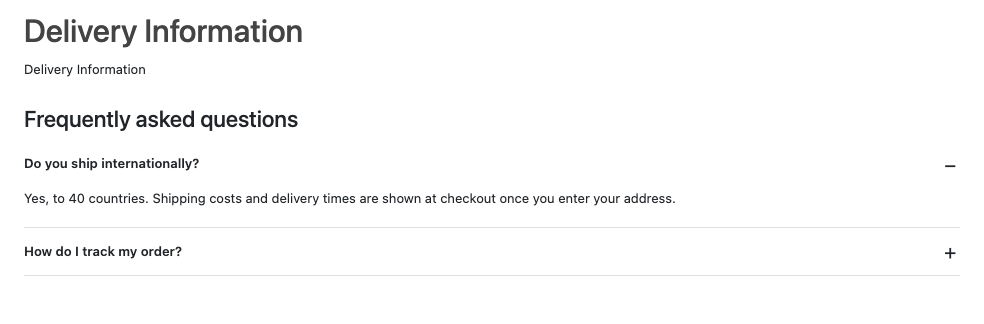
| Information pages | Under Delivery Information: international shipping, tracking, PO boxes. Under About Us: where you’re based, how long you’ve been trading |
Keep answers short and direct: the answer in the first sentence, details after. Don’t stuff keywords into questions nobody asks.
The structured data
With FAQPage schema on, each page with FAQs gets one JSON-LD block, built from the same questions shown on the page:
{
"@context": "https://schema.org",
"@type": "FAQPage",
"mainEntity": [
{
"@type": "Question",
"name": "Is this iPhone unlocked?",
"acceptedAnswer": {
"@type": "Answer",
"text": "Yes. Every iPhone we sell is factory unlocked and works with any carrier that supports it, including prepaid SIMs and eSIM.
"
}
}
]
}The < sequences are < written safely: the extension encodes them with JSON_HEX_TAG, so nothing typed in an answer can close the script tag early. JSON readers turn them back into normal HTML. The answer keeps a short list of tags (paragraphs, links, lists, bold, italics) and drops everything else.
Only one FAQPage block is added per page. If your theme or another extension already adds FAQPage markup to the same pages, turn the schema off here so there's only one. For product markup (price, stock, reviews), see product structured data for OpenCart 4. It works alongside this one.
How it's built
Two tables (oc_faq and oc_faq_description) and three events on the product, category and information views. No core files change.
On product pages, the event adds a tab to OpenCart's tab list and a pane inside tab-content. On category and information pages, it needs the end of <div id="content">, and themes put very different things there, so instead of guessing at the markup it counts opening and closing div tags to find the matching close:
$offset = $match[0][1] + strlen($match[0][0]);
$depth = 1;

while ($depth > 0 && preg_match('#<div\b|</div>#i', $output, $tag, PREG_OFFSET_CAPTURE, $offset)) {
    $depth += (strtolower($tag[0][0]) == '</div>') ? -1 : 1;
    $offset = $tag[0][1] + strlen($tag[0][0]);

    if ($depth == 0) {
        $output = substr_replace($output, $html, $tag[0][1], 0);
    }
}
The FAQs for a page come from one query: the page's own questions first, then the shared ones, each group in sort order. See OpenCart 4 events by example for how view events work.
Testing
| Test | Result |
|---|---|
| Save an empty FAQ | "Choose the page, or tick Every page of this type", "The question must be between 3 and 255 characters" and "Enter an answer" |
| Pick the product with the search box | Typing "iPh" listed iPhone; saved with its product ID |
| iPhone page: 2 own FAQs, 2 for all products | "FAQ (4)" tab, own questions first; one FAQPage block with 4 questions, valid JSON |
Answer with a <ul> list | Rendered as a list on the page and kept in the JSON-LD |
| Desktops category: 2 FAQs | Section at the end of the category content, inside #content |
| Delivery Information page: 2 FAQs | Section after the page text, readable on a phone |
| Editing existing FAQs | Product, category, "all products" and information page choices all reload correctly |
| Another product (iMac) with no FAQs of its own | "FAQ (2)" tab with only the two shared questions |
| Laptops category, no FAQs | No section, no markup |
Troubleshooting
| Problem | Cause and fix |
|---|---|
| No FAQ tab on a product | Check Status, that the FAQ is enabled and has a question in the shopper's language. A theme without OpenCart's tab markup gets the FAQ at the end of the page instead. |
| The FAQ appears in the wrong place on category pages | Your theme has no <div id="content">. Tell us the theme; the position is one line in the event. |
| A page shows a deleted product in the admin list | The product was deleted after the FAQ was made. Edit the FAQ and choose another page, or delete it. |
| Google's Rich Results Test doesn't show an FAQ | Expected since May 2026. Use the Schema Markup Validator to check the markup instead. |
More on search in 2026: structured data that still works, getting cited by ChatGPT, Perplexity and Gemini and copy-ready JSON-LD templates.

Rupak Nepali is a web developer, manage Webocreation website and the author of six books:
Getting Started with OpenCart Module Development (Packt, 2013),
OpenCart Theme and Module Development (Packt, 2015),
OpenCart 4: Dev Guide for Themes & Extensions (2024),
OpenCart 4: User Manual (2025),
Cloudflare for the Enterprise Website (2026) and
The Technical Web Guide for Marketers (2026).
Rupak has built OpenCart stores and extensions since 2010, has published more than 600 tutorials on Webocreation, and shares free OpenCart extensions on GitHub.
Find Rupak on
GitHub | Amazon | LinkedIn | X | YouTube.