OpenCart Redirects Manager Module for free 4.1.0.3
 Rupak NepaliPublished May 29, 2026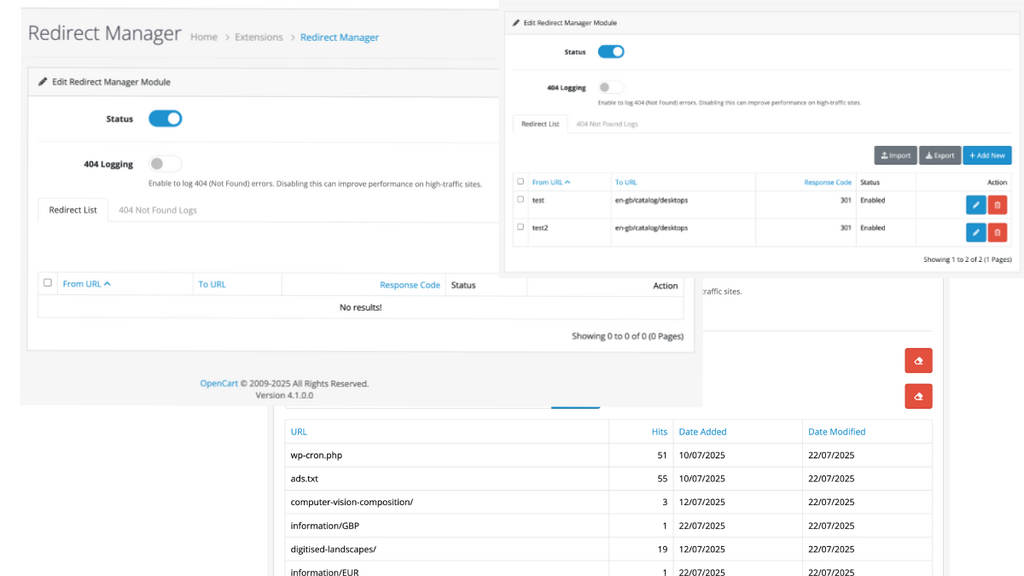
The Redirect Manager is a powerful OpenCart module extension designed to help store owners manage URL redirects and efficiently handle “404 Not Found” errors. This module offers a user-friendly interface within the OpenCart admin panel, allowing you to create, edit, and delete redirects, thereby preventing traffic loss from broken or outdated links.
🧩 What Is the Redirection Module?
The Redirection Module for OpenCart allows you to set up and manage 301 (permanent) and 302 (temporary) redirects directly from your admin panel — no need to edit .htaccess manually.
It’s perfect for:
- Redirecting old product URLs to new ones
- Merging categories or changing slugs
- SEO optimization after site migration
- Catching and fixing broken links (404s)
Key Features
- Full Redirect Management: Create, edit, and delete URL redirects with ease.
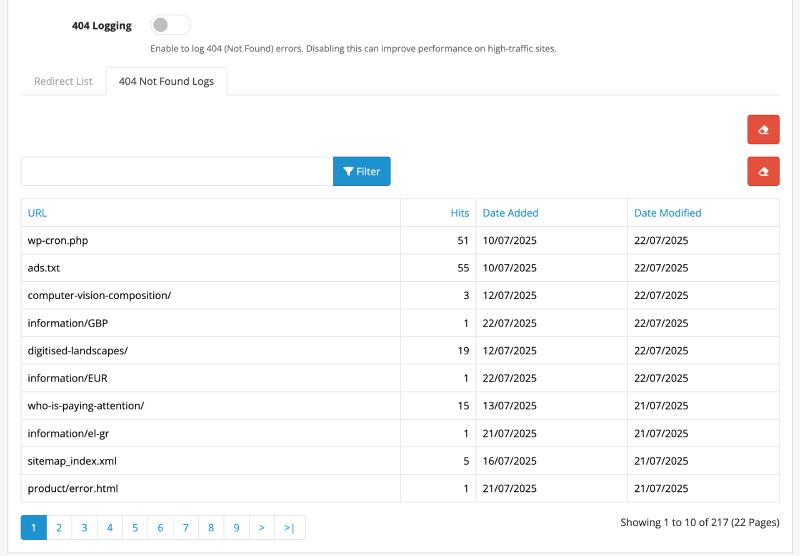
- 404 Error Logging: Automatically logs all “404 Not Found” errors, giving you insight into broken links that visitors are trying to access.
- Bulk Actions: Delete multiple redirects at once using the checkbox selection.
- Multiple Response Codes: Choose the appropriate HTTP status code for your redirects (301 Permanent, 302 Found, 307 Temporary).
- One-Click Redirect Creation: Convert a logged 404 error into a redirect with a single click.
- Import & Export: Easily import and export your redirect list in CSV format, perfect for migrating or bulk-managing URLs.
- Permissions Control: The module integrates with OpenCart’s user permission system, ensuring only authorized administrators can manage redirects.
- AJAX-Powered Deletion: Delete individual redirects directly from the list without a full page reload, providing a seamless and fast user experience.
Example
If you visit https://demo.webocreation.com/test it will redirect to https://demo.webocreation.com/en-gb/catalog/desktops
How to Use
- Installation: Install the extension through the OpenCart admin panel under
Extensions > Installer. - Access: Navigate to
Extensions > Extensions, selectModulesfrom the filter, and find theRedirect Manager. Install and edit it to access the main settings page.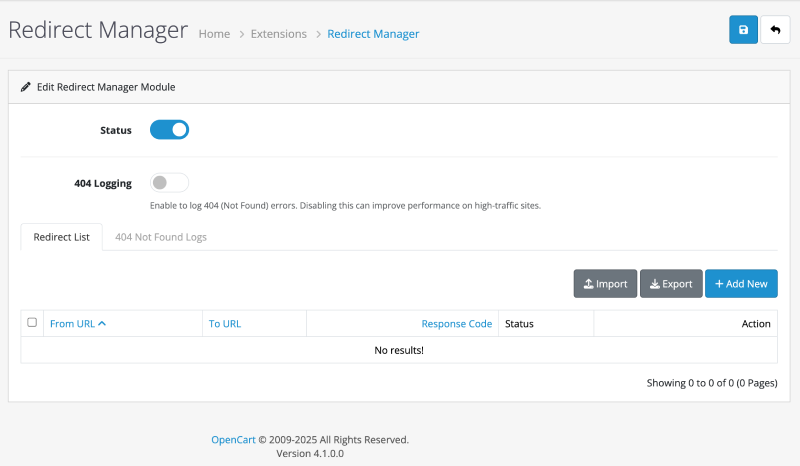
- Managing Redirects:
- Add: Click the blue
+button to add a new redirect. - Edit: Click the blue pencil button next to any entry to edit it.
- Delete: Click the red trash can button to delete a single redirect. You will be asked for confirmation.
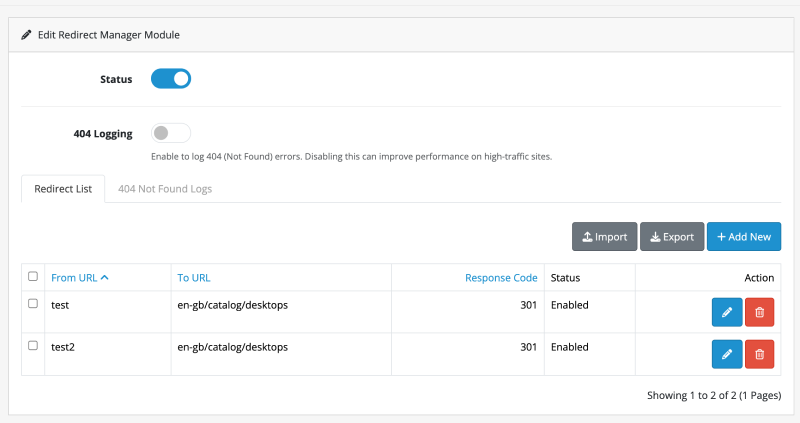
- Add: Click the blue
- Using the 404 Log: Click on the
404 LogTab to view a list of URLs that resulted in a “Not Found” error. You can add these URLs as new redirects directly from this list.
🗺️ How to Use the Redirection Module
- Navigate to Admin > Tools > Redirection Manager
- Click Add New Redirect
- From URL: (e.g.,
/old-product-url) - To URL: (e.g.,
/new-product-url) - Type: 301 (Permanent) or 302 (Temporary)
- From URL: (e.g.,
- Save your changes — and it’s live!
✅ You can also bulk import redirects by uploading a CSV file:
from_url,to_url,type
/old-url-1,/new-url-1,301
/old-url-2,/new-url-2,302
💡 Use Case Scenarios
| Scenario | What to Do |
|---|---|
| Product removed | Redirect to a replacement product or category |
| Changed URL slugs | Add a 301 from old slug to new one |
| Rebranded categories | Redirect old category URLs to the new one |
| Site restructure | Use bulk upload to quickly set up new paths |
📈 SEO Benefits
- Prevents 404 errors that harm SEO
- Helps preserve link equity from old URLs
- Provides better crawlability and user experience
- Avoids penalties for duplicate content
Technical Implementation Highlights
This module is built following OpenCart 4.x best practices, utilizing the MVC-L (Model-View-Controller-Language) pattern and event system.
Admin Controller (admin/controller/module/redirect_manager.php)
The controller handles all the business logic for the module. Key methods include:
index(): Loads the main module page and settings.getList(): Fetches and prepares the list of redirects for display.delete(): Handles the deletion of single or multiple redirects. It performs a permission check and returns a JSON response to the client.validateDelete(): A protected method that ensures the user has the ‘modify’ permission before allowing a delete operation.
Admin View (admin/view/template/module/redirect_list.twig)
The view template for the redirect list contains the HTML structure and the client-side JavaScript needed for the dynamic delete functionality. A key feature is the AJAX call that handles the delete request:
$('#form-redirect').on('click', '.btn-danger', function(e) {
    e.preventDefault();

    if (confirm('{{ text_confirm }}')) {
        $.ajax({
            url: $(this).attr('href'),
            dataType: 'json',
            success: function(json) {
                // ... handle success and error messages

                // Reload the redirect list container
                $('#redirects').load('index.php?route=extension/redirect_manager/module/redirect_manager.list&user_token={{ user_token }}');
            }
        });
    }
});
This script listens for clicks on delete buttons, shows a confirmation dialog, and sends an AJAX request to the delete() method in the controller. On success, it reloads the #redirects container with the updated list, avoiding a full page refresh.
Final Thoughts
Improve SEO and user experience with this Redirection Module for OpenCart. Easily manage 301/302 redirects, monitor 404s, and prevent broken links. It’s quick to install, easy to configure, and highly useful for modern e-commerce sites. We hope you liked this OpenCart module. Please subscribe to our YouTube Channel for OpenCart video tutorials. You can also find us on Twitter and Facebook. Do you have questions or need a custom feature added? Feel free to contact us at WeboCreation.

Author of four Opencart book.
The recent are Opencart 4 developer book and Opencart 4 user manual