Enhancing Your OpenCart 4 Store with The Advanced Image Content Module for free
 Rupak NepaliPublished Jun 5, 2026
In the competitive world of e-commerce, creating engaging and visually appealing product pages and landing pages is crucial for converting visitors into customers. The Image Content Module for OpenCart 4 takes this to the next level by providing a flexible, multilingual, and highly customizable way to display images alongside rich content and call-to-action buttons.
Whether you’re showcasing products, creating promotional banners, or building landing pages, this module offers the tools you need to create compelling visual experiences that drive conversions.
Installation and Setup
Getting started is straightforward:
- Download the zip file by clicking the button above. You will get “image_content.ocmod.zip”
- Install via the admin panel under Extensions >> Installer >> Upload the zip file. >> Then, click the install green button

Configuration of the Image Content module
After installation is complete, go to Extensions >> Extensions >> Choose the extension type “Modules” >> Find Image Content and install it >> Then click “Add New” >> You will get a list, then click “Add module.”

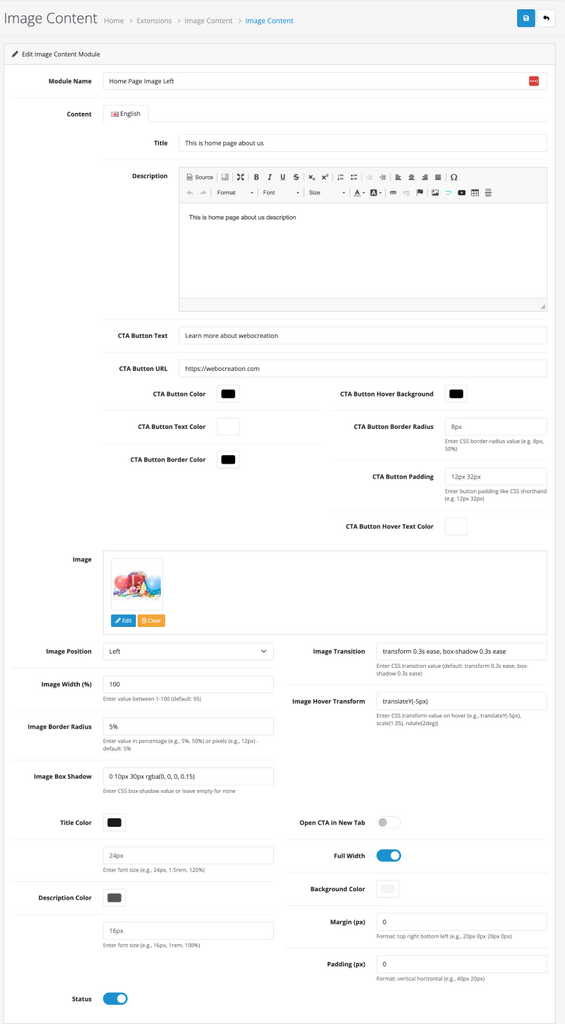
You will get a form with the following fields:
- Module Name
- Title
- Description
- CTA text, URL, and its styles fields
- Image
- Image Position (Left or Right)
- Image Styles
- Font sizes of Title and Description
- Title and description text color
- Background Color
- Full width selection
- Margin
- Padding
- Status
Add those settings as needed. The module integrates seamlessly with OpenCart 4’s existing systems and requires no complex setup.
With the above settings, you can see the output in the frontend like below:

What Makes the Image Content Module Special?
Multilingual Support from the Ground Up
One of the standout features of this module is its comprehensive multilingual support. Every aspect of the content can be customized for different languages:
- Titles and descriptions in multiple languages
- CTA button text and URLs that adapt to your audience’s language
- Language-specific styling for complete customization per language
This ensures that your international customers receive a truly localized experience, from content to visual presentation.
Advanced Styling Options
The module doesn’t just display content—it allows you to create stunning visual experiences with extensive styling controls:
Image Customization
- Adjustable width percentages for perfect layout control
- Border radius and box shadow effects for modern aesthetics
- Smooth transition and hover transform effects
- Professional image presentation with customizable positioning
Typography Control
- Custom font sizes for titles and descriptions
- Color customization for optimal readability and branding
- Responsive text sizing for mobile devices
Call-to-Action Enhancement
The CTA button system is particularly impressive, with fully language-specific styling:
- Background, text, and border colors
- Border radius and padding controls
- Hover effects for interactive engagement
- Option to open links in new tabs
Responsive Design Excellence
Built with Bootstrap and modern web standards, the module ensures your content looks perfect on all devices:
- Mobile-optimized layouts that stack content vertically
- Adaptive text sizes and spacing
- Touch-friendly interactive elements
- Cross-browser compatibility
Recent Major Updates (Version 1.1.0)
The latest version brings significant improvements to the admin experience and functionality:
Redesigned Admin Interface
The admin panel has been completely reorganized with a two-column layout that makes configuration intuitive and efficient:
- Logical grouping of related settings
- Full-width image settings with internal column organization
- Streamlined workflow for faster setup
- Visual clarity with better spacing and organization
Enhanced Typography Controls
Font size customization has been added for both titles and descriptions, giving you complete control over your content’s visual hierarchy.
Fully Multilingual CTA Styling
What was once a limitation is now a strength—all CTA button styling options are now language-specific, allowing you to:
- Use different color schemes per language
- Adjust button sizes and spacing for different character sets
- Create culturally appropriate hover effects
- Maintain brand consistency across languages
Real-World Applications
Product Showcases
Create compelling product presentations with images, detailed descriptions, and prominent call-to-action buttons that drive purchases.
Landing Pages
Build conversion-optimized landing pages with hero sections that combine striking visuals with persuasive copy and clear next steps.
Promotional Campaigns
Design seasonal promotions or special offers with eye-catching imagery and language-specific messaging that resonates with your audience.
Category Pages
Enhance category pages with featured content sections that highlight key products or collections.
Technical Benefits
Performance Optimized
- Inline CSS for minimal HTTP requests
- Per-instance styling to avoid conflicts
- Efficient image handling with automatic resizing
Developer Friendly
- Clean, maintainable code following OpenCart standards
- Extensive customization hooks for further development
- Comprehensive documentation and support
SEO Ready
- Semantic HTML structure
- Alt text support for images
- Clean URLs and proper heading hierarchy
Conclusion
The Image Content Module represents the evolution of OpenCart module design—combining powerful functionality with an exceptional user experience. Whether you’re a store owner looking to enhance your visual presentation or a developer seeking a flexible content solution, this module delivers professional results with minimal effort.

Author of four Opencart book.
The recent are Opencart 4 developer book and Opencart 4 user manual