Instant Pages for OpenCart 4: Prerender the Next Page With the Speculation Rules API (Free Extension)
Make product and category pages open instantly in Chrome and Edge with the Speculation Rules API, with safe exclusions for checkout, account, logout, language and image links.
 Rupak NepaliPublished Nov 22, 2026

Most of the time a shopper spends waiting is between clicking a product and seeing it. Chrome and Edge can remove that wait: if the page tells them which links are worth loading, they load the next page in the background while the visitor’s pointer rests on the link, and show it instantly on click. This is the Speculation Rules API, and it takes one small script tag.
This free extension adds that script tag to OpenCart 4, with sensible rules: product and category pages are prerendered; checkout, account, logout, and similar links never are.
Download Instant Pages for OpenCart 4 (free, tested on OpenCart 4.1.0.4 and Chrome)
What speculation rules are
A speculation rule is a JSON block in a <script type="speculationrules"> tag. It tells the browser which links it may prefetch (download the HTML) or prerender (load and render the whole page in a hidden tab), and when. With “moderate” eagerness, Chrome starts when the pointer rests on a link for about 200 milliseconds, or when a link is pressed. On a click, a prerendered page is swapped in at once: no request, no layout, no images to wait for.
Browsers that don’t support it (Firefox and Safari at the time of writing) ignore the tag. Nothing breaks.
Install
- Go to Extensions > Installer, upload
speculation.ocmod.zipand click the green + button. - Go to Extensions > Extensions, choose Modules, and install Instant Pages (Speculation Rules).
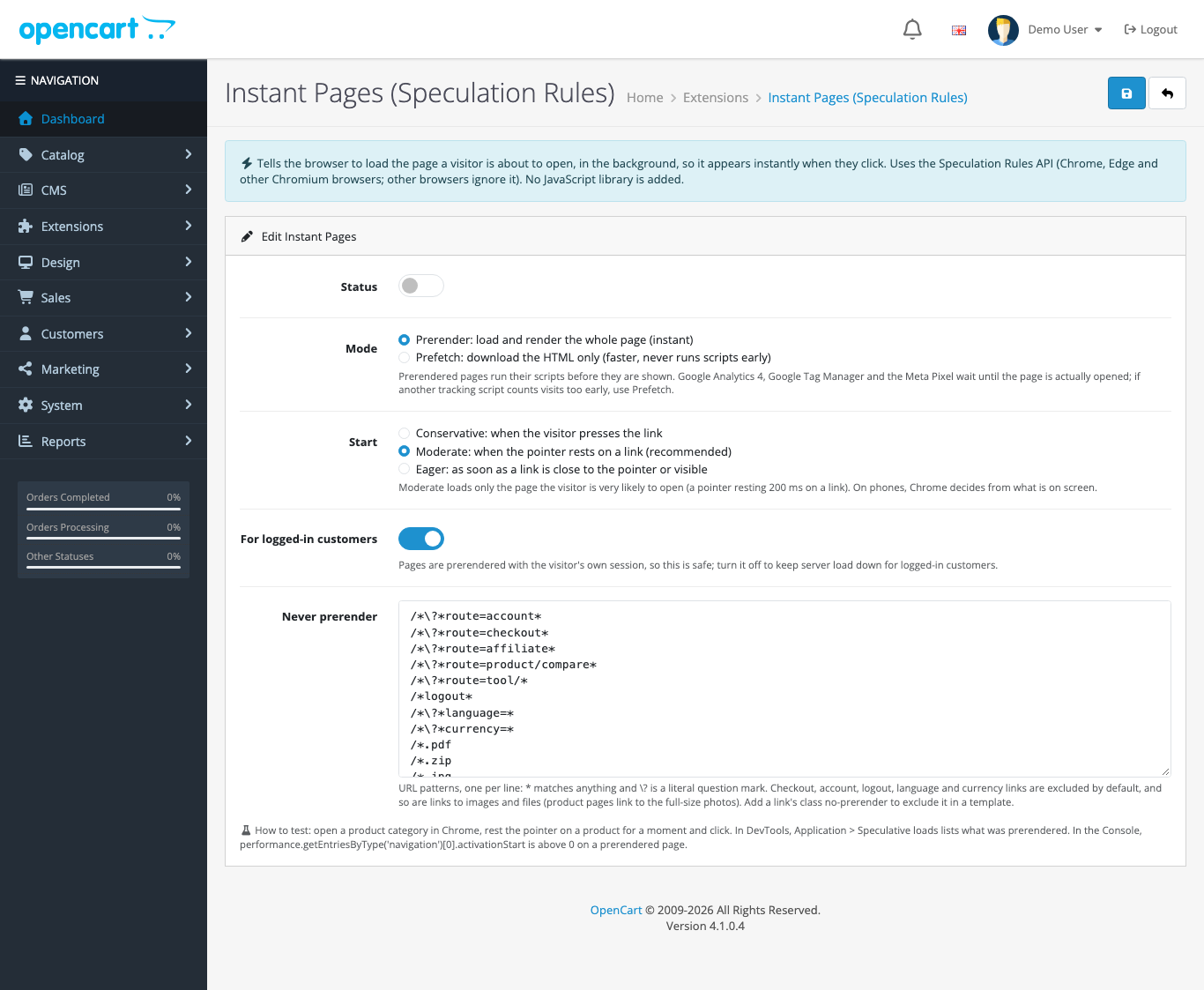
- Click Edit, turn Status on, and save.
The rules it adds
With the defaults, every storefront page except checkout and account pages gets this (shortened):
<script type="speculationrules">
{"prerender":[{"source":"document",
  "where":{"and":[
    {"href_matches":"/*"},
    {"not":{"href_matches":["/*\\?*route=account*","/*\\?*route=checkout*","/*logout*","/*.jpg", ...]}},
    {"not":{"selector_matches":"[rel~=nofollow], .no-prerender, [target=_blank], [download]"}}]},
  "eagerness":"moderate"}],
 "prefetch":[ ...the same links, moderate... ]}
</script>"source":"document"means “links on this page”, so you don’t list URLs.- The exclusions keep the browser away from links that do something rather than show something: account and checkout pages, logout, affiliate, compare, language and currency switchers.
- Images and files are excluded too. OpenCart’s product page links each thumbnail to the full-size photo for its lightbox; without this exclusion, Chrome treated those
.jpglinks as pages to prerender. We found that in testing and added/*.jpg,/*.pngand similar to the defaults. - Links with
rel="nofollow",target="_blank",downloador the classno-prerenderare skipped. Addclass="no-prerender"to any link in a template to exclude it.
The patterns use the URL Pattern syntax: * matches anything and \? is a literal question mark. When you save, each line must start with / or a full origin, because one invalid pattern makes Chrome ignore the whole rule set.
Settings
- Mode: Prerender loads the whole page and gives an instant switch. Prefetch only downloads the HTML: a smaller win, but nothing runs early.
- Start: Conservative waits for the press of a link, moderate (recommended) for a pointer resting on it, eager starts sooner.
- For logged-in customers: pages are prerendered with the visitor’s own session, so this is safe. Turn it off to save server load.
- Never prerender: the URL patterns above. Add your own, for example, a payment provider’s return page.
Analytics and prerendering
A prerendered page runs its scripts before the visitor opens it, and might never be opened at all. Google Analytics 4 (gtag.js), Google Tag Manager and the Meta Pixel know this and wait until the page is actually shown, so your page views stay correct. If you use another tracking script that counts a visit as soon as it runs, check it, or switch to Prefetch mode, which never runs scripts early.
What we tested
We checked the rules in Chrome through the DevTools protocol on the OpenCart demo store:
- Chrome parsed the generated rule set as valid on every page.
- On the home page, 10 links pointed at account, checkout, or image URLs, and on a product page, 16. None of them became a prerender candidate, while normal product and category links did.
- Checkout and account pages get no rules at all.
One thing we could not show in an automated test is the instant switch itself: Chrome refuses to prerender while a DevTools automation client is attached, and reports the reason as PrerenderingDisabledByDevTools. Prefetching still worked. To see a prerender in your own Chrome, open a category, rest the pointer on a product for a moment, and look at DevTools > Application > Speculative loads. After clicking, performance.getEntriesByType('navigation')[0].activationStart in the console is above 0 on a prerendered page.
Server load
Moderate eagerness only loads pages the visitor is very likely to open, and Chrome limits how many prerenders run at once. You’ll see somewhat more page requests in your server logs, mostly for pages that are then opened. Prerender requests carry the header Sec-Purpose: prefetch;prerender if you want to count them.
With a full-page cache for guests, those extra requests cost almost nothing, so the two work well together. See also Core Web Vitals for OpenCart themes: a prerendered page has a Largest Contentful Paint close to zero for the visitor.
How it works
One storefront event, catalog/view/common/header/after, inserts the script tag before </head>. No core or theme files are changed, and no JavaScript library is added.
Uninstall
Switch Status off or uninstall, and the tag is gone from the next page load.

Rupak Nepali is a web developer, manage Webocreation website and the author of six books:
Getting Started with OpenCart Module Development (Packt, 2013),
OpenCart Theme and Module Development (Packt, 2015),
OpenCart 4: Dev Guide for Themes & Extensions (2024),
OpenCart 4: User Manual (2025),
Cloudflare for the Enterprise Website (2026) and
The Technical Web Guide for Marketers (2026).
Rupak has built OpenCart stores and extensions since 2010, has published more than 600 tutorials on Webocreation, and shares free OpenCart extensions on GitHub.
Find Rupak on
GitHub | Amazon | LinkedIn | X | YouTube.