Subscriptions in OpenCart 4.1, Tested: Plans, Trials, Payment Support and What Breaks at Renewal
A hands-on guide to OpenCart 4.1 subscription plans and trials, and six problems we found when we let the renewal cron run, with what to do instead.
 Rupak NepaliPublished Nov 23, 2026
OpenCart 4 can sell subscriptions: a product with a monthly or yearly plan, an optional trial at a lower price, and renewals that a cron job is supposed to turn into new orders. Our overview of subscription plans explains the idea; this guide is the hands-on version for OpenCart 4.1.0.4, and it includes what happened when we let the cron job actually run.
Short version: setting up plans and selling the first payment works. Automatic renewals don’t work in 4.1.0.4 without a payment extension that supports them, and even then the core renewal job has bugs you need to know about before you take anyone’s money on a schedule.
Setting up a subscription product
1. Create a plan
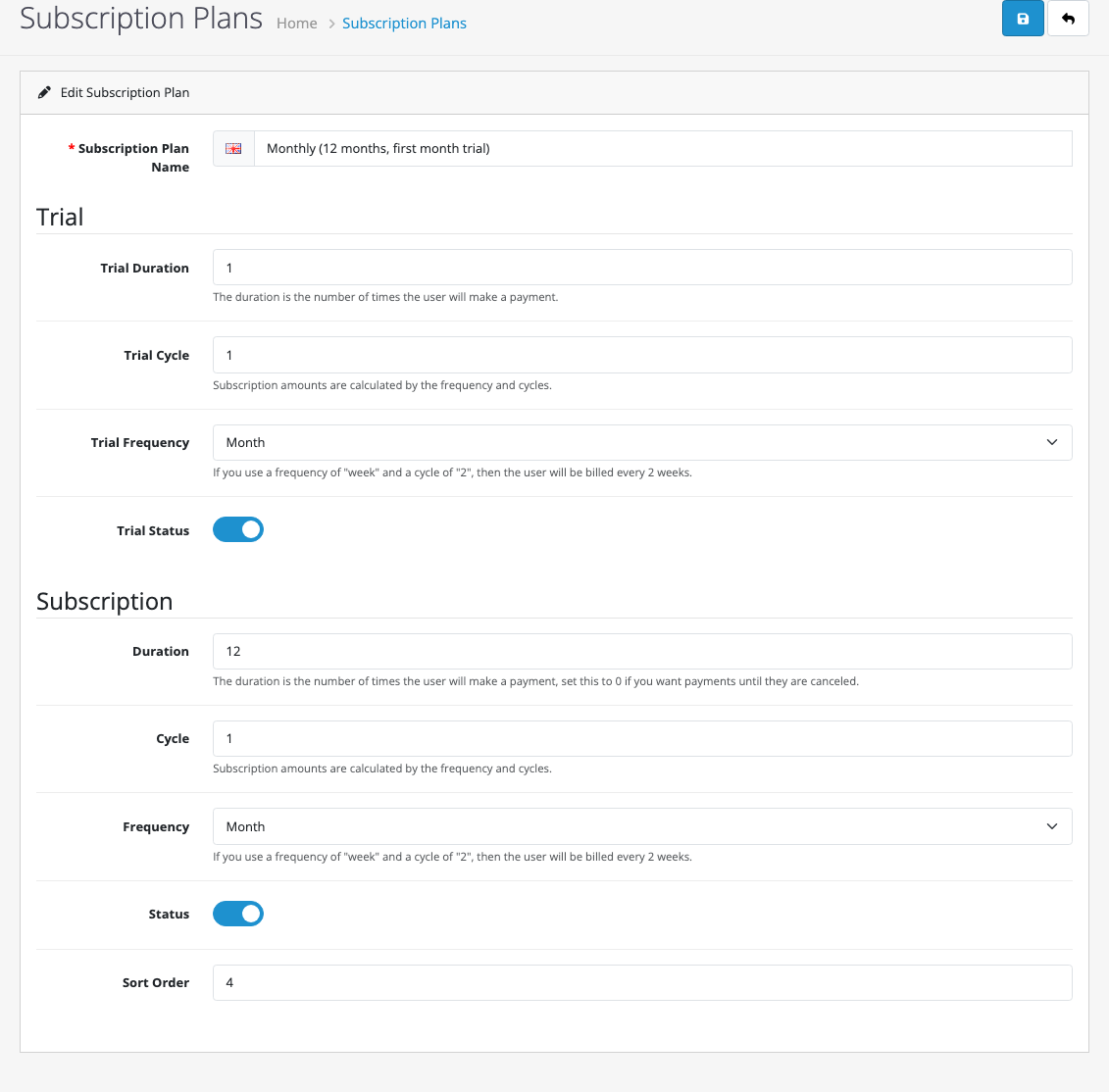
Go to Catalog > Subscription Plans and add a plan. A plan describes the schedule, not the price:
- Frequency and Cycle: how often a payment is taken. Frequency “Month” with cycle 1 is monthly; “Week” with cycle 2 is every two weeks.
- Duration: how many payments in total. 0 means until the customer cancels.
- Trial: the same three fields for an introductory period, plus Trial Status to switch it on.
2. Attach it to a product with prices
Edit the product and open the Subscription tab. Add the plan, choose the customer group, and enter the Trial Price and the regular Price per payment. Different customer groups can get different prices for the same plan.
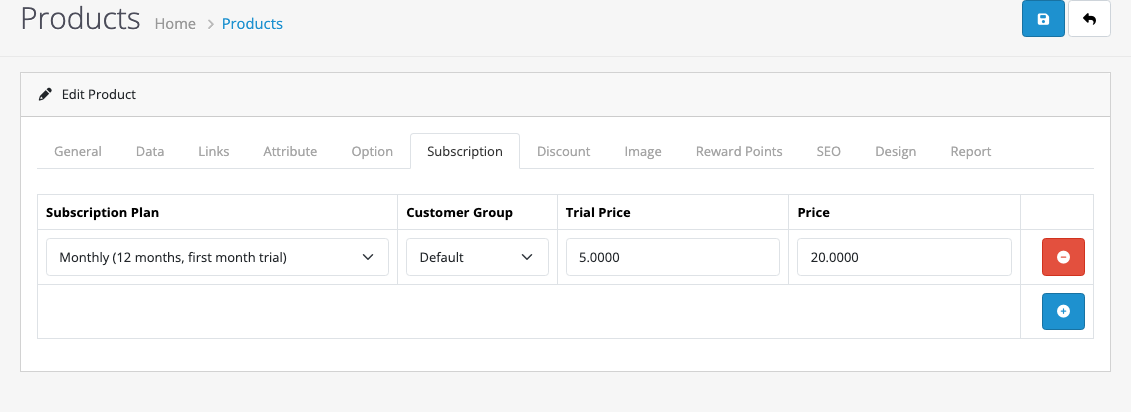
Once a product has at least one plan, it can only be bought as a subscription. Adding it to the cart without choosing a plan fails with “Subscription Plan is not valid!”, so a product you also want to sell once needs a second, separate product.
3. What the shopper sees
In the cart the subscription is described correctly: “$8.00 every 1 month(s) for 1 payment(s) then $26.00 every 1 month(s) for 12 payment(s)” (our test prices with 20% VAT and a $2 eco tax), and the first order is charged the trial price, $8.00 here.
What we found when we tested renewals
We created three active subscriptions for a test customer, due for renewal, paid with Cash On Delivery: one in its trial (two trial payments left), one on a 12-payment plan, and one that runs until cancelled. Then we ran OpenCart’s cron the way a server would. These are the results on 4.1.0.4:
1. Only trial payments are ever renewed
The 12-payment and until-cancelled subscriptions were skipped; only the trial one produced an order. The renewal job only processes a subscription when this condition is true:
if (($result['trial_status'] && $result['trial_remaining']) || (!$result['duration'] && $result['remaining'])) {At checkout, a 12-payment plan is saved with remaining = 11 and an until-cancelled plan with remaining = 0. With no trial running, the first case fails !$result['duration'] and the second fails $result['remaining'], so regular payments are never processed.
2. Only subscriptions due exactly today
The job looks up subscriptions whose next date is today, not today or earlier:
$implode[] = "DATE(`s`.`date_next`) = DATE('" . $this->db->escape($data['filter_date_next']) . "')";Our first run, with renewals due the day before, did nothing at all. If your cron misses a day, those subscriptions are never picked up again.
3. The renewal order has the wrong total
The trial renewal created an order whose product line said $5.00 (the trial price) but whose sub-total was $100.00, the product’s normal price, for a total of $103.00 with tax worked out on $5.
4. Nothing moves the subscription forward
After the renewal, the subscription’s next date and remaining trial payments were unchanged, and a second cron run the same day created a second identical order. With Cash On Delivery the orders stayed as missing orders (status 0), nothing was charged and nothing was written to the subscription’s history or log.
5. Charging is left to the payment extension
After creating the order, the job hands over to the payment method by loading extension/<extension>/cron/<code>. None of OpenCart’s built-in payment methods (Bank Transfer, Cash On Delivery, Cheque, Free Checkout) has such a controller, so with them no renewal is ever paid. A payment extension that supports subscriptions has to store the customer’s payment method, charge it in that controller, and update the subscription’s next date itself.
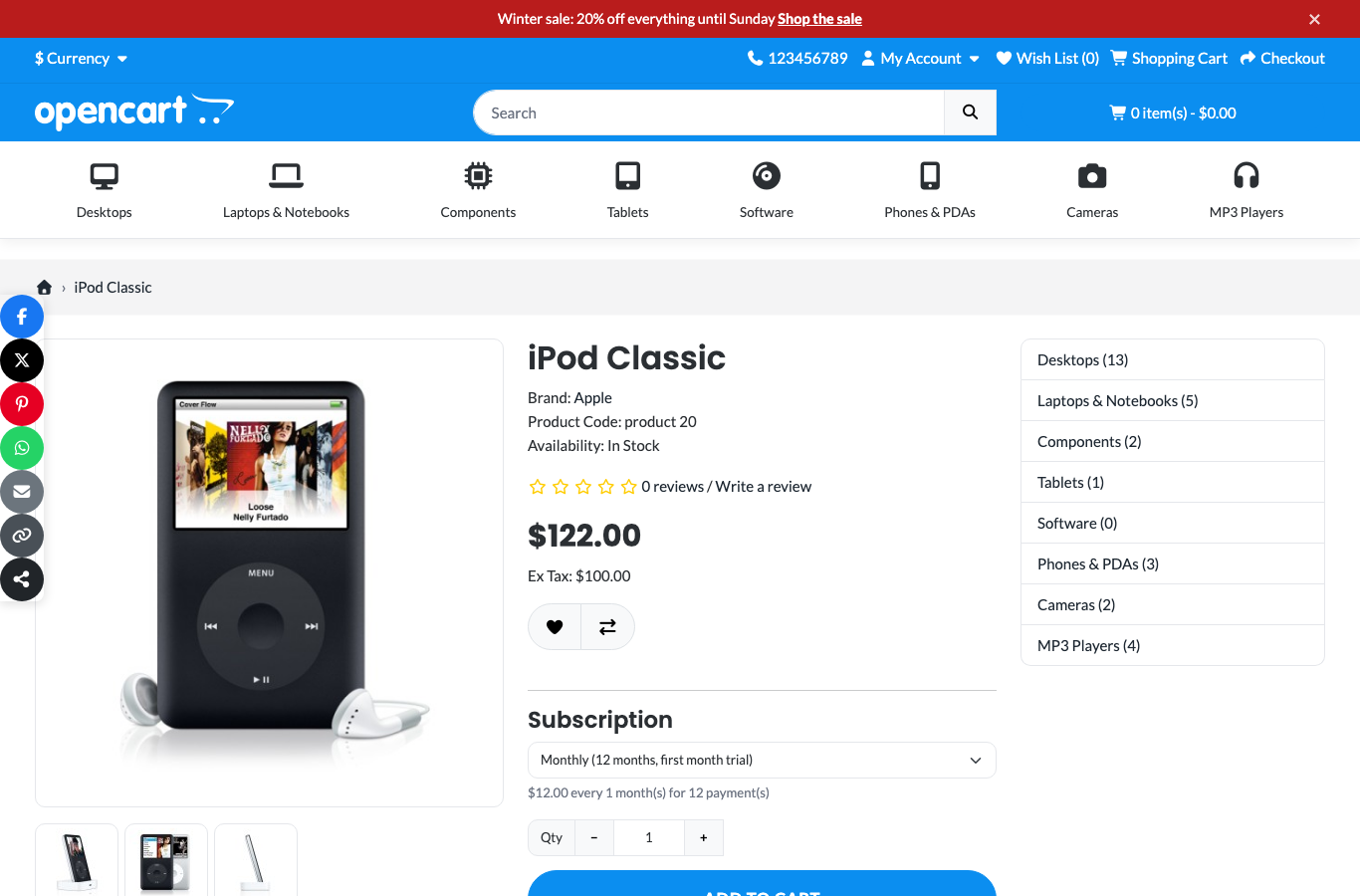
6. The product page shows a made-up price
The text under the plan select divides the product’s normal price by the number of payments: our $100 product (with tax) on a 12-payment plan showed “$12.00 every 1 month(s) for 12 payment(s)”, while the real prices are $8.00 for the trial month and $26.00 a month after that. Until that’s fixed, put the real prices in the product description.
Also worth knowing
- Cron must run from the command line, and
cron.phpin 4.1.0.4 fails to load Twig; our OpenCart 4 cron jobs guide has the fix. - The “subscription” task under Extensions > Cron Jobs is disabled by default, but
cron/croncalls the subscription job directly on every run anyway:$this->load->controller('cron/subscription', 3, 'subscription', 1, '', '');
What to do instead
- Let the payment provider bill. Stripe Billing, PayPal subscriptions and similar services handle schedules, retries, card updates and dunning, and tell your store about each payment by webhook. See our Stripe guide for OpenCart 4 for the webhook side.
- Or use a subscription extension that does its own scheduling and charging, and test a full cycle, including a missed day and a failed card, in the gateway’s test mode before going live.
- Keep an eye on Sales > Orders with the “Missing Orders” status filter if cron is running against subscriptions, so stray renewal orders don’t pile up.
- Show the real prices on subscription product pages, in the description, until the plan text is fixed.
How we tested
OpenCart 4.1.0.4 on PHP 8.3 in Docker, with the plan and product shown above, a test customer, three subscriptions inserted with a next date of the day before and then of today, and cron.php run from the command line (with the Twig fix applied to a temporary copy). The test orders and subscriptions were deleted afterwards.
Related
- OpenCart 4 cron jobs and the cron.php bug
- Stripe in OpenCart 4
- Selling downloadable products in OpenCart 4

Rupak Nepali is a web developer, manage Webocreation website and the author of six books:
Getting Started with OpenCart Module Development (Packt, 2013),
OpenCart Theme and Module Development (Packt, 2015),
OpenCart 4: Dev Guide for Themes & Extensions (2024),
OpenCart 4: User Manual (2025),
Cloudflare for the Enterprise Website (2026) and
The Technical Web Guide for Marketers (2026).
Rupak has built OpenCart stores and extensions since 2010, has published more than 600 tutorials on Webocreation, and shares free OpenCart extensions on GitHub.
Find Rupak on
GitHub | Amazon | LinkedIn | X | YouTube.