Sell in Packs for OpenCart 4: Quantity Steps (Packs of 6, Cases of 12) and a Maximum per Order (Free Extension)
Only allow whole packs and set a maximum per order: the product page rounds to packs, cards add one pack, and checkout stays closed until quantities are valid.
 Rupak NepaliPublished Nov 21, 2026
Some products only make sense in multiples: wine by the case of 6, screws by the box of 100, T-shirts for a team in tens. Others need a ceiling: a limited release, a heavily discounted item, or anything resellers like to buy out. OpenCart 4 has a Minimum Quantity field on each product, but nothing for “multiples of 6” and nothing for “no more than 24 per order”.
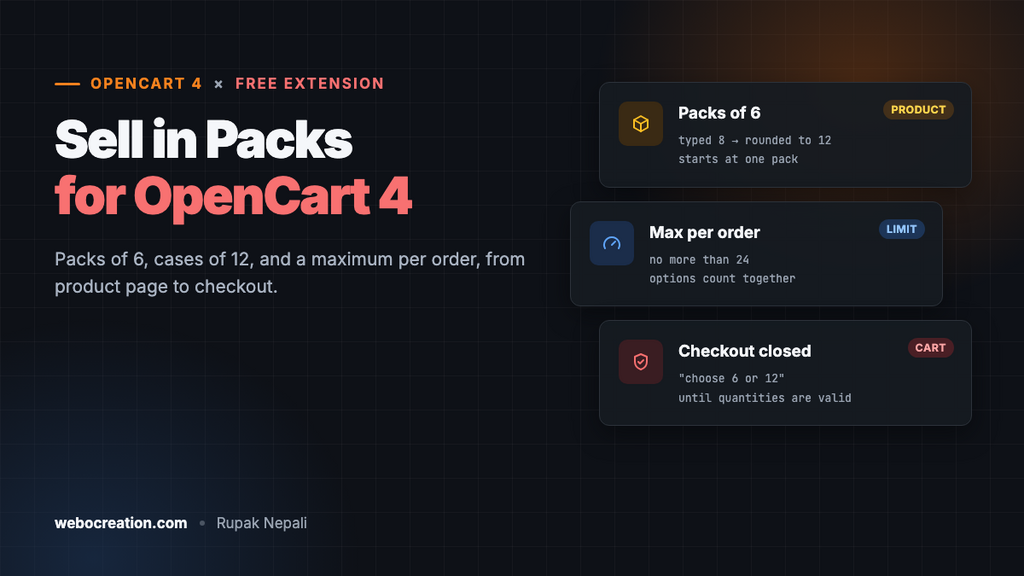
This free extension adds both. Pick a product, set the pack size and an optional maximum, and OpenCart only lets customers order whole packs up to that limit, from the product page all the way to checkout.
Download Sell in Packs for OpenCart 4 (free, tested on OpenCart 4.1.0.4)
What it does
- Pack sizes per product. Packs of 6 means 6, 12, 18… can be ordered, and nothing in between.
- A maximum per order per product, with or without a pack size.
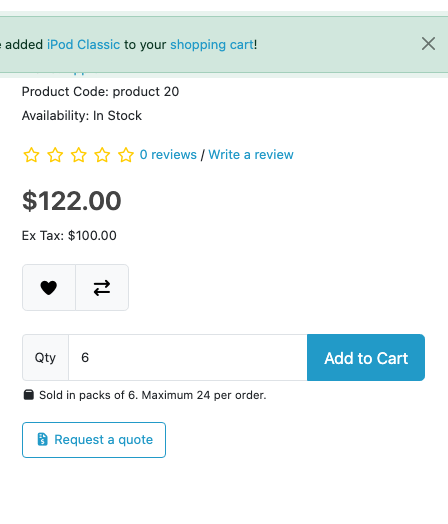
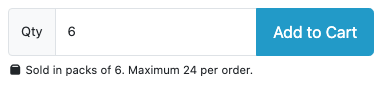
- On the product page, the quantity box starts at one pack, a note shows the pack size and limit, and anything the customer types is rounded up to a whole pack (8 becomes 12) and capped at the maximum.
- On product cards (category, search, Latest, Featured and other modules), the Add to Cart button adds one pack instead of one item.
- In the cart, any product in the wrong quantity gets a clear message with the nearest valid quantities, and the Checkout button is disabled until it’s fixed.
- Checkout is closed to anyone who goes straight to the checkout URL with an invalid cart: they’re sent back to the cart.
- Options count together. A pack of 6 can be 3 red and 3 blue.
Install it
- Download
sellinpacks.ocmod.zip. - Go to Extensions → Installer, upload it, and click the green +.
- Go to Extensions → Extensions → Modules and install Sell in Packs.
- Click Edit, add your products, turn Status on and save.
Set up your products
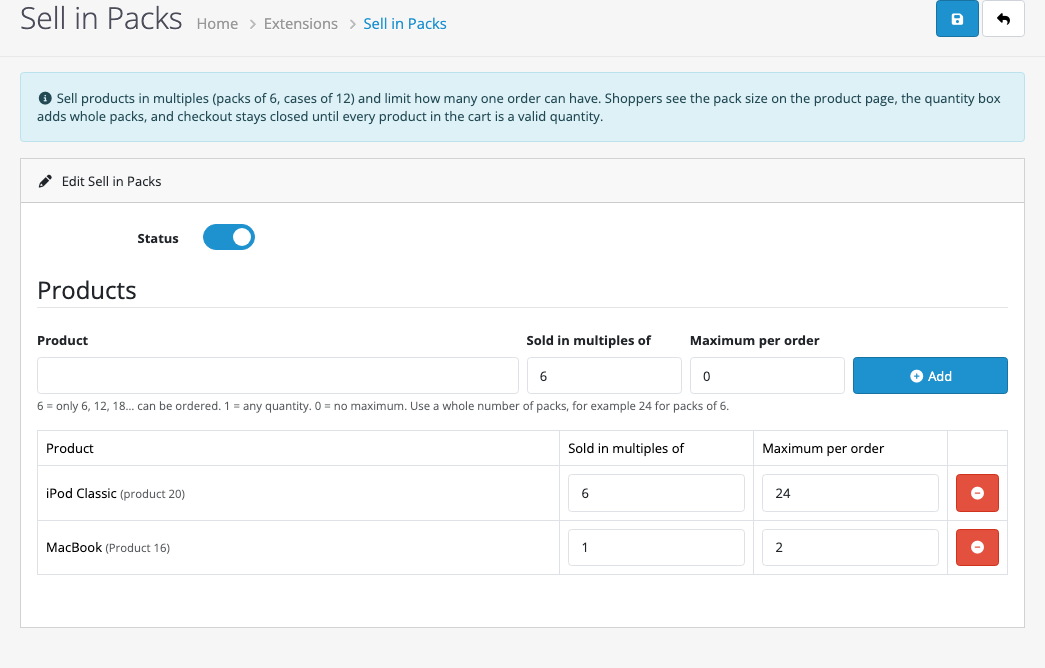
Start typing a product name, pick it from the list, fill in the two numbers and click Add. Every rule stays editable in the table below, and the red button removes it.
| Field | What it means |
|---|---|
| Sold in multiples of | The pack size. 6 allows 6, 12, 18… Use 1 for any quantity (useful when you only want a maximum). |
| Maximum per order | The most one order can have, counting all of the product’s options together. 0 means no maximum. |
The maximum has to be a whole number of packs. If you enter 20 for packs of 6, the settings page won’t save and tells you why: “A maximum of 20 can’t be reached in packs of 6. Use a multiple of the pack size.” Pick 18 or 24 instead.
Products without a rule aren’t affected, and switching Status off turns all rules off at once without deleting them.
With OpenCart’s Minimum Quantity
The product’s own Minimum Quantity (Catalog → Products → Data) still applies. The extension starts the quantity box at the smallest whole number of packs that meets it: a product with a minimum of 10 in packs of 6 starts at 12.
What customers see
On the product page, the box starts at one pack. If a customer types 8, it becomes 12 as soon as they leave the box or click Add to Cart. If they type 40 with a maximum of 24, it becomes 24. The same happens on a phone:
The cart is where customers can still change quantities freely. If a quantity isn’t allowed, they see exactly what to change, and the Checkout button stays greyed out until they do:
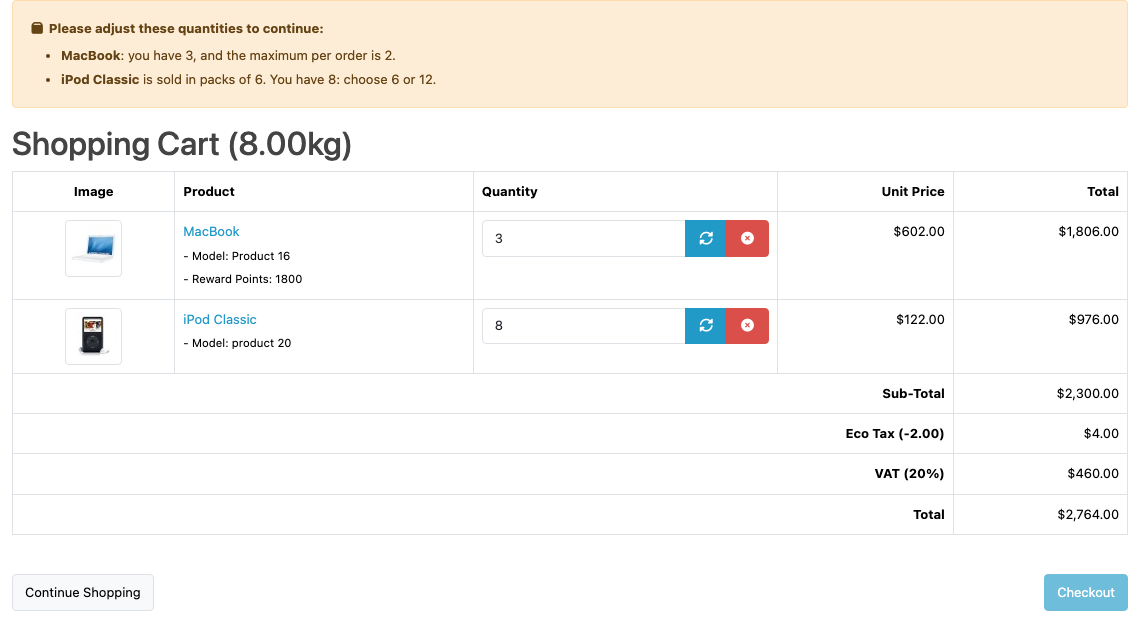
Once both are fixed (2 MacBooks and 12 iPods in our test), the warning disappears and Checkout works again.
How it’s built
Sell in Packs changes no core files. It uses four OpenCart 4 events:
| Event | What it does |
|---|---|
catalog/view/product/product/after | Sets the starting quantity, adds the note and the rounding script |
catalog/view/product/thumb/after | Makes product card buttons add one pack |
catalog/view/checkout/cart_list/after | Adds the warning and disables the Checkout button |
catalog/controller/checkout/checkout/before | Sends an invalid cart back to the cart page |
The cart check adds up every line of the same product first, so different options of one product share the pack and the limit:
foreach ($this->cart->getProducts() as $product) {
    $id = (int)$product['product_id'];

    $totals[$id]['quantity'] = ($totals[$id]['quantity'] ?? 0) + (int)$product['quantity'];
}

// later, for each product with a rule:
if ($rule['max'] && $quantity > $rule['max']) {
    // "you have 3, and the maximum per order is 2"
} elseif ($quantity % $rule['step']) {
    // "sold in packs of 6. You have 8: choose 6 or 12"
}
Why warn in the cart instead of refusing the add to cart? OpenCart’s cart page lets customers type any number, and refusing the change outright would leave them guessing. A message that says “choose 6 or 12” is quicker to act on, and the checkout check makes sure no invalid order gets through either way.
New to events? OpenCart 4 events by example explains how they work.
Testing
| Test | Result |
|---|---|
| Save a maximum of 20 for packs of 6 | Refused: “A maximum of 20 can’t be reached in packs of 6…” |
| Product page, iPod Classic (packs of 6, max 24) | Quantity starts at 6, note shown; typing 8 gives 12, typing 40 gives 24 |
| Add to Cart on the category page card | Adds 6 |
| Cart with 3 MacBooks (max 2) and 8 iPods | Both problems listed, Checkout button disabled |
| Opening the checkout URL with that cart | Redirected to the cart |
| Fixed to 2 MacBooks and 12 iPods | No warning, checkout opens |
| Canon EOS 5D in packs of 2: 1 Red | “Sold in packs of 2. You have 1: choose 2.” |
| 1 Red + 1 Blue (two cart lines) | No warning: the two colours make one pack |
Troubleshooting
| Problem | Cause and fix |
|---|---|
| No note on the product page | Check Status is on and the product has a rule. A theme that changes the quantity box’s HTML can stop the extension from finding it: compare with the default theme. |
| Checkout button is greyed out | A product in the cart is in the wrong quantity. The message above the cart says which one. |
| Customers want to mix products in one pack (any 6 wines) | Packs are per product. For a mixed case, create a “Mixed case of 6” product with options for the choices. |
Related: minimum order amount for OpenCart 4, B2B wholesale pricing for customers who buy by the case, and product options in OpenCart 4.

Rupak Nepali is a web developer, manage Webocreation website and the author of six books:
Getting Started with OpenCart Module Development (Packt, 2013),
OpenCart Theme and Module Development (Packt, 2015),
OpenCart 4: Dev Guide for Themes & Extensions (2024),
OpenCart 4: User Manual (2025),
Cloudflare for the Enterprise Website (2026) and
The Technical Web Guide for Marketers (2026).
Rupak has built OpenCart stores and extensions since 2010, has published more than 600 tutorials on Webocreation, and shares free OpenCart extensions on GitHub.
Find Rupak on
GitHub | Amazon | LinkedIn | X | YouTube.