All Reviews Page for OpenCart 4: Every Approved Product Review on One Page (Free Extension)
A free OpenCart 4 extension that lists every approved product review on one Customer Reviews page, with the average rating, product links, pagination and a footer link, and fixes the OpenCart 3 version showing unapproved reviews.
 Rupak NepaliPublished Nov 19, 2026

Every OpenCart store collects reviews one product at a time, and shows them one product at a time, in a tab most shoppers never open. Put them together on one page and they become your strongest trust signal: dozens of real customers, with real names and dates, saying your products are good.
This free extension adds a Customer Reviews page to OpenCart 4: every approved review, newest first, with the product, the stars, the author and the date, plus your average rating at the top. It’s the OpenCart 4 version of our OpenCart 3 all reviews module, with an important fix.
Download All Reviews Page for OpenCart 4 (free, tested on OpenCart 4.1.0.4)

What it does
- One page with every approved review, newest first, paginated.
- The average rating and review count at the top (“Rated 4.3 out of 5 from 4 reviews”).
- Each review with its product: image, name and link, so the page also sends shoppers to products.
- A footer link under Extras, optional.
- Your own title and introduction, used for the page heading and meta description, with a canonical URL on every page of results.
Install it
- Download
allreviews.ocmod.zip. - Go to Extensions → Installer, upload it, and click the green +.
- Go to Extensions → Extensions → Modules and install All Reviews Page.
- Click Edit, turn Status on and save.
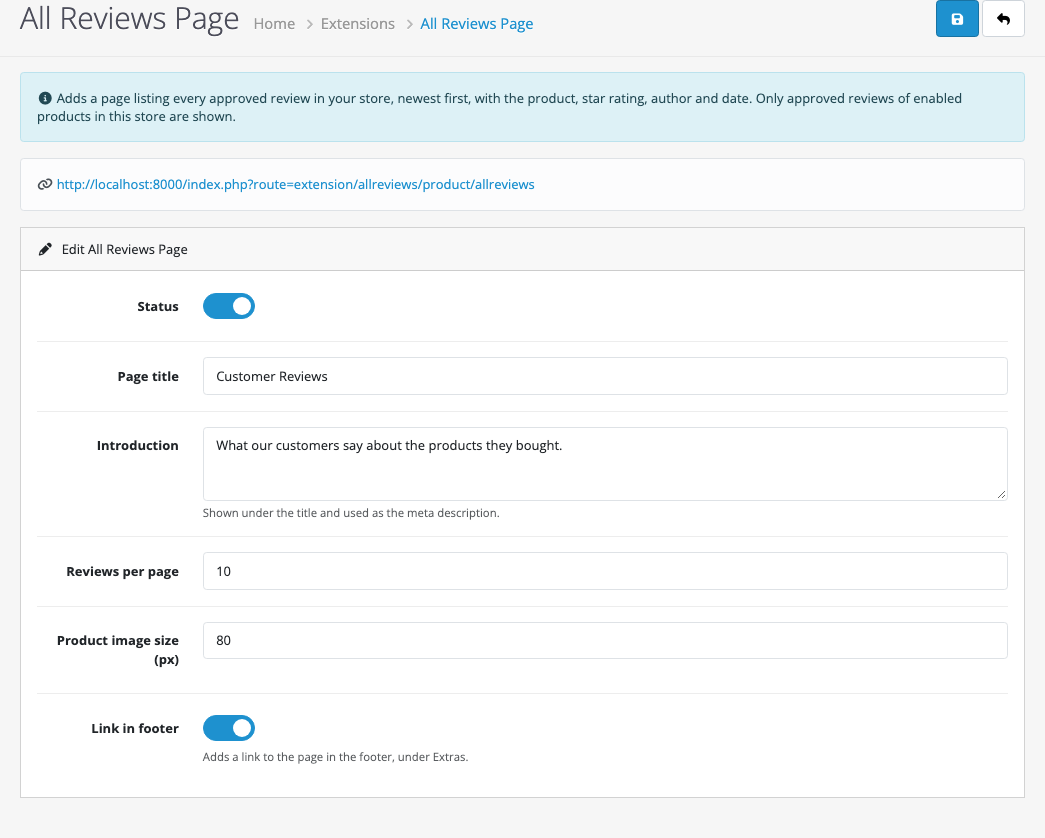
The page lives at index.php?route=extension/allreviews/product/allreviews. If you use SEO URLs, add a keyword for that route in Design → SEO URL (key route, value extension/allreviews/product/allreviews), for example reviews. Reviews must also be switched on in System → Settings → Option → Reviews, or the page returns “not found”.
Only approved reviews: the fix
The OpenCart 3 version had a serious bug: its query selected every row in the review table, without checking the status. Reviews waiting in Catalog → Reviews for your approval, spam included, appeared on the public page straight away.
The OpenCart 4 version only shows reviews you’ve approved, for products that are enabled, already available and assigned to the current store:
WHERE r.`status` = '1'
  AND p.`status` = '1'
  AND p.`date_available` <= NOW()
  AND p2s.`store_id` IS NOT NULL
We tested it with four approved reviews and one pending spam review: the page showed the four and the average of 4.3, and the spam review never appeared. If you still run the OpenCart 3 module, add WHERE r.status = '1' to getReviews() in catalog/model/extension/product/allreviews.php today.
A note on review markup
The page doesn’t add Review or AggregateRating structured data. Google only shows review stars for markup on the page about the reviewed item (the product page), not on a page listing reviews of many products, so putting it here wouldn’t earn stars and could count as misleading. For star ratings in search results, use product structured data on the product pages: see product structured data for OpenCart 4.
Getting more reviews
The page is only as good as the reviews behind it. Most customers will review if you ask at the right moment: a few days after delivery. Automated review request emails for OpenCart 4 do that for you.
Testing
| Test | Result |
|---|---|
| 4 approved reviews (5, 4, 5, 3 stars) and 1 pending | 4 shown, newest first; “Rated 4.3 out of 5 from 4 reviews”; pending review hidden |
| Footer link on | “Customer Reviews” under Extras, after Specials |
| Page title and introduction | Used for the heading, title tag and meta description |
| Status off | The page returns OpenCart’s “page not found” |

Rupak Nepali is a web developer, manage Webocreation website and the author of six books:
Getting Started with OpenCart Module Development (Packt, 2013),
OpenCart Theme and Module Development (Packt, 2015),
OpenCart 4: Dev Guide for Themes & Extensions (2024),
OpenCart 4: User Manual (2025),
Cloudflare for the Enterprise Website (2026) and
The Technical Web Guide for Marketers (2026).
Rupak has built OpenCart stores and extensions since 2010, has published more than 600 tutorials on Webocreation, and shares free OpenCart extensions on GitHub.
Find Rupak on
GitHub | Amazon | LinkedIn | X | YouTube.