What an Autopilot Store Really Means (and What Automation Can’t Fix)
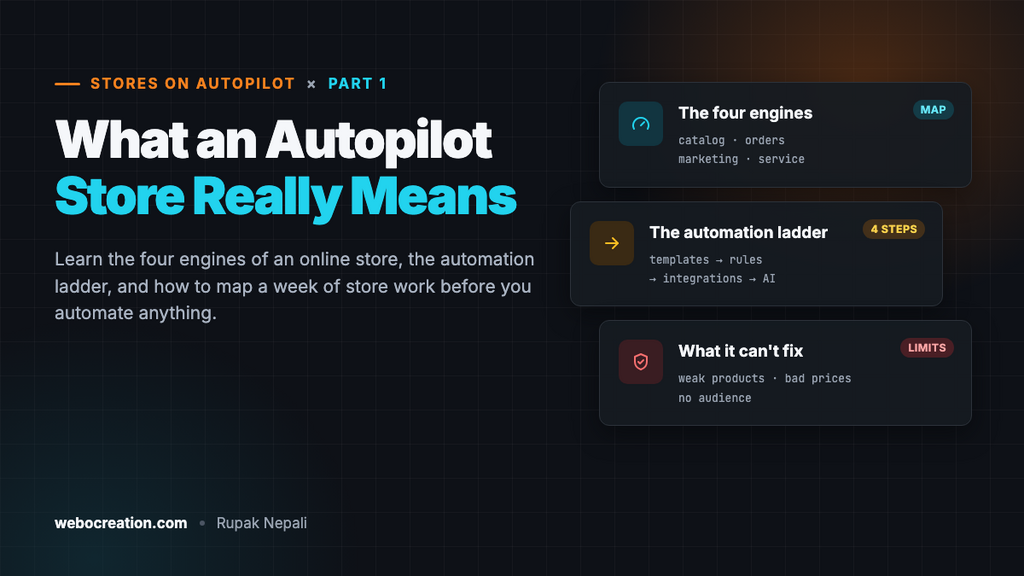
Learn the four engines of an online store, the automation ladder, and how to map a week of store work before you automate anything.
 Rupak NepaliPublished Nov 22, 2026
An airplane on autopilot still has a pilot. The autopilot holds altitude, follows the route and adjusts for wind. The pilot watches the instruments, handles takeoff and landing, and takes over when something unusual happens. Nobody calls that a “passive” flight. It is a flight where the machine does the steady, repeatable work so the human can focus on judgment.
That is the kind of store this series builds. Not a “passive income” fantasy where products sell themselves and money appears. A store where the repeatable work runs on systems, and the owner spends their time on the few decisions that grow the business.
The myth of the passive store
You have probably seen the ads: “Build a store in a weekend and earn while you sleep.” Most of those promises skip three facts.
First, automation multiplies what you already have. If your product is weak, your prices are wrong or nobody knows your store exists, automation will help you fail faster and more efficiently. A good abandoned-cart email cannot rescue a product nobody wants.
Second, automation needs maintenance. Tools change their settings, payment gateways update their APIs, and a supplier’s feed format changes without warning. An automated store still needs an owner who checks the dashboard each week.
Third, the most valuable work in a store is not automatable: choosing products, setting prices, building relationships with suppliers, deciding what your brand stands for. You want more time for that work, not less involvement in it.
So we will use a better definition:
Note
A store on autopilot is a store where every repeatable task is handled by a system, every system is watched by an alert, and the owner reviews the whole machine on a fixed schedule.
Why now: the numbers behind the shift
Three trends make automation more urgent and more achievable than ever.
More of retail is online. US ecommerce reached 17.1% of total retail sales in the second quarter of 2026, and total ecommerce sales for 2025 were about $1.23 trillion (U.S. Census Bureau, 2026). Each percentage point of share means millions more orders, emails and support questions across the industry.
Small businesses are already automating. In a May 2026 survey of 508 US small and medium business owners conducted for Zapier, 76% said they use automation. Among those users, 94% reported benefits: 44% cited more consistency and fewer errors, 44% cited cost savings, and 43% said automation freed time for higher-value work (Zapier, 2026).
AI has become part of how people shop. During the 2025 holiday season, traffic from generative AI tools to US retail sites grew 693% year over year (Adobe, 2026). Salesforce estimated that AI and AI agents influenced 20% of global online holiday sales, about $262 billion (Salesforce, 2026). Shoppers are asking AI assistants what to buy, and stores are using AI to answer questions and process requests. our guide AI Agents and Agentic Commerce covers what that means for your store.
By the numbers
76% of US small-business owners surveyed in 2026 said they already use automation, and 94% of them reported benefits. (Zapier, 2026)
The four engines of a store
Every online store, whatever it sells, runs on four engines. Thinking in engines helps you see where automation fits and stops you from buying random tools.
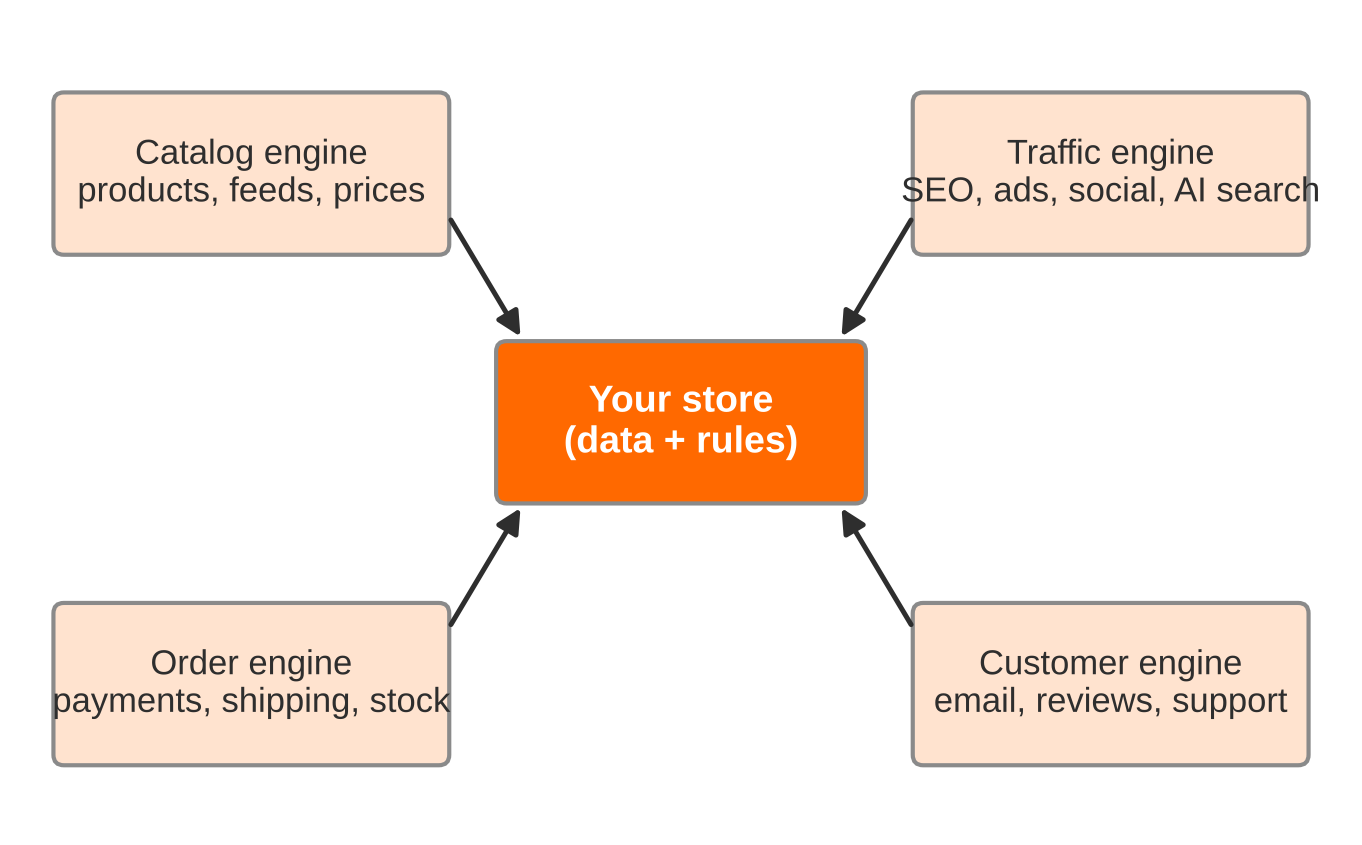
The catalog engine keeps products accurate and attractive: titles, descriptions, images, prices, stock levels and the feeds that send your products to Google, Meta and marketplaces. (see Catalog on Autopilot)
The order engine turns a click into a delivered package: payment, fraud checks, fulfillment, shipping, invoices, returns and inventory. (see Orders, Payments and Fulfillment and Inventory and Suppliers)
The traffic engine brings shoppers to the store: search engines, AI assistants, ads, social media and content. (see Search Traffic That Compounds and Ads and Retargeting with Guardrails)
The customer engine turns one-time buyers into repeat buyers: email and SMS, reviews, referrals, loyalty and support. (see Email and SMS Flows That Sell While You Sleep, Reviews, Social Proof and Referrals and Customer Service Without the Inbox)
All four engines share one thing: they run on your store’s data. A product with a missing weight breaks shipping rules. A customer with no email address cannot receive a cart reminder. A category with no description gives search engines nothing to rank. That is why our guide Building an Automation-Ready Store spends time on clean store data before we automate anything.
Mapping a week of store work
Before you automate, measure. Most owners underestimate how much time small tasks take, because the tasks are scattered through the day. Ten minutes answering an email here, fifteen minutes updating stock there.
For one week, keep a simple log. Each time you do store work, write down:
- What the task was
- How long it took
- How often it happens (daily, weekly, per order)
- Whether you did it the same way as last time
At the end of the week, group the tasks by engine. You will usually find that a handful of tasks take most of your time. Common culprits:
- Answering “Where is my order?” and other repeat questions
- Writing or editing product descriptions
- Copying orders to a supplier or shipping tool
- Updating stock levels
- Sending follow-up emails by hand
- Checking ad spend and pausing campaigns
- Pulling numbers from different tools into a spreadsheet
The last question in your log, “Did I do it the same way as last time?”, is the most important. If you do a task the same way every time, a system can do it. If every instance needs a different decision, keep it human, at least for now.
The automation ladder
Not every task should jump straight to AI. Automation has four rungs, and each rung builds on the one below it.
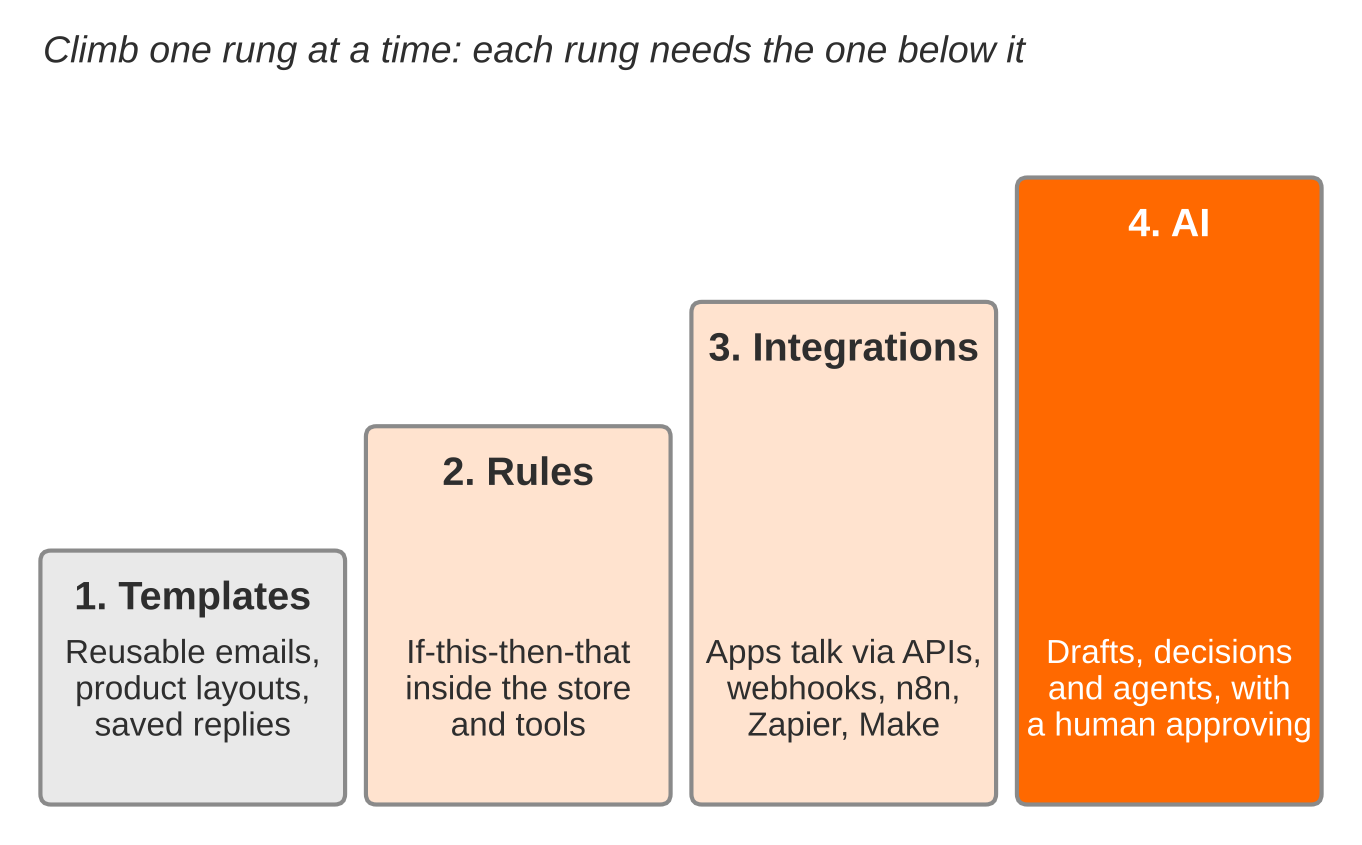
Rung 1: Templates. You still do the task, but faster. Saved email replies, product page layouts, a standard returns message, a checklist for adding new products. Templates are free, take minutes to create and remove most of the “blank page” time.
Rung 2: Rules. The system does the task when a condition is met. “When an order’s status changes to Shipped, email the customer.” “When stock falls below 5, disable the Add to Cart button.” “When the cart total is over $75, make shipping free.” Most rules live inside your store platform or email tool.
Rung 3: Integrations. Two or more systems pass data to each other without you. A new order is sent to your supplier. A delivered package triggers a review request. A new customer is added to your email list with their purchase history. Integrations use APIs, webhooks, scheduled jobs and connector tools like n8n, Zapier or Make.
Rung 4: AI. The system drafts, decides or acts in situations that are not perfectly predictable. An AI assistant answers a customer question using your policies. An AI model drafts a product description from supplier specs. An agent checks competitor prices and suggests changes. AI works best on top of the lower rungs: it needs your templates as examples, your rules as limits and your integrations as data.
Tip
Climb one rung at a time. If you cannot write a template for a task, you are not ready to write a rule for it. If you cannot write a rule, you are not ready to hand it to AI.
What automation cannot fix
Be honest with yourself before investing time in automation. These problems need business decisions, not systems:
- Product-market fit. If visitors come and do not buy, look at the product, price and offer first.
- Margins. Automation saves time, but it rarely saves enough money to fix a product that loses money on every sale after shipping, fees and returns.
- No audience. Automated emails need subscribers. Automated ads need a budget and a product worth advertising.
- A broken checkout. Baymard Institute estimates that the average large ecommerce site could increase conversions by 35.26% by fixing documented checkout usability issues (Baymard Institute, 2025). Fix the leaks before you pour in more traffic.
Build it: your one-page automation map
Your first build is a planning document, not software. It becomes the to-do list for the rest of this series.
- Take your one-week task log.
- List every task that took more than 30 minutes per week in total.
- For each task, record the hours per week, whether it is repeatable, which engine it belongs to and which rung of the ladder it can reach.
- Sort by hours per week, largest first.
- Circle the top three repeatable tasks. Those are your first automations.
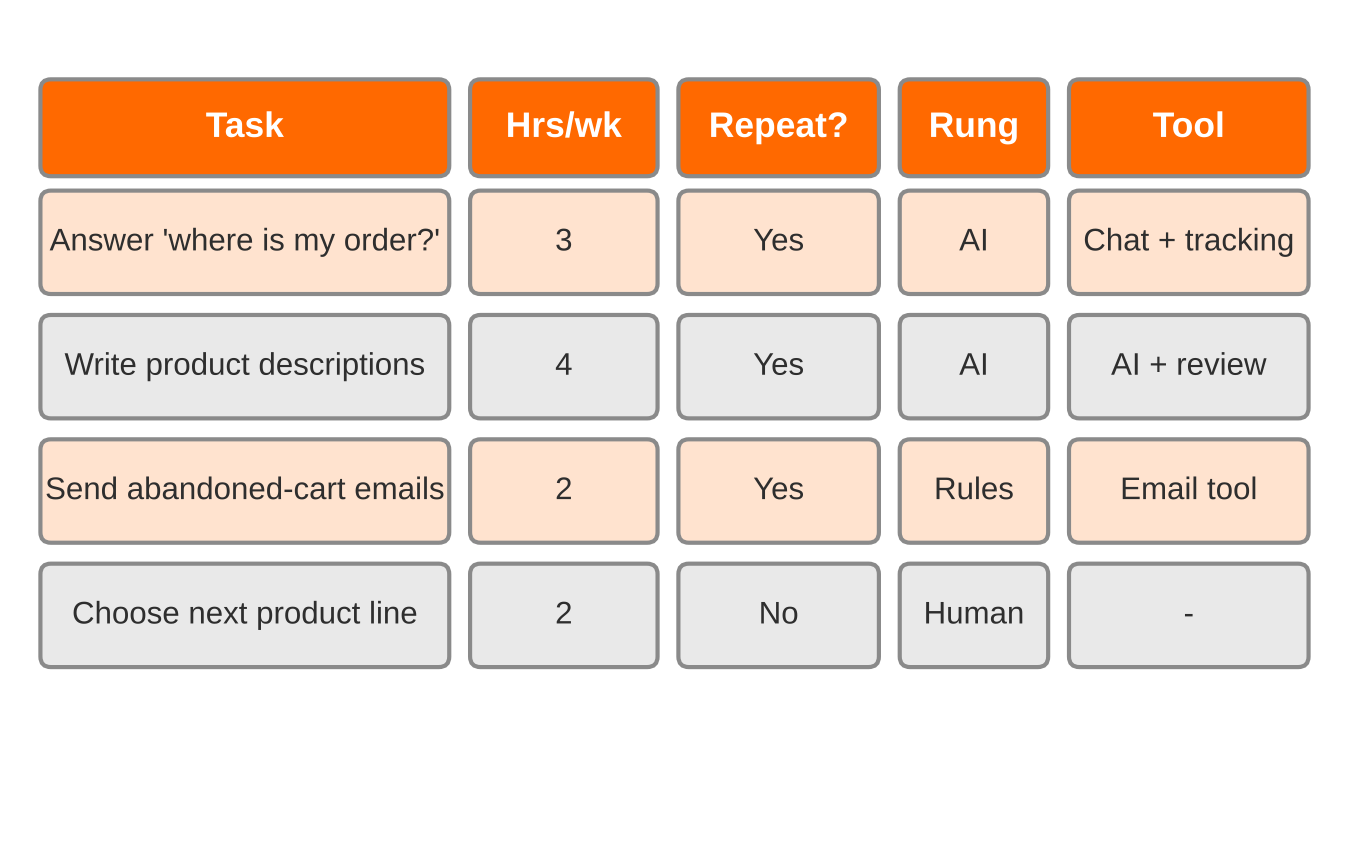
The example above shows four rows from a typical small store. Notice “Choose next product line.” It takes time, but it is not repeatable and should stay human. That is exactly the kind of work you are freeing time for.
Other platforms
The automation map is platform-neutral. Shopify, WooCommerce, PrestaShop and OpenCart stores all produce the same kinds of tasks. Only the tools in the last column change.
Tools
| Need | Free option | Paid option |
|---|---|---|
| Task and time log | Google Sheets, a paper notebook | Toggl Track, Clockify Pro |
| Automation map | Google Sheets, the worksheet on the companion page | Notion, Airtable |
| Saved replies (Rung 1) | Gmail templates, OpenCart order status comments | Help desk tools (see Customer Service Without the Inbox) |
Guardrails
- Do not automate a mess. If the manual process is unclear, write it down first. Automation copies your process exactly, including its mistakes.
- One owner per automation. Even if you are a team of one, write down who checks each automation and how often.
- Keep a list. Record every automation you create: what triggers it, what it does and where it lives. You will thank yourself when something breaks six months from now.
Autopilot checklist
- ☐ I logged one full week of store tasks with time spent.
- ☐ I grouped tasks into the four engines.
- ☐ I marked each task as repeatable or judgment-based.
- ☐ I assigned each repeatable task a ladder rung.
- ☐ I picked my top three automations.
- ☐ I started an automation register (what, trigger, tool, owner).
This article is part of the book Stores That Sell on Autopilot by Rupak Nepali.
Get every chapter, the printable checklists and the worksheets in one place. See the automations running live at demo.webocreation.com. Want it done for you? Ask about the Stores That Sell on Autopilot service.
← Previous: Series overview | Next: The Autopilot Stack →
The Stores That Sell on Autopilot series
- Start here: Series overview
- Part 1: What "Autopilot" Really Means (you are here)
- Part 2: The Autopilot Stack
- Part 3: Building an Automation-Ready Store
- Part 4: Catalog on Autopilot
- Part 5: Orders, Payments and Fulfillment
- Part 6: Inventory and Suppliers
- Part 7: Search Traffic That Compounds
- Part 8: Email and SMS Flows That Sell While You Sleep
- Part 9: Reviews, Social Proof and Referrals
- Part 10: Ads and Retargeting with Guardrails
- Part 11: Customer Service Without the Inbox
- Part 12: AI Agents and Agentic Commerce
- Part 13: The 30-Minute Weekly Owner Routine
- Part 14: Case Study: Automating the Demo Store
- Resource: The Complete Ecommerce Automation Checklist
- Resource: Ecommerce Automation Tools Directory: Free and Paid Options
- Resource: Copy-Ready Email Templates for Ecommerce Flows
- Resource: OpenCart Automation Quick Reference: Menus, Events and Cron
Sources
- Adobe and Adobe Digital Insights: 2025 holiday shopping recap (January 2026), AI traffic reports and holiday mobile forecasts. business.adobe.com / news.adobe.com
- Baymard Institute: Cart abandonment rate statistics (updated September 22, 2025) and checkout usability research. baymard.com
- Salesforce: AI and agents account for $262 billion of 2025 holiday spend (January 2026). salesforce.com
- U.S. Census Bureau: Quarterly Retail E-Commerce Sales, Q2 2026 (August 2026) and Q4 2025 (March 2026). census.gov
- Zapier: SMB automation survey conducted by Centiment, May 2026. zapier.com

Rupak Nepali is a web developer, manage Webocreation website and the author of six books:
Getting Started with OpenCart Module Development (Packt, 2013),
OpenCart Theme and Module Development (Packt, 2015),
OpenCart 4: Dev Guide for Themes & Extensions (2024),
OpenCart 4: User Manual (2025),
Cloudflare for the Enterprise Website (2026) and
The Technical Web Guide for Marketers (2026).
Rupak has built OpenCart stores and extensions since 2010, has published more than 600 tutorials on Webocreation, and shares free OpenCart extensions on GitHub.
Find Rupak on
GitHub | Amazon | LinkedIn | X | YouTube.