Six Email and SMS Flows That Sell While You Sleep
Build welcome, browse abandonment, cart abandonment, post-purchase, review request and win-back flows, with benchmarks and deliverability tips.
 Rupak NepaliPublished Nov 22, 2026
If you build only one set of automations from this series, build these. Automated emails and texts are the closest thing ecommerce has to a store that sells while the owner sleeps. They reach people at the moment they are most interested, with a message that matches what they just did.
The manual way, and what it misses
A store without automation sends a newsletter when the owner has time. Everyone gets the same email. Abandoned carts are never followed up, new subscribers hear nothing until the next newsletter, and past customers drift away without a word.
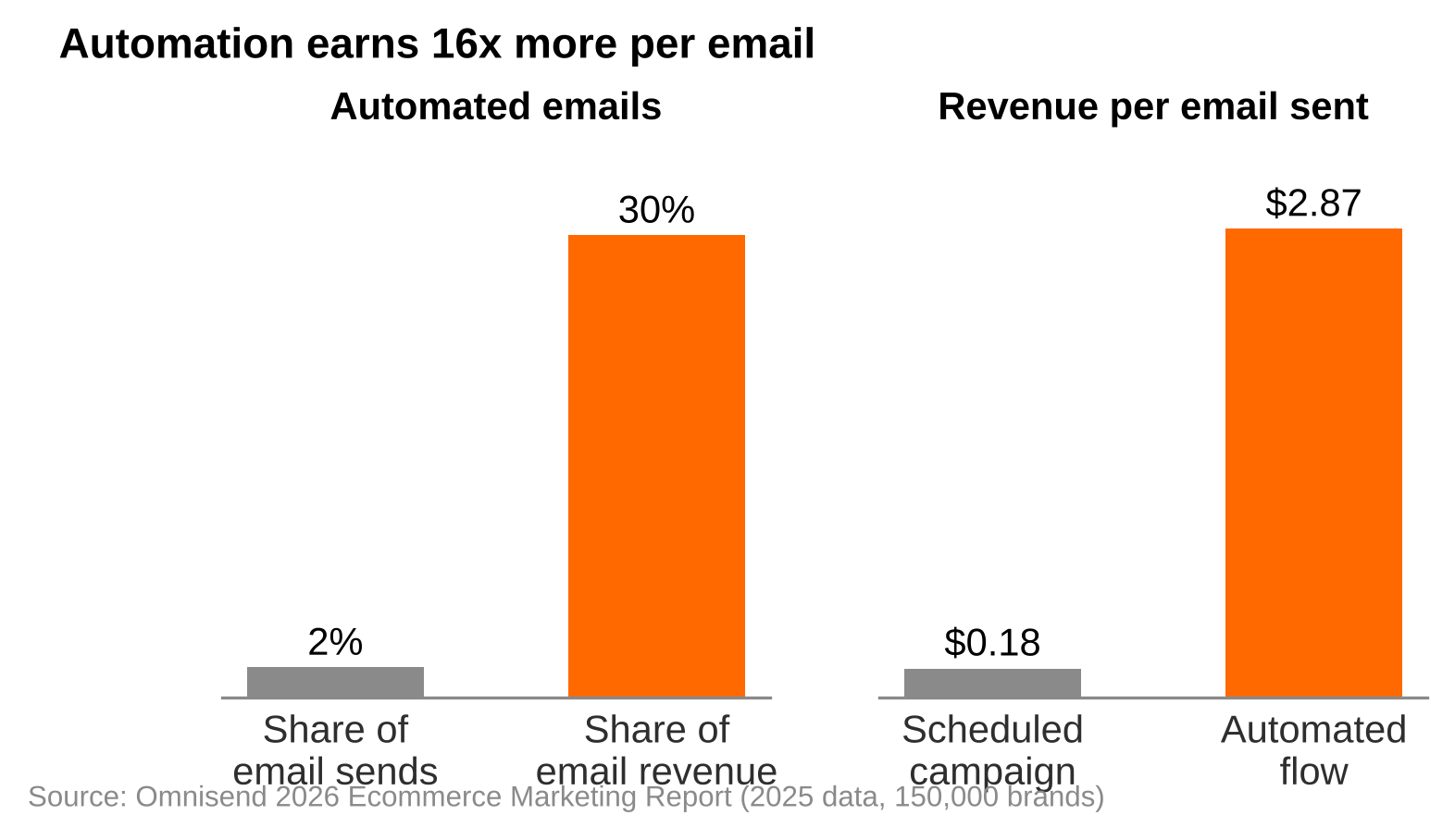
The numbers show what that costs. Omnisend’s 2026 report, based on 27 billion emails sent by 150,000 brands in 2025, found that automated emails made up just 2% of email sends but generated 30% of email revenue. Each automated email earned $2.87 on average, compared with $0.18 for a scheduled campaign: about 16 times more (Omnisend, 2026).
Email as a channel also pays back well overall. Litmus has long reported an average return of $36 for every $1 spent on email marketing, with retail and ecommerce among the highest-returning industries in its research (Litmus).
By the numbers
Automated emails were 2% of sends but 30% of email revenue, earning $2.87 per send versus $0.18 for campaigns. (Omnisend 2026 Ecommerce Marketing Report)
Building the list
Flows need subscribers. Grow your list on purpose:
- A signup popup or banner with a clear reason to join: a first-order discount, free shipping, early access or a useful guide. Show it after a delay or on exit intent, not the instant someone arrives, and make it easy to close on mobile.
- Checkout opt-in: a clear, unticked checkbox for marketing emails.
- Account creation after purchase, with the opt-in offered again.
- Lead magnets that fit your products: a size guide, a care guide, a buying checklist.
- Back-in-stock and price-drop alerts (see Inventory and Suppliers) that also ask for marketing consent.
Consent and the law. Follow the rules where your customers live. In the US, the CAN-SPAM Act requires an accurate sender, a physical address and a working unsubscribe link. The EU and UK require clear opt-in consent for marketing email. SMS marketing in the US requires express written consent under the TCPA and carrier rules. When in doubt, use clear opt-in everywhere and keep records of when and how each person subscribed.
The six core flows
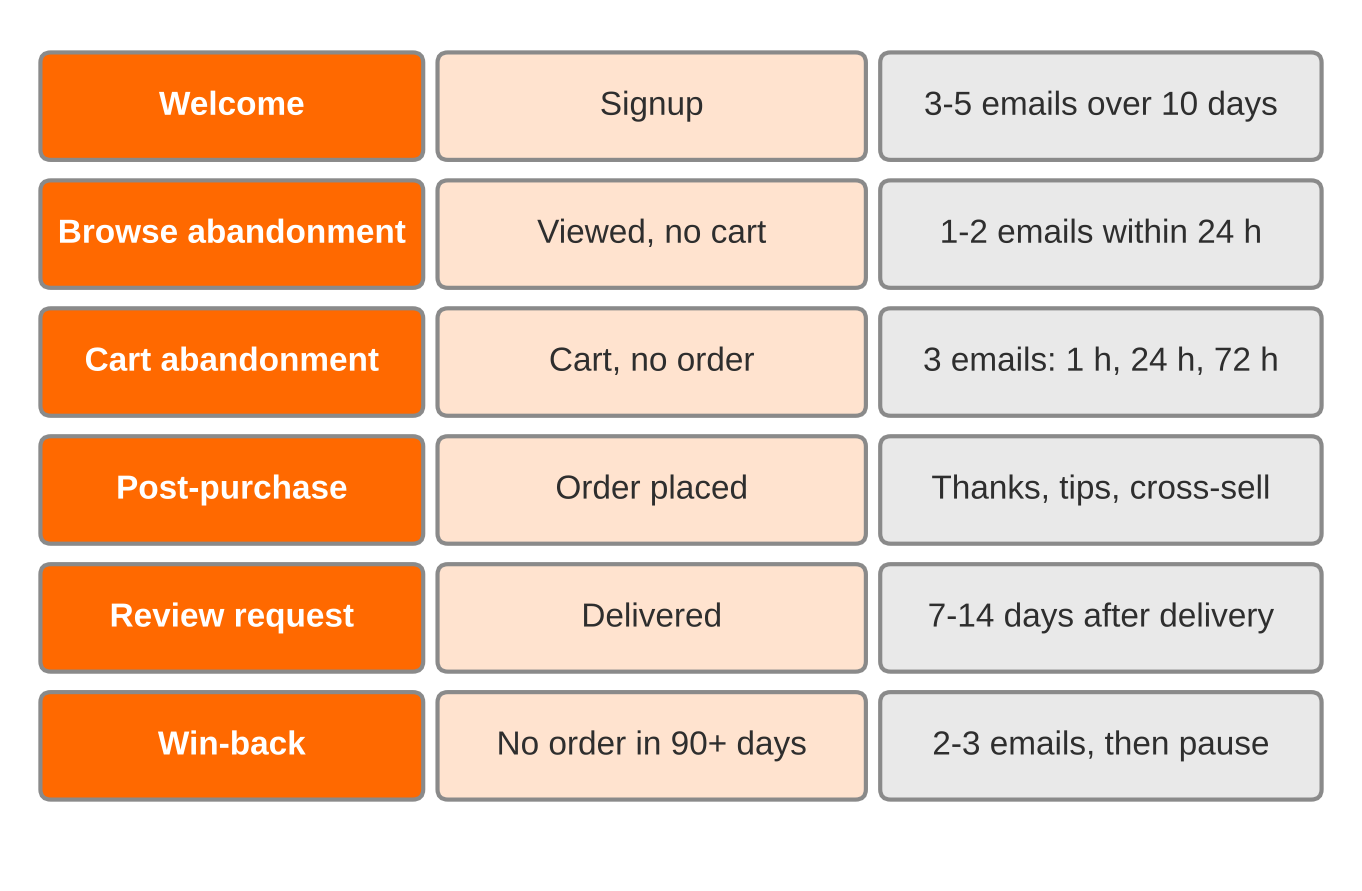
These six flows cover the main moments in a customer’s life with your store. Build them in this order.
Flow 1: Welcome series
Trigger: someone subscribes. Goal: first purchase and trust.
- Email 1 (immediately): thank them, deliver the promised discount or guide, show bestsellers.
- Email 2 (day 2): your story and what makes your store different.
- Email 3 (day 4): social proof: reviews, customer photos.
- Email 4 (day 7): help choosing: a buying guide or top categories.
- Email 5 (day 10): reminder that the welcome offer is expiring, if you gave one.
Welcome emails get strong engagement. In Klaviyo’s 2026 benchmark data, the welcome series flow had an average email click rate of 10.0%, with the top 10% of brands reaching 18.3% (Klaviyo, 2026).
Flow 2: Browse abandonment
Trigger: a known subscriber views a product but does not add it to the cart. Goal: bring them back.
- One or two emails within 24 hours showing the viewed product, similar items and a reason to buy (reviews, free shipping, easy returns). No discount by default.
Flow 3: Cart abandonment
Trigger: a known contact adds to cart or starts checkout and does not order. Goal: recover the sale.
- Email 1 (about 1 hour): a friendly reminder with the cart contents and a direct link back.
- Email 2 (about 24 hours): answer objections: shipping cost, returns, reviews, questions.
- Email 3 (about 72 hours): last reminder; optionally a modest incentive for first-time customers only.
Cart abandonment flows are usually the highest-earning automation. Klaviyo’s 2024 benchmark report found abandoned-cart flows had the highest average revenue per recipient ($3.65) and placed-order rate (3.33%) of all flows, with the top 10% of brands reaching a 7.69% placed-order rate (Klaviyo, 2024). Omnisend found that abandoned-cart and welcome messages together drove 76% of all automation-generated orders (Omnisend, 2026).
Flow 4: Post-purchase
Trigger: order placed. Goal: reduce anxiety, reduce support tickets, set up the next purchase.
- Order confirmation (transactional, from the store).
- “What happens next” email: shipping timeline, how to track.
- After delivery: how to use or care for the product, tips, a related product.
- 30 to 60 days later (depending on the product): replenishment reminder or cross-sell.
Flow 5: Review request
Trigger: delivery confirmed (or a set number of days after shipping). Goal: reviews and feedback. Covered in detail in our guide Reviews, Social Proof and Referrals.
Flow 6: Win-back
Trigger: no purchase in a period longer than your normal buying cycle (often 90 to 180 days). Goal: reactivate or clean the list.
- Email 1: “We miss you,” new arrivals, what has changed.
- Email 2: a reason to return: an offer, a guide or a bestseller.
- Email 3: “Do you still want to hear from us?” with a one-click option to stay.
- Then stop sending marketing email to people who never respond. It protects your sender reputation.
SMS: shorter, faster, more personal
Text messages are read quickly and work well for time-sensitive messages: cart reminders, shipping updates, flash sales, back-in-stock alerts. They are also more intrusive and cost money per message. Use SMS for fewer, more important messages, and always with proper consent. Omnisend’s 2025 report found automated SMS made up 9% of SMS sends but drove 18% of SMS orders (Omnisend, 2025).
Segmentation by behavior
The same email to everyone performs worse than the right email to the right group. Start with these segments:
- Subscribers who have never purchased
- First-time customers
- Repeat customers (2+ orders)
- VIPs (top 10% by total spend)
- At-risk customers (past their usual reorder time)
- Category interest (based on views and purchases)
Use segments to change what you send, not just who gets it. VIPs get early access; first-time buyers get a second-purchase incentive; never-purchased subscribers get trust-building content.
Campaigns versus flows
Flows run forever on triggers. Campaigns are one-off sends to a segment: a new product launch, a seasonal sale, a newsletter. You need both. A simple rhythm:
- Flows: always on, reviewed monthly.
- Campaigns: one or two a week, planned a month ahead in a content calendar.
- Frequency caps: limit how many marketing emails one person receives per week, so a subscriber in three flows and a campaign does not get five emails in two days.
Deliverability basics
The best email is worthless in a spam folder. Since 2024, Gmail and Yahoo have required bulk senders to authenticate their email and make unsubscribing easy. Set up:
- SPF: a DNS record listing the servers allowed to send email for your domain.
- DKIM: a digital signature that proves the email was not changed. Your email tool gives you the DNS records.
- DMARC: a DNS policy telling inbox providers what to do with email that fails SPF or DKIM. Start with p=none and monitoring, then tighten.
- A sending subdomain (for example, mail.yourstore.com) for marketing email, separate from your everyday business email.
- One-click unsubscribe in every marketing email.
- List hygiene: remove hard bounces immediately and suppress people who have not opened or clicked in six months.
- Low spam complaint rates: Gmail asks bulk senders to keep reported spam well below 0.3%.
Build it: a three-email abandoned-cart flow connected to OpenCart
- Choose an email tool with an OpenCart integration (or connect through n8n, Make or Zapier).
- Install the integration so it sends customers, products, carts and orders to the email tool. Check that it tracks “started checkout” events with the cart contents and a restore-cart link.
- Confirm your site captures email early: in the signup popup, at the first checkout step and for logged-in customers.
- In the email tool, create a flow triggered by “Started Checkout” (or “Added to Cart”), with the exit condition “Placed Order.”
- Add Email 1 at 1 hour: subject line such as “Still thinking it over?”, the cart items with images, one button back to the cart.
- Add Email 2 at 24 hours: answer the top three questions shoppers ask before buying, plus two short reviews.
- Add Email 3 at 72 hours: a final reminder. If you add an incentive, show it only to first-time customers.
- Send test events from staging and check every email on a phone.
- Turn the flow on. Review results after 30 days: open rate, click rate, placed-order rate and revenue per recipient.
Other platforms
Shopify includes a basic abandoned checkout email, and Klaviyo, Omnisend and others offer deep Shopify integrations. WooCommerce works with the same email tools through official plugins, and AutomateWoo builds flows inside WordPress. PrestaShop connects through modules from the same providers. The six flows, timing and segmentation are platform-independent.
Tools
| Need | Free option | Paid option |
|---|---|---|
| Email flows | Free tiers of Brevo, MailerLite, Omnisend, Klaviyo (limited contacts or sends) | Klaviyo, Omnisend, Mailchimp Standard, ActiveCampaign |
| SMS | Pay-per-message on email tools that include SMS | Klaviyo SMS, Omnisend SMS, Postscript, Attentive |
| Popups | Built into most email tools | Privy, OptiMonk |
| Deliverability checks | MXToolbox, Google Postmaster Tools | Deliverability monitoring services |
Guardrails
- Every flow has an exit condition so buyers stop receiving reminders the moment they buy.
- Discounts are rules, not reflexes. Limit incentives to first-time buyers or set a minimum order, so customers do not learn to abandon carts on purpose.
- Frequency caps protect against too many emails at once.
- SPF, DKIM and DMARC pass, checked every quarter.
- Monthly flow review: one metric per flow, compared with last month.
Autopilot checklist
- ☐ A signup popup and checkout opt-in grow my list with clear consent.
- ☐ Welcome, browse abandonment, cart abandonment, post-purchase, review request and win-back flows are live.
- ☐ Every flow has an exit condition and is tested on mobile.
- ☐ Customers are segmented by purchase behavior.
- ☐ Campaigns follow a monthly calendar with frequency caps.
- ☐ SPF, DKIM and DMARC pass; marketing email uses a sending subdomain.
- ☐ Unengaged contacts are suppressed after six months.
- ☐ I review each flow’s key metric monthly.
This article is part of the book Stores That Sell on Autopilot by Rupak Nepali.
Get every chapter, the printable checklists and the worksheets in one place. See the automations running live at demo.webocreation.com. Want it done for you? Ask about the Stores That Sell on Autopilot service.
← Previous: Search Traffic That Compounds | Next: Reviews, Social Proof and Referrals →
The Stores That Sell on Autopilot series
- Start here: Series overview
- Part 1: What "Autopilot" Really Means
- Part 2: The Autopilot Stack
- Part 3: Building an Automation-Ready Store
- Part 4: Catalog on Autopilot
- Part 5: Orders, Payments and Fulfillment
- Part 6: Inventory and Suppliers
- Part 7: Search Traffic That Compounds
- Part 8: Email and SMS Flows That Sell While You Sleep (you are here)
- Part 9: Reviews, Social Proof and Referrals
- Part 10: Ads and Retargeting with Guardrails
- Part 11: Customer Service Without the Inbox
- Part 12: AI Agents and Agentic Commerce
- Part 13: The 30-Minute Weekly Owner Routine
- Part 14: Case Study: Automating the Demo Store
- Resource: The Complete Ecommerce Automation Checklist
- Resource: Ecommerce Automation Tools Directory: Free and Paid Options
- Resource: Copy-Ready Email Templates for Ecommerce Flows
- Resource: OpenCart Automation Quick Reference: Menus, Events and Cron
Sources
- Klaviyo: Abandoned cart benchmarks (2024 Benchmark Report) and 2026 Omnichannel Benchmark Report. klaviyo.com
- Litmus: The ROI of Email Marketing. litmus.com
- Omnisend: 2026 and 2025 Ecommerce Marketing Reports. omnisend.com
- Zapier: SMB automation survey conducted by Centiment, May 2026. zapier.com

Rupak Nepali is a web developer, manage Webocreation website and the author of six books:
Getting Started with OpenCart Module Development (Packt, 2013),
OpenCart Theme and Module Development (Packt, 2015),
OpenCart 4: Dev Guide for Themes & Extensions (2024),
OpenCart 4: User Manual (2025),
Cloudflare for the Enterprise Website (2026) and
The Technical Web Guide for Marketers (2026).
Rupak has built OpenCart stores and extensions since 2010, has published more than 600 tutorials on Webocreation, and shares free OpenCart extensions on GitHub.
Find Rupak on
GitHub | Amazon | LinkedIn | X | YouTube.