AI Agents and Agentic Commerce: A Practical Guide for Store Owners
What AI agents can safely do in your store, how to keep a human in charge, and how to get your store ready for AI shoppers.
 Rupak NepaliPublished Nov 22, 2026
An AI assistant answers when asked. An AI agent takes steps toward a goal: it gathers information, decides what to do next, uses tools and reports back. Agents are the newest rung of the automation ladder and the one most surrounded by hype. This article shows what agents can safely do in a store today, how to keep a human in charge, and how to prepare your store for AI agents that shop on behalf of customers.
Two sides of agentic commerce
Agents affect your store in two ways.
Agents working for you. Software agents that research, monitor, draft and act on your behalf: checking competitor prices, writing weekly reports, sorting supplier emails, preparing product listings.
Agents working for your customers. AI assistants that search, compare and, increasingly, buy on a shopper’s behalf. When a customer asks an assistant to “find a waterproof 30-liter hiking backpack under $100 that ships by Friday,” the assistant reads stores, feeds and reviews to decide which products to recommend.
Both are growing quickly. Salesforce estimated that AI and agents influenced 20% of global online sales during the 2025 holiday season, about $262 billion, and that retailers who deployed their own AI agents grew sales 6.2% year over year compared with 3.9% for those who did not (Salesforce, 2026).
By the numbers
AI and agents influenced an estimated $262 billion, or 20%, of global online holiday sales in 2025. (Salesforce)
What agents can safely do in a store today
Match the task to the risk. The more reversible and lower-cost a mistake is, the more freedom an agent can have.
| Task | Risk if wrong | Agent freedom |
|---|---|---|
| Summarize last week’s sales, traffic and reviews | Low | Run and report automatically |
| Research competitor prices for your top products | Low | Run and report automatically |
| Draft product listings or blog posts | Low to medium | Draft only; human publishes |
| Sort and draft replies to supplier emails | Medium | Draft only; human sends |
| Suggest price changes | Medium | Suggest; human approves |
| Update stock from supplier data | Medium | Act within rules; alert on anomalies |
| Issue refunds or discounts | High | Human only, or tight limits |
| Spend ad budget or place purchase orders | High | Human approval required |
Agent workflow design: keep a human in charge
Every store agent should follow the same loop:
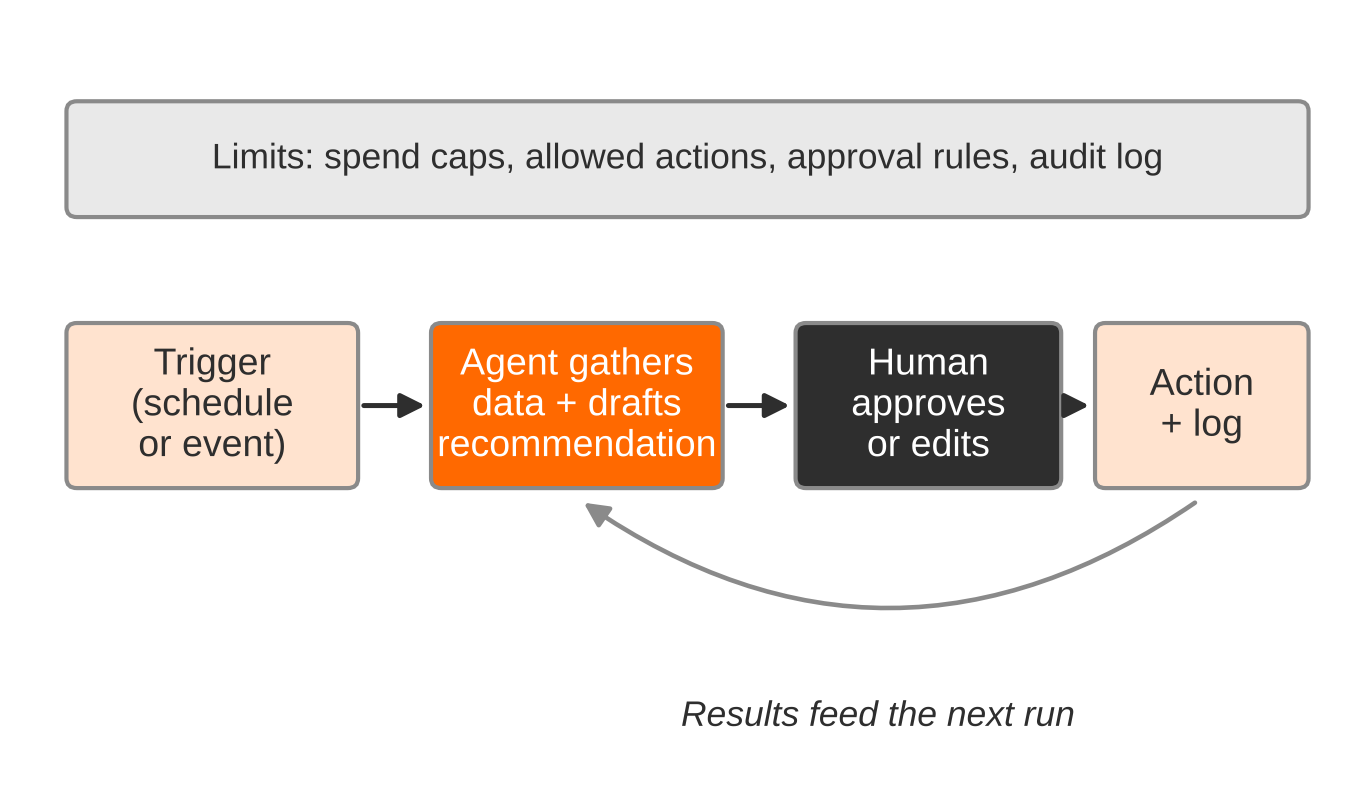
- Trigger: a schedule (every Monday at 7 a.m.) or an event (a new supplier price file).
- Gather and draft: the agent reads data through approved tools and prepares a recommendation or draft.
- Human approval: you approve, edit or reject, ideally with one click from an email or chat message.
- Action and log: the approved action runs, and the agent records what it did and why.
- Learn: the results feed the next run (for example, last week’s price changes and their effect on sales).
And every agent has limits written down:
- Allowed tools: which systems it can read and which it can change.
- Spending caps: maximum money it can commit without approval (often zero).
- Action limits: for example, no price change greater than 10%, no more than 20 products per run.
- Approval rules: which actions always need a human.
- Audit log: every action, input and output recorded.
Building agents with tools you already have
You do not need a research lab. Practical options:
- Connector tools with AI steps. n8n, Make and Zapier let you add AI model steps and “agent” nodes to workflows, connected to your store, spreadsheets, email and chat. This is the most practical route for most stores.
- AI assistants with connectors. Many AI assistants can connect to your email, documents, spreadsheets and other apps through integrations and the Model Context Protocol (MCP), an open standard for connecting AI tools to data and actions. Several commerce and marketing platforms now offer MCP servers.
- Custom scripts calling an AI model’s API, for developers who want full control.
Start with read-only agents (reporting and research) before giving any agent write access to your store.
Getting your store ready for AI shoppers
When a shopper’s AI assistant evaluates your store, it does not admire your banner. It reads data. Make the data excellent:
- Complete, accurate product data: structured attributes, dimensions, materials, compatibility, GTINs (see Building an Automation-Ready Store and Catalog on Autopilot).
- Live price and availability in your pages, structured data and feeds (see Search Traffic That Compounds).
- Machine-readable policies: shipping times and costs, return window and conditions, warranty, all in plain text on crawlable pages and in structured data where supported.
- Real reviews with verified-buyer labels (see Reviews, Social Proof and Referrals).
- Fast, accessible pages that work without complex scripts for basic content.
- Clear checkout with guest option and common payment methods. As assistants begin completing purchases, simple checkouts will be easier for them to use.
- Open feeds: Merchant Center and Meta catalogs kept current. Watch for new agentic checkout programs from AI and payment providers, and evaluate them as they mature.
Tip
Test your own store like an AI shopper. Ask two or three AI assistants to recommend a product in your category with specific requirements, and see whether your store appears and whether the details are right. Wrong details usually trace back to missing or unclear facts on your pages.
Costs, privacy and data handling
- Costs: AI usage is often billed per request or per amount of text processed. Agents that run frequently can add up. Set monthly usage caps and alerts with your AI provider and connector tool.
- Privacy: do not send more customer data to AI tools than the task needs. Use order IDs instead of full addresses where possible. Check each provider’s data retention and training policies, and list AI providers in your privacy policy.
- Security: give agents their own API keys with the minimum permissions, and never paste admin passwords into an AI tool.
- Accuracy: AI can be confidently wrong. Approval steps and audit logs are your defense.
Build it: a weekly agent that checks competitor prices and drafts recommendations
- List your top 20 products by revenue, with your price, cost and margin floor, in a spreadsheet.
- For each product, list two or three competitor product page URLs.
- In n8n, Make or Zapier, create a workflow scheduled for Monday morning.
- For each competitor URL, fetch the page and extract the price (use a scraping step or an AI step instructed to return only the price and availability). Respect each website’s terms of use.
- Write the results to the spreadsheet.
- Add an AI step with instructions: compare prices; for each product, recommend keep, lower or raise, with a one-line reason; never recommend a price below the margin floor; flag missing data.
- Email or message yourself the recommendations as a short table with approve/reject options.
- For approved changes, a second workflow updates the price in OpenCart and logs the change.
- After four weeks, compare sales before and after changes, and refine the instructions.
Other platforms
Shopify offers its own AI tools and Flow automations, plus apps and MCP integrations for agents. WooCommerce and PrestaShop expose REST APIs that connector tools and agents can use. The agent loop, limits and approval rules are the same on every platform.
Tools
| Need | Free option | Paid option |
|---|---|---|
| Agent workflows | n8n self-hosted | n8n cloud, Make, Zapier with AI agents |
| AI models | Free tiers of AI assistants (manual use) | AI model APIs, paid assistant plans with connectors |
| Price monitoring | Custom workflow | Price monitoring services (e.g., Prisync) |
| Audit log | Google Sheets log | Database or logging service |
Guardrails
- Read-only first. Give write access only after weeks of accurate recommendations.
- Written limits for tools, spend, change size and approvals.
- Every action logged with inputs and reasons.
- Usage caps on AI and connector costs.
- Minimum customer data sent to AI providers.
Autopilot checklist
- ☐ I classified agent tasks by risk and set freedom levels.
- ☐ Every agent follows trigger, draft, approve, act and log.
- ☐ Each agent has written limits and its own minimal API key.
- ☐ My product data, policies and feeds are ready for AI shoppers.
- ☐ I tested how AI assistants describe my store and fixed errors.
- ☐ AI usage caps and alerts are set.
- ☐ A weekly price-check agent drafts recommendations for approval.
This article is part of the book Stores That Sell on Autopilot by Rupak Nepali.
Get every chapter, the printable checklists and the worksheets in one place. See the automations running live at demo.webocreation.com. Want it done for you? Ask about the Stores That Sell on Autopilot service.
← Previous: Customer Service Without the Inbox | Next: The 30-Minute Weekly Owner Routine →
The Stores That Sell on Autopilot series
- Start here: Series overview
- Part 1: What "Autopilot" Really Means
- Part 2: The Autopilot Stack
- Part 3: Building an Automation-Ready Store
- Part 4: Catalog on Autopilot
- Part 5: Orders, Payments and Fulfillment
- Part 6: Inventory and Suppliers
- Part 7: Search Traffic That Compounds
- Part 8: Email and SMS Flows That Sell While You Sleep
- Part 9: Reviews, Social Proof and Referrals
- Part 10: Ads and Retargeting with Guardrails
- Part 11: Customer Service Without the Inbox
- Part 12: AI Agents and Agentic Commerce (you are here)
- Part 13: The 30-Minute Weekly Owner Routine
- Part 14: Case Study: Automating the Demo Store
- Resource: The Complete Ecommerce Automation Checklist
- Resource: Ecommerce Automation Tools Directory: Free and Paid Options
- Resource: Copy-Ready Email Templates for Ecommerce Flows
- Resource: OpenCart Automation Quick Reference: Menus, Events and Cron
Sources
- Salesforce: AI and agents account for $262 billion of 2025 holiday spend (January 2026). salesforce.com
- Zapier: SMB automation survey conducted by Centiment, May 2026. zapier.com

Rupak Nepali is a web developer, manage Webocreation website and the author of six books:
Getting Started with OpenCart Module Development (Packt, 2013),
OpenCart Theme and Module Development (Packt, 2015),
OpenCart 4: Dev Guide for Themes & Extensions (2024),
OpenCart 4: User Manual (2025),
Cloudflare for the Enterprise Website (2026) and
The Technical Web Guide for Marketers (2026).
Rupak has built OpenCart stores and extensions since 2010, has published more than 600 tutorials on Webocreation, and shares free OpenCart extensions on GitHub.
Find Rupak on
GitHub | Amazon | LinkedIn | X | YouTube.