Ecommerce SEO on Autopilot: Templates, Schema and AI Search
Scale SEO with templates, generate product schema automatically, get recommended by AI assistants and monitor search health monthly.
 Rupak NepaliPublished Nov 22, 2026
Ads stop the moment you stop paying. Search traffic keeps coming. A page that ranks today can bring buyers for years. This article builds a search engine and AI-search system that grows with your catalog instead of needing hand-written SEO for every page.
The manual way
Many store owners write SEO the way they write product descriptions: one page at a time, when they remember. Titles are duplicated, half the products have no meta description, broken links pile up after products are removed, and nobody checks Search Console until traffic drops. Meanwhile, shoppers are starting to ask AI assistants for recommendations, and the store gives those assistants little to work with.
Two kinds of search now
Traditional search engines like Google and Bing crawl your pages, rank them and send clicks.
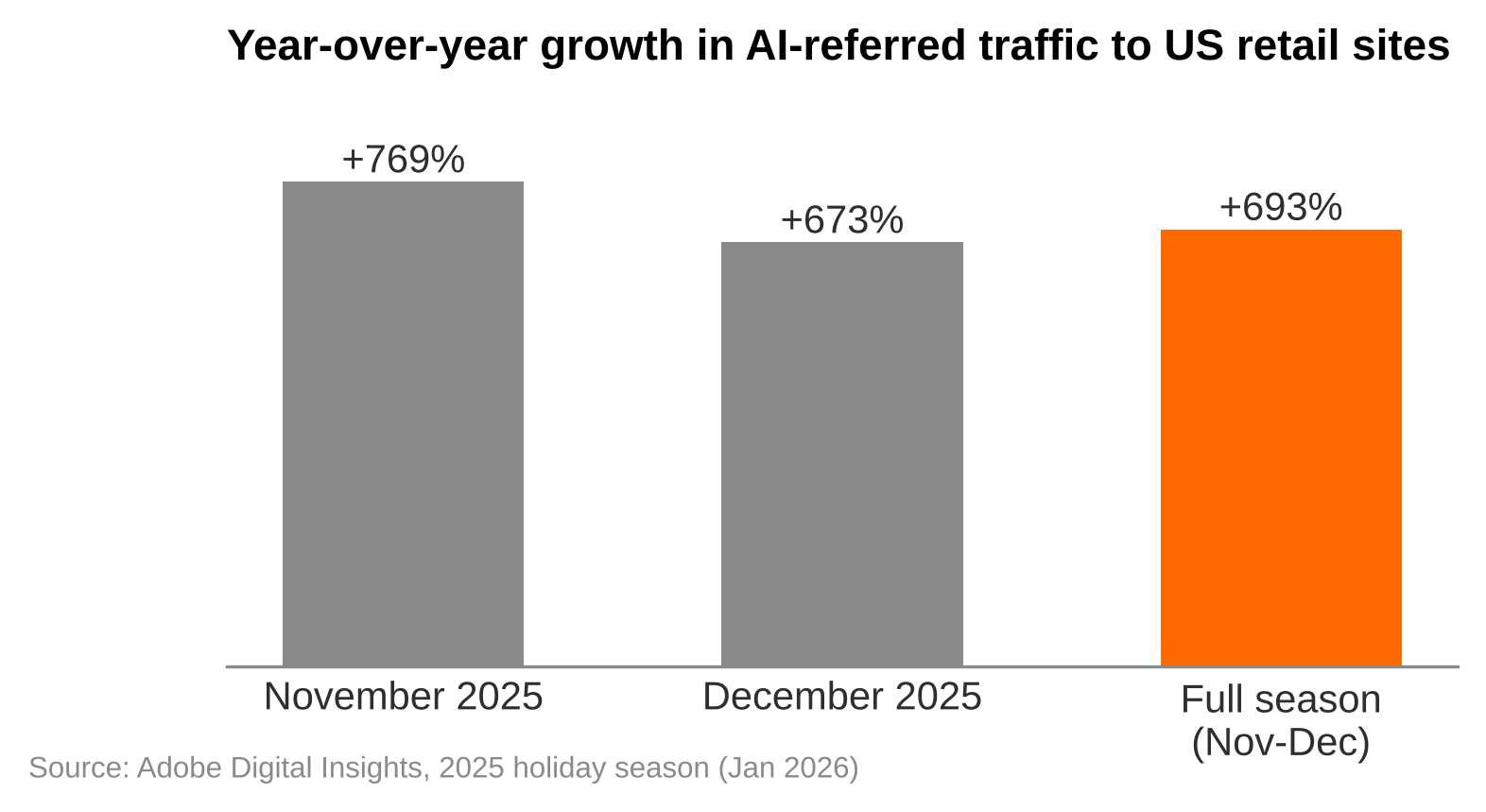
AI assistants and AI search like ChatGPT, Gemini, Perplexity, Copilot and Google’s AI features read web pages, summarize them and recommend products, often with links. This traffic is growing fast. Adobe reported that generative AI traffic to US retail sites grew 693% year over year during the 2025 holiday season, with 769% growth in November and 673% in December (Adobe, 2026).
The traffic is valuable, too. In October 2025, Adobe found shoppers arriving from generative AI sources were 16% more likely to convert than shoppers from other sources (Adobe, 2025). Salesforce reported that shoppers referred by AI search channels converted nine times more often than those referred by social media during the 2025 holidays (Salesforce, 2026).
The good news: the same work helps both. Clear, accurate, well-structured pages rank in search engines and get quoted by AI assistants.
By the numbers
AI-referred traffic to US retail sites grew 693% year over year during the 2025 holidays, and in October 2025 it converted 16% better than other traffic. (Adobe Digital Insights)
SEO templates that scale with the catalog
Instead of writing SEO fields product by product, define templates that fill them from product data. Then hand-edit only your top pages.
| Field | Template example | Result |
|---|---|---|
| Product meta title | {Brand} {Product Name} – {Key Attribute} – {Store} | Acme Trail Backpack – 30L Waterproof – GearShop |
| Product meta description | Shop the {Product Name} by {Brand}. {Benefit sentence}. Free shipping over ${threshold}. | Shop the Trail Backpack by Acme. Keeps gear dry on wet hikes. Free shipping over $75. |
| Product URL (SEO keyword) | {brand}-{product-name} | acme-trail-backpack |
| Category meta title | {Category Name} – Shop {Count}+ Options – {Store} | Hiking Backpacks – Shop 40+ Options – GearShop |
| Image alt text | {Brand} {Product Name} {view} | Acme Trail Backpack front view |
In OpenCart, SEO keywords are set per store and language in each product, category and information page, and SEO URLs are turned on in System > Settings > Server. An SEO extension or your import script (see Catalog on Autopilot) can apply templates in bulk and fill empty fields only, so your hand-written pages are never overwritten.
Rules that matter:
- Every page gets a unique title and description. No duplicates.
- Titles put the most important words first and stay under about 60 characters.
- URLs are short, lowercase and readable, and never change once indexed. If you must change one, add a 301 redirect.
- Category pages get a short, useful introduction, not a wall of keywords.
Structured data, generated automatically
Structured data (schema markup) tells search engines and AI systems exactly what a page contains: this is a product, this is its price, it is in stock, it has 4.6 stars from 38 reviews. Google uses it for rich results that show price, availability and ratings in search.
For product pages, generate JSON-LD for these schema.org types from your product data:
- Product: name, image, description, SKU, brand, GTIN
- Offer: price, currency, availability, URL, seller, shipping and return details
- AggregateRating and Review: only real reviews from your store
- BreadcrumbList: the category path
- Organization on the home page: name, logo, contact, social profiles
A minimal example of what your template should output:
<script type="application/ld+json">
{
  "@context": "https://schema.org",
  "@type": "Product",
  "name": "Acme Trail Backpack 30L",
  "sku": "ACM-TB30",
  "brand": {"@type": "Brand", "name": "Acme"},
  "image": "https://example.com/image/acme-trail-backpack.webp",
  "offers": {
    "@type": "Offer",
    "price": "89.99",
    "priceCurrency": "USD",
    "availability": "https://schema.org/InStock",
    "url": "https://example.com/acme-trail-backpack"
  }
}
</script>
Add it to your theme’s product template so it is generated for every product, using live price and stock. Test pages with Google’s Rich Results Test and watch the Search Console enhancement reports for errors.
Note
Never mark up reviews or ratings that do not appear on the page, and never invent ratings. Search engines penalize misleading structured data.
Showing up in AI answers
AI assistants recommend products they can understand and trust. Make your store easy to read and easy to quote:
- State facts plainly. Dimensions, materials, compatibility, warranty, shipping times and return windows in clear text, not only in images.
- Answer real questions on the page. Add a short FAQ to product and category pages based on the questions customers actually ask your support team (our guide Customer Service Without the Inbox collects them).
- Write comparison and buying-guide content that helps people choose (“How to choose a hiking backpack size”).
- Keep policies on clear, crawlable pages: shipping, returns, warranty, contact.
- Do not block helpful crawlers by accident. Review your robots.txt and CDN bot settings so legitimate search and AI crawlers can reach public product pages, while still blocking abusive bots. Decide deliberately which AI crawlers you allow.
- Consider an llms.txt file. This is a proposed convention: a plain-text file at your site’s root that summarizes your store and links to your most important pages for AI systems. Support varies by provider, so treat it as a low-cost extra, not a guarantee.
- Keep your Merchant Center feed accurate. AI shopping features in search draw on product feeds as well as pages.
A content engine on a schedule
Products and categories cover “buy” searches. Content covers “learn” and “compare” searches that come earlier in the journey.
Build a simple monthly engine:
- Collect questions from support tickets, search queries in Search Console, “People also ask” boxes and on-site search logs.
- Pick two topics a month that link naturally to your categories, such as a buying guide and a comparison.
- Draft with AI from an outline you write, including your own expertise, photos and product links.
- Edit for accuracy and voice. Add first-hand details AI cannot know: what you noticed testing the product, what customers tell you.
- Publish on a schedule in OpenCart’s blog (via an extension) or Information pages, and link to it from related categories.
- Refresh, do not just add. Every quarter, update your top five articles with new products and facts.
Monitoring on autopilot
Search problems are quiet. Traffic slips for weeks before anyone notices. Set up alerts:
- Search Console email alerts for coverage problems, manual actions and enhancement errors (enabled by default; make sure the right email receives them).
- A monthly crawl with a site crawler to find broken links, missing titles, duplicate descriptions and redirect chains.
- 404 monitoring: log 404 errors and review them weekly. Redirect removed products to their closest category.
- Core Web Vitals: watch the Search Console report and PageSpeed Insights for your top templates (home, category, product, cart).
- Rank and traffic summary: a monthly report of clicks, impressions and top pages from Search Console, delivered to your inbox through Looker Studio scheduling.
Build it: automatic product schema plus a monthly SEO health report
- On staging, add JSON-LD Product and Offer markup to your product template, pulling price, availability, SKU, brand and images from OpenCart. Use an extension if you prefer not to edit the theme.
- Add BreadcrumbList markup to category and product pages and Organization markup to the home page.
- Test five product pages in the Rich Results Test. Fix errors in the template, not on individual pages.
- Deploy to live and watch Search Console’s product snippets and merchant listings reports.
- Connect Search Console to Looker Studio and build a one-page report: clicks, impressions, average position, top 10 pages, top 10 queries.
- Schedule the report to email you on the first of each month.
- Schedule a monthly crawl and save the error summary next to the report.
Other platforms
Shopify themes include basic Product structured data, and apps extend it; Shopify generates sitemaps and canonical tags automatically. WooCommerce outputs product schema natively, and SEO plugins such as Yoast or Rank Math add templates and more types. PrestaShop has SEO settings per page and modules for rich snippets. Templates, monitoring and AI-readiness work the same on all platforms.
Tools
| Need | Free option | Paid option |
|---|---|---|
| Search data | Google Search Console, Bing Webmaster Tools | Semrush, Ahrefs |
| Reports | Looker Studio | Paid dashboard tools |
| Site crawls | Screaming Frog (up to 500 URLs) | Screaming Frog licence, Sitebulb |
| Schema testing | Rich Results Test, Schema Markup Validator | Included in SEO suites |
| Speed | PageSpeed Insights, Search Console | Performance monitoring services |
Guardrails
- Templates fill empty fields only. Hand-written content is never overwritten.
- URLs never change without a 301 redirect.
- Structured data matches what is visible on the page, with live price and stock.
- AI-drafted content is fact-checked and includes your own expertise before publishing.
- Bot rules are reviewed quarterly so you neither block helpful crawlers nor let abusive ones run wild.
Autopilot checklist
- ☐ SEO templates fill titles, descriptions, URLs and alt text for every product and category.
- ☐ Every page has a unique title and meta description.
- ☐ Product, Offer, Breadcrumb and Organization schema are generated automatically and pass testing.
- ☐ Product pages state key facts in text and include real FAQs.
- ☐ Policies are on clear, crawlable pages; robots and bot settings were reviewed.
- ☐ Two new or refreshed content pieces are published each month.
- ☐ A monthly SEO report and crawl arrive automatically.
- ☐ 404s are reviewed weekly and redirected.
This article is part of the book Stores That Sell on Autopilot by Rupak Nepali.
Get every chapter, the printable checklists and the worksheets in one place. See the automations running live at demo.webocreation.com. Want it done for you? Ask about the Stores That Sell on Autopilot service.
← Previous: Inventory and Suppliers | Next: Email and SMS Flows That Sell While You Sleep →
The Stores That Sell on Autopilot series
- Start here: Series overview
- Part 1: What "Autopilot" Really Means
- Part 2: The Autopilot Stack
- Part 3: Building an Automation-Ready Store
- Part 4: Catalog on Autopilot
- Part 5: Orders, Payments and Fulfillment
- Part 6: Inventory and Suppliers
- Part 7: Search Traffic That Compounds (you are here)
- Part 8: Email and SMS Flows That Sell While You Sleep
- Part 9: Reviews, Social Proof and Referrals
- Part 10: Ads and Retargeting with Guardrails
- Part 11: Customer Service Without the Inbox
- Part 12: AI Agents and Agentic Commerce
- Part 13: The 30-Minute Weekly Owner Routine
- Part 14: Case Study: Automating the Demo Store
- Resource: The Complete Ecommerce Automation Checklist
- Resource: Ecommerce Automation Tools Directory: Free and Paid Options
- Resource: Copy-Ready Email Templates for Ecommerce Flows
- Resource: OpenCart Automation Quick Reference: Menus, Events and Cron
Sources
- Adobe and Adobe Digital Insights: 2025 holiday shopping recap (January 2026), AI traffic reports and holiday mobile forecasts. business.adobe.com / news.adobe.com
- Salesforce: AI and agents account for $262 billion of 2025 holiday spend (January 2026). salesforce.com

Rupak Nepali is a web developer, manage Webocreation website and the author of six books:
Getting Started with OpenCart Module Development (Packt, 2013),
OpenCart Theme and Module Development (Packt, 2015),
OpenCart 4: Dev Guide for Themes & Extensions (2024),
OpenCart 4: User Manual (2025),
Cloudflare for the Enterprise Website (2026) and
The Technical Web Guide for Marketers (2026).
Rupak has built OpenCart stores and extensions since 2010, has published more than 600 tutorials on Webocreation, and shares free OpenCart extensions on GitHub.
Find Rupak on
GitHub | Amazon | LinkedIn | X | YouTube.