The Ecommerce Automation Stack: Tools, Layers and Budgets
Choose a store platform, connector tools like n8n, Zapier or Make, and channel tools at $0, $50 or $300 a month without tool sprawl.
 Rupak NepaliPublished Nov 22, 2026
A stack is the set of tools that work together to run your store. A good stack is boring: each tool does one job well and passes data cleanly to the next. A bad stack is a pile of apps that overlap, conflict and each charge a monthly fee.
This article helps you choose a stack on purpose, at the budget you have today, with room to grow.
The layers of an autopilot stack
Think of your stack as six layers. Each layer depends on the one beneath it.
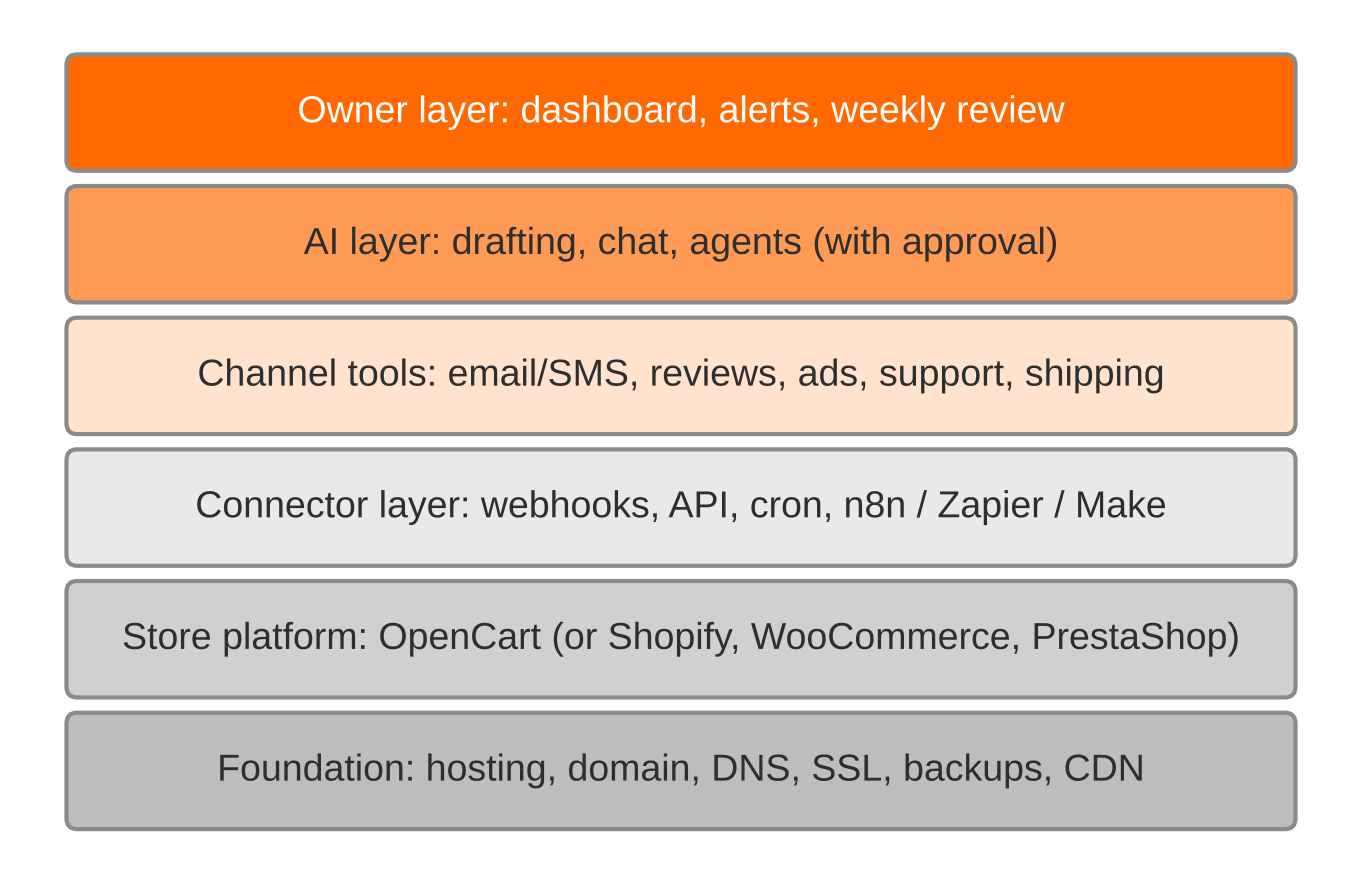
- Foundation: hosting, domain, DNS, SSL certificate, backups and a content delivery network (CDN).
- Store platform: the software that holds products, customers and orders. In this series, OpenCart.
- Connector layer: the plumbing that moves data. Webhooks, APIs, scheduled (cron) jobs and connector tools like n8n, Zapier and Make.
- Channel tools: specialist tools for email and SMS, reviews, ads, support and shipping.
- AI layer: models and assistants that draft content, answer questions and run agents.
- Owner layer: the dashboard, alerts and weekly review that keep you in charge.
When something breaks, it is usually at a boundary between layers: a connector that stopped running, a channel tool that lost its login to the store, an AI assistant working from outdated data. Knowing the layers helps you find the problem fast.
Choosing a store platform
If you already have a store, keep it unless it truly blocks you. Migrating platforms is expensive and risky. Automation works on all of the major platforms.
If you are starting fresh, the choice depends on how much control you want and how much you want to manage yourself.
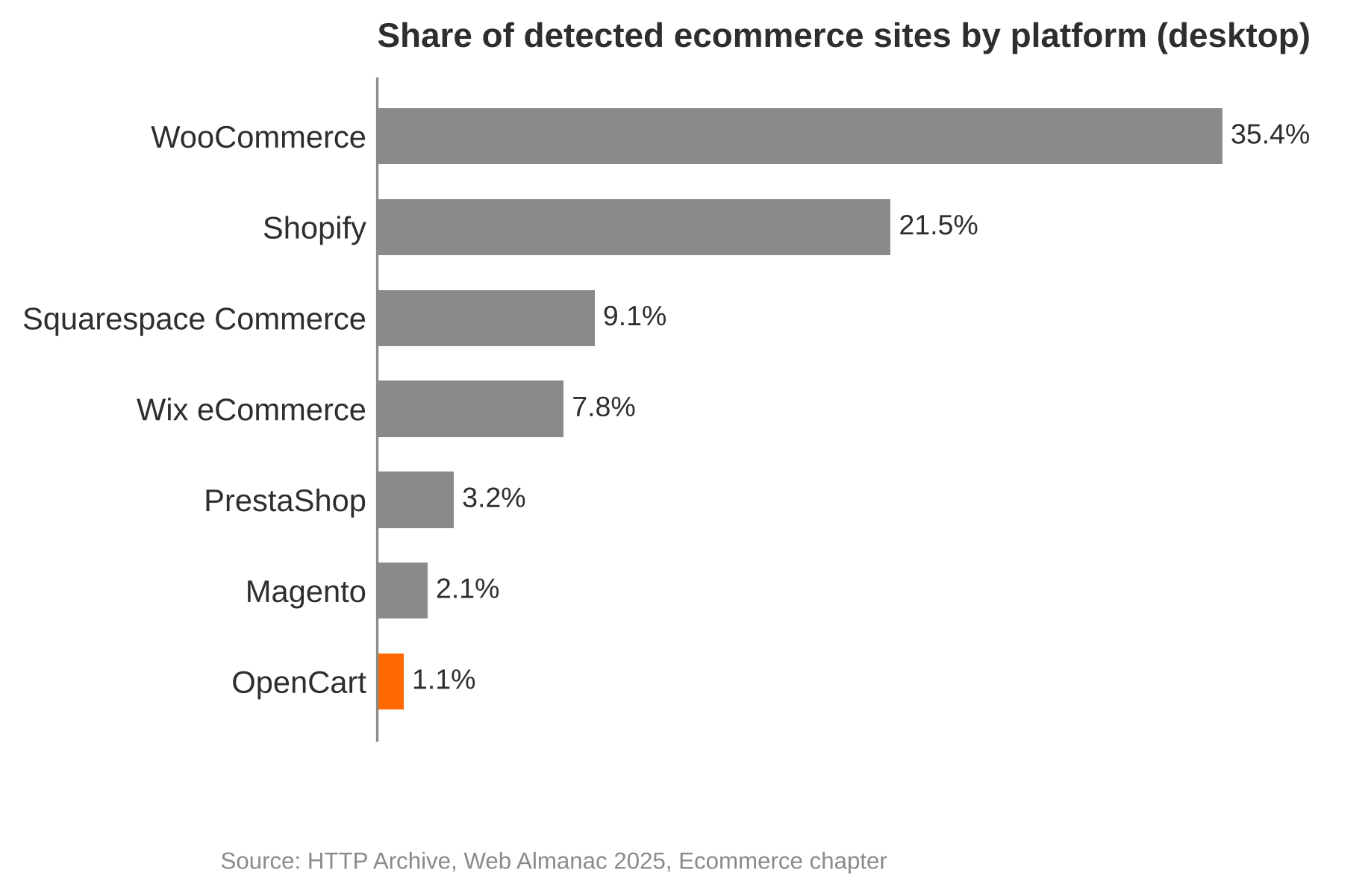
The HTTP Archive’s 2025 Web Almanac found WooCommerce on 35.4% of detected ecommerce sites on desktop, Shopify on 21.5%, PrestaShop on 3.2% and OpenCart on 1.1% (HTTP Archive, 2025). Popularity matters for finding extensions and help, but it does not decide which platform fits you.
| Platform | Type | Best for | Automation strengths | Watch out for |
|---|---|---|---|---|
| OpenCart | Open source, self-hosted | Owners and developers who want control and low running costs | Event system, full code access, multi-store, no platform fees | You handle hosting, updates and security |
| WooCommerce | WordPress plugin, self-hosted | Content-heavy stores already on WordPress | Huge plugin library, hooks and REST API | Plugin conflicts, performance tuning |
| Shopify | Hosted SaaS | Owners who want zero server work | Built-in Shopify Flow, large app store, strong APIs | Monthly fees, app costs add up, less code control |
| PrestaShop | Open source, self-hosted | Stores selling in Europe and many languages | Modules, hooks, multi-language | Smaller ecosystem outside Europe |
Why this series uses OpenCart
OpenCart has three qualities that make it a good teaching platform for automation. It is light enough to run on modest hosting. Its event system lets you hook into almost any action, such as an order being added or its status changing, without editing core files. And because you own the code and database, you can connect anything to it. The same patterns translate directly to WooCommerce hooks, Shopify Flow and PrestaShop hooks.
The connector layer
Connectors are where most automation lives. You will use four kinds:
Webhooks are messages your store sends to another URL when something happens. “Order 1052 was just placed, here are the details.” Webhooks are instant and efficient. OpenCart does not send webhooks out of the box, but a small event extension can, as our guide Building an Automation-Ready Store shows.
APIs are doors other systems use to read or change data in your store. “Give me all orders from today.” “Set the stock of product 88 to 12.” Most channel tools use APIs to sync with stores.
Cron jobs are scheduled tasks. “Every night at 2 a.m., import the supplier’s stock file.” Every self-hosted platform can run them, and OpenCart 4 includes a built-in cron manager.
Connector tools sit in the middle and let you build workflows visually. You pick a trigger (“new order in OpenCart”), add steps (“look up the customer in the email tool,” “send a message to Slack”) and turn it on.
| Tool | Hosting | Pricing model | Good for |
|---|---|---|---|
| n8n | Self-hosted (free) or cloud | Free self-hosted; cloud plans by executions | Owners comfortable with a small server; unlimited workflows for low cost |
| Zapier | Cloud | Tiered by tasks per month | Fastest setup, largest app library |
| Make | Cloud | Tiered by operations | Complex multi-step workflows at lower cost than Zapier |
| Custom PHP scripts | Your server | Free (your time) | Simple, high-volume jobs like nightly stock imports |
Tip
If you are technical, self-hosted n8n gives you nearly unlimited automations for the price of a small server. If you are not, start with Zapier or Make and move high-volume workflows to cheaper options later.
Channel tools
These are the specialists. Choose one per job and avoid overlap.
- Email and SMS: Klaviyo, Omnisend, Mailchimp, Brevo, MailerLite
- Reviews: Judge.me, Trustpilot, Yotpo, or OpenCart’s built-in reviews with an automated request
- Support: Freshdesk, Zendesk, Gorgias, Tidio, Crisp
- Shipping: ShipStation, Shippo, EasyPost, or carrier extensions
- Ads: Google Merchant Center and Google Ads, Meta Commerce Manager
- Analytics: Google Analytics 4, Google Search Console, Microsoft Clarity
- Accounting: QuickBooks Online, Xero, Wave
Before you choose, check two things: does it connect to your platform (natively or through a connector tool), and can you export your data if you leave?
Budget tiers
You can automate a store at almost any budget. Here are three realistic stacks.
| Layer | $0 stack (starting out) | ~$50/month stack (growing) | ~$300/month stack (scaling) |
|---|---|---|---|
| Hosting | Budget shared hosting you already pay for | Managed VPS | Managed cloud with staging |
| Platform | OpenCart (free) | OpenCart + a few paid extensions | OpenCart + custom extensions |
| Connectors | OpenCart events + cron | n8n self-hosted or Make starter | n8n cloud or Zapier professional |
| Email/SMS | Free tier of Brevo or MailerLite | Omnisend or Klaviyo entry tier | Klaviyo with SMS |
| Reviews | Built-in OpenCart reviews | Judge.me paid tier | Yotpo or Trustpilot |
| Support | Email + saved replies | Tidio or Crisp with AI add-on | Gorgias or Zendesk with AI |
| AI | Free AI assistant tiers for drafting | One paid AI subscription | API access for automated workflows |
| Analytics | GA4 + Search Console (free) | Same + Looker Studio | Same + paid dashboard tool |
Prices are approximate and change often. The point is that you can start with the $0 stack, prove the value and add paid tools when they pay for themselves.
Avoiding tool sprawl and lock-in
Tool sprawl happens one “free trial” at a time. A year later you pay for nine apps, three of which do the same thing. Follow these rules:
- One tool per job. If two tools both send email, pick one.
- Own your core data. Products, customers and orders should live in your store, not only in a third-party app.
- Prefer tools with exports and APIs. If you cannot get your data out, you cannot leave.
- Review subscriptions every quarter. Cancel anything you have not used in 60 days.
Build it: choose your stack
- Open the stack decision worksheet (companion page) or copy the budget table above into a spreadsheet.
- For each layer, write what you use today.
- Mark gaps: layers where you have nothing, or where you do the work by hand.
- Using your automation map from our guide What “Autopilot” Really Means, decide which gap blocks your top three automations.
- Fill that gap first, at the lowest tier that works.
Other platforms
In Shopify, Shopify Flow covers many Rung 2 rules without a connector tool. In WooCommerce, AutomateWoo and the built-in REST API play the same role as OpenCart events plus a connector. In PrestaShop, modules and hooks fill the connector layer. The layer model is identical everywhere.
Guardrails
- Write down every login and API key in a password manager, not a spreadsheet. Give each tool its own API user with only the permissions it needs.
- Test integrations on a staging copy of your store when possible. our guide Building an Automation-Ready Store shows how.
- Watch usage-based pricing. Connector tools that charge per task can surprise you during a sale. Set a usage alert.
Autopilot checklist
- ☐ I listed my current tool for each of the six layers.
- ☐ I identified the gaps blocking my top three automations.
- ☐ I chose a connector approach (events/cron, n8n, Zapier or Make).
- ☐ I have one tool per job with no overlaps.
- ☐ Every tool has its own API user and the keys are in a password manager.
- ☐ I set a calendar reminder to review subscriptions each quarter.
This article is part of the book Stores That Sell on Autopilot by Rupak Nepali.
Get every chapter, the printable checklists and the worksheets in one place. See the automations running live at demo.webocreation.com. Want it done for you? Ask about the Stores That Sell on Autopilot service.
← Previous: What "Autopilot" Really Means | Next: Building an Automation-Ready Store →
The Stores That Sell on Autopilot series
- Start here: Series overview
- Part 1: What "Autopilot" Really Means
- Part 2: The Autopilot Stack (you are here)
- Part 3: Building an Automation-Ready Store
- Part 4: Catalog on Autopilot
- Part 5: Orders, Payments and Fulfillment
- Part 6: Inventory and Suppliers
- Part 7: Search Traffic That Compounds
- Part 8: Email and SMS Flows That Sell While You Sleep
- Part 9: Reviews, Social Proof and Referrals
- Part 10: Ads and Retargeting with Guardrails
- Part 11: Customer Service Without the Inbox
- Part 12: AI Agents and Agentic Commerce
- Part 13: The 30-Minute Weekly Owner Routine
- Part 14: Case Study: Automating the Demo Store
- Resource: The Complete Ecommerce Automation Checklist
- Resource: Ecommerce Automation Tools Directory: Free and Paid Options
- Resource: Copy-Ready Email Templates for Ecommerce Flows
- Resource: OpenCart Automation Quick Reference: Menus, Events and Cron
Sources
- HTTP Archive: Web Almanac 2025, Ecommerce chapter. almanac.httparchive.org
- Klaviyo: Abandoned cart benchmarks (2024 Benchmark Report) and 2026 Omnichannel Benchmark Report. klaviyo.com
- Omnisend: 2026 and 2025 Ecommerce Marketing Reports. omnisend.com
- Zapier: SMB automation survey conducted by Centiment, May 2026. zapier.com

Rupak Nepali is a web developer, manage Webocreation website and the author of six books:
Getting Started with OpenCart Module Development (Packt, 2013),
OpenCart Theme and Module Development (Packt, 2015),
OpenCart 4: Dev Guide for Themes & Extensions (2024),
OpenCart 4: User Manual (2025),
Cloudflare for the Enterprise Website (2026) and
The Technical Web Guide for Marketers (2026).
Rupak has built OpenCart stores and extensions since 2010, has published more than 600 tutorials on Webocreation, and shares free OpenCart extensions on GitHub.
Find Rupak on
GitHub | Amazon | LinkedIn | X | YouTube.