Chapter 13: Launch Day: Go-Live Runbooks
How to write a go-live runbook for a website launch, with a change request, a go/no-go decision and clear war-room roles.
 Rupak NepaliPublished Nov 26, 2026
This is Chapter 13 of The Web Delivery Manager’s Playbook, a free series on running enterprise websites from request to release. How to write a go-live runbook for a website launch, with a change request, a go/no-go decision and clear war-room roles.
The night before the new careers site went live, Maya asked the team a simple question: “Walk me through exactly what happens tomorrow, in order, with names.”
There was a pause. Everyone knew roughly what had to happen. The DNS would be pointed to the new platform. Old URLs would redirect. The HR system integration would be switched to production. Someone would tell recruiting. But nobody had written the steps down. Nobody was sure who would update the DNS, what time the old site would stop accepting applications, or what the team would do if job listings did not load from the HR system.
They stayed for another hour and wrote the runbook. The next morning, the integration failed on the first attempt. Because the runbook said exactly what to check and who to call, the HR system vendor was on the phone within ten minutes and the issue was fixed before most recruiters had finished their coffee.
Launch day with a go-live runbook
When you need a launch plan
Chapter 11 covered routine releases: tested changes deployed in regular windows under standard change templates. Launches are different. A launch is a release with extra risk or visibility, such as:
- A new site or microsite going live
- A redesign of a major site
- A migration to a new CMS or hosting platform
- A DNS cutover from one platform to another
- A major campaign with a fixed public date, such as a product announcement
Launches usually involve several teams, external vendors, DNS or infrastructure changes, and stakeholders watching closely. They are almost always normal changes, not standard ones, and need CAB approval. They also need a runbook.
What a runbook is
A runbook is a step-by-step script for a launch. It lists every action, in order, with the time, the person responsible, how to confirm the step worked, and what to do if it does not. A good runbook means that on launch day nobody has to remember anything or make it up as they go.
Runbooks are written in the days before the launch, reviewed by everyone involved, and rehearsed where possible. On the day, one person reads the steps out and tracks progress, while others carry them out.
Planning the launch
Pick the date and time
The launch date is often set by the business: a product announcement, an event, a press release. But the time within that day is usually up to you. Choose it with the same care as a release window:
- Low traffic, but with everyone needed available
- Well before any public announcement, so there is time to fix problems before people arrive
- Not on a Friday, a holiday or the day before one
- Outside any change freeze
If marketing is planning a press release or an email campaign, agree that it goes out only after the launch is confirmed as successful. Launching the site at 9 a.m. with the press release at 9:01 leaves no room for problems.
Know your dependencies
List every system and team the launch depends on: DNS provider, CDN, hosting platform, CMS, CRM, marketing automation, HR or e-commerce systems, analytics, the agency, vendors. For each, confirm who will be available on launch day and how to reach them. Get vendor support contacts and escalation numbers in advance.
DNS cutovers
Many launches involve pointing a domain from an old platform to a new one. DNS changes are simple to make but tricky to time, because DNS records are cached around the internet for a period set by each record’s time to live (TTL).
To make a DNS cutover smooth:
- Lower the TTL in advance. A few days before launch, reduce the TTL on the records you will change, for example from a day to five minutes. This makes the change take effect quickly on launch day.
- Prepare the new platform. Make sure the new site is ready to serve the domain, including its SSL certificate. Many platforms can issue certificates only after DNS points to them, so plan for a short window or use a CDN that can issue certificates in advance.
- Make the change at the planned time, and confirm it from several locations using online DNS lookup tools.
- Keep the old platform running for a few days in case you need to roll back.
- Restore a normal TTL once the launch is stable.
If your company’s DNS sits behind a CDN that also proxies traffic, a cutover may be as simple as changing the origin server the CDN sends traffic to, which can be almost instant and easy to reverse. Learn which kind of change your launch needs, well before launch day.
Redirects
When a site is replaced or restructured, old URLs must redirect to the most relevant new pages. Missing redirects mean broken links from other sites, lost search rankings and frustrated visitors with bookmarks.
Build a redirect map in a spreadsheet: every important old URL, its new URL, and the type of redirect (usually a permanent 301). Get the old URLs from your analytics, your sitemap, search console data and a crawl of the old site. Test every redirect on staging before launch, and again on production immediately after. Chapter 24 covers redirect maps for migrations in more detail.
Cache warming and performance
A brand-new site may be slow for the first visitors, because nothing is cached yet. For high-traffic launches, warm the cache by visiting key pages, or using a crawler, right after the cutover. Check that CDN caching rules are correct for the new site. If you expect a traffic spike, confirm with your hosting provider that the site can handle it.
Monitoring
Before launch, set up monitoring so you know immediately if something goes wrong:
- Uptime monitoring on the home page and key pages, checking every minute.
- Error monitoring, using your platform’s logs or an error tracking tool.
- Form and integration checks, for example a test submission sent every hour.
- Analytics real-time view, to confirm visitors are arriving and being tracked.
The change request
A launch needs a normal change request in ServiceNow. Raise it early, at least a week before the CAB meeting that falls before the launch, so there is time for questions. Attach the runbook, the test results, the rollback plan and the list of people involved.
On launch day, the change window in ServiceNow should match the time in the runbook. Work only within the approved window. If the launch overruns, tell the change manager rather than carrying on silently.
After the launch, close the change request with evidence: smoke test results, screenshots, monitoring checks and confirmation from the business owner. If anything went wrong, record it honestly. A change closed as “successful with issues” with a clear explanation is far better for your credibility than an outage nobody mentions.
Go/no-go
A go/no-go decision is a short meeting before the launch where the team confirms that everything is ready. Hold it the day before, and again on the morning of launch, before the first irreversible step.
At the meeting, go through a checklist:
- Has all testing passed, including acceptance by the business owner?
- Is the change request approved?
- Are all required people and vendors available?
- Is the rollback plan ready and understood?
- Are there any open issues, and are they acceptable for launch?
- Is anything happening elsewhere in the company that could clash?
One person must have the authority to make the go/no-go call. Usually that is the delivery manager, with the business owner’s agreement. Agree this in advance. On the day, everyone needs to know who decides.
A no-go is not a failure. Delaying a launch by a day because a critical issue was found is much cheaper than launching with it. Make it safe for anyone on the team to raise a concern.
The war room
On launch day, gather everyone involved in one place: a meeting room, a video call or a dedicated chat channel. This is the war room. It keeps communication fast and makes sure decisions are recorded.
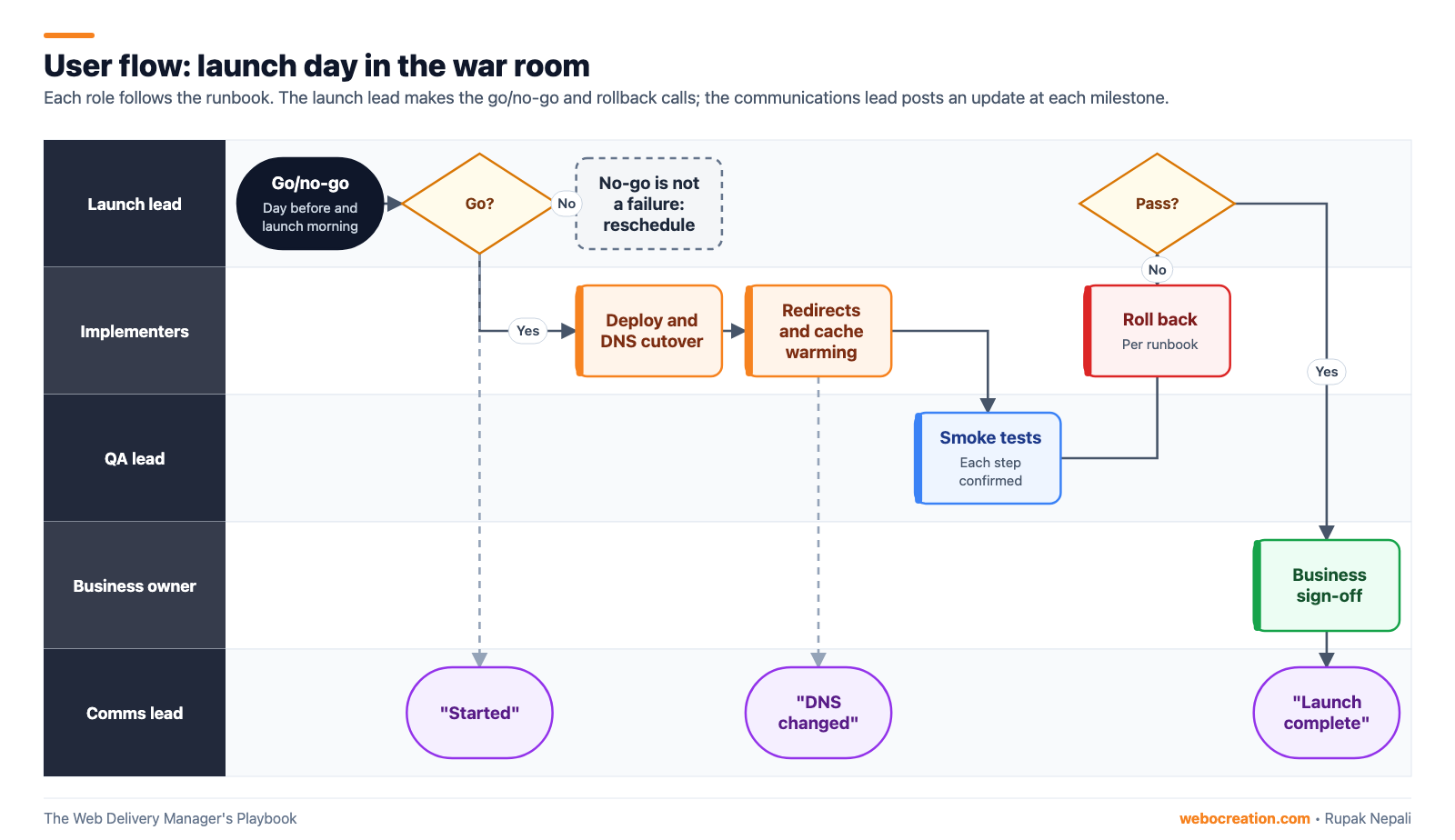
Assign clear roles:
| Role | Responsibility |
|---|---|
| Launch lead | Runs the runbook, tracks progress, makes go/no-go and rollback calls |
| Technical lead | Directs technical steps and troubleshooting |
| Implementers | Carry out specific steps (DNS, deployment, configuration) |
| QA lead | Runs smoke tests and confirms each step |
| Business owner | Confirms the site is acceptable; signs off |
| Communications lead | Updates stakeholders, recruiting, marketing or customer support |
The launch lead should post a short update in the stakeholder channel at each major milestone: started, DNS changed, smoke tests passed, launch complete. Stakeholders will be watching. Regular updates stop them from interrupting the people doing the work.
After the launch
A launch does not end when the site is live.
- First hour: intensive monitoring; smoke tests repeated; quick fixes for minor issues.
- First day: check analytics, forms and integrations; review any reports from users or support.
- First week: watch search console for crawl errors and missing redirects; review performance; fix issues found by real visitors.
- Two weeks after: hold a short launch retrospective. What went well? What would we do differently? Update the runbook template with what you learned.
Also remember the housekeeping from Chapter 3: update the inventory and CMDB, retire the old site and its hosting when safe, update the renewal calendar, and restore normal DNS TTLs.
Webocreation Group: The careers site launch
The runbook for the careers site launch had 34 steps. The integration failure at step 18 turned out to be a configuration value pointing to the HR system’s test environment instead of production. The fix took four minutes once the vendor was on the phone.
At the launch retrospective, the team agreed two changes: vendor configuration would be checked against a written list during the go/no-go, and every runbook would include a named vendor contact for each external system. Both went into the runbook template below.
Template: Go-live runbook
Use one row per step. Rehearse the runbook on staging if you can.
| Step | Time | Action | Owner | How to confirm | If it fails |
|---|---|---|---|---|---|
| 1 | T-3 days | Lower DNS TTL to 5 minutes for the domains being moved | WEB-DNS | DNS lookup shows new TTL | Retry; escalate to DNS provider |
| 2 | T-1 day | Go/no-go meeting | Launch lead | Decision recorded in change request | Reschedule launch |
| 3 | T-0, 6:30 | Open war room channel; confirm all people and vendors present | Launch lead | Roll call complete | Call missing people; delay if critical |
| 4 | 6:45 | Final go/no-go | Launch lead and business owner | Go recorded | Stop; communicate delay |
| 5 | 7:00 | Put old site into read-only or maintenance mode if needed | Implementer | Old site shows notice | Skip if not needed |
| 6 | 7:05 | Deploy final release to new platform | Implementer | Version tag confirmed on production | Redeploy; roll back if needed |
| 7 | 7:15 | Switch DNS or CDN origin to new platform | WEB-DNS | DNS lookups from three locations show new target | Revert DNS record |
| 8 | 7:20 | Confirm SSL certificate valid on new site | QA lead | Browser shows valid certificate | Issue certificate; escalate to CDN or host |
| 9 | 7:25 | Switch integrations to production endpoints | Implementer | Test transaction succeeds | Check configuration list; call vendor contact |
| 10 | 7:35 | Run smoke tests: key pages, forms, search, redirects | QA lead | All smoke tests pass | Fix or roll back |
| 11 | 7:50 | Warm cache on key pages | Implementer | Response times normal | Investigate CDN rules |
| 12 | 8:00 | Business owner sign-off | Business owner | Sign-off recorded | Fix or roll back |
| 13 | 8:05 | Announce launch complete; release marketing communications | Communications lead | Message sent | |
| 14 | 9:00 | One-hour check of monitoring, analytics and errors | Technical lead | No critical errors | Fix or roll back |
| 15 | T+1 day | Close change request with evidence; update CMDB and inventory | Launch lead | Records updated |
Add a header to the runbook with: launch name, change request number, date, war room link, the go/no-go decision maker, the rollback decision maker, and contact details for every person and vendor.
Checklist
- Decide which upcoming releases count as launches and need a runbook.
- Choose a launch time well before any public announcement.
- List every dependency and confirm vendor contacts for launch day.
- Lower DNS TTLs in advance and keep the old platform available for rollback.
- Build and test a redirect map.
- Set up uptime, error and form monitoring before launch.
- Raise the normal change request early and attach the runbook.
- Hold go/no-go meetings with a single, agreed decision maker.
- Run a launch retrospective and update the runbook template.
Common traps
- Launching at the same time as the announcement. Leave time to fix problems before visitors arrive.
- Forgetting DNS caching. Lower TTLs days before a cutover, not minutes before.
- No vendor contacts. When an external system fails, you need a name and a number, not a support form.
- Unclear decision rights. Everyone must know who can call a no-go or a rollback.
- Silence during the launch. Regular updates keep stakeholders informed and out of the way.
- Turning off the old site too soon. Keep it available until the new site is stable.
Related reading
- DNS records explained for marketers: what breaks when you change them
- Website redesign without losing traffic: the SEO redirect checklist
- Cloudflare Rules for WordPress: security, redirect and cache rules
- Chapter 12: QA, Accessibility and Content Review
- Chapter 14: Incidents, Outages and Post-Mortems

Rupak Nepali is a web developer, manage Webocreation website and the author of six books:
Getting Started with OpenCart Module Development (Packt, 2013),
OpenCart Theme and Module Development (Packt, 2015),
OpenCart 4: Dev Guide for Themes & Extensions (2024),
OpenCart 4: User Manual (2025),
Cloudflare for the Enterprise Website (2026) and
The Technical Web Guide for Marketers (2026).
Rupak has built OpenCart stores and extensions since 2010, has published more than 600 tutorials on Webocreation, and shares free OpenCart extensions on GitHub.
Find Rupak on
GitHub | Amazon | LinkedIn | X | YouTube.