Chapter 3: Know Your Stack: The Platform Inventory
How to build a website platform inventory of every site, domain, certificate, script and contract, record it in the CMDB, and review access and renewals.
 Rupak NepaliPublished Nov 26, 2026
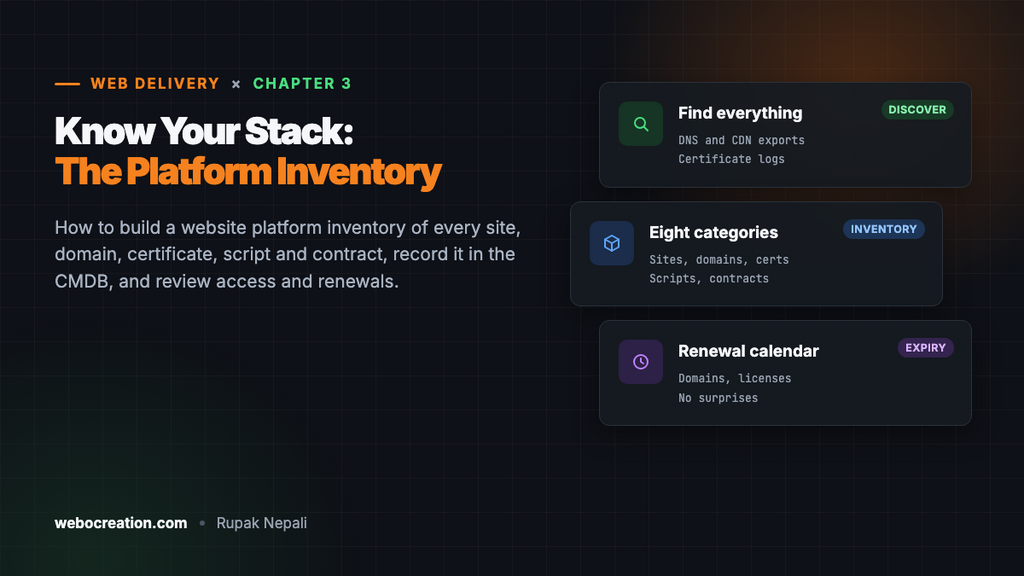
This is Chapter 3 of The Web Delivery Manager’s Playbook, a free series on running enterprise websites from request to release. How to build a website platform inventory of every site, domain, certificate, script and contract, record it in the CMDB, and review access and renewals.
On a Tuesday afternoon in Maya’s third week, a regional sales director forwarded a screenshot. Customers in one region were seeing a full-page browser warning: “Your connection is not private.” The regional product site’s SSL certificate had expired that morning.
Nobody on the web team had heard of the site. It turned out an agency had built it four years earlier for a product launch, hosted it on its own server, and set up the certificate under an employee’s personal email address. That employee had since left the agency. The site still got two thousand visits a week, most of them from a printed brochure that was still being handed out at trade shows.
It took two days to regain access and fix the certificate. Maya’s conclusion was simple: you cannot manage what you do not know you have.
Building the website platform inventory
Why the inventory comes first
It is tempting to start a new role by fixing processes: intake forms, release schedules, approval flows. Those matter, and they come next. But processes only cover what is inside them. If a site, a domain or a vendor is missing from your picture, no process will protect it.
A good inventory gives you four things:
- Scope. A clear, agreed answer to “what are we responsible for?”
- Risk. A list of what can expire, break or be attacked, and who would notice.
- Cost. A view of every license, hosting bill and contract, which often reveals waste.
- Ownership. A named owner for every item, so nothing depends on memory or luck.
Most delivery managers discover that the real portfolio is 20 to 30 percent larger than anyone thought. Webocreation Group believed it had 30 sites. Maya’s inventory found 37.
What to capture
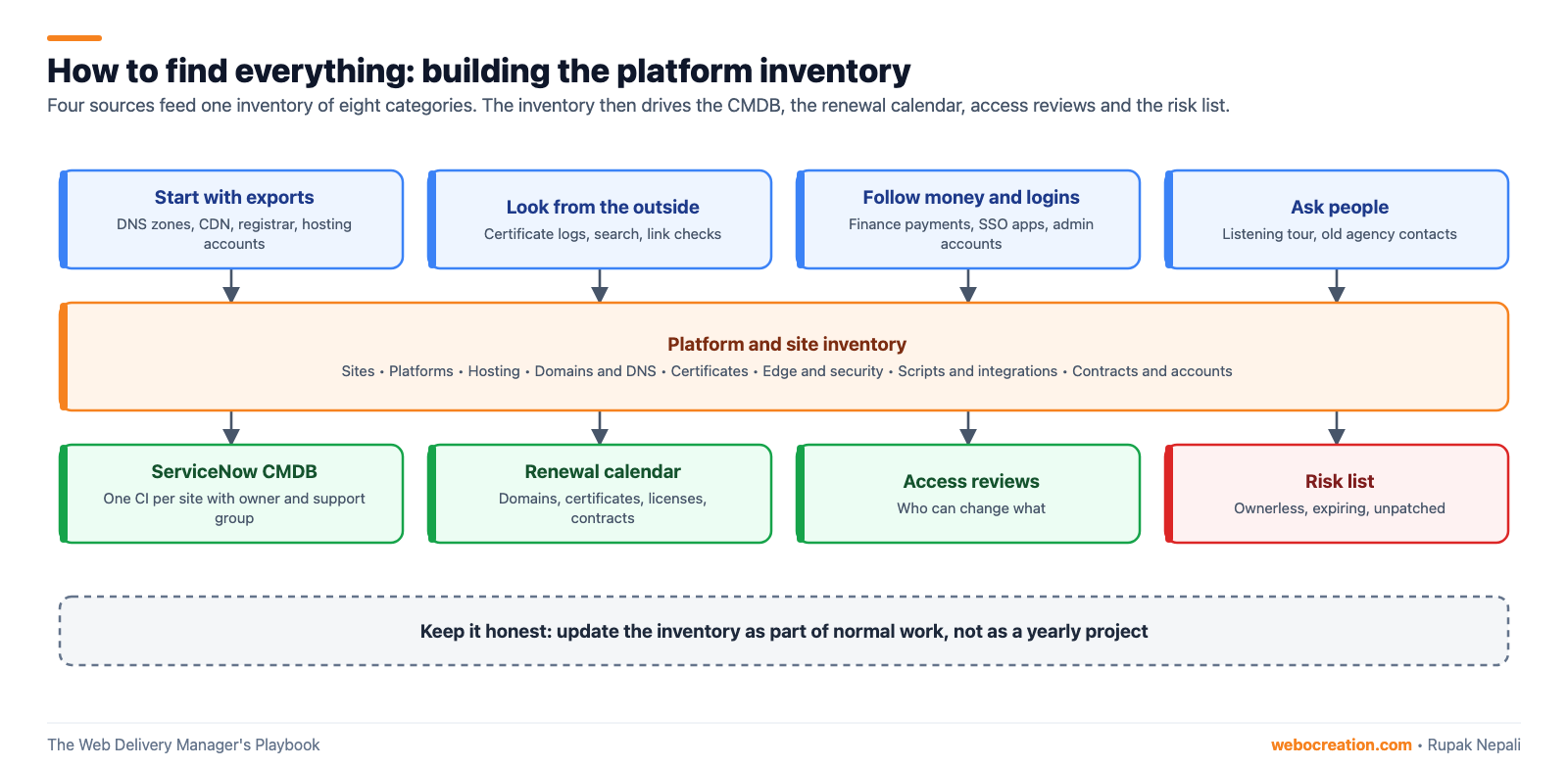
Your inventory should cover more than websites. A complete picture has eight categories.
- Sites. Every public website, microsite, landing-page domain, and every non-production copy (development, staging, test).
- Platforms. The CMS for each site, plus shared systems like the DAM, search, forms, personalization and translation tools.
- Hosting and infrastructure. Where each site runs: a managed platform, a cloud account, a vendor’s server.
- Domains and DNS. Every registered domain, where it is registered, where its DNS is hosted, when it expires and who can change it.
- Certificates. SSL/TLS certificates for each domain, who issues them, whether they renew automatically, and when they expire.
- Edge and security. CDN, firewall and bot protection services, and which sites sit behind them.
- Third-party scripts and integrations. Analytics, tag managers, consent tools, chat widgets, ad pixels, CRM forms, and any system a site sends data to or receives data from.
- Contracts, licenses and accounts. Every paid service, its renewal date, its cost, the number of seats, and who holds the administrator account.
That sounds like a lot, and the first pass takes real effort. But you only build it once. After that, you maintain it as part of normal work.
How to find everything
Nobody will hand you a complete list. You will assemble it from many sources, each of which shows part of the picture. Work through these in order.
Start with what you can export
- DNS zones. Export every DNS zone your company controls. Each A, CNAME and AAAA record that points somewhere is a potential site. Old records often reveal forgotten services.
- Domain registrar accounts. List every domain registered. Ask finance and legal whether any domains are registered through other accounts or other registrars.
- CDN and firewall dashboards. Every hostname behind the CDN is a site you are already protecting.
- Cloud accounts. Ask IT for a list of cloud accounts and look for storage buckets, virtual servers and load balancers that serve web traffic.
- Analytics properties. Each property in your analytics tool usually maps to a site. Properties that still receive traffic but are not on your list are a red flag.
Then look from the outside
- Certificate transparency logs. Every publicly trusted SSL certificate is logged in public databases. Searching these logs for your company’s domains, using a free tool such as crt.sh, will reveal hostnames you never knew existed, including those hosted by agencies.
- Search engines. A search for your company name combined with “site:” queries on known domains can surface old pages and subdomains.
- Brand monitoring. If marketing uses a brand monitoring tool, ask for domains that mention your brand. Some will be yours.
Then follow the money and the logins
- Finance records. Ask accounts payable for every payment to hosting companies, domain registrars, web agencies and SaaS vendors over the past two years.
- Single sign-on (SSO). Ask the identity team for the list of web-related applications connected to SSO, and who has access to each.
- Expense reports. Small tools often hide on corporate credit cards. A search of expense reports for common vendor names can uncover them.
Finally, ask people
Send a short message to marketing, product, regional and HR leaders: “We are building a complete list of company websites and web tools so we can keep them secure and up to date. Do you have any sites, landing pages or web tools that might not be on IT’s radar?” Make it clear you are not looking to blame anyone. You will find things this way that no export will show.
Template: Platform and site inventory
Use one row per site. Keep a separate tab for shared platforms and contracts with the same core columns. A spreadsheet is fine to start; the next section covers moving it into ServiceNow.
| Column | What to record | Example |
|---|---|---|
| Site name | A short, recognizable name | Product A microsite |
| URL(s) | Production URL plus any aliases | producta.example.com |
| Purpose | One line on what the site is for | Lead generation for Product A |
| Business owner | Named person accountable for content and purpose | J. Rivera, Product Marketing |
| Technical owner | Named person or team for the platform | WEB-Development |
| Platform | CMS or framework and version | Webflow |
| Hosting | Where it runs | Webflow hosting |
| DNS and registrar | Where the domain is registered and DNS hosted | Company registrar; CDN DNS |
| Certificate | Issuer, auto-renew yes or no, expiry date | CDN-managed, auto-renew |
| Behind CDN or firewall | Yes or no | Yes |
| Non-production copies | Staging or test URLs, and whether they are locked down | staging link, password protected |
| Third-party scripts | Analytics, tags, chat, forms | Analytics, consent tool, CRM form |
| Criticality tier | Tier 1, 2 or 3 (see Chapter 19) | Tier 2 |
| Monthly cost | Hosting and licenses for this site | $39 |
| Renewal dates | Contracts or plans that renew | Annual plan, renews in March |
| Last reviewed | Date the row was last confirmed | Last month |
| Notes | Anything unusual | Built by agency in 2022 |
The two owner columns are the most important. A row with no named business owner is a candidate for retirement (Chapter 24). A row with no technical owner is a security risk.
Recording sites in the ServiceNow CMDB
A spreadsheet is a good starting tool, but it has limits. It is not connected to your tickets, it does not know who is on call, and it goes stale the moment someone forgets to update it. If your company uses ServiceNow, the long-term home for your inventory is the configuration management database, or CMDB.
What the CMDB is
The CMDB is ServiceNow’s record of the things IT supports: servers, applications, services and the relationships between them. Each item is called a configuration item, or CI. When an incident or change is logged, it is linked to one or more CIs. That link is what lets ServiceNow route the ticket to the right group, show which business services are affected, and build reports on reliability by system.
Modeling a web portfolio
How you model websites depends on your company’s CMDB standards, so start by talking to the CMDB owner, usually someone in IT asset or configuration management. A common, lightweight approach looks like this:
- A business service or application for each site, such as “Corporate Website” or “Product A Microsite.” This is what requesters and incident reporters will select.
- Supporting CIs for shared platforms, such as the CMS platform, the CDN, the DAM and the DNS service.
- Relationships that connect each site to the platforms it depends on. If the CDN has an outage, ServiceNow can then show every site affected.
For each site CI, fill in at least these fields:
- Owned by: the business owner from your inventory.
- Support group: the assignment group that handles incidents, such as WEB-Development.
- Business criticality: matched to your site tiers.
- Operational status: in production, in development, or retired.
- Description and URL, so people can find the right CI.
Keeping the CMDB honest
Many CMDBs are full of outdated records, and people stop trusting them. To keep your part of it accurate:
- Tie updates to change. Any change request that launches, moves or retires a site must include updating the CI. Add this to your release checklist (Chapter 11).
- Review quarterly. Once a quarter, compare the CMDB against your DNS zones and CDN hostnames. Anything in one but not the other needs attention.
- Start small. Ten accurate CIs are worth more than a hundred guesses. Add detail over time.
Access reviews
Your inventory will show not just what you have, but who can change it. That is where many of the real risks are. The agency employee who left with the certificate login is a common story, and so is the former employee who still has administrator access to a CMS three years after leaving.
Run an access review every quarter for your critical platforms (CMS, CDN, DNS, registrar, DAM, analytics, tag manager). For each one:
- Export the list of users and their roles.
- Send each business or technical owner the list for their platform and ask them to confirm who still needs access.
- Remove anyone who has left, and downgrade anyone with more access than they need.
- Record the review, including who confirmed it and when. Auditors will ask.
Wherever possible, connect platforms to the company SSO. When someone leaves the company, SSO access is removed automatically, which closes most of the risk. Chapter 23 covers running access reviews through ServiceNow.
The renewal calendar
From the inventory, build one calendar of everything that can expire: domains, certificates that do not renew automatically, SaaS contracts, support agreements and software licenses. For each item, set two reminders: one 90 days out, so there is time to negotiate or cancel, and one 30 days out, as a safety net.
Send the reminders to a team mailbox or a ServiceNow queue, not to one person. The expired-domain warning that started Maya’s first week had gone to a shared mailbox nobody read. Reminders only work if someone is accountable for acting on them.
Webocreation Group: What the inventory found
It took Maya and one developer about three weeks, working part-time, to complete the first inventory. Here is what they found:
- 37 sites instead of 30. Five were old campaign sites still live on agency servers. Two were regional sites built by a sales team.
- Four sites with no business owner. Nobody could say what they were for. All four went on the retirement list.
- Eleven staging sites open to the public. Search engines had indexed three of them, including one with unreleased product pricing.
- Six certificates that did not renew automatically, including two on the corporate site’s alternate domains.
- Fourteen former employees and contractors with active accounts on at least one platform.
- Three overlapping form tools with a combined cost of more than $9,000 a year.
None of this was anyone’s fault. It was simply what happens when a portfolio grows for years without a single view. The inventory gave Maya her first risk list, her first cost savings and her strongest argument for the operating model she was about to propose.
Checklist
- Export DNS zones, registrar lists and CDN hostnames, and combine them into one list.
- Search certificate transparency logs for every company domain.
- Ask finance for two years of payments to web vendors, hosts and registrars.
- Send the “do you have any sites we don’t know about?” message to business leaders.
- Fill in the inventory template, with a named business and technical owner for every site.
- Meet your CMDB owner and agree how websites will be modeled as CIs.
- Run your first access review on the CMS, CDN, DNS and registrar.
- Build a renewal calendar with 90-day and 30-day reminders sent to a team queue.
Common traps
- Trusting the official list. The real portfolio is almost always bigger. Verify from DNS, certificates and payments.
- Forgetting non-production sites. Open staging sites leak unreleased content and get indexed by search engines.
- Reminders to one person. People go on vacation and change jobs. Send renewals to a team queue.
- A CMDB nobody updates. If CI updates are not part of the change process, the CMDB will drift out of date within months.
- Blaming the people who built shadow sites. You need their help to find everything. Make it safe to come forward.
Related reading
- DNS records explained for marketers: what breaks when you change them
- How to install a free SSL certificate with Let’s Encrypt
- Cloudflare Rules for Drupal: security, redirect and cache rules
- Chapter 2: The Web Operating Model
- Chapter 4: Your First 90 Days

Rupak Nepali is a web developer, manage Webocreation website and the author of six books:
Getting Started with OpenCart Module Development (Packt, 2013),
OpenCart Theme and Module Development (Packt, 2015),
OpenCart 4: Dev Guide for Themes & Extensions (2024),
OpenCart 4: User Manual (2025),
Cloudflare for the Enterprise Website (2026) and
The Technical Web Guide for Marketers (2026).
Rupak has built OpenCart stores and extensions since 2010, has published more than 600 tutorials on Webocreation, and shares free OpenCart extensions on GitHub.
Find Rupak on
GitHub | Amazon | LinkedIn | X | YouTube.