Cloudflare Rules for Odoo: Lock the Database Manager, Fix proxy_mode Behind Cloudflare, and Cache Asset Bundles
Secure Odoo behind Cloudflare: block and disable the database manager, make proxy_mode see real IPs, rate-limit logins, and cache only the hashed asset bundles. Tested on Odoo 20.0.
 Rupak NepaliPublished Nov 21, 2026
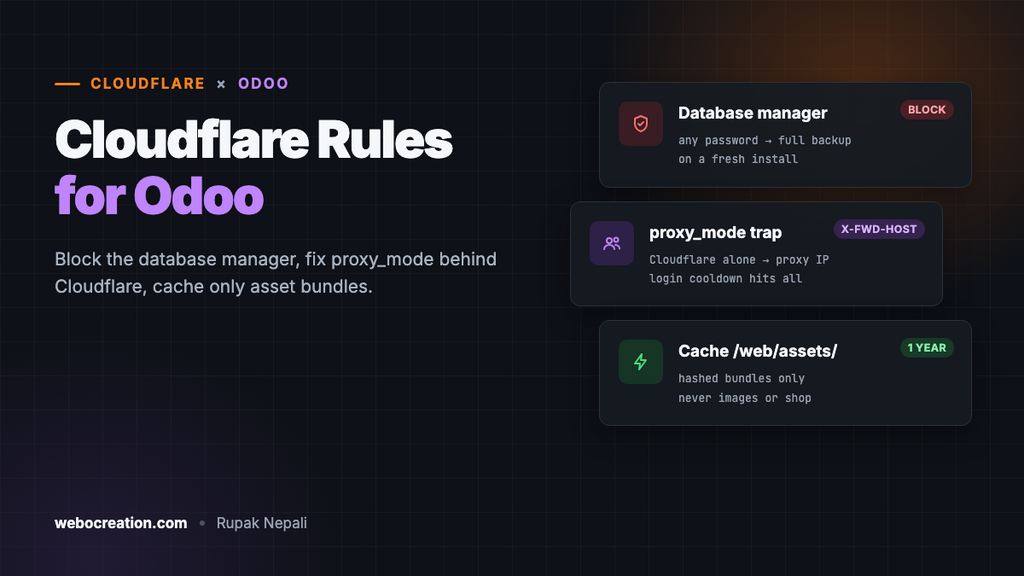
Odoo runs a company’s sales, invoices, stock and website from one database, which makes it one of the most valuable things a small business can expose to the internet. Putting it behind Cloudflare is a good idea, but Odoo has two traps that a generic rule set misses. A fresh install’s database manager hands over the whole database to the first person who asks. And behind a proxy, Odoo’s login protection blocks the wrong people unless it’s configured exactly right.
We tested every path and behaviour in this guide on a fresh Odoo 20.0 (official Docker image, build 20261112, PostgreSQL 16) with the Website and eCommerce apps, before putting anything in front of it. The rules apply to Odoo 17, 18 and 19 too; where older versions differ, we say so.
What a fresh Odoo exposes
The database manager gives the database away
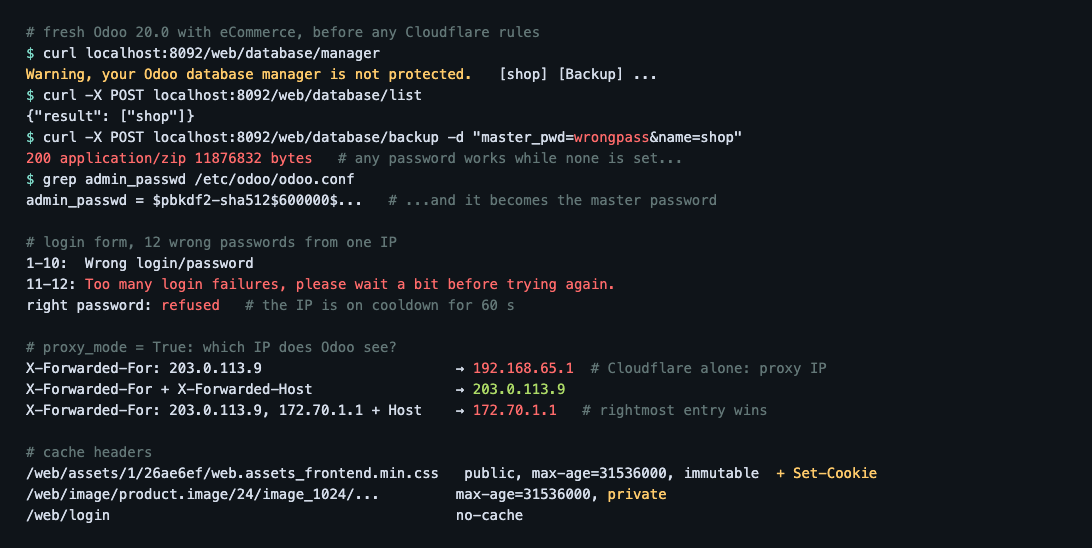
/web/database/manager is public on every Odoo server, lists every database, and offers Backup, Duplicate, Restore and Delete buttons. They’re protected by a master password, but on a new server none is set, and the page says so: “Warning, your Odoo database manager is not protected.”
Here’s what that means in practice. We sent one request to the backup URL with the master password wrongpass. Odoo returned a 12 MB zip of the whole database and its files: customers, orders, invoices, password hashes. Then it saved wrongpass as the server’s master password in odoo.conf, so from that moment the real owner’s guesses were refused and ours worked. Odoo’s code does this on purpose: while the master password is still the default, the first password anyone submits becomes the new one. The same applies to Delete and Restore.
If your Odoo has been reachable before you set a master password, assume someone may have set it for you. Check admin_passwd in your config file and change it.
Two settings in odoo.conf close this for good:
[options]
admin_passwd = a-long-random-master-password
list_db = False
With list_db = False, the manager page said “The database manager has been disabled by the administrator”, the database list API returned Access Denied, and even a backup with the right master password was refused (403). The shop kept working. Make backups from the command line or your hosting panel instead. If you run several databases on one server, also set dbfilter (for example ^%d$ to pick the database by subdomain), because visitors can no longer choose one from the list.
Login protection is per IP address
Odoo has a login cooldown. We sent wrong passwords for the admin account through the login form: ten got “Wrong login/password”, the eleventh got “Too many login failures, please wait a bit before trying again.” The right password was refused too for the next 60 seconds. The limits are system parameters (base.login_cooldown_after = 10, base.login_cooldown_duration = 60).
The cooldown applies to the IP address. Behind Cloudflare, unless Odoo is told where the real visitor address is, every request comes from a Cloudflare server, and one attacker or one customer with a wrong saved password puts everyone behind that Cloudflare address on cooldown. Odoo even warns about it in its log: “The rate-limited IP address … is classified as private and *might* be a proxy.”
Make Odoo work behind Cloudflare
1. Real visitor IPs: proxy_mode, and the header Cloudflare doesn’t send
Odoo’s setting for this is proxy_mode = True. But there’s a catch we confirmed in Odoo’s code and in testing: Odoo only trusts the forwarding headers when the request also has an X-Forwarded-Host header, and Cloudflare doesn’t send one. Then it uses the rightmost address in X-Forwarded-For.
| Request reaching Odoo (proxy_mode on) | IP Odoo used |
|---|---|
| X-Forwarded-For: 203.0.113.9 (what Cloudflare sends) | The proxy’s address. Wrong. |
| X-Forwarded-For: 203.0.113.9 + X-Forwarded-Host | 203.0.113.9. Right. |
| X-Forwarded-For: 203.0.113.9, 172.70.1.1 + X-Forwarded-Host | 172.70.1.1, the last proxy. Wrong. |
So proxy_mode alone does nothing behind Cloudflare. How to fix it depends on your setup.
With Nginx in front of Odoo (recommended, and what Odoo’s own deployment docs use). Let Nginx restore the visitor’s address from Cloudflare, then pass Odoo a single clean address and the host:
# Cloudflare's ranges: https://www.cloudflare.com/ips-v4 and /ips-v6
set_real_ip_from 173.245.48.0/20;
set_real_ip_from 103.21.244.0/22;
# ...one line per range...
real_ip_header CF-Connecting-IP;

location / {
    proxy_pass http://127.0.0.1:8069;
    proxy_set_header X-Forwarded-Host $host;
    proxy_set_header X-Forwarded-For $remote_addr;   # one address, not a list
    proxy_set_header X-Forwarded-Proto https;
    proxy_set_header X-Real-IP $remote_addr;
}
Note $remote_addr rather than $proxy_add_x_forwarded_for: the second appends Nginx’s view of the previous hop, and Odoo would take that last entry, the third row of the table.
Cloudflare straight to Odoo, no Nginx. Add the missing header with a Transform Rule: Rules → Transform Rules → Modify Request Header, Set static, header X-Forwarded-Host, value your hostname. Cloudflare’s own X-Forwarded-For then ends with the visitor’s real address. Only do this if your server’s firewall accepts connections from Cloudflare’s IP ranges alone; otherwise anyone could connect directly and send their own headers.
To check it works, make one failed login and look at Odoo’s log: the “Login failed … from” line should show your own public IP.
2. HTTPS and the base URL
Use Cloudflare’s Full (strict) SSL mode with a certificate on your server or Nginx. With proxy_mode working, Odoo reads X-Forwarded-Proto and builds https links. Also set the system parameter web.base.url to your https address and add web.base.url.freeze = True, so links in emails, invoices and payment redirects never fall back to http or an internal hostname.
3. Paths that must never be challenged
/payment/: payment providers send their confirmations (webhooks) here, for example/payment/stripe/webhook. A challenge means paid orders stay unconfirmed./json/2/,/xmlrpc/,/jsonrpc: the external APIs used by integrations, connectors and mobile apps. We found all three live on Odoo 20./websocket: live updates in the backend (chat, notifications). Cloudflare supports WebSockets, so it works as long as nothing challenges it./web/health: if your load balancer or uptime monitor uses it.
Security rules
In the Cloudflare dashboard, go to Security → Security rules and create custom rules. The free plan includes five.
Rule 1: Block the database manager and probes
Action: Block.
(starts_with(http.request.uri.path, "/web/database/"))
or (http.request.uri.path contains "/.git")
or (http.request.uri.path contains "/.env")
or (starts_with(http.request.uri.path, "/wp-"))
or (ends_with(http.request.uri.path, ".php"))
The first line is the important one. Even with list_db = False, there’s no reason for the internet to reach these URLs, and blocking them at the edge protects a server where someone later turns the manager back on. If you do need the manager, for a migration, add and not ip.src in {your IP} to the first line for the day. Odoo is written in Python, so any .php request is a scanner.
Rule 2: Challenge the backend
Action: Managed Challenge.
((http.request.uri.path eq "/odoo")
 or (starts_with(http.request.uri.path, "/odoo/"))
 or (http.request.uri.path eq "/web"))
and not ip.src in {203.0.113.10 198.51.100.0/24}
Replace the IPs with your office addresses, or leave that line out. /odoo is the backend’s address on recent versions (Odoo 18 and later); older versions use only /web. The rule matches only the page employees open, not /web/… URLs in general, which the website and shop also call in the background. Once an employee passes the challenge, Cloudflare’s clearance cookie covers the backend’s own requests.
For a small team, Cloudflare Zero Trust Access (free for up to 50 users) in front of /odoo is stronger: nobody even sees the backend without signing in to your identity provider first. Either way, turn on two-factor authentication for internal users in Odoo (Settings → Permissions).
Rate limiting: logins and sign-ups
In Security → Security rules → Rate limiting rules:
- If incoming requests match: URI Path is in
/web/login,/web/session/authenticate,/web/reset_passwordand/web/signup - Characteristics: IP
- Requests: 10 per 10 seconds
- Action: Block for 10 seconds
Shop customers log in on /web/login too, so this protects their accounts as well as your staff’s. /web/session/authenticate is the same login as JSON, used by scripts and apps, and it obeys Odoo’s cooldown too, so it deserves the same limit. The password reset and sign-up pages are where spam bots send floods of emails and fake accounts.
Cache rules
Odoo bundles the website’s CSS, JavaScript and fonts into files under /web/assets/, with a hash in the URL that changes whenever the code changes (/web/assets/1/26ae6ef/web.assets_frontend.min.css). Odoo marks them Cache-Control: public, max-age=31536000, immutable, a year.
There’s one wrinkle: when a visitor arrives without a session, Odoo also sets its session_id cookie on these files. Cloudflare doesn’t store a response that sets a cookie when it follows the origin’s cache headers. With an explicit edge TTL it does store it, and removes the cookie from the cached copy, which is what we want for these files. The HTML pages still set the session cookie.
Cache rule 1: Odoo’s asset bundles
In Caching → Cache Rules:
(starts_with(http.request.uri.path, "/web/assets/"))- Cache eligibility: Eligible for cache
- Edge TTL: Ignore cache-control header and use this TTL: 1 year
- Browser TTL: Respect origin
This is safe only because of the hash in the URL. After an upgrade or a change to the website’s code, Odoo generates new bundles at new URLs, and visitors get them immediately without a Cloudflare purge.
Don’t cache images, pages or the shop
- Images (
/web/image/…), including product photos and the website logo, came backCache-Control: … private. Odoo checks access rights on each image, so an image of an unpublished product, an employee avatar or a document attachment must not be served from a shared cache. - Shop pages depend on the visitor: cart, pricelist, currency, language, logged-in customer prices. A cached page would show one customer’s cart or prices to the next.
- Login, checkout,
/myand the backend are personal to each visitor.
Cloudflare leaves all of these alone by default. Keep it that way: no Cache Everything rule on an Odoo hostname.
Test everything
After the rules are live, check from outside your network (replace the domain):
# Rule 1: should be 403 from Cloudflare
curl -s -o /dev/null -w "%{http_code}\n" https://shop.example/web/database/manager

# Asset bundle from the edge: run twice, the second should say HIT
curl -sI "https://shop.example/web/assets/1/HASH/web.assets_frontend.min.css" | grep -i cf-cache-status

# The shop must not be cached: expect DYNAMIC
curl -sI https://shop.example/shop | grep -i cf-cache-status

# The external API must still answer (expect XML, not a challenge page)
curl -s -X POST https://shop.example/xmlrpc/2/common -H "Content-Type: text/xml" \
  -d '<?xml version="1.0"?><methodCall><methodName>version</methodName></methodCall>' | head -c 200
Copy the real asset URL from your shop’s page source. Then place a test order with your real payment provider in test mode and check the order is confirmed (that’s the webhook getting through), log in to the backend, and make one failed login to confirm the log shows your public IP.
Summary
| Where | What |
|---|---|
| odoo.conf | admin_passwd set to a long random password; list_db = False; dbfilter if several databases |
| odoo.conf | proxy_mode = True |
| Nginx | Real IP from CF-Connecting-IP; send Odoo X-Forwarded-Host and a single-address X-Forwarded-For |
| Without Nginx | Transform Rule adding X-Forwarded-Host; firewall the origin to Cloudflare’s ranges |
| Odoo | web.base.url = https address, web.base.url.freeze = True; 2FA for internal users |
| Rule 1 | Block /web/database/, probes and .php |
| Rule 2 | Managed Challenge on the backend (/odoo, /web), office IPs excluded |
| Rate limit | Login, JSON login, password reset, sign-up: 10 per 10 seconds per IP |
| Cache | /web/assets/ for a year; never images, shop pages or the backend |
| Never challenge | /payment/, /json/2/, /xmlrpc/, /jsonrpc, /websocket |
The same approach for other platforms: Nextcloud, Django, Moodle, Shopware and WooCommerce.

Rupak Nepali is a web developer, manage Webocreation website and the author of six books:
Getting Started with OpenCart Module Development (Packt, 2013),
OpenCart Theme and Module Development (Packt, 2015),
OpenCart 4: Dev Guide for Themes & Extensions (2024),
OpenCart 4: User Manual (2025),
Cloudflare for the Enterprise Website (2026) and
The Technical Web Guide for Marketers (2026).
Rupak has built OpenCart stores and extensions since 2010, has published more than 600 tutorials on Webocreation, and shares free OpenCart extensions on GitHub.
Find Rupak on
GitHub | Amazon | LinkedIn | X | YouTube.