Cloudflare Rules for Django: Protect the Admin, Rate-Limit Logins and Cache Static Files
Copy-ready Cloudflare custom, rate limiting and cache rules for Django sites, tested on a fresh Django 6.1 project behind gunicorn, plus the Django settings that make it work behind Cloudflare: real IPs, HTTPS detection and CSRF.
 Rupak NepaliPublished Nov 17, 2026
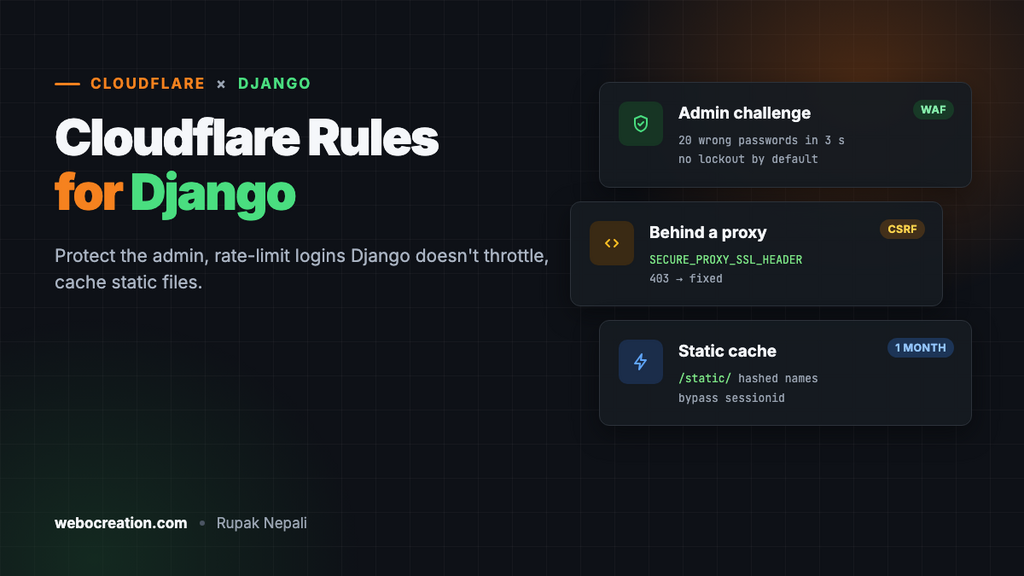
Django has a strong security record: CSRF protection on every form, safe templates, a host header check and clickjacking protection are on by default. What it doesn’t do is limit login attempts, and every Django site has its admin at the same well-known address unless someone changes it. A few Cloudflare rules cover those gaps, and a few Django settings make Django behave correctly behind Cloudflare.
We tested every path and behaviour in this guide on a fresh Django 6.1.3 project, served by gunicorn with DEBUG = False. The rules work for any Django version.
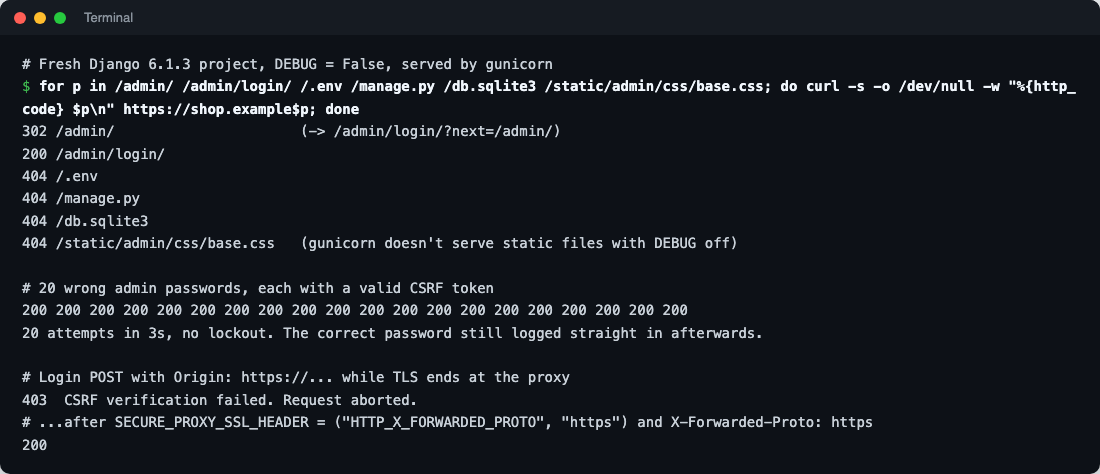
What a fresh Django project exposes
| Path | Response | Notes |
|---|---|---|
/admin/ | 302 to /admin/login/ | The admin, at the default path from startproject |
/admin/login/ | 200 | No limit on attempts |
/.env, /manage.py, /db.sqlite3 | 404 | Django only serves URLs in your URLconf; project files aren’t reachable unless a web server is wrongly pointed at the project folder |
/static/admin/css/base.css | 404 | With DEBUG = False, Django and gunicorn don’t serve static files. Nginx, WhiteNoise or a CDN must |
Any request with an unknown Host header | 400 | ALLOWED_HOSTS at work |
The admin has no brute-force protection
We sent 20 wrong passwords for the admin user, each with a valid CSRF token, as a script would. All 20 returned 200 with “Please enter the correct username and password for a staff account”, in 3 seconds, and the correct password still logged straight in afterwards: no lockout, no delay. That’s by design; Django leaves throttling to packages such as django-axes, or to the layer in front. Rules 2 and the rate limit below are that layer.
Never run DEBUG = True in production
With DEBUG = True, any 404 lists every URL pattern of your site to whoever asks, here in answer to a bot probing for /wp-login.php:

Errors are worse: the debug page shows settings, local variables and the stack trace. Check with python manage.py check --deploy, which warns about DEBUG and several other production settings.
Make Django work behind Cloudflare
1. HTTPS detection and CSRF
Cloudflare, and usually Nginx, ends HTTPS before the request reaches Django, so Django thinks every request is plain HTTP. Then SECURE_SSL_REDIRECT loops, secure cookies misbehave, and form posts fail. We reproduced it: a login POST from https:// was rejected with 403 CSRF verification failed, because the browser’s Origin (https://) didn’t match what Django saw (http://).
Tell Django to trust the forwarded protocol header:
# settings.py
SECURE_PROXY_SSL_HEADER = ("HTTP_X_FORWARDED_PROTO", "https")
SECURE_SSL_REDIRECT = True
SESSION_COOKIE_SECURE = True
CSRF_COOKIE_SECURE = True
ALLOWED_HOSTS = ["example.com", "www.example.com"]
CSRF_TRUSTED_ORIGINS = ["https://example.com", "https://www.example.com"]
With SECURE_PROXY_SSL_HEADER set and X-Forwarded-Proto: https arriving, the same login POST went through. Cloudflare sends X-Forwarded-Proto to your server. If Nginx sits in between, make sure it passes Cloudflare’s value on rather than overwriting it with its own $scheme (which is http when Cloudflare connects over HTTP):
proxy_set_header X-Forwarded-Proto $http_x_forwarded_proto;Only do this when every request comes through Cloudflare and your proxy, and use SSL/TLS mode Full (strict), so the header can’t be faked by someone reaching the server directly.
2. Real visitor IPs
request.META["REMOTE_ADDR"] will be a Cloudflare address. Fix it in Nginx, trusting only Cloudflare’s ranges, and pass the result to gunicorn:
# Full list: https://www.cloudflare.com/ips-v4 and /ips-v6
set_real_ip_from 173.245.48.0/20;
set_real_ip_from 103.21.244.0/22;
# ...one line per range...
real_ip_header CF-Connecting-IP;

location / {
    proxy_pass http://127.0.0.1:8000;
    proxy_set_header Host $host;
    proxy_set_header X-Forwarded-For $remote_addr;
    proxy_set_header X-Forwarded-Proto $http_x_forwarded_proto;
}
Packages that read the IP (django-axes, rate limiting, logging) usually let you choose the header; point them at the one your proxy sets. Don’t read CF-Connecting-IP in Django directly unless the server only accepts connections from Cloudflare.
3. Rename the admin
Changing path("admin/", admin.site.urls) to something private, such as path("staff-7k2q/", admin.site.urls), removes your site from every scan that targets /admin/. It’s not a security control on its own, but it cuts the noise, and Rule 1 can then block /admin/ outright.
Security rules
Rule 1: Block probes
Action: Block.
(http.request.uri.path contains "/.env")
or (http.request.uri.path contains "/.git")
or (ends_with(http.request.uri.path, ".py"))
or (ends_with(http.request.uri.path, ".sqlite3"))
or (ends_with(http.request.uri.path, ".sql"))
or (ends_with(http.request.uri.path, ".php"))
or (starts_with(http.request.uri.path, "/wp-"))
or (http.request.uri.path in {"/admin/" "/admin" "/admin/login/"})
Django sites have no .php URLs, so the PHP and /wp- lines only ever catch bots scanning for WordPress and PHP holes, which make up a large share of the junk traffic any site gets. Keep the last line only if you renamed the admin. And check no real URL of yours ends in .py (a code-sharing blog might).
Rule 2: Challenge the admin
Action: Managed Challenge.
(starts_with(http.request.uri.path, "/staff-7k2q/"))
and not ip.src in {203.0.113.10 198.51.100.0/24}
Use your admin path and office IPs (or /admin/ if you kept the default). Because Django doesn’t throttle logins, this rule matters more on Django than on platforms that do. For staff working from anywhere, Cloudflare Zero Trust Access (free for up to 50 users) in front of the admin path is stronger: no one reaches the login form without signing in to your identity provider first.
APIs: don’t challenge them
If you run Django REST Framework or a GraphQL endpoint, keep it out of every challenge rule: API clients and mobile apps can’t solve challenges. Protect API logins and token endpoints with the rate limit below, and use DRF’s own throttling classes for per-user limits.
Rate limiting: logins
- If incoming requests match: URI Path equals
/staff-7k2q/login/(your admin login), or/accounts/login/for a site’s user login (django-allauth anddjango.contrib.auth‘s default) - Characteristics: IP
- Requests: 10 per 10 seconds
- Action: Block for 10 seconds
The Free plan gives one rate-limiting rule with a 10-second window, which turns our 20-passwords-in-3-seconds script into one attempt a second at most. That’s a big improvement but not a lockout, so add django-axes (or similar) in Django for real per-account lockouts. On paid plans, add http.request.method eq "POST" and longer windows, and cover password reset (/accounts/password/reset/) too.
Cache rules
Cache rule 1: Static files
(starts_with(http.request.uri.path, "/static/"))Eligible for cache, Edge TTL: 1 month, Browser TTL: 1 week. Long caching is safe if your static files get a new name when they change. Django’s ManifestStaticFilesStorage (or WhiteNoise’s CompressedManifestStaticFilesStorage) adds a content hash to each file name during collectstatic, such as base.3d2f1a9c.css. Without it, use a shorter TTL or purge after each deploy.
Cache rule 2: User uploads
(starts_with(http.request.uri.path, "/media/"))Edge TTL: 1 week. Uploaded files usually keep their name when replaced, so purge the URL in Cloudflare after replacing one. Never put private uploads (invoices, documents) under a public /media/ path at all; serve them through a view that checks permissions.
Cache rule 3: Bypass everything private
(starts_with(http.request.uri.path, "/staff-7k2q/"))
or (starts_with(http.request.uri.path, "/accounts/"))
or (starts_with(http.request.uri.path, "/api/"))
or (http.cookie contains "sessionid")
Action: Bypass cache. Django’s admin responses send Cache-Control: max-age=0, no-cache, no-store, must-revalidate, private, which Cloudflare respects anyway; the rule makes it explicit and covers your own views. sessionid is Django’s default session cookie name; change it if you set SESSION_COOKIE_NAME.
Caching public HTML pages at Cloudflare is possible for content sites (a blog, docs) with a Cache Everything rule and a cookie bypass like the one above, but test that no page includes user-specific content (a “Hi, Maya” header, a CSRF token in a cached form) before relying on it.
Test everything
curl -s -o /dev/null -w "%{http_code}\n" https://example.com/.env                      # 403
curl -s -o /dev/null -w "%{http_code}\n" https://example.com/wp-login.php              # 403
curl -s -o /dev/null -w "%{http_code}\n" https://example.com/admin/                    # 403 (if renamed)
curl -s -o /dev/null -w "%{http_code}\n" https://example.com/staff-7k2q/login/         # 403 challenge from a non-allowed IP
curl -sI https://example.com/static/admin/css/base.css | grep -i cf-cache-status        # HIT after a reload
python manage.py check --deploy                                                          # no warnings left
Then log in to the admin and submit every form on the site (contact, login, checkout) to be sure CSRF works over HTTPS.
Summary
| What | Where | Stops |
|---|---|---|
| Probe block | Cloudflare custom rule | PHP, WordPress and file scans |
| Admin challenge | Cloudflare custom rule | Automated admin password guessing |
| Login rate limit | Cloudflare rate limiting | Credential stuffing floods |
| Static and media cache | Cloudflare cache rules | Origin load |
SECURE_PROXY_SSL_HEADER, CSRF_TRUSTED_ORIGINS | Django settings | Redirect loops and CSRF failures |
| Real IPs | Nginx | Wrong IPs in logs and rate limits |
DEBUG = False | Django settings | Leaking routes, settings and code |
More in this series: Cloudflare rules for Laravel, Next.js, WordPress, Shopware 6 and Strapi, plus the OWASP Core Ruleset guide.

Rupak Nepali is a web developer, manage Webocreation website and the author of six books:
Getting Started with OpenCart Module Development (Packt, 2013),
OpenCart Theme and Module Development (Packt, 2015),
OpenCart 4: Dev Guide for Themes & Extensions (2024),
OpenCart 4: User Manual (2025),
Cloudflare for the Enterprise Website (2026) and
The Technical Web Guide for Marketers (2026).
Rupak has built OpenCart stores and extensions since 2010, has published more than 600 tutorials on Webocreation, and shares free OpenCart extensions on GitHub.
Find Rupak on
GitHub | Amazon | LinkedIn | X | YouTube.