Chapter 16: Working with Agencies and Contractors
Web agency management that keeps your code, accounts and standards under your control, from statement of work to exit checklist.
 Rupak NepaliPublished Nov 26, 2026
This is Chapter 16 of The Web Delivery Manager’s Playbook, a free series on running enterprise websites from request to release. Web agency management that keeps your code, accounts and standards under your control, from statement of work to exit checklist.
The agency that built Webocreation Group’s product microsites had done good creative work. The sites looked great and won an industry award. But when Maya’s team took over maintenance, the problems began.
The code was in the agency’s own repository, and nobody at Webocreation Group had access. There was no documentation. The sites used a custom plugin the agency had written, licensed only for use “during the term of the engagement.” Several sites ran on the agency’s hosting account, billed through the agency at a markup. And when Maya asked for the source files for the designs, the agency quoted a fee for “handover services.”
None of this was dishonest. It was all in the original contract, which a marketing manager had signed three years earlier without anyone from the web team reviewing it. The contract was written to protect the agency. Nobody had written one to protect Webocreation Group.
Web agency management from SOW to exit
When to use agencies and contractors
Most corporate web teams rely on outside help. Used well, agencies and contractors give you skills and capacity you cannot keep in-house. Common reasons to bring them in:
- Peak capacity: a redesign or migration that needs more people for a few months.
- Specialist skills: UX research, accessibility audits, performance engineering, complex integrations.
- Creative work: campaign concepts, brand design, video.
- Ongoing support: a retainer for maintenance, out-of-hours support or a platform you do not have expertise in.
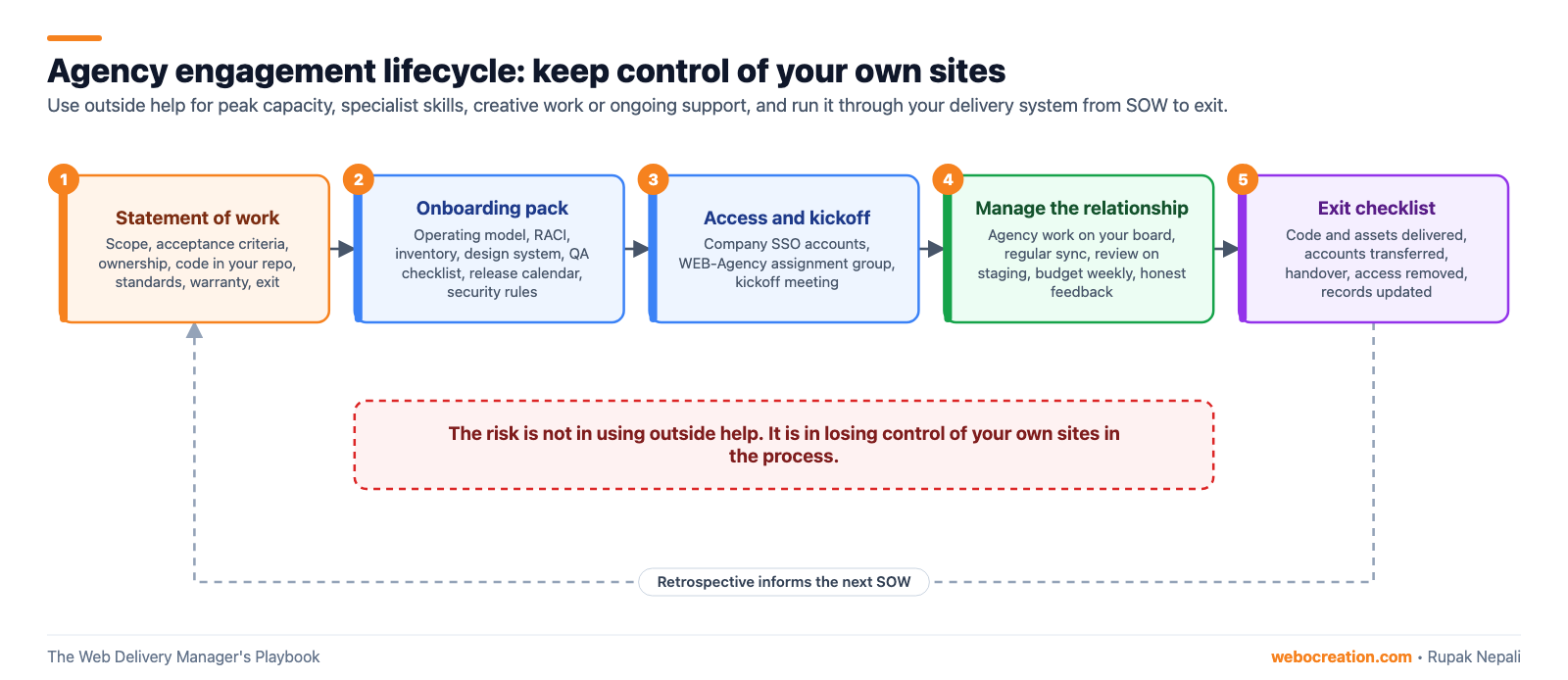
The risk is not in using outside help. It is in losing control of your own sites in the process.
The statement of work
A statement of work (SOW) describes what an agency or contractor will deliver, how, when and for how much. It usually sits under a master services agreement (MSA) that covers legal terms. Procurement and legal will own the contract, but the delivery manager should review every SOW for web work. Many of the most expensive problems come from what the SOW leaves out.
What a good web SOW includes
Scope and deliverables. A clear list of what will be delivered, such as pages, templates, features and integrations, and what is out of scope. Vague scope, such as “website redesign,” leads to disputes.
Acceptance criteria. How you will decide a deliverable is complete. Reference your QA checklist (Chapter 12), accessibility standard (for example, WCAG 2.2 level AA), browser and device support, and performance targets.
Ownership of work. All code, designs, content and other materials created for you belong to your company on payment. Any pre-existing agency tools or plugins used in the work come with a perpetual license for your use, including after the engagement ends.
Code and accounts. Code is kept in your company’s repository from day one, or at least delivered there regularly. Hosting, domains, analytics, tag managers and other accounts are set up in your company’s name, with the agency given access, not the other way around.
Standards. The agency follows your coding standards, design system, security requirements, accessibility standard and release process, including your change management process.
Documentation and handover. Documentation for editors and developers is a deliverable, with a handover session and a defined support period after launch.
Testing responsibilities. Who does what testing, on which environments, and how defects are tracked and fixed.
Change control. How scope changes are requested, estimated and approved, so that changes do not quietly increase costs.
Warranty and support. A period after launch, often 30 to 90 days, during which the agency fixes defects in its work at no extra cost.
Exit. What happens when the engagement ends: transfer of all materials, access removal, and knowledge transfer.
Template: Agency SOW checklist
Use this checklist when reviewing any SOW for web work, before it is signed.
| Area | Question | Yes / No |
|---|---|---|
| Scope | Are deliverables listed specifically, with clear out-of-scope items? | |
| Acceptance | Are acceptance criteria defined, including QA, accessibility, browsers and performance? | |
| Ownership | Does all work become ours on payment? | |
| Licensing | Do we get a perpetual license to any agency tools used in our sites? | |
| Code | Is code stored in our repository, or delivered there regularly? | |
| Accounts | Are hosting, domains and tools in our company’s name? | |
| Standards | Must the agency follow our coding, design, security and accessibility standards? | |
| Process | Must the agency follow our release and change management process? | |
| Documentation | Are editor and developer documentation required deliverables? | |
| Testing | Are testing responsibilities clear for both sides? | |
| Change control | Is there a defined process for scope changes? | |
| Warranty | Is there a warranty period for defects after launch? | |
| Exit | Are handover and access removal defined for the end of the engagement? | |
| Security | Has the agency passed our vendor security review? |
Onboarding an agency
A good contract is necessary, but not enough. Agencies do their best work when they understand how your company operates. Run a short, structured onboarding for every new agency or significant new engagement.
The onboarding pack
Give every agency a pack containing:
- Your one-page operating model and RACI (Chapter 2).
- The site inventory entries for the sites they will work on (Chapter 3).
- Your design system, brand guidelines and content style guide.
- Coding standards, branching strategy and environment setup.
- Your QA checklist and accessibility standard.
- Release calendar, change management process and how to raise or support a change request.
- Who to contact for what, including legal and brand reviewers.
- Security requirements: SSO, password policy, data handling and what to do if they suspect a security issue.
Access
Give agency staff access through your company’s systems wherever possible: company SSO accounts for the CMS and tools, access to your code repository, and a ServiceNow account so they can work requests and incidents assigned to them. Avoid shared logins entirely. Record all agency access in your access review (Chapter 3), with an expiry date tied to the engagement.
If agency staff will handle ServiceNow tickets, create an assignment group for them, such as WEB-Agency, so their work is visible and routed properly.
The kickoff
Hold a kickoff meeting with the agency team and your key people. Walk through goals, the operating model, communication channels, and how work will flow. Agree a regular status meeting and a single point of contact on each side.
Managing the relationship
Once work is underway, manage the agency as part of your delivery system, not as a separate world.
- Put agency work on your board. Their tasks should appear alongside your team’s work, so you can see the whole picture.
- Include them in standups or a regular sync. For larger engagements, agency developers should join the team standup.
- Review work continuously. Do not wait until the end to look at what has been built. Review on staging every cycle.
- Track budget weekly. For time-and-materials work, compare hours used with progress. Surprises at the end of a project are always bad ones.
- Give honest feedback. Tell the agency what is working and what is not, early. Most agencies want to improve and will respond to clear feedback.
- Treat them as partners. The best agency relationships are long-term. Respect, clear direction and prompt payment earn you better people and more care.
Contractors
Individual contractors are common for short-term development, content or design work. The same principles apply on a smaller scale: a clear scope, ownership of work, access through company systems, inclusion in your process, and a clean exit. Be especially careful with knowledge. A contractor who builds a critical feature and leaves without documentation creates a single point of failure. Make documentation and a handover session part of every contractor engagement.
Ending an engagement
When an agency engagement ends, run an exit checklist:
- Confirm all code is in your repository and all design files and assets are delivered.
- Confirm all accounts and services are in your company’s name, and transfer any that are not.
- Hold a handover session with your team and record it.
- Remove all agency access to systems and accounts.
- Update the inventory, CMDB and access review records.
- Close any open tickets assigned to the agency group, or reassign them.
- Hold a short retrospective with the agency on what worked and what did not.
Webocreation Group: Taking back control
It took Maya four months to bring the microsites fully under Webocreation Group’s control. Procurement negotiated the transfer of code and design files as part of a new, smaller support agreement. The sites moved to hosting in the company’s name, saving about 30 percent on hosting costs. The custom plugin was replaced with a standard alternative.
From then on, every SOW for web work went through Maya’s checklist before signature. The CMO agreed to a simple rule: no agency could start web work without the web delivery manager’s review of the SOW. Procurement added the rule to its own process.
The same agency was later hired for a new campaign under the new terms. Its account director admitted the new SOW was clearer than most and made the project easier to run.
Checklist
- Review every SOW for web work against the checklist before it is signed.
- Make sure code, accounts and hosting are in your company’s name.
- Build an agency onboarding pack and run a kickoff for every new engagement.
- Give agencies access through SSO and ServiceNow, never shared logins.
- Put agency work on your board and review it on staging every cycle.
- Track agency budgets weekly.
- Run an exit checklist at the end of every engagement.
Common traps
- Contracts signed without web review. The most expensive problems come from what the SOW leaves out.
- Agency-owned accounts and code. If the agency controls your hosting, domains or code, it controls your site.
- No documentation. Make it a deliverable, not a favor.
- Shared logins. Every person gets their own account, with an expiry date.
- Reviewing only at the end. Look at the work every cycle, while changes are still cheap.
- Forgetting the exit. Plan the handover at the start, not when the relationship ends.
Related reading
- Git, CI/CD and staging: a deployment workflow that does not break the live site
- Passwords, MFA and passkeys: authentication done right
- Chapter 15: Managing Stakeholders and Executives
- Chapter 17: Vendor and License Management

Rupak Nepali is a web developer, manage Webocreation website and the author of six books:
Getting Started with OpenCart Module Development (Packt, 2013),
OpenCart Theme and Module Development (Packt, 2015),
OpenCart 4: Dev Guide for Themes & Extensions (2024),
OpenCart 4: User Manual (2025),
Cloudflare for the Enterprise Website (2026) and
The Technical Web Guide for Marketers (2026).
Rupak has built OpenCart stores and extensions since 2010, has published more than 600 tutorials on Webocreation, and shares free OpenCart extensions on GitHub.
Find Rupak on
GitHub | Amazon | LinkedIn | X | YouTube.