Chapter 24: Migrations, Replatforming and Sunsetting
Website migration done right: when to replatform, how to plan and test the move without losing search traffic, and how to retire a site cleanly.
 Rupak NepaliPublished Nov 26, 2026
This is Chapter 24 of The Web Delivery Manager’s Playbook, a free series on running enterprise websites from request to release. Website migration done right: when to replatform, how to plan and test the move without losing search traffic, and how to retire a site cleanly.
Three of Webocreation Group’s regional sites ran on an old version of a CMS that would lose security support within a year. Five more regional sites were to move onto the corporate CMS as a multisite (Chapter 19). And nine Tier 3 sites were marked for retirement. In one year, Maya’s team would move or close almost half the portfolio.
The previous migration at the company, three years earlier, had been remembered for all the wrong reasons. Search traffic to the migrated site had fallen by 40 percent for six months. Hundreds of PDFs had disappeared. Several forms had stopped sending data to the CRM without anyone noticing for weeks. That migration had been treated as a technical project: move the content, switch the DNS, done.
Migrations are not technical projects. They are business projects with a technical core.
Planning a website migration and sunset
When to replatform
Moving a site to a new platform is expensive and risky. Before starting, be sure it is the right call. Good reasons to replatform include:
- The current platform is reaching end of support, and upgrading is not practical.
- The platform cannot meet security, accessibility or compliance requirements.
- Running it costs far more than a standard alternative.
- It is a non-standard platform in your portfolio, and consolidating would reduce cost and risk.
- It genuinely cannot support important business needs.
Weak reasons include “a new CMS will fix our content problems” (it will not; content problems are governance problems), “a vendor showed us a great demo,” and “the new CMO used it at their last company.” A new platform with the same processes produces the same problems on newer technology.
Before choosing to migrate, compare the options: upgrade in place, consolidate onto an existing standard platform, migrate to a new platform, or retire the site. Use the business case structure from Chapter 21.
Planning a migration
A migration plan covers much more than moving content. Work through each area below.
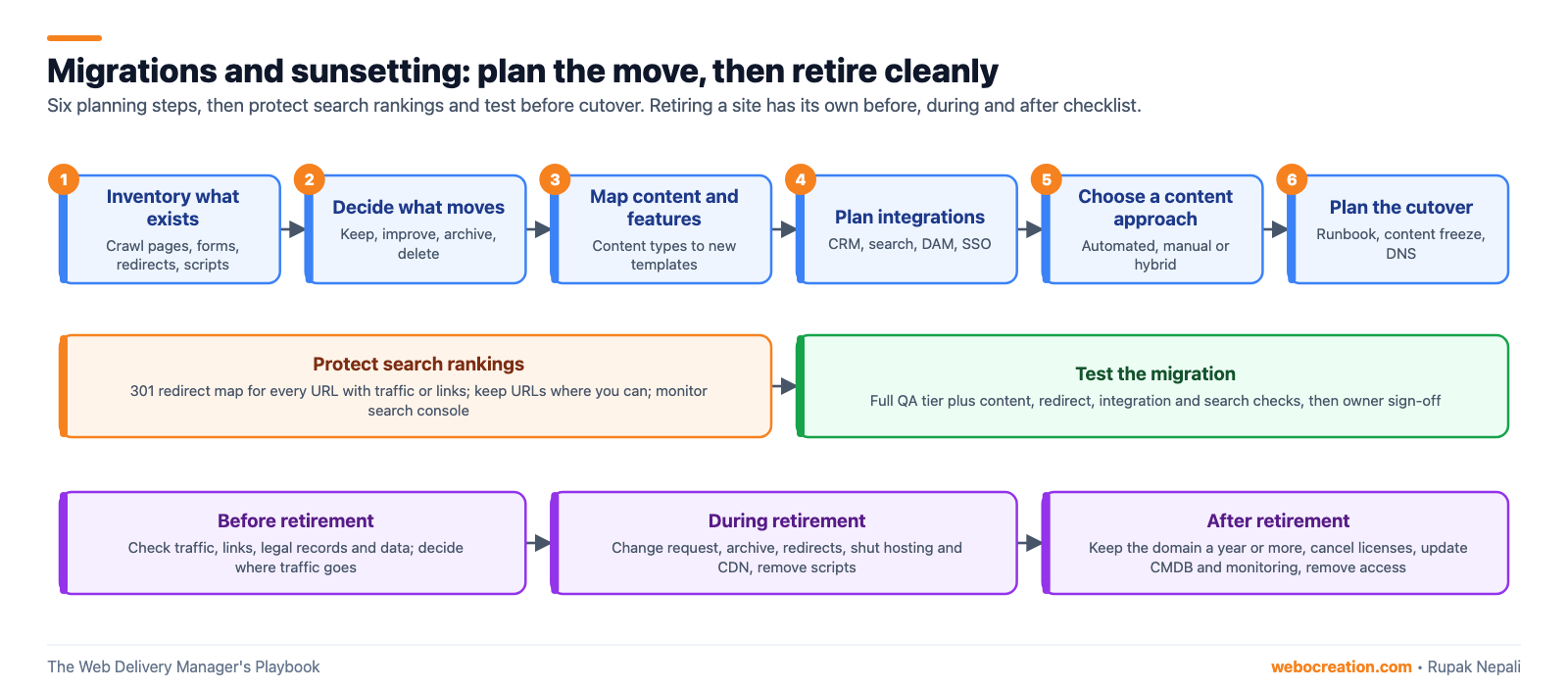
1. Inventory what exists
Crawl the current site and list every page, file, form, integration, redirect, script and feature. Use analytics to see which pages get traffic and which do not. Use search console data to find pages that receive search traffic and external links. You will almost always find more than expected, as with the inventory in Chapter 3.
2. Decide what moves
Not everything should move. A migration is the best opportunity you will have to clean up. For each page or group of pages, decide to:
- Keep and migrate as is.
- Improve: rewrite, consolidate or update during the move.
- Archive: remove from the live site but keep a record.
- Delete: remove, with a redirect to the most relevant page.
Use traffic, business value and content owner input to decide. Pages with no traffic in a year and no business owner are strong candidates for deletion.
3. Map content and features
Map each kept content type to a template on the new platform. Identify gaps: features or content types the new platform does not support yet. Decide whether to build them, change them, or drop them.
4. Plan integrations
List every system the site connects to: CRM, marketing automation, search, analytics, DAM, HR or e-commerce systems, single sign-on. For each one, plan how it will connect on the new platform and how it will be tested. Integrations are where migrations most often fail quietly.
5. Choose a content migration approach
- Automated: scripts export content from the old system and import it into the new one. Fast for large volumes of structured content, but needs careful testing and clean-up.
- Manual: editors rebuild pages by hand. Slower, but good for small sites or content being rewritten anyway.
- Hybrid: automate the bulk and handle complex pages manually. This is the most common approach.
6. Plan the cutover
Decide how and when the switch will happen, using the launch approach from Chapter 13: runbook, change request, DNS plan, go/no-go and war room. Plan a content freeze on the old site a few days before cutover, so content does not change after it has been migrated.
Protecting search rankings
The 40 percent drop in search traffic after the earlier migration was almost entirely avoidable. Search engines rank individual URLs. When URLs change without redirects, those rankings are lost.
To protect search performance:
- Build a complete redirect map from every old URL with traffic, search visibility or external links to its new equivalent. Map to the most relevant page, not just the home page.
- Use permanent (301) redirects.
- Keep URLs the same where you can. The best redirect is the one you do not need.
- Preserve page titles, headings and key content for important pages, at least at first.
- Test every redirect on staging and again after launch.
- Submit the new sitemap to search engines and monitor search console for crawl errors in the weeks after launch.
- Keep redirects in place for at least a year, and ideally permanently for important URLs.
Expect a small, temporary fluctuation in search traffic after any migration. A large or lasting drop means something was missed. Investigate immediately.
Testing a migration
Test a migration more thoroughly than any normal release. Use the full QA tier (Chapter 12), plus:
- Content checks: compare a sample of migrated pages with the originals, including images, tables, links and documents.
- Redirect testing: automated testing of every redirect in the map.
- Integration testing: submit every form and confirm the data reaches its destination with the right fields.
- Search checks: titles, meta descriptions, canonical tags, structured data and sitemap.
- User acceptance testing: content owners review their sections on staging and sign off.
Sunsetting a site properly
Retiring a site sounds simple: switch it off. Done badly, it leaves broken links, lost domains, orphaned data and lingering costs. Done well, it is clean and permanent.
Before retirement
- Confirm the decision with the business owner, or with leadership if the site has no owner.
- Check traffic and links. Where do visitors come from? Are there external links, printed materials or email campaigns pointing to it?
- Check legal and records requirements. Some content must be kept for a set period, such as regulated disclosures, terms and conditions or investor information. Archive it accordingly.
- Check data. Does the site hold personal data, form submissions or user accounts? Follow your data retention policy and privacy requirements for deleting or exporting it.
- Decide where traffic goes. Usually a redirect to the most relevant page on another site.
During retirement
- Raise a change request (Chapter 11).
- Archive the site’s content as required.
- Set up redirects from the old domain and important URLs.
- Shut down hosting and remove the site from the CDN configuration.
- Remove third-party scripts and close related tool accounts.
After retirement
- Keep the domain for at least a year with redirects in place, then decide whether to keep or release it. Releasing a domain lets anyone register it, including people who may use it to impersonate your company. For any domain with past traffic or brand value, keeping it is often the safer choice.
- Cancel licenses and hosting and confirm the final invoices.
- Update records: set the CMDB configuration item to retired, update the inventory, remove the site from monitoring, and update the renewal calendar.
- Remove access for any accounts that existed only for this site.
Webocreation Group: A year of moves
The regional site migrations used a hybrid content approach. The team migrated about 2,100 pages by script, then content owners reviewed and improved their sections. About 30 percent of the old pages were deleted with redirects, because they had no traffic and no owner. The redirect map had 1,850 entries, every one tested automatically before and after launch.
Search traffic to the regional sites dipped by 6 percent in the first two weeks, then recovered and grew past its previous level within two months, helped by faster pages and cleaner content.
The nine retired sites were closed over three months using the sunset checklist. Two domains turned out to be printed on product packaging still in stores, so they were kept with permanent redirects. Retiring the sites saved about $38,000 a year and removed nine entries from the risk register.
Template: Migration plan and sunset checklist
Migration plan outline:
| Section | Contents |
|---|---|
| Goals and success measures | Why we are migrating; how we will know it worked (for example: no lasting search traffic loss; all forms working) |
| Scope | Sites, sections and content in scope; what is out of scope |
| Content inventory and decisions | Keep, improve, archive or delete, by page or section |
| Content and template mapping | Old content types to new templates; feature gaps and decisions |
| Integrations | Each system, how it connects, how it will be tested |
| Migration approach | Automated, manual or hybrid; tools and owners |
| Redirect map | Location of the map; testing method |
| Testing plan | QA, content checks, integrations, SEO, user acceptance |
| Cutover plan | Content freeze, runbook, change request, DNS, go/no-go |
| Post-launch monitoring | Search console, analytics, forms, error logs for at least 4 weeks |
| Old platform decommissioning | When and how the old platform is shut down |
Sunset checklist:
- Retirement decision confirmed with business owner or leadership.
- Traffic sources, external links and printed references checked.
- Legal, records and data retention requirements met; content archived.
- Personal data exported or deleted according to policy.
- Change request raised and approved.
- Redirects in place from the domain and key URLs.
- Hosting, CDN configuration and scripts removed.
- Licenses and accounts cancelled; final invoices confirmed.
- Domain kept with redirects for at least a year; long-term decision recorded.
- CMDB, inventory, monitoring and renewal calendar updated.
- Access removed for site-specific accounts.
Checklist
- Compare upgrade, consolidate, migrate and retire options before replatforming.
- Inventory every page, file, form, integration and redirect before planning a migration.
- Use the migration to delete or archive content with no traffic or owner.
- Build and test a complete redirect map.
- Test every integration end to end before cutover.
- Monitor search console, analytics and forms for at least four weeks after launch.
- Use the sunset checklist for every site retirement.
Common traps
- Treating migration as a technical project. Content, search, integrations and owners matter as much as code.
- Migrating everything. A migration is the best chance to clean up. Take it.
- Redirects to the home page. Map old URLs to the most relevant new pages.
- Forgetting integrations. Forms that quietly stop sending data can go unnoticed for weeks.
- Releasing domains too soon. Anyone can register a released domain, including people who want to impersonate you.
- Leaving the CMDB out of date. Retired sites that still appear active confuse incident routing and audits.
Related reading
- Website redesign without losing traffic: the SEO redirect checklist
- SEO, AEO and GEO checklists: technical, content, migration and more
- Crawlability and indexability: robots.txt, sitemaps, canonicals and redirects
- Upgrading OpenCart 3 to 4.1: a migration plan that works
- Chapter 23: Security, Compliance and Risk for Delivery Managers
- Chapter 25: AI in Web Delivery

Rupak Nepali is a web developer, manage Webocreation website and the author of six books:
Getting Started with OpenCart Module Development (Packt, 2013),
OpenCart Theme and Module Development (Packt, 2015),
OpenCart 4: Dev Guide for Themes & Extensions (2024),
OpenCart 4: User Manual (2025),
Cloudflare for the Enterprise Website (2026) and
The Technical Web Guide for Marketers (2026).
Rupak has built OpenCart stores and extensions since 2010, has published more than 600 tutorials on Webocreation, and shares free OpenCart extensions on GitHub.
Find Rupak on
GitHub | Amazon | LinkedIn | X | YouTube.