Chapter 14: Incidents, Outages and Post-Mortems
Website incident management for web teams: restore service first, communicate on a schedule, then remove the cause with blameless post-mortems.
 Rupak NepaliPublished Nov 26, 2026
This is Chapter 14 of The Web Delivery Manager’s Playbook, a free series on running enterprise websites from request to release. Website incident management for web teams: restore service first, communicate on a schedule, then remove the cause with blameless post-mortems.
At 10:40 on a Wednesday morning, the corporate site at Webocreation Group started returning errors. Within five minutes, the web team chat channel had 30 messages. Developers were checking different things without telling each other. The CMO’s assistant called Maya to ask what was going on. Someone from the service desk logged an incident and assigned it to the infrastructure team, who said it was not theirs. A developer restarted something on the hosting platform, which made things briefly worse.
The site came back at 11:25. The cause turned out to be a database connection limit reached after a marketing email drove a traffic spike to a page with a slow query. It was a fixable problem. What made the incident painful was not the cause but the chaos around it: no clear owner, no single channel, no regular updates, and nobody writing down what was tried.
Incidents will happen to every website. You cannot prevent all of them. You can make sure that when they happen, your team responds calmly and well.
Website incident management step by step
Incidents, problems and major incidents
ServiceNow and ITIL use precise terms, and it helps to use them consistently.
- An incident is an unplanned interruption or reduction in the quality of a service. A broken form, a page showing an error, a site that is down, or wrong prices on a live page are all incidents. The goal of incident management is to restore normal service as quickly as possible.
- A problem is the underlying cause of one or more incidents. The goal of problem management is to find and remove the cause, so the incident does not happen again.
- A major incident is an incident with severe business impact, such as a key site down for all users, a data exposure, or an issue affecting revenue at scale. Major incidents follow a special process with dedicated coordination and senior communication.
The distinction matters because the goals are different. During an incident, you do whatever restores service fastest, even a temporary workaround. Finding the root cause can wait for problem management.
Priority: Impact and urgency
ServiceNow usually calculates incident priority from two factors:
- Impact: how widely the incident affects the business. How many users, how many sites, how much revenue or reputation is at stake?
- Urgency: how quickly the business needs it fixed. Is there a workaround? Is the damage growing over time?
A typical priority matrix looks like this:
| Impact / Urgency | High urgency | Medium urgency | Low urgency |
|---|---|---|---|
| High impact | P1 Critical | P2 High | P3 Moderate |
| Medium impact | P2 High | P3 Moderate | P4 Low |
| Low impact | P3 Moderate | P4 Low | P5 Planning |
Your company will have its own matrix and response targets. Learn them, then translate them into web examples so the service desk and your team classify web incidents consistently.
| Priority | Web examples | Typical response target |
|---|---|---|
| P1 Critical | Corporate site down for all users; checkout or lead forms failing sitewide; security breach or defacement; incorrect rates or legal disclosures on a high-traffic regulated page | Response within 15 minutes; work continuously until resolved |
| P2 High | A major section or important microsite down; key form failing; serious performance problem; widespread broken images or styles | Response within 30 minutes; resolve within hours |
| P3 Moderate | A single page broken; a minor form issue with a workaround; a broken integration on a low-traffic site | Response within 4 business hours |
| P4 Low | Cosmetic issues; a broken link; minor layout issue on one browser | Response within 1 business day |
Notice that wrong prices or disclosures on a regulated page can be P1, even though the site technically works. In financial services, healthcare and other regulated industries, inaccurate information can cause legal and customer harm. Agree this classification with legal and compliance in advance.
On-call for web teams
If your sites matter outside business hours, someone must be able to respond. Many web teams do not have a formal on-call rota, which means incidents at night depend on whoever happens to see a message.
A basic web on-call setup includes:
- A rota of people who take turns being reachable outside business hours, usually for a week at a time.
- Clear scope: on-call responds to P1 and P2 incidents only. Everything else waits for business hours.
- Alerting: uptime and error monitoring sends alerts to the on-call person’s phone, through ServiceNow or a paging tool.
- Access: on-call people can log into every critical platform from home, including the CMS, hosting, CDN and DNS.
- Escalation: a named backup and a manager to call if the on-call person needs help.
- Fair compensation: on-call is real work. Follow your company’s policy for on-call pay or time off.
If your team is too small for an on-call rota, agree with IT operations or a managed service provider who handles out-of-hours web incidents, and give them the runbooks they need.
Responding to an incident
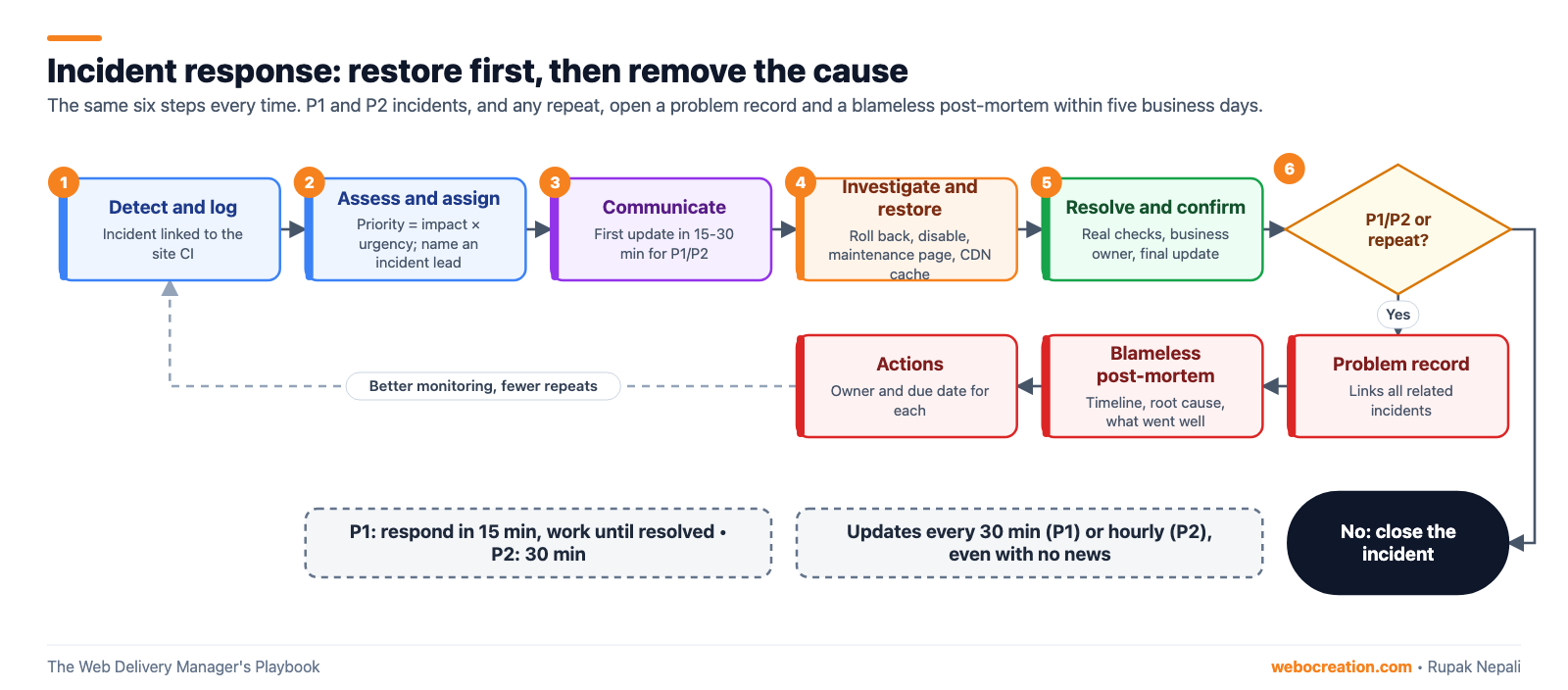
Good incident response follows the same steps every time. Write them down and practice them.
1. Detect and log
Incidents are detected by monitoring, by users, or by the team. Whatever the source, log an incident in ServiceNow immediately, linked to the affected site’s configuration item. The record is where the timeline and decisions will be kept.
2. Assess and assign
Set the priority using the matrix. Assign the incident to the right group. For P1 and P2 incidents, name an incident lead: one person who coordinates the response. The incident lead does not have to fix the problem. Their job is to make sure the right people are working on it, decisions are made and everyone is informed.
3. Communicate
Open a single incident channel, such as a chat room or a call, for the people working the problem. Keep everyone else out of it. Separately, send an initial update to stakeholders within 15 to 30 minutes for a P1 or P2, even if you know little yet.
4. Investigate and restore
Work to restore service, not to understand everything. Common fast fixes include rolling back the last release, scaling up hosting, disabling a failing feature or third-party script, switching to a maintenance page, or serving cached content through the CDN.
Record every action and its result in the incident work notes, with times. In the Webocreation Group outage, the developer’s restart made things worse partly because nobody else knew he had done it.
5. Resolve and confirm
When service is restored, confirm with real checks and, for significant incidents, with the business owner. Update the incident with the resolution and a summary. Send a final update to stakeholders.
6. Follow up
For P1 and P2 incidents, and for any repeated incident, open a problem record and schedule a post-mortem.
The major incident process
Most companies have a major incident process run by IT, with a major incident manager who coordinates across teams and communicates with leadership. Learn how yours works before you need it:
- Who can declare a major incident, and how?
- Who is the major incident manager, and how do you reach them?
- What communication channels and templates are used?
- How does the web team join a major incident bridge call?
When a web incident becomes a major incident, the web team usually provides the technical response while the major incident manager handles coordination and executive communication. Agree this split in advance so there is no confusion on the day.
Communicating during an outage
Stakeholders can accept an outage. What they cannot accept is silence. Good incident communication follows a few rules:
- Update early, even with little information: “We are aware the corporate site is showing errors. The web team is investigating. Next update in 30 minutes.”
- Update on a schedule, every 30 minutes for P1, every hour for P2, even if nothing has changed.
- Say what users should do, if anything: use a workaround, call a phone line, wait.
- Keep it plain. Executives need impact and expected time to resolution, not technical detail.
- Close clearly: “The corporate site has been working normally since 11:25. The cause was a database connection limit reached during a traffic spike. We have added capacity and are reviewing the slow page. A full review will follow.”
If the incident is visible to customers, coordinate with communications and customer support. They may need to post a notice on social media or prepare support staff for calls.
Problem management
Restoring service fixes the incident. Problem management stops it from happening again.
Open a problem record in ServiceNow when:
- A P1 or P2 incident occurs.
- The same type of incident happens more than once.
- A workaround is in place but the cause is still unknown.
The problem record links to all related incidents, tracks the investigation, and records the root cause and the permanent fix. If the fix will take time, record the workaround as a known error, so the service desk and on-call staff know how to handle the incident if it happens again.
Blameless post-mortems
A post-mortem, sometimes called a post-incident review, is a structured discussion after a significant incident to understand what happened and how to improve. The most important word in this section is blameless.
People make mistakes because systems allow them to. If a developer can restart a production database during an incident without telling anyone, the problem is the lack of a coordination process, not the developer. Post-mortems that look for someone to blame teach people to hide information, which makes the next incident worse.
Run post-mortems within five business days of the incident, while memories are fresh. Invite everyone involved. Use a consistent structure:
- Summary: what happened, in two or three sentences.
- Impact: who was affected, for how long, and how badly.
- Timeline: key events with times, from detection to resolution.
- Root cause and contributing factors: why it happened. Ask “why” several times to get past the first answer.
- What went well: what helped the response.
- What could be improved: gaps in monitoring, process, communication or tools.
- Actions: specific improvements, each with an owner and a due date.
Then turn every action into a ticket on the backlog, rank it like any other work, and track it to completion. Post-mortems whose actions are never done are worse than useless: they teach the team that nothing changes.
Webocreation Group: The Wednesday outage, reviewed
The post-mortem for the Wednesday outage produced six actions. The team added database connection monitoring with alerts. The slow query was rewritten. Marketing agreed to tell the web team before sending large email campaigns to specific pages. The service desk received a guide for routing web incidents to WEB-Development. The team adopted the incident lead role and a single incident channel. And Maya added the web priority examples above to the ServiceNow knowledge base.
Four months later, a CDN configuration error caused another outage. This time, monitoring alerted the on-call developer within a minute, an incident lead was named at once, stakeholders got their first update at the 12-minute mark, and service was restored by rolling back the configuration in 19 minutes. The CMO’s only comment was to thank the team for the updates.
Template: Incident report and post-mortem
Use this template for every P1 and P2 incident, and attach it to the problem record in ServiceNow.
| Section | What to write |
|---|---|
| Incident number and title | From ServiceNow, plus a plain description |
| Date, duration and priority | When it started, when it was resolved, priority level |
| Incident lead | Name |
| Summary | Two or three sentences on what happened |
| Impact | Sites, users, revenue or reputation affected; for how long |
| Timeline | Key events with times: detection, escalation, actions, resolution |
| Root cause | The underlying cause, found by asking “why” repeatedly |
| Contributing factors | Conditions that made it worse or slower to fix |
| What went well | What helped |
| What could be improved | Gaps in monitoring, process, communication or tools |
| Actions | Each with an owner, due date and ticket number |
| Problem record | Link to the ServiceNow problem record and any known error article |
Checklist
- Learn your company’s priority matrix and write web examples for each level.
- Agree with legal and compliance how incorrect regulated content is classified.
- Set up on-call coverage for P1 and P2 web incidents, or agree it with IT operations.
- Define the incident lead role and the single incident channel.
- Learn how your company’s major incident process works and how the web team joins it.
- Prepare stakeholder update templates for the first, regular and final updates.
- Open problem records for P1, P2 and repeated incidents.
- Run blameless post-mortems and track every action to completion.
Common traps
- Everyone fixing, nobody leading. Name an incident lead for every significant incident.
- Silence. Stakeholders accept outages more readily than a lack of updates.
- Hunting for root cause before restoring service. Restore first; investigate in problem management.
- Undocumented actions. Record every step and its time in the incident notes.
- Blame. Blame makes people hide information, and the next incident gets worse.
- Post-mortem actions that never happen. Turn them into ranked tickets and track them.
Part 3 covered how work gets delivered: ServiceNow set up for web teams, a delivery rhythm that fits both projects and small requests, safe releases, real quality assurance, well-run launches and calm incident response. Part 4 turns to the people side of the job: stakeholders, agencies, vendors and your own team.
Related reading
- Incident lifecycle: from alert to postmortem
- Incident postmortems: turning outages into wins
- Bot incidents 101: treating traffic spikes as security and reliability events
- Chapter 13: Launch Day: Go-Live Runbooks
- Chapter 15: Managing Stakeholders and Executives

Rupak Nepali is a web developer, manage Webocreation website and the author of six books:
Getting Started with OpenCart Module Development (Packt, 2013),
OpenCart Theme and Module Development (Packt, 2015),
OpenCart 4: Dev Guide for Themes & Extensions (2024),
OpenCart 4: User Manual (2025),
Cloudflare for the Enterprise Website (2026) and
The Technical Web Guide for Marketers (2026).
Rupak has built OpenCart stores and extensions since 2010, has published more than 600 tutorials on Webocreation, and shares free OpenCart extensions on GitHub.
Find Rupak on
GitHub | Amazon | LinkedIn | X | YouTube.