Incident Lifecycle for Ecommerce: From Alert to Postmortem
 Rupak NepaliPublished Jun 24, 2026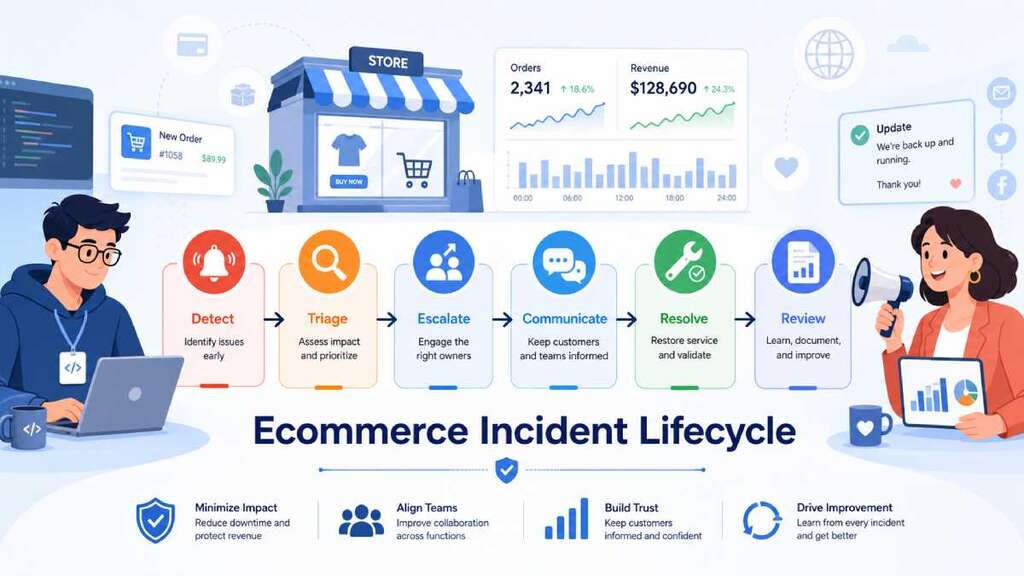
An incident lifecycle is the difference between “panic in Slack” and a calm, repeatable way to protect your ecommerce revenue when something breaks. A good process gives everyone—from on‑call devs to marketers and store owners—a script to follow: detect → triage → escalate → communicate → resolve → review.
This post walks through that lifecycle, with concrete roles and responsibilities so any ecommerce team can use it as a playbook.
Why ecommerce needs a defined incident lifecycle
Incident management guides all say the same thing: if you don’t define how you respond before trouble hits, you lose precious minutes improvising during an outage. For online stores, those minutes are active carts, ad clicks, and checkout attempts.
Best‑practice frameworks (ITIL, SRE, PagerDuty, Atlassian) all describe similar stages—detect/log, classify/triage, assign/escalate, investigate, resolve, and review. The trick for ecommerce is mapping those stages to:
- Store owners / ecommerce managers – responsible for revenue, customer promises, and priorities.
- Developers / ops / SRE – fix the technical problem.
- Marketers / comms / support – shape customer communication, campaigns, and expectations.
Let’s walk the lifecycle.
Stage 1: Detect – knowing something broke before your customers tell you
In most incident frameworks, the lifecycle starts with detection and logging—monitoring tools or humans notice something wrong and create an incident record.
For ecommerce, incidents are often detected through:
- Automated monitoring – uptime checks, observability dashboards, and alerts when error rates or latency cross thresholds on PDP, cart, checkout, or payment APIs.
- Customer or support reports – tickets, live chat, or social media complaints (“Can’t checkout”, “Payment failed”, “Site is super slow”).
- Internal discovery – marketers spotting weird conversion drops, analysts noticing funnel anomalies, or engineers seeing anomalies during routine work.
Best practice is to aim for automated detection before customers notice, minimizing the gap between incident start and detection (Time to Detect).
Who does what at Detect
- Monitoring/ops/dev: Maintain alerts for key ecommerce signals (checkout 5xx, payment failures, latency, synthetic checkout journeys) and ensure they create incidents automatically in your tool (PagerDuty, OpsGenie, etc.).
- Support / social / marketing: Escalate unusual patterns (many complaints, conversion crash) into the same incident system—not just a pinned Slack message.
- Store owner / ecommerce manager: Define what counts as an “incident” vs a minor bug, so people aren’t afraid to declare one.
Stage 2: Triage – how bad is it, and who needs to jump in?
After detection, guidance from Atlassian, PagerDuty, and others is clear: categorize, prioritize, and assign severity.
For ecommerce, triage answers:
- Impact – which users, regions, and journeys are affected (checkout only? mobile only? all traffic?).
- Urgency – is this growing quickly or stable? Is there a simple workaround?
- Severity level (SEV1–SEV3) – based on business impact:
- SEV1: Checkout down, critical payment method failing, or major security issue.
- SEV2: Some users or regions affected, or serious performance issues.
- SEV3: Minor feature or cosmetic issues, low immediate revenue impact.
Incident management references emphasize that consistent severity definitions help route incidents and avoid decision paralysis.
Who does what at Triage
- Incident commander / on‑call dev or ops (you should designate this role):
- Quickly review metrics and logs to estimate scope and impact.
- Set the severity level and confirm “yes, this is an incident.”
- Store owner / ecommerce manager:
- Provide context: current campaigns, sales events, or VIP customers likely affected, which may bump severity up.
- Data / analytics / marketing:
- Provide early data on conversion impact (“Checkout completion just dropped by 70% in the last 10 minutes”).
Stage 3: Escalate – get the right people in the room, fast
Once severity is set, most incident frameworks recommend assignment and escalation: notify the right responders, and bring in more help based on severity.
For ecommerce, that usually means:
- Technical responders – on‑call engineer for the affected service (web, backend, payment integration, database, etc.).
- Incident commander – coordinates, decides, and keeps people focused; often the primary on‑call or a senior engineer.
- Communications owner – handles updates to internal stakeholders and customers.
- Business/marketing rep – makes calls on pausing campaigns, adjusting promotions, or updating banners.
PagerDuty and similar tools describe this stage as mobilize: assembling the right team based on severity and type of incident.
Who does what at Escalate
- On‑call / incident commander:
- Trigger the incident in your tool (PagerDuty, etc.), page the right responders, and spin up an incident channel (Slack/Teams) and optionally a Zoom/Meet bridge.
- Technical leads / SMEs:
- Join quickly, declare when they’re taking specific investigative tasks, and escalate further if needed (DBA, security, networking).
- Store owner / marketing:
- Join as observers/decision‑makers, not extra troubleshooters—focus on customer impact and business decisions instead of poking logs.
Stage 4: Communicate – keep customers and stakeholders informed
Every serious incident guide stresses communication as a separate, intentional practice—not an afterthought. For ecommerce, communication failures can cost as much as the technical failure itself: confused customers, angry social posts, and internal chaos.
Best‑practice communication guidance includes:
- Have a designated spokesperson / comms owner so updates are consistent.
- Be transparent and empathetic about impact and progress.
- Give timely, regular updates rather than silence or vague reassurances.
- Use multiple channels—status page, in‑app banners, email for major incidents, social for widespread issues.
- Tailor messages for different audiences (customers vs leadership vs support teams).
For ecommerce outages (checkout broken, payments failing, performance meltdown), a good pattern is:
- Internal update within minutes: what’s impacted, who’s on it, when the next update is.
- External status update if SEV1/SEV2: short, clear message on a status page or banner, with promised update cadence.
- Regular internal + external updates until resolution, then a final “resolved” note with next steps.
Who does what at Communicate
- Comms lead / marketing / CX:
- Own all external words: status page, banners, emails, social posts.
- Stick to consistent messaging and timelines.
- Incident commander:
- Own internal updates in the incident channel and summary messages to leadership.
- Store owner:
- Decide on customer‑facing concessions (extended sale duration, coupons, free shipping) and internal thresholds for notifying top customers.
Stage 5: Resolve – mitigate first, perfect later
Incident response frameworks emphasize a key principle: mitigation and containment come before full root cause analysis. For an ecommerce store, “resolve” means:
- Stop or reduce customer impact as fast as possible (rollback, failover, feature flag).
- Then restore normal operations in a controlled way.
- Then monitor to ensure the issue doesn’t recur immediately.
Typical ecommerce mitigation patterns:
- Roll back the deployment that broke checkout or slowed the site.
- Fail over to a backup payment gateway or region if the primary provider is down.
- Rate‑limit or block bot traffic if a flood is overloading search or checkout.
- Temporarily disable non‑essential features (heavy personalization, recommendations, experiments) to reduce load on critical paths.
PagerDuty and Atlassian both stress that the incident is “over” when customer impact ends—even if you’re still running on a temporary workaround.
Who does what at Resolve
- Technical responders:
- Execute changes (rollbacks, config flips, WAF rules), verify via dashboards that errors and latency return to normal, and monitor for relapse.
- Incident commander:
- Decide when to declare the incident mitigated or resolved; coordinate any staged rollouts.
- Marketing / store owner:
- Decide when to resume paused campaigns or promotions, and whether to extend offers to make up for downtime.
Stage 6: Review – postmortem and improvement, not blame
The final stage in most incident lifecycles is closure and review, often via a blameless postmortem. This is where you turn an expensive mistake into a concrete reliability and conversion improvement.
Incident review best practices include:
- Schedule a short review soon after the incident (while details are fresh).
- Use a structured document: summary, impact, timeline, root cause, what worked, what didn’t, and action items.
- Focus on systems and processes, not individual blame.
- Capture learnings in a place others will actually find and read.
For ecommerce, add a business and marketing lens:
- How many sessions, orders, and how much revenue were impacted (even approximately)?
- Which campaigns were running at the time, and how did they amplify the impact?
- Which SLOs were breached (checkout availability, latency, conversion stability)?
- What changes will prevent or soften this type of incident next time (extra monitoring, redundant providers, better bot protection)?
Who does what at Review
- Incident commander / technical lead:
- Draft the core postmortem (timeline, technical root cause, technical actions).
- Store owner / marketing / analytics:
- Fill in business impact and conversion metrics, plus any customer‑facing cleanup (refunds, follow‑up messages, extended sales).
- All participants:
- Agree on 3–7 prioritized action items with owners and dates (for example, new alerts, new runbooks, backup integrations).
Putting it together: a simple ecommerce incident lifecycle you can adopt
You can summarize the process in a compact checklist for your own runbook:
- Detect
- Monitoring or humans spot an issue.
- Create an incident ticket with initial details (what’s broken, where, since when).
- Triage
- Estimate scope and user impact.
- Set severity (SEV1–SEV3) and decide if this is truly an incident.
- Escalate
- Page on‑call technical responders and incident commander via your tool (PagerDuty, etc.).
- Add comms/marketing rep for SEV1/SEV2.
- Communicate
- Provide clear internal updates; publish external status if needed.
- Keep messages honest, consistent, and audience‑appropriate.
- Resolve
- Mitigate impact quickly (rollback, failover, block bots).
- Then stabilize and verify via dashboards and logs.
- Review
- Run a short, blameless postmortem.
- Document technical and business impact, decide actions, and track them to completion.
If you give each stage an owner and write this down where everyone can find it, you’ve effectively built an incident management system that any ecommerce team—no matter how small—can use to handle outages with less chaos and more learning.

Author of four Opencart book.
The recent are Opencart 4 developer book and Opencart 4 user manual