SLOs for Ecommerce: Defining “Good Enough” Uptime, Speed, and Error Rates
 Rupak NepaliPublished Jun 24, 2026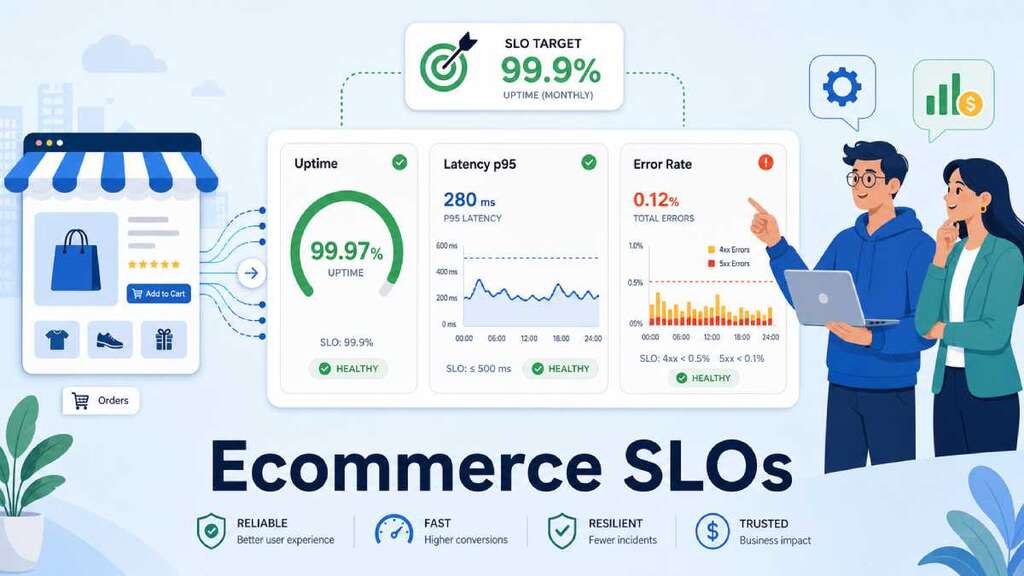
“SLOs” are how you define what “good enough” means for your ecommerce site—before something breaks, not after. In practice, they turn vague goals like “keep checkout fast” into concrete targets for uptime, speed, and error rates that everyone (tech, marketing, leadership) can align on.
What SLOs are (and why ecommerce needs them)
In reliability engineering, three terms come together:
- SLI (Service Level Indicator) – a measurable metric, like checkout success rate, p95 checkout latency, or 5xx rate.
- SLO (Service Level Objective) – the target you want that SLI to meet over a time window (for example, “99.9% of checkouts succeed each month”).
- SLA (Service Level Agreement) – a contractual promise with customers; often legal/financial, and built on top of SLOs.
For ecommerce, SLOs matter because:
- Conversion is fragile. Studies consistently show that slower pages and higher error rates cut conversion and revenue.
- Not all pages are equal. A brief issue on a blog post is annoying; the same issue on checkout is expensive.
- Teams need a shared language. SLOs give ops, dev, and marketing a common way to talk about “how healthy is the store?”
Instead of “the site seems slow,” you can say “checkout p95 latency exceeded our SLO yesterday, and conversion dropped.”
Step 1: Choose SLIs that actually matter for ecommerce
Observability guides recommend starting from business requirements, then choosing SLIs that represent user experience on key journeys.
For an online store, focus on four areas:
- Availability / uptime by page type
- SLIs:
- % of successful requests (non‑4xx/5xx) for home, PDP, cart, checkout.
- “End‑to‑end” synthetic checks for full checkout journeys (home → PDP → cart → checkout → payment).
- SLIs:
- Latency / speed
- SLIs:
- p95 response time for PDP, cart, and checkout routes.
- Real‑user Web Vitals (LCP, INP) on critical pages
- SLIs:
- Error rates
- SLIs:
- 4xx and 5xx error rate per key route, especially
/checkoutand payment APIs. - % of failed payment attempts vs successful ones.
- 4xx and 5xx error rate per key route, especially
- SLIs:
- Business / funnel health
- SLIs:
- Cart → checkout conversion rate.
- Checkout → purchase conversion rate.
- Revenue per session, split by device.
- SLIs:
You don’t need dozens of SLIs—start with 1–2 per critical journey and refine later.
Step 2: Decide which journeys deserve the strictest SLOs
Not every part of your site needs “four nines.” Observability best‑practice guides stress that reliability targets should match user expectations and business value.
For ecommerce, think in tiers:
- Tier 1: Checkout and payment
- Highest expectations. Outages directly translate to lost orders and wasted ad spend.
- Tier 2: Cart, PDPs, search
- Very important for conversion, but a brief glitch may be less catastrophic than payment failure.
- Tier 3: Content, blog, admin, reports
- Still need to work, but you can accept more lenient SLOs.
Example “strictness”:
- Checkout availability SLO: 99.9% monthly (≤ ~43 minutes of “down” time per month).
- PDP availability SLO: 99.5% monthly.
- Blog availability SLO: 99% monthly.
This keeps you focused on the pages that move revenue first.
Step 3: Define “good enough” uptime, speed, and error rates
Availability SLOs
A common availability SLI is the fraction of successful requests, based on HTTP status codes:
For ecommerce:
- Checkout:
- SLO example: “At least 99.9% of checkout and payment requests succeed each calendar month.”
- PDPs / PLPs:
- SLO example: “At least 99.7% of product and category page requests succeed each month.”
Latency / speed SLOs
Average latency hides the worst experiences. Observability practices emphasize using p95 or p99 to capture tail latency.
For example:
- Checkout p95 SLO: “95% of checkout page loads complete in under 2.5 seconds server time, and under 3.5 seconds LCP for real users on mobile.”
- PDP p95 SLO: “95% of product page responses are under 1 second on the backend.”
These thresholds should be informed by user behavior: research shows that just a 100ms delay can measurably reduce conversion, while multi‑second delays significantly hurt revenue.
Error rate SLOs
You can define error SLOs as:
- “5xx errors on
/checkoutremain below 0.5% of requests over any 30‑minute window.” - “Payment failure rate (excluding user declines) stays below 1% daily.”
For funnels:
- “Checkout→purchase conversion stays within ±X% of the 30‑day baseline, excluding bot traffic.”
That last one is powerful because it gives marketing a reliability expectation too: if conversion suddenly drops outside the SLO, something needs investigation—even if error rates look OK.
Step 4: Add error budgets so you know when to stop shipping and start fixing
SLOs are targets; error budgets are how much you’re allowed to miss them before you must change behavior.
For example:
- Checkout availability SLO: 99.9% per month → error budget = 0.1% “unreliability.”
- If you blow half the budget in a week (for example, a 30‑minute outage), you pause risky releases that affect checkout until reliability is back on track.
This approach, popular in SRE, helps balance:
- Marketing/product pressure to ship features fast.
- Ops pressure to keep the system stable.
For ecommerce, you can define budgets on:
- Checkout uptime.
- Checkout p95 latency.
- Payment failure rates.
When a budget is “burning too fast,” you prioritize reliability work that has a direct conversion impact.
Step 5: Tie SLOs directly to dashboards and alerts
SLOs are only useful if you can see and alert on them.
For each SLO:
- Build a dashboard tile that shows:
- Current value (for example, checkout p95 latency).
- SLO target line (for example, 2.5s).
- Historical trend (7/30 days).
- Set alerts on SLO symptoms, not just low‑level metrics:
- If 5xx on checkout > 1% over 5–10 minutes → alert.
- If checkout p95 latency > SLO threshold for N minutes → alert.
- If checkout conversion drops more than X% vs baseline (after filtering bots) → alert both ops and marketing.
- Make the alert actionable: include which route is affected, recent deploys, and links to dashboards.
This is where your “Ecommerce Observability Stack” and SLOs join up: SLOs define the target; observability shows whether you’re meeting it, in both technical and business terms.
Step 6: Include marketing and business metrics in SLO reviews
Most SLO discussions stay inside engineering. For ecommerce, they should include:
- Conversion rates by step (PDP→Cart, Cart→Checkout, Checkout→Purchase).
- Revenue per session and per channel.
- Impacted campaigns when SLOs are breached (for example, “Meta campaign X ran during a checkout availability breach”).
A simple monthly review agenda:
- Which SLOs were met or missed?
- Where did we burn error budget (outages, slowdowns)?
- How did those align with conversion changes and campaigns?
- What are the top 3 fixes or investments for next month?
This keeps SLOs from becoming a purely technical exercise; they become a shared tool for protecting revenue and customer experience.
Concrete “starter” SLO set for a typical ecommerce site
You can offer this as a ready‑to‑copy set in your post:
- Checkout availability
- SLI: % of checkout and payment requests returning non‑4xx/5xx.
- SLO: ≥ 99.9% per month.
- Checkout speed (mobile)
- SLI: p95 LCP on checkout page for mobile real users.
- SLO: ≤ 3.5 seconds over rolling 7 days.
- Payment error rate
- SLI: % of payment attempts failing for non‑user reasons (gateway errors/timeouts).
- SLO: ≤ 1% daily.
- PDP speed
- SLI: p95 backend latency on PDP routes.
- SLO: ≤ 1 second over rolling 7 days.
- Checkout conversion stability
- SLI: Checkout→Purchase conversion, bot‑filtered.
- SLO: Stays within ±X% of 30‑day moving average (outside this range triggers investigation).
That’s enough to get a serious SLO program going without drowning in metrics.
Final thought
For ecommerce, “good enough” isn’t an abstract number—it’s the combination of uptime, speed, and error rates that still delivers the conversion and revenue you expect. SLOs give you a way to define that line, see when you cross it, and choose when to slow down releases and invest in reliability.

Author of four Opencart book.
The recent are Opencart 4 developer book and Opencart 4 user manual