Chapter 23: Security, Compliance and Risk for Delivery Managers
Website security and compliance for delivery managers: access, patching, edge rules, privacy, audit evidence and a monthly risk register.
 Rupak NepaliPublished Nov 26, 2026
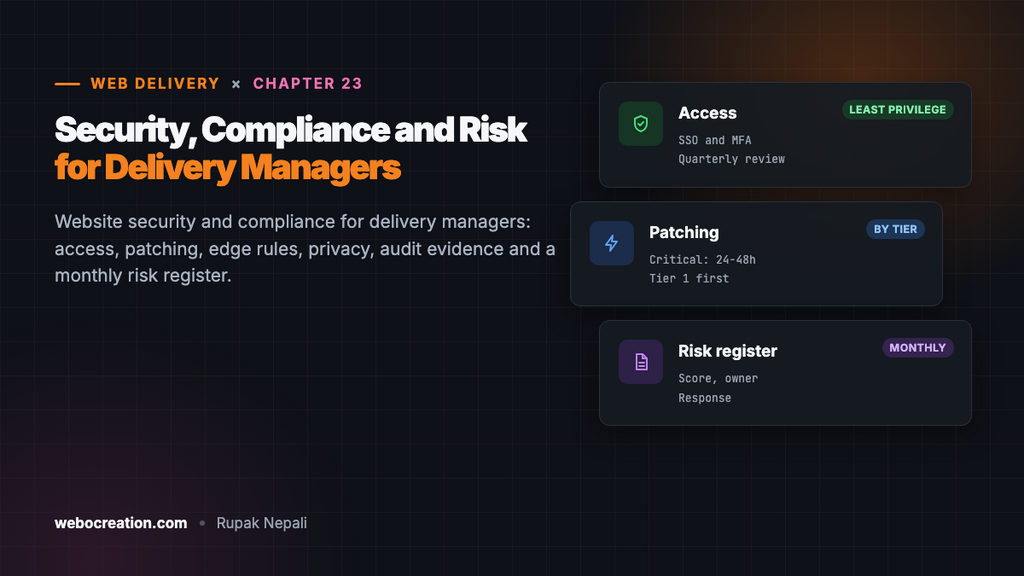
This is Chapter 23 of The Web Delivery Manager’s Playbook, a free series on running enterprise websites from request to release. Website security and compliance for delivery managers: access, patching, edge rules, privacy, audit evidence and a monthly risk register.
Two weeks before Webocreation Group’s annual audit, the internal audit team sent Maya a request list. They wanted evidence of quarterly access reviews for every web platform, records showing that every production change in the past year had been approved, proof that critical vulnerabilities had been patched within the company’s policy timeframe, and confirmation that regulated content had been reviewed by compliance.
A year earlier, that list would have meant two weeks of panic. This time, Maya exported the access review records from ServiceNow, ran a report of web change requests with their approvals, pulled the patching history from the problem and change records, and attached the compliance review log. It took an afternoon.
Security and compliance are not separate from delivery. Done well, they are a natural result of the processes in this book.
Website security and compliance with a risk register
The delivery manager’s role in security
You are probably not a security engineer, and you do not need to be. Your security team owns policy, threat monitoring and specialist tools. Your role is different but just as important: making sure the web program’s everyday processes keep sites secure, and that security work actually gets done.
That means four things:
- Knowing what you have, so nothing is unprotected (Chapter 3).
- Controlling who can change it, through access management.
- Keeping it up to date, through patching and upgrades.
- Managing risk visibly, so leadership knows what is being accepted and why.
This chapter covers each, at the level a delivery manager needs. Technical security topics such as firewall rules, bot protection and CDN security configuration are specialist subjects with their own books and guides.
Access management
Most website security incidents involve compromised or misused accounts. Strong access management is the single most effective security control a web team can run.
The principles
- Least privilege. Give people only the access they need for their job. Editors do not need administrator rights. Agencies do not need access to sites they are not working on.
- Named accounts. Every person has their own account. No shared logins, ever.
- SSO and multi-factor authentication for every critical platform (Chapter 17).
- Fast removal. Access is removed the day someone leaves or no longer needs it.
- Regular review. Access is checked every quarter.
Running access through ServiceNow
ServiceNow can handle the full lifecycle of access to web platforms.
Requesting access. The “platform access” catalog item (Chapter 5) collects which platform, which role and why. It routes to the platform owner for approval. Once approved, a task is assigned to WEB-Platform to grant the access, or provisioning happens automatically if the platform is integrated with your identity system.
Removing access. Ask your ServiceNow team to add web platforms to the company’s offboarding workflow, so that when someone leaves, tasks to remove their access are created automatically. Also handle role changes: when someone moves teams, their old access should be reviewed.
Access reviews (recertification). Many companies use ServiceNow or a dedicated identity governance tool to run periodic access certifications. Each quarter, platform owners receive a list of users and must confirm or revoke each one. The results are recorded automatically, which gives auditors exactly the evidence they need. If your company does not have this, run reviews manually (Chapter 3) and record the results in a ServiceNow task or a controlled document.
Patching and upgrades
Unpatched software is one of the most common ways websites are attacked. CMS cores, plugins, modules, themes, server software and libraries all receive security updates, sometimes several times a month.
Set patching timeframes by severity and tier, aligned with your company’s vulnerability management policy:
| Severity | Tier 1 | Tier 2 | Tier 3 |
|---|---|---|---|
| Critical (actively exploited) | Within 24 to 48 hours | Within 72 hours | Within 72 hours, or take offline |
| High | Within 7 days | Within 14 days | Within 30 days |
| Medium | Within 30 days | Within 30 days | Next scheduled maintenance |
| Low | Next scheduled maintenance | Next scheduled maintenance | Next scheduled maintenance |
To make patching reliable:
- Subscribe to security advisories for every platform and plugin you use.
- Schedule regular maintenance windows, for example monthly, for routine updates.
- Use emergency changes for critical vulnerabilities (Chapter 11).
- Reduce the attack surface. Remove unused plugins, modules and themes. Every component you do not run is one you do not have to patch.
- Track platform end-of-support dates on your roadmap, and plan upgrades well before them (Chapter 8).
Track patching work in ServiceNow, linked to the affected configuration items. That gives you the history auditors will ask for.
Edge security basics
Most enterprise sites sit behind a CDN or web application firewall (WAF) that blocks common attacks, limits abusive traffic and filters bots. As a delivery manager, make sure that:
- Every production site, including microsites and regional sites, is behind the company’s edge protection.
- Changes to security rules go through change management, with the security team accountable (Chapter 2).
- Non-production environments are protected (Chapter 11).
- Someone reviews security alerts and blocked traffic regularly, and you know who that is.
Privacy and consent
Websites collect personal data through forms, cookies, analytics and third-party scripts. Privacy laws in many regions require clear notices, lawful grounds for collection and, in many cases, consent for non-essential cookies and tracking.
Your privacy team owns policy. The web program makes it work in practice:
- Every site uses the company’s approved consent tool, configured correctly for each region.
- Scripts and tags only load when the required consent is given (Chapter 20).
- Forms collect only the data needed, link to the privacy notice, and send data securely to approved systems.
- New tracking vendors and data flows go through privacy review before launch.
- Privacy notices are linked from every page and kept current.
Accessibility as a risk
Accessibility is a quality and inclusion issue (Chapter 12), and also a legal risk in many countries and industries. Organizations face complaints and legal action over inaccessible websites. Treat accessibility like other compliance risks: set a standard, test against it, track issues to resolution and record the evidence. Tier 1 sites should have regular audits, with findings tracked as work items in ServiceNow or on the delivery board.
Regulated content
In regulated industries such as financial services, healthcare and insurance, certain website content is subject to rules: rates, fees, terms, product claims, risk disclosures, testimonials. Errors can lead to regulatory action and customer harm.
For regulated content:
- Identify it. Mark regulated pages in the CMS and in your inventory.
- Require compliance approval before publishing, through the RACI and ServiceNow approvals.
- Keep records of who approved what and when. Retention periods may apply.
- Review regularly, for example quarterly, even if nothing has changed.
- Treat errors as incidents, often high priority (Chapter 14).
Audit evidence
Auditors, whether internal, external or regulatory, want evidence that controls are working. If you run the processes in this book through ServiceNow, most evidence already exists:
| Auditors ask for | Where the evidence lives |
|---|---|
| Approved changes to production | Change requests with approvals and closure notes |
| Emergency changes reviewed afterwards | Emergency change records with post-implementation review |
| Access granted with approval | Access request records with approvals |
| Access removed when people leave | Offboarding tasks |
| Periodic access reviews | Certification records or review tasks |
| Timely patching | Change and problem records linked to vulnerabilities |
| Incident handling | Incident records, post-mortems and problem records |
| Compliance review of regulated content | Approval records on requests; review logs |
| Vendor security reviews | Vendor risk records |
The key is consistency. A process followed 95 percent of the time leaves 5 percent of cases for auditors to question. That is another reason standard changes (Chapter 11) and automated approvals (Chapter 9) are so valuable. They make the right path the easy one.
The web risk register
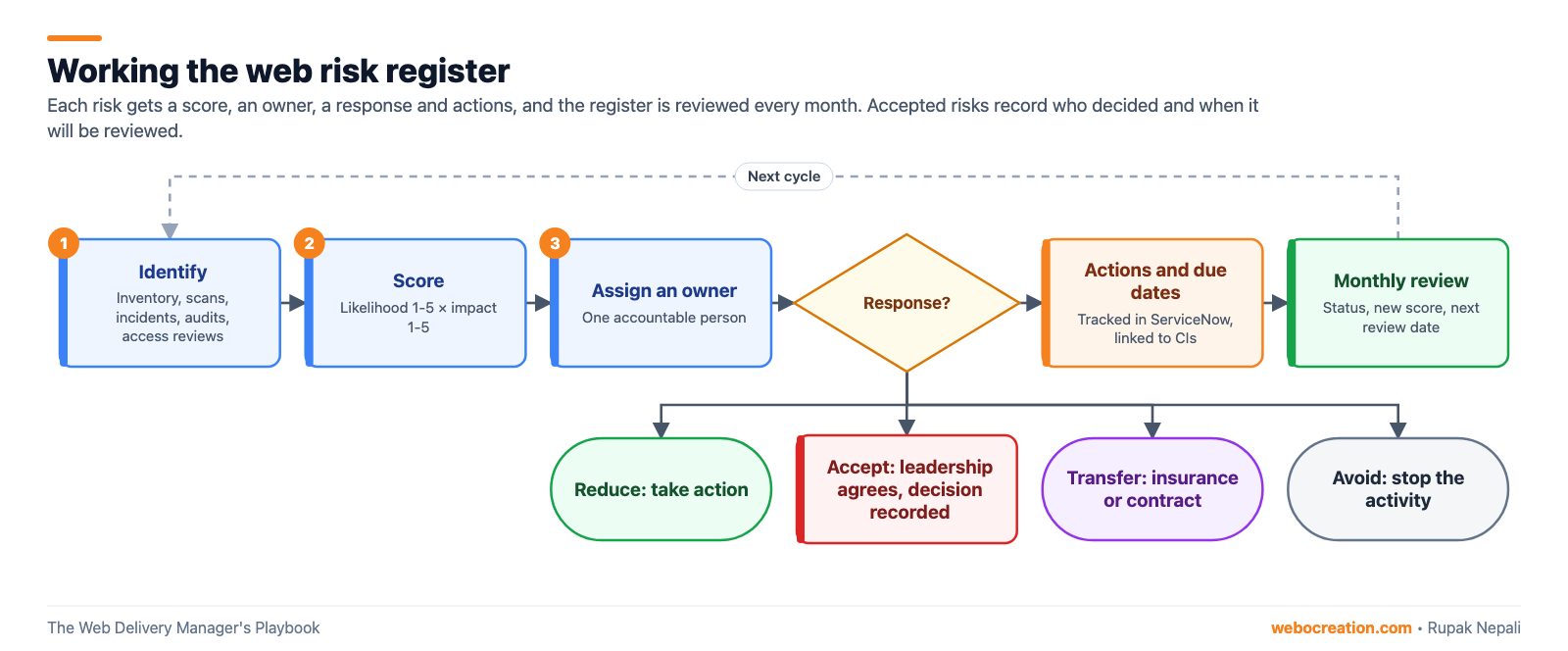
A risk register is a list of known risks, each with an owner, an assessment and an action. Chapter 4 introduced a simple risk list. As the program matures, turn it into a register reviewed every month.
For each risk, record:
- Description: what could happen and why.
- Likelihood and impact, each scored 1 to 5, giving a risk score.
- Owner: the person accountable for managing it.
- Response: reduce (take action), accept (live with it, with leadership’s agreement), transfer (insurance or contract) or avoid (stop the activity).
- Actions and due dates.
- Status and review date.
Accepted risks need special care. When leadership decides not to fund a fix, record the decision, who made it, and when it will be reviewed. This protects the web team and makes the trade-off visible.
Template: Web risk register
| Risk | Likelihood x impact = score | Owner | Response | Actions | Review |
|---|---|---|---|---|---|
| Legacy sites on unsupported CMS could be compromised | 3 x 4 = 12 | Technical lead | Reduce | Migrate 3 sites to standard platform by Q3 | Monthly |
| Former staff retain access to tools without SSO | 3 x 4 = 12 | Platform admin | Reduce | Move DAM and tag manager to SSO; quarterly reviews | Monthly |
| Unapproved third-party scripts collect visitor data | 2 x 5 = 10 | Delivery manager | Reduce | Quarterly script scan; restrict tag publishing | Quarterly |
| Regulated rates displayed incorrectly | 2 x 5 = 10 | Compliance lead | Reduce | Compliance approval workflow; quarterly content review | Quarterly |
| Single developer knows the HR integration | 3 x 3 = 9 | Delivery manager | Reduce | Cross-train second developer; write runbook | Monthly |
| Accessibility complaint on a Tier 2 site | 2 x 3 = 6 | Content lead | Accept for now | Annual audit; automated checks; revisit next budget cycle | Quarterly |
Checklist
- Run access requests, removals and quarterly reviews through ServiceNow.
- Connect every critical web platform to SSO with multi-factor authentication.
- Set patching timeframes by severity and tier, aligned with company policy.
- Confirm every production site is behind the company’s edge protection.
- Work with privacy to make sure consent and data collection are correct on every site.
- Mark regulated content and require compliance approval with records.
- Build a web risk register and review it monthly.
- Do a practice audit: can you produce evidence for each control in an afternoon?
Common traps
- Treating security as someone else’s job. The web program’s everyday processes are the first line of defense.
- Shared accounts. They make access reviews and investigations impossible.
- Patching only when convenient. Set timeframes by severity and stick to them.
- Inconsistent processes. The exceptions are what auditors find.
- Unrecorded risk acceptance. If leadership accepts a risk, write down who decided and when.
Related reading
- HTTP security headers: a practical checklist for 2026
- Cloudflare OWASP Core Ruleset explained
- Passwords, MFA and passkeys: authentication done right
- Google Consent Mode v2 explained for marketers
- Chapter 22: Metrics and Reporting to Leadership
- Chapter 24: Migrations, Replatforming and Sunsetting

Rupak Nepali is a web developer, manage Webocreation website and the author of six books:
Getting Started with OpenCart Module Development (Packt, 2013),
OpenCart Theme and Module Development (Packt, 2015),
OpenCart 4: Dev Guide for Themes & Extensions (2024),
OpenCart 4: User Manual (2025),
Cloudflare for the Enterprise Website (2026) and
The Technical Web Guide for Marketers (2026).
Rupak has built OpenCart stores and extensions since 2010, has published more than 600 tutorials on Webocreation, and shares free OpenCart extensions on GitHub.
Find Rupak on
GitHub | Amazon | LinkedIn | X | YouTube.