Chapter 8: Roadmaps and Quarterly Planning
How to build a web roadmap that balances business initiatives, maintenance, debt and support, with capacity planned before anything is promised.
 Rupak NepaliPublished Nov 26, 2026
This is Chapter 8 of The Web Delivery Manager’s Playbook, a free series on running enterprise websites from request to release. How to build a web roadmap that balances business initiatives, maintenance, debt, and support, with capacity planned before anything is promised.
Three weeks into the quarter, the head of IT asked Maya when the corporate site’s CMS upgrade would happen. The platform’s current version would lose security support in five months. Maya checked her ranked list. The upgrade was there, but it kept sliding down, pushed aside by campaigns and urgent fixes. Nothing about it scored high on business value, and it was never urgent until suddenly it would be.
On the same day, product marketing asked about a microsite planned for the autumn, and the CMO asked when the homepage redesign would start. Maya realized that her weekly ranked list was good at answering “what next?” but bad at answering “what this quarter?” She needed a plan that looked further ahead, protected work that never wins a weekly ranking, and told the business when big items would happen.
She needed a roadmap.
Planning the web roadmap with real capacity
What a web roadmap is, and is not
A web roadmap is a view of the significant work the web program plans to deliver over the next one to four quarters, organized by time. It answers three questions for stakeholders: what is coming, roughly when, and why.
A roadmap is not:
- A list of every request. Small requests flow through intake and triage. The roadmap shows larger items and themes.
- A promise of exact dates. Items further out are less certain. A good roadmap shows that uncertainty honestly.
- A project plan. Each large roadmap item may have its own detailed plan. The roadmap shows them side by side.
- Fixed. It is reviewed every quarter and adjusted every month as things change.
The four kinds of web work
The biggest reason web roadmaps fail is that they include only one kind of work: the new things the business has asked for. A healthy roadmap balances four kinds.
- Business initiatives. New sites, redesigns, major campaigns, new features. This is what most stakeholders think of as “the roadmap.”
- Platform and maintenance. CMS upgrades, security patching, hosting changes, end-of-life replacements, certificate and domain housekeeping.
- Technical and content debt. Fixing fragile code, removing unused plugins, cleaning up outdated content, consolidating duplicate tools, retiring old sites.
- Run and support. Day-to-day content changes, small requests, bug fixes and incidents. This is not individual roadmap items, but it uses real capacity and must be planned for.
If you only plan business initiatives, the other three still happen. They just happen by surprise, displacing planned work and making the roadmap look unreliable.
Capacity planning: The 60/20/20 split
Before you place anything on the roadmap, work out how much capacity you actually have. Start with the team’s total available time for the quarter, then subtract what is already committed.
Step 1: calculate available time
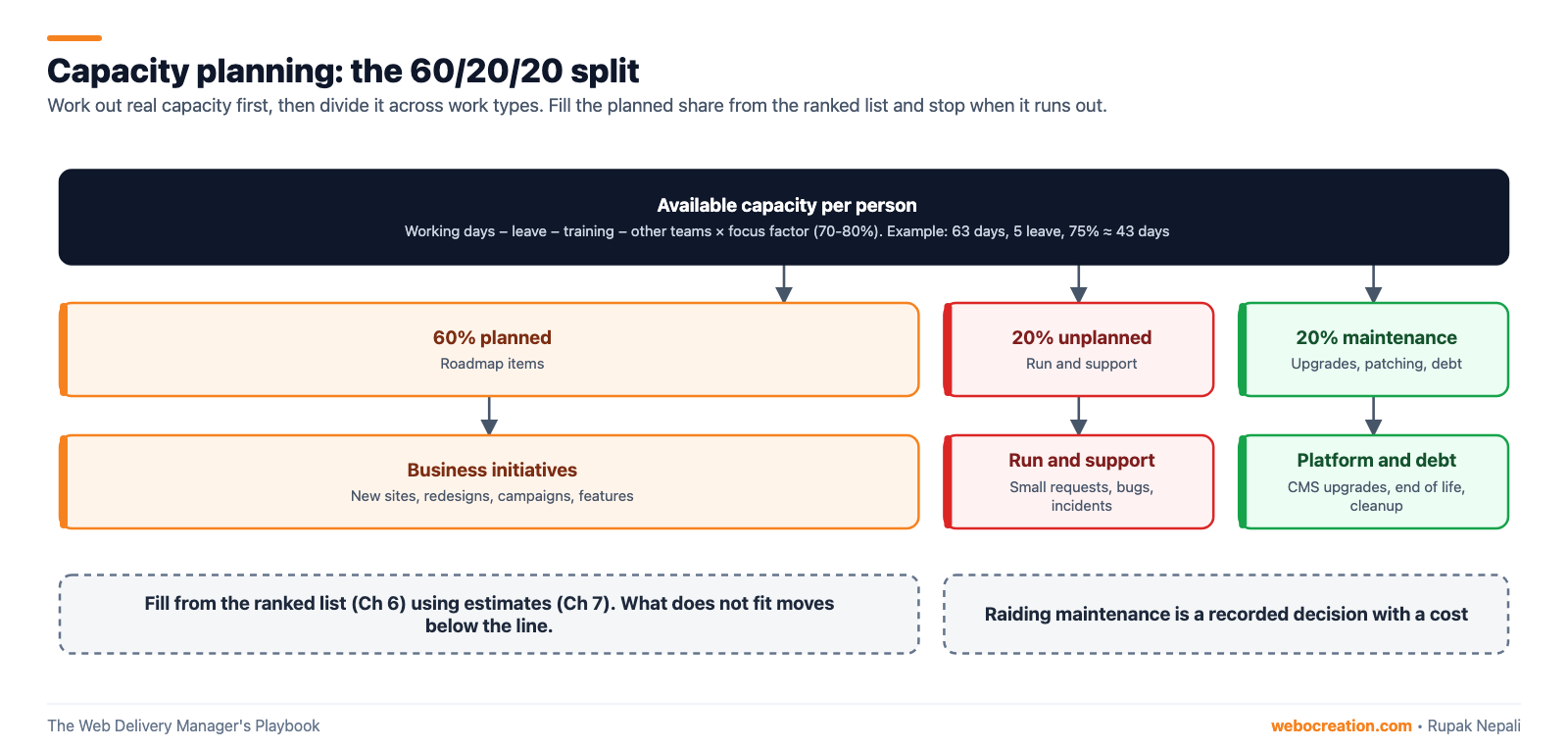
For each team member, take the working days in the quarter and subtract holidays, planned leave, training and time committed to other teams. Then apply a focus factor for meetings, email and general overhead. A focus factor of 70 to 80 percent is realistic for most web teams.
For example, a developer with 63 working days in the quarter, 5 days of leave and a 75 percent focus factor has about 43 days of real capacity.
Step 2: divide capacity across work types
Next, decide how capacity is shared across the four kinds of work. Maya uses a starting split of 60/20/20:
- 60 percent planned: business initiatives and their scheduled roadmap items.
- 20 percent unplanned: run and support work, small requests, bugs and incidents.
- 20 percent maintenance: platform upgrades, patching and debt reduction.
These numbers are a starting point, not a rule. Look at your own history. If your team spent 35 percent of last quarter on unplanned work, planning for 20 percent will fail. Use real data, then work to reduce unplanned work over time.
The maintenance share is the one most often raided. When a big campaign needs more time, it is tempting to borrow from maintenance “just this quarter.” Do it occasionally if you must, but record it as a decision with a cost. A CMS that misses its upgrade window does not care how important the campaign was.
Step 3: fill the planned capacity
Take the planned share and fill it from your ranked list of larger items (Chapter 6), using their estimates (Chapter 7). Stop when the capacity runs out. Items that do not fit move to the next quarter or below the line.
| Team capacity for the quarter | Days |
|---|---|
| Total available (after leave and focus factor) | 240 |
| Planned initiatives (60%) | 144 |
| Unplanned and support (20%) | 48 |
| Maintenance and debt (20%) | 48 |
With 144 days for planned initiatives, Maya could fit the spring campaign (about 20 days), the new product microsite (about 30 days), the first phase of the homepage redesign (about 40 days) and two smaller initiatives. The rest waited.
Building the roadmap
With capacity known and items selected, lay out the roadmap. A simple structure works best.
Use time horizons, not dates, for the future
A common and effective format divides the roadmap into three horizons:
- Now (this quarter): committed work, with target months. High confidence.
- Next (next quarter): planned work, likely but not committed. Medium confidence.
- Later (two to four quarters out): ideas and expected needs. Low confidence; may change.
This format sets honest expectations. Stakeholders see that their item is on the roadmap without hearing a firm date for something six months away.
Organize by theme or workstream
Within each horizon, group items by theme so the roadmap tells a story. Typical web themes include brand and redesign, campaigns and growth, platform and security, content and SEO, and portfolio cleanup. Themes help leadership see the balance of work at a glance and make it easier to explain why platform work matters.
Mark dependencies and gates
Some items depend on others. The homepage redesign at Webocreation Group depended on the CMS upgrade, because the new design used components only available in the newer version. Show dependencies clearly. If the upgrade slips, everyone can see that the redesign moves too.
Also mark gates: decisions or approvals that must happen before an item can start, such as budget approval for a new platform, a vendor selection, or a legal review of a new data collection.
Large initiatives as projects or demands
Some requests are too large to handle as tickets. A new site on a new platform, a CMS migration or a full redesign may take months, involve several teams and need a budget. These should be managed as projects, with a proper plan, not as a long-running request in the intake queue.
If your company uses ServiceNow Strategic Portfolio Management (SPM, formerly IT Business Management), large requests can enter as demands. A demand is a proposal for significant work, reviewed by a portfolio or governance group before it is approved and becomes a project. The demand records the business case, estimated cost, benefits and risks.
Using demands for big web initiatives has several advantages:
- The business case is written down before work starts.
- Leadership decides between large initiatives in one place, alongside other IT and digital investments.
- Approved projects get resources and budget explicitly, instead of borrowing them from the web team’s routine capacity.
If your company does not use SPM, the same discipline still applies. Use a simple one-page business case for any request sized XL, and get it approved by the right owner before it enters the roadmap.
Running quarterly planning
Quarterly planning is where the roadmap is refreshed. Maya runs it as a half-day session two to three weeks before each quarter starts.
Before the session:
- Update the capacity calculation for the coming quarter.
- Gather larger requests, demands and known deadlines from business owners.
- Review the maintenance calendar: upgrades, end-of-support dates, contract renewals, certificate changes.
- Score and estimate candidate items.
During the session (with the technical lead and key business owners):
- Review last quarter: what was delivered, what slipped and why.
- Confirm capacity and the split across work types.
- Walk through maintenance commitments first, so they are protected.
- Rank and select business initiatives to fill planned capacity.
- Agree what moves to “next” or “later,” and who will tell affected requesters.
- Confirm dependencies, gates and owners for each committed item.
After the session:
- Publish the updated roadmap.
- Tell every requester whose item moved, with the reason.
- Create or update the work items in Jira or ServiceNow.
Keeping the roadmap current
A roadmap that is updated once a quarter will be out of date within weeks. Review it monthly, at the stakeholder review meeting, and update it when something significant changes: a new priority from leadership, a slipped dependency, a change in team capacity.
When something new must be added mid-quarter, apply the same rule as for executive overrides: show what moves. A roadmap is a set of trade-offs, and every addition displaces something else.
Webocreation Group: Protecting the upgrade
Maya’s first full roadmap placed the CMS upgrade in the “now” horizon under the platform and security theme, with its end-of-support date shown next to it. In the quarterly planning session, she walked through maintenance commitments first. When the CMO’s homepage redesign came up, she showed the dependency on the upgrade. The CMO, who had been frustrated that the redesign was not starting sooner, became the upgrade’s strongest supporter.
The upgrade went live six weeks before the end-of-support date. The redesign started the following quarter, on the new version, with the components it needed.
Template: Quarterly web roadmap
Use this structure for a one-page roadmap. Keep the number of items in each horizon small enough to fit on one screen.
| Theme | Now (this quarter, committed) | Next (next quarter, planned) | Later (2 to 4 quarters, ideas) |
|---|---|---|---|
| Brand and redesign | Homepage redesign: discovery and design (month 3) | Homepage redesign: build and launch | Corporate site navigation overhaul |
| Campaigns and growth | Spring launch campaign (month 1); product microsite (month 2) | Autumn product launch pages | Personalization pilot |
| Platform and security | CMS upgrade (month 2); legacy WordPress patching (month 1) | CDN rule clean-up; SSO for all web tools | Evaluate DAM integration upgrade |
| Content and SEO | Redirect and broken-link clean-up | Content audit of regional sites | Structured data rollout |
| Portfolio clean-up | Retire four ownerless sites | Consolidate form tools | Migrate remaining legacy sites |
Below the roadmap, add three short lines: the capacity split for the quarter, the key dependencies, and the date of the next review.
Checklist
- Calculate real team capacity for the next quarter, including leave and a focus factor.
- Look at last quarter’s data to set a realistic split between planned, unplanned and maintenance work.
- List every end-of-support date, upgrade and renewal for the next 12 months.
- Build a now, next, later roadmap organized by theme.
- Mark dependencies and gates on the roadmap.
- Route any XL request through a demand or business case before it enters the roadmap.
- Schedule a half-day quarterly planning session and a monthly roadmap review.
Common traps
- Roadmaps with only new features. Maintenance, debt and support still happen. Plan for them or they will plan for you.
- Raiding the maintenance budget. Borrowing from maintenance is sometimes necessary. Record it as a decision with a cost.
- Firm dates far in the future. Use horizons to show uncertainty honestly.
- Planning to 100 percent capacity. There is always unplanned work. Leave room for it.
- Hidden dependencies. If one item needs another, show it, so slips are understood.
- Silent moves. When an item slips to the next quarter, tell the requester why.
Part 2 turned scattered requests into a managed flow: one front door, a fair way to rank work, honest estimates, and a roadmap that balances new work with the work that keeps the lights on. Part 3 moves into delivery, starting with how to make ServiceNow work for a web team instead of against it.
Related reading
- How to upgrade Drupal 10 to Drupal 11
- Upgrading OpenCart 3 to 4.1: a migration plan that works
- Chapter 7: Estimating Web Work
- Chapter 9: Running Web Work Through ServiceNow

Rupak Nepali is a web developer, manage Webocreation website and the author of six books:
Getting Started with OpenCart Module Development (Packt, 2013),
OpenCart Theme and Module Development (Packt, 2015),
OpenCart 4: Dev Guide for Themes & Extensions (2024),
OpenCart 4: User Manual (2025),
Cloudflare for the Enterprise Website (2026) and
The Technical Web Guide for Marketers (2026).
Rupak has built OpenCart stores and extensions since 2010, has published more than 600 tutorials on Webocreation, and shares free OpenCart extensions on GitHub.
Find Rupak on
GitHub | Amazon | LinkedIn | X | YouTube.