Chapter 2: The Web Operating Model
How to build a one-page web operating model with a team model, named owners, a RACI with one accountable per row, assignment groups and a cadence.
 Rupak NepaliPublished Nov 26, 2026
This is Chapter 2 of The Web Delivery Manager’s Playbook, a free series on running enterprise websites from request to release. How to build a one-page web operating model with a team model, named owners, a RACI with one accountable per row, assignment groups and a cadence.
In her second week, Maya asked a simple question at five different meetings: “Who approves a change to the homepage banner?”
The head of brand said brand did. The corporate communications lead said communications did, because the homepage was “the company’s front door.” A product marketing manager said whoever owned the campaign did. The lead developer said nobody approved it; content editors just published it. The legal counsel said legal should review anything with a claim or a number in it, and was surprised to learn that this had not been happening.
Five answers meant there was no answer. Every banner change was either a fight or a risk. This is what happens when a website has no operating model.
The web operating model in practice
What an operating model is
An operating model is the agreed answer to “how do we run this?” For a web program, it has five parts:
- Ownership. Who is responsible for each part of the website: content, design, code, platforms, domains, analytics, security.
- Decision rights. Who decides, who must be consulted, and who just needs to be told.
- Workflows. The paths work follows, from request to release, including approvals.
- Standards. The rules every site follows: brand, accessibility, security, performance, tagging.
- Cadence. The regular meetings and reviews that keep everything moving.
Most companies have pieces of all five, scattered across old emails, wiki pages and people’s heads. Your job is to gather them into one model that everyone can see, then fill the gaps.
Choosing a team model
Before you assign ownership, you need to decide how the web team itself is organized relative to the rest of the business. There are three common models.
| Model | How it works | Strengths | Weaknesses | Best fit |
|---|---|---|---|---|
| Centralized | One web team builds and maintains all sites; business units request work from it | Consistent quality, standards and security; one platform strategy | Can become a bottleneck; business units may feel underserved | Smaller companies, or portfolios with high brand and compliance risk |
| Hub-and-spoke | A central team owns platforms, standards and complex work; business units have their own editors or developers for day-to-day changes | Balances speed and control; scales well | Requires clear standards and training; spokes can drift | Mid-sized and large companies with several business units |
| Federated | Each business unit runs its own sites; a small central group sets light standards | Fast and independent; close to each business | Duplicate tools and costs; inconsistent brand and security; hard to govern | Holding companies with very different brands |
Most companies end up with hub-and-spoke, whether they planned it or not. Webocreation Group was officially centralized, but two business units had quietly hired agencies to build their own microsites. Maya chose to make the model officially hub-and-spoke: the central team owns platforms, standards, the corporate site and anything complex; trained editors in each business unit can make content changes on their own sites within agreed rules.
The important thing is to choose deliberately and write it down. An unofficial federated model, where teams build things in secret to avoid the central team, is the worst of all worlds.
Mapping ownership
Next, list the areas of the web program and decide who owns each one. Start with this list and adjust it to your company:
- Content: words, images and documents on the pages
- Design: layouts, components, the design system
- Code: themes, templates, custom features, integrations
- Platforms: the CMS, hosting, CDN, DAM, forms and search tools
- Domains and DNS: registrations, DNS records, certificates
- Analytics and tags: tracking scripts, consent tools, dashboards
- Security: firewall rules, access control, vulnerability fixes
- Legal and compliance: privacy notices, disclosures, accessibility, regulated claims
- Brand: logos, colors, voice, imagery standards
For each area, name one owning team and, ideally, one named person. “Marketing” is not an owner; “Jordan in brand marketing” is. Teams do not answer emails. People do.
Decision rights with a RACI
Ownership tells you who looks after an area. Decision rights tell you who does what when a specific piece of work happens. The most common tool for this is a RACI matrix. For each activity, every relevant team gets one letter:
- R, Responsible: does the work.
- A, Accountable: makes the final decision and answers for the result. There must be exactly one A per activity.
- C, Consulted: gives input before the work is done or the decision is made. This is two-way communication.
- I, Informed: is told after the decision or the work is done. This is one-way communication.
A RACI only works if you follow a few rules:
- One A per row. If two teams are accountable, neither is. This is the rule people most want to break, and the one you must hold to.
- Keep the C column short. Every C adds a review cycle. Ask whether a team truly needs to give input, or just needs to know.
- R and A can be the same team. For routine work, the person doing the job can also own the outcome.
- Rows are activities, not areas. “Publish a homepage banner” is a row. “Homepage” is not.
At Webocreation Group, the banner question became a row in the RACI. Content editors are Responsible for publishing. Corporate communications is Accountable for the homepage message. Brand is Consulted on visuals, legal is Consulted only when the banner contains a claim, price or statistic, and the web delivery manager is Informed. The fight stopped because there was finally an answer.
Template: Web RACI matrix
Copy this matrix and adapt the rows and columns to your company. The letters below show a typical starting point for a hub-and-spoke model.
| Activity | Marketing / BU | Web delivery | Web dev | IT / infra | Security | Legal | Brand |
|---|---|---|---|---|---|---|---|
| Publish routine content change | R/A | I | |||||
| Publish homepage or high-visibility content | R | I | C | C | |||
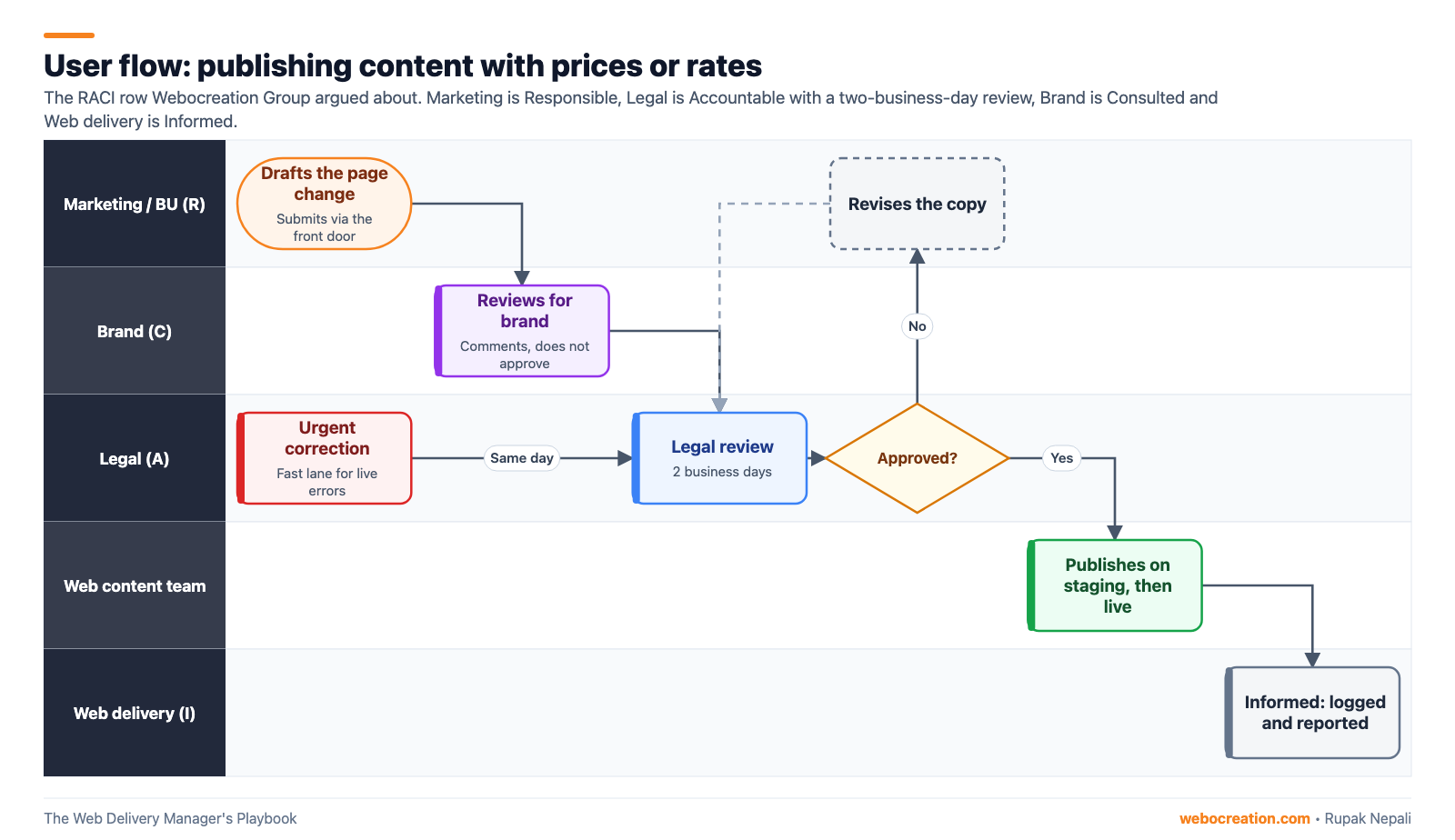
| Content with claims, prices or rates | R | I | A | C | |||
| New page or template | A | R | R | C | C | ||
| New site or microsite | A | R | R | C | C | C | C |
| Add or change a tracking tag | R | A | R | C | C | ||
| DNS or domain change | C | A | R | R | C | ||
| Firewall or CDN security rule | C | R | C | A | |||
| Code release to production | I | A | R | C | C | ||
| Platform upgrade or patching | I | A | R | C | C | ||
| New vendor or SaaS tool | C | R | C | C | C | C | |
| Incident on a live site | I | A | R | R | C |
Two notes on this template. First, “Web delivery” holding the A for releases does not mean you personally approve every line of code. It means you own the release process and answer for its results. Second, review the matrix with every team in it before you publish it. A RACI that one team wrote alone will be ignored by everyone else.
From RACI to ServiceNow assignment groups
A RACI on a wiki page is a good start. A RACI built into your ticketing system actually changes behavior. In ServiceNow, the main tool for this is the assignment group.
An assignment group is a team that can be assigned work in ServiceNow. Each request, incident or change task is routed to a group, and members of that group see it in their queue. If your RACI says the web development team is Responsible for code releases, there should be an assignment group for that team, and change tasks for releases should route to it automatically.
When you set up groups for the web program, follow these guidelines:
- Keep the number small. Four to six web groups is usually enough. Too many groups and tickets bounce between them.
- Name them clearly. Use a common prefix so they sort together and are easy to find. For example: WEB-Delivery, WEB-Content, WEB-Development, WEB-Platform and WEB-DNS.
- Give every group a manager and a backup. Someone must be accountable for the queue, including when people are on leave.
- Route by catalog item. When a requester submits a “DNS change” request, ServiceNow should route it to WEB-DNS without anyone touching it. Chapter 5 covers catalog items in detail.
- Match groups to the configuration items they support. In the CMDB (Chapter 3), each website or platform should list its support group, so incidents route correctly.
Work with your ServiceNow administrators on this. They will have naming conventions and rules about who can create groups. Bring them your RACI; it gives them exactly what they need to build the routing.
Setting the cadence
Workflows and decisions need a regular rhythm to keep them moving. Here is the cadence Maya set up at Webocreation Group. It is a reasonable starting point for most teams.
| Meeting | Frequency | Length | Who attends | Purpose |
|---|---|---|---|---|
| Team standup | Daily | 15 minutes | Web team | Progress, blockers, today’s priorities |
| Intake triage | Weekly | 30 minutes | Delivery manager, tech lead, content lead | Review new requests, size them, rank them |
| Release planning and CAB prep | Every release | 30 minutes | Delivery manager, developers, QA | Confirm scope, risks, rollback plan |
| Stakeholder review | Monthly | 45 minutes | Key requesters and business owners | Delivered work, upcoming work, decisions needed |
| Operating model review | Quarterly | 60 minutes | Leads from every team in the RACI | Is the model still working? What needs to change? |
| Quarterly planning | Quarterly | Half day | Delivery manager, tech lead, business owners | Roadmap and capacity for next quarter (Chapter 8) |
Resist the urge to add more meetings. Every meeting on this list should have a written agenda and end with written decisions. If a meeting stops producing decisions, cancel it.
Writing it down: The one-page operating model
Once you have the team model, ownership, RACI and cadence, write the whole thing on one page. Longer documents are not read. A one-page summary, with links to the RACI and detailed processes, is something people will keep open.
The one-page operating model should answer six questions:
- What is in scope? Which sites and platforms.
- How are we organized? Centralized, hub-and-spoke or federated, in one paragraph.
- Who owns what? The ownership list, with named people.
- How do I ask for something? The front door, with a link.
- How do decisions get made? A link to the RACI, plus the two or three rules people most need to know.
- When do we meet? The cadence table.
Publish it where people already look: the team’s intranet page, the ServiceNow portal, or a pinned message in the main web channel. Then review it every quarter.
Webocreation Group: The banner question, answered
Maya presented the draft operating model at a meeting with brand, communications, product marketing, legal, IT and the web team. She expected arguments about the team model. Instead, the debate was about the RACI row for content with prices or rates. Product marketing wanted to be Accountable; legal insisted it should be. They agreed that legal would be Accountable but would commit to a two-business-day review, with a fast lane for urgent corrections.
That compromise turned out to be the most valuable outcome of the meeting. It was the first time legal had committed to a turnaround time, and the first time product marketing knew how long to plan for.
Checklist
- Decide whether your web program is centralized, hub-and-spoke or federated, and write it down.
- List each ownership area and name one owning person for each.
- Draft a RACI with at least ten common activities, holding to one A per row.
- Review the RACI with every team in it before you publish it.
- Work with your ServiceNow administrators to create or tidy up the web assignment groups.
- Set up the core cadence: daily standup, weekly triage, monthly stakeholder review.
- Publish a one-page operating model and schedule its first quarterly review.
Common traps
- Two accountable teams. Shared accountability always becomes no accountability. Force a single A, even when it is uncomfortable.
- Consulting everyone. A long C column turns every change into a committee. Move teams to I wherever you can.
- A RACI written alone. If other teams did not help build it, they will not follow it.
- Too many assignment groups. Tickets that bounce between groups are tickets nobody owns.
- Meetings without decisions. If a recurring meeting produces no written decisions for a month, change it or cancel it.
- Set and forget. Teams, platforms and people change. A model nobody reviews is out of date within a year.
Related reading
- Data governance: key importance for business success
- AI governance, risk and measuring business impact
- Chapter 1: What a Web Delivery Manager Actually Does
- Chapter 3: Know Your Stack: The Platform Inventory

Rupak Nepali is a web developer, manage Webocreation website and the author of six books:
Getting Started with OpenCart Module Development (Packt, 2013),
OpenCart Theme and Module Development (Packt, 2015),
OpenCart 4: Dev Guide for Themes & Extensions (2024),
OpenCart 4: User Manual (2025),
Cloudflare for the Enterprise Website (2026) and
The Technical Web Guide for Marketers (2026).
Rupak has built OpenCart stores and extensions since 2010, has published more than 600 tutorials on Webocreation, and shares free OpenCart extensions on GitHub.
Find Rupak on
GitHub | Amazon | LinkedIn | X | YouTube.