Chapter 5: Building a Request Intake Process
How to design web request intake with one front door: ServiceNow catalog items, good forms, daily and weekly triage, and published service levels.
 Rupak NepaliPublished Nov 26, 2026
This is Chapter 5 of The Web Delivery Manager’s Playbook, a free series on running enterprise websites from request to release. How to design web request intake with one front door: ServiceNow catalog items, good forms, daily and weekly triage, and published service levels.
At the end of her first 90 days, Maya had a simple front door: one ServiceNow catalog item called “Website Request” with four fields. It worked. Most requests now came through it, and requesters could see their status. But after a month, the cracks started to show.
The single form treated a typo fix and a new microsite as the same kind of request. Developers spent hours going back to requesters for missing details: which page, what URL, who approves the copy, is there a deadline and why. Urgent requests and routine ones landed in the same queue. And because everything looked the same, the triage meeting turned into a long debate about each item.
The front door was open. Now it needed rooms behind it.
The web request intake process at a glance
Why intake matters
Intake is where most delivery problems begin. A badly described request becomes a badly estimated task, which becomes a missed date, which becomes an unhappy stakeholder. A request that arrives through a side channel never gets ranked at all, so it either jumps the queue or gets lost.
A good intake process does four jobs:
- Captures everything. All web work enters through one place, so nothing is hidden and nothing is lost.
- Collects the right details up front. The requester provides what the team needs to act, so work does not stall on back-and-forth questions.
- Sorts work by type. A content fix, a new page, a campaign and a new site follow different paths, with different approvals and timelines.
- Sets expectations. Requesters know how long each type of request usually takes, and they can see where their request stands.
One front door, many rooms
The principle is simple: one place to ask, but different paths behind it. In ServiceNow, that usually means a web category in the Service Catalog, containing several catalog items, one for each common request type.
A catalog item is a request form in the ServiceNow portal. Each item has its own fields, its own approval rules and its own fulfillment workflow. When a requester submits it, ServiceNow creates a request record (REQ) containing one or more requested items (RITMs), and routes tasks to the right assignment group.
Most web programs need between six and ten catalog items. Here is the set Maya built at Webocreation Group.
| Catalog item | Use it for | Routes to | Typical target |
|---|---|---|---|
| Content update | Text, image or document changes on existing pages | WEB-Content | 3 business days |
| New page | A new page using an existing template | WEB-Content, then WEB-Development if needed | 10 business days |
| Campaign or landing page | Pages, forms and tracking for a marketing campaign | WEB-Delivery for planning | Planned with requester; 4-week minimum lead time |
| New site or microsite | Any new domain or standalone site | WEB-Delivery for review | Planned through quarterly roadmap |
| Website bug | Something on a live site is broken or wrong | WEB-Development | Based on priority |
| Form or integration change | Changes to forms, CRM connections or data flows | WEB-Development | 10 business days |
| Tracking or tag request | New analytics, pixel or tag manager change | WEB-Delivery for review, then WEB-Development | 5 business days after approval |
| DNS or domain request | New domain, DNS record, redirect domain or certificate | WEB-DNS | 5 business days |
| Platform access | Access to the CMS, DAM, analytics or other web tools | WEB-Platform | 2 business days |
A few things to notice. Campaigns and new sites route to the delivery manager first, because they need planning before anyone can start work. Tracking requests route through review, because every new tag is a privacy and performance risk. And the targets are written as typical times, not promises. Chapter 9 explains how to turn these into service level agreements in ServiceNow.
Request, incident or change?
ServiceNow uses different record types for different kinds of work, and web requesters will not know the difference. Getting it right matters, because each record type has its own workflow, reports and urgency rules.
| Record type | What it means | Web examples |
|---|---|---|
| Request (REQ / RITM) | Someone wants something new or different | Update a page, add a new page, create a DNS record, give me CMS access |
| Incident (INC) | Something that should work is broken | Site down, form not submitting, page showing an error, wrong price displayed |
| Change (CHG) | A planned modification to a production system that needs approval | Deploying a code release, upgrading the CMS, changing a firewall rule |
| Problem (PRB) | The underlying cause of one or more incidents | The form fails every time the CRM vendor updates its API |
The simplest rule for requesters: if something used to work and now does not, it is an incident; if you want something new or different, it is a request. Requesters never raise changes. Changes are created by the web team when fulfilling a request requires modifying production (Chapter 11).
One subtle case is worth calling out. A wrong price or an incorrect legal disclosure on a live site may look like a content request, but it should be treated as an incident, often a high-priority one. Wrong information on a regulated page is a live problem, not a wish. Make this clear in your request guidance.
Designing the forms
The quality of a request depends almost entirely on the form. A good form collects what the team needs, and nothing more. Every extra field reduces the chance that someone fills it in properly.
Fields every web request needs
- Short description. One line, written by the requester, for example “Update pricing table on Product A page.”
- Site and page URL. Use a dropdown for the site, linked to your CMDB records, and a free-text field for the exact URL.
- What needs to change. A clear description. Encourage screenshots and attachments.
- Business reason. Why this is needed. This feeds prioritization (Chapter 6).
- Requested date and reason for the date. “By March 3 because the product launches that day” is useful. “ASAP” is not.
- Content approver. Who has approved, or will approve, the words and images.
Fields that depend on the request type
- Campaign: launch date, campaign owner, channels, number of pages, forms needed, tracking needs, budget code.
- New site: business purpose, audience, expected lifespan, owner after launch, domain preference, required integrations.
- Bug: steps to reproduce, browser and device, when it started, how many users are affected.
- Tracking: vendor name, what data it collects, privacy review status, which pages it should run on.
- DNS: record type, hostname, target, reason, and whether the domain is new or existing.
Make the form smarter, not longer
ServiceNow catalog items can show and hide fields based on earlier answers. Use this. If a requester says a page contains prices or rates, show a field asking whether legal has approved the content. If they say they need a form, show the form fields. A requester for a simple text change should see six fields, not thirty.
Write help text for every field in plain language, with an example. “Requested date: the date this must be live, and why. Example: March 3, product launch press release goes out that morning.”
Triage: Turning requests into ready work
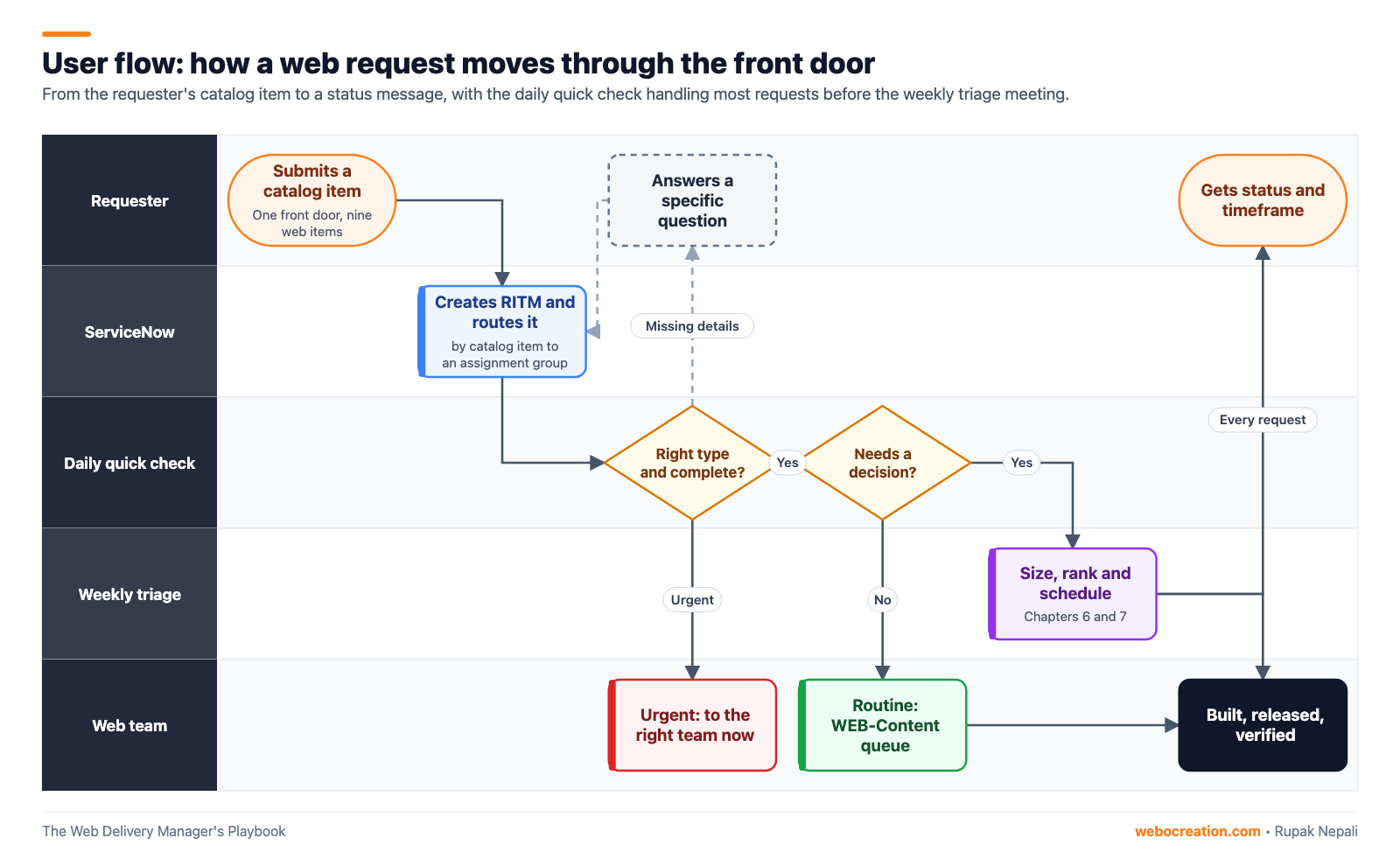
A request in the queue is not yet ready for work. Triage is the step where someone checks it, sorts it and decides what happens next. Maya runs triage two ways: a daily quick check and a weekly triage meeting.
The daily quick check
Each morning, the delivery manager or a designated team member spends 15 minutes on new requests:
- Is it the right type? Move a broken-form “request” to an incident, or a new-site request filed as a content update to the right item.
- Is it complete? If key details are missing, send it back to the requester right away with a specific question. Do not let incomplete requests sit.
- Is it urgent? Anything with real urgency (a wrong price, a legal issue, a broken page) goes to the right team immediately.
- Is it routine? Standard content updates that need no planning go straight to the WEB-Content queue.
Most requests should be handled in the daily check. Only the ones that need discussion go to the weekly meeting.
The weekly triage meeting
Once a week, the delivery manager, the technical lead and the content lead spend 30 minutes on everything that needs a decision: new pages, campaigns, new sites, larger bugs and anything unusual. For each one, the meeting decides:
- Do we understand it well enough to size it? If not, who will talk to the requester?
- How big is it? (Chapter 7)
- How does it rank against everything else? (Chapter 6)
- When will it happen, and who will do it?
- What do we tell the requester?
The last question matters most. Every request that comes out of triage should get a message to the requester with a status and an expected timeframe, even if the answer is “not this quarter.”
Service levels by request type
Requesters do not expect everything to happen immediately. They expect to know when it will happen. Publishing target times by request type is one of the most effective ways to reduce chasing and frustration.
Set targets in two parts:
- Response time: how quickly someone from the web team acknowledges the request and confirms it is complete. One business day is a good default.
- Delivery time: how long a typical request of this type takes from acceptance to release.
Base your targets on what your team actually achieves today, not what you wish it achieved. Look at the last three months of requests, find the typical delivery time for each type, and publish something you can hit 80 to 90 percent of the time. You can tighten targets later. Missing published targets every week destroys trust faster than having none.
In ServiceNow, these targets become SLA definitions attached to each catalog item, with timers that pause when the request is waiting on the requester. Chapter 9 covers the setup.
The “just one small thing” problem
Every web team knows this moment. Someone stops by, sends a chat message or catches a developer after a meeting: “Can you just change one small thing? It’ll take two minutes.”
Sometimes it really does take two minutes. But small things add up. Five two-minute favors a day, each with a context switch, can cost a developer an hour or more. They also skip the queue, which is unfair to everyone who used the front door. And “small” changes break things too: the two-minute text change that removed a legal disclaimer, or the quick redirect that created a loop.
Handle it with a consistent, friendly rule:
- Every request goes through the front door, however small. The team can process small ones fast, but they still get a ticket.
- Make it easy. Give people a link they can bookmark. Let them submit by email to an address that creates a ticket automatically, if your ServiceNow setup allows it.
- Help people the first time. If someone asks in chat, submit the ticket for them and send the link. “I’ve logged that for you, here’s where you can track it.”
- Protect the team. Ask developers to redirect side-channel requests to the front door, and back them up when they do. If senior people bypass the process, raise it with them directly and privately.
The goal is not bureaucracy. The goal is that every piece of work is visible, so it can be ranked fairly and nothing is forgotten.
Webocreation Group: The intake redesign
Maya replaced the single “Website Request” form with nine catalog items. Before launching, she tested each form with two real requesters, watching them fill it in. The tests led to several changes: the term “hostname” on the DNS form was replaced with “web address,” and the campaign form was split into a short first stage (dates and goals) and a later detailed stage.
Six weeks after launch, the results were clear:
- Requests sent back for missing details dropped from about one in three to one in ten.
- The weekly triage meeting shrank from 60 minutes to 25, because routine requests no longer reached it.
- The median time for content updates fell from eight business days to three, mostly because they skipped the triage queue.
- Side-channel requests fell below 5 percent of total web work.
The biggest change was one Maya had not expected. Because the campaign form asked for a launch date and showed the four-week minimum lead time, marketing began submitting campaigns earlier. The first-stage form had become a planning tool.
Template: Web request intake form
Use this as a starting point for your core content and page request forms. Fields marked with an asterisk are required.
| Field | Type | Help text for requesters |
|---|---|---|
| Short description* | Single line | One sentence. Example: Update pricing table on Product A page |
| Site* | Dropdown (from CMDB) | Choose the website this change is for |
| Page URL* | Single line | Paste the full address of the page. For a new page, paste the page it should sit under |
| Request type* | Dropdown | Content update, new page, bug, other |
| What needs to change* | Multi-line, attachments allowed | Describe the change. Attach the new text, images or a marked-up screenshot |
| Business reason* | Multi-line | Why is this needed? What happens if it is not done? |
| Requested live date | Date | The date this must be live, if there is one |
| Reason for date | Single line, shown if a date is entered | Example: product launch on this date |
| Content includes prices, rates, claims or legal text?* | Yes or no | If yes, legal approval is required before publishing |
| Legal approval reference | Single line, shown if yes | Approval email or ticket number, if already approved |
| Content approver* | User lookup | The person who has approved, or will approve, the content |
| Additional people to notify | User lookup, multiple | Anyone else who should receive status updates |
Checklist
- List the six to ten most common types of web requests and create a catalog item for each.
- Write a one-paragraph guide explaining request vs. incident for requesters.
- Design each form with only the fields the team truly needs, using conditional fields.
- Test each form with two real requesters before launch.
- Set up a daily 15-minute quick check and a weekly 30-minute triage meeting.
- Publish response and delivery targets based on your last three months of actual performance.
- Agree a friendly, consistent rule for side-channel requests, and back your team when they use it.
Common traps
- One form for everything. A single generic form produces vague requests and endless follow-up questions.
- Forms that are too long. Every unnecessary field lowers the quality of the answers to the fields that matter.
- Letting incomplete requests sit. Send them back the same day with a specific question.
- Promising targets you cannot hit. Base targets on real data, and tighten them later.
- Treating a live error as a request. A wrong price or disclosure is an incident, not a content update.
- Making exceptions for senior people. One visible exception teaches everyone that the front door is optional.
Related reading
- Marketing analytics with Google Analytics 4
- DNS records explained for marketers: what breaks when you change them
- Chapter 4: Your First 90 Days
- Chapter 6: Prioritization That Survives Stakeholders

Rupak Nepali is a web developer, manage Webocreation website and the author of six books:
Getting Started with OpenCart Module Development (Packt, 2013),
OpenCart Theme and Module Development (Packt, 2015),
OpenCart 4: Dev Guide for Themes & Extensions (2024),
OpenCart 4: User Manual (2025),
Cloudflare for the Enterprise Website (2026) and
The Technical Web Guide for Marketers (2026).
Rupak has built OpenCart stores and extensions since 2010, has published more than 600 tutorials on Webocreation, and shares free OpenCart extensions on GitHub.
Find Rupak on
GitHub | Amazon | LinkedIn | X | YouTube.