Show images for the sub-categories in the opencart version 1.5+
 Rupak NepaliPublished Dec 4, 2011
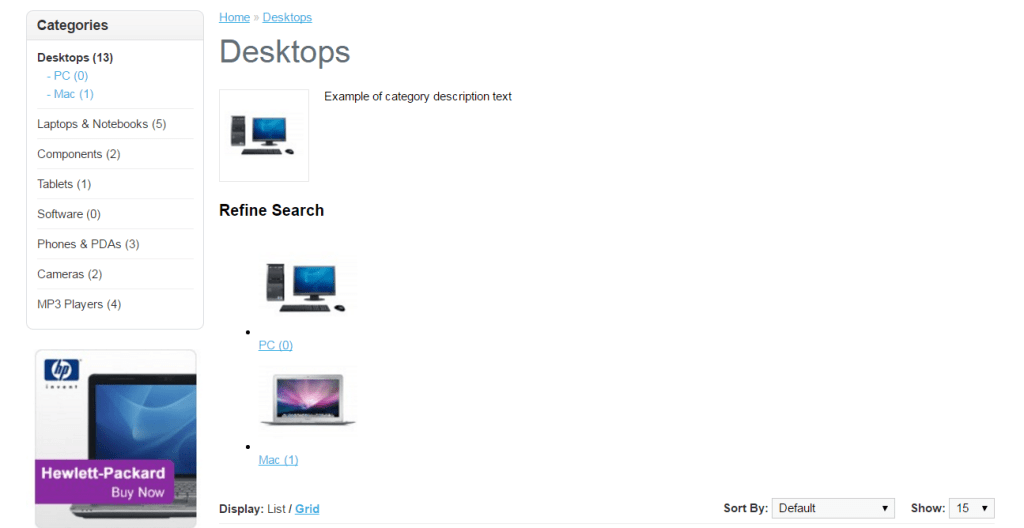
Show images for the sub-categories in the opencart version 1.5+. If you are looking for 2.3 then: Show images for the sub-categories in the opencart version 2.3
Find lines below on catalog/controller/product/category.php
$this->data['categories'][] = array(
	'name'  => $result['name'] . ($this->config->get('config_product_count') ? ' (' . $product_total . ')' : ''),
	'href'  => $this->url->link('product/category', 'path=' . $this->request->get['path'] . '_' . $result['category_id'] . $url)
);
Replace with the following code:
$this->data['categories'][] = array(
   'name'  => $result['name'] . ($this->config->get('config_product_count') ? ' (' . $product_total . ')' : ''),
   'image'=>$this->model_tool_image->resize($result['image'], 100,100),
   'href'  => $this->url->link('product/category', 'path=' . $this->request->get['path'] . '_' . $result['category_id'] . $url)
);
Find following lines of code at catalog\view\theme\default\template\product\category.tpl
<?php if ($categories) { ?>
  <h2><?php echo $text_refine; ?></h2>
  <div class="category-list">
    <?php if (count($categories) <= 5) { ?>
    <ul>
      <?php foreach ($categories as $category) { ?>
      <li><a href="<?php echo $category['href']; ?>"><?php echo $category['name']; ?></a></li>
      <?php } ?>
    </ul>
    <?php } else { ?>
    <?php for ($i = 0; $i < count($categories);) { ?>
    <ul>
      <?php $j = $i + ceil(count($categories) / 4); ?>
      <?php for (; $i < $j; $i++) { ?>
      <?php if (isset($categories[$i])) { ?>
      <li><a href="<?php echo $categories[$i]['href']; ?>"><?php echo $categories[$i]['name']; ?></a></li>
      <?php } ?>
      <?php } ?>
    </ul>
    <?php } ?>
    <?php } ?>
  </div>
  <?php } ?>
Replace with following lines of code:
<?php if ($categories) { ?>
  <h2><?php echo $text_refine; ?></h2>
  <div class="category-list">
    <?php if (count($categories) <= 5) { ?>
    <ul>
      <?php foreach ($categories as $category) { ?>
      <li><a href="<?php echo $category['href']; ?>">
          <?php if($category['image']){ ?>
          <img src="<?php echo $category['image']; ?>" /><br>
          <?php } ?>
          <?php echo $category['name']; ?></a></li>
      <?php } ?>
    </ul>
    <?php } else { ?>
    <?php for ($i = 0; $i < count($categories);) { ?>
    <ul>
      <?php $j = $i + ceil(count($categories) / 4); ?>
      <?php for (; $i < $j; $i++) { ?>
      <?php if (isset($categories[$i])) { ?>
      <li><a href="<?php echo $categories[$i]['href']; ?>">
          <?php if($category['image']){ ?>
          <img src="<?php echo $category['image']; ?>" /><br>
          <?php } ?>
          <?php echo $categories[$i]['name']; ?></a></li>
      <?php } ?>
      <?php } ?>
    </ul>
    <?php } ?>
    <?php } ?>
  </div>
  <?php } ?>
Save and things are done you will be able to see the pictures of the sub-categories
For demo visit: https://webocreation.com/nepalbuddha/index.php?route=product/category&path=20

Rupak Nepali is a web developer, manage Webocreation website and the author of six books:
Getting Started with OpenCart Module Development (Packt, 2013),
OpenCart Theme and Module Development (Packt, 2015),
OpenCart 4: Dev Guide for Themes & Extensions (2024),
OpenCart 4: User Manual (2025),
Cloudflare for the Enterprise Website (2026) and
The Technical Web Guide for Marketers (2026).
Rupak has built OpenCart stores and extensions since 2010, has published more than 600 tutorials on Webocreation, and shares free OpenCart extensions on GitHub.
Find Rupak on
GitHub | Amazon | LinkedIn | X | YouTube.





please improve this post the code plugin you used is not working fine. I am not sure where i need to put $result[‘image’] to get image of subcategories.
thanks..
Hi Aj,
Detail updated