Scalable Ecommerce Architecture on AWS: An OpenCart 4 Reference Build With CloudFront, Auto Scaling, RDS, ElastiCache and EFS
Build OpenCart 4 on AWS across two Availability Zones with CloudFront, an ALB, Auto Scaling EC2, RDS for MySQL, ElastiCache and EFS, with a CloudFormation template and three fixes OpenCart needs on several servers.
 Rupak NepaliPublished Nov 26, 2026
Most online stores run fine 360 days a year and fall over on the five that matter: Black Friday, a product launch, a sale email to 100,000 people. The site slows down, checkout times out, and the traffic you paid for turns into abandoned carts. Adding a bigger server helps for a while; after that you need more than one server, and that’s where most PHP stores break in ways nobody expected.
This guide builds a scalable ecommerce architecture on AWS for OpenCart 4, end to end: CloudFront, an Application Load Balancer, an Auto Scaling group of Graviton EC2 instances, RDS for MySQL, ElastiCache and EFS across two Availability Zones. It comes with a CloudFormation template and the EC2 bootstrap script. Before writing it, we replicated the topology locally (two OpenCart 4.1.0.4 nodes behind a load balancer, shared files, Redis, MySQL 8.4 and Amazon Linux 2023), and found three problems in OpenCart that break a multi-server setup. They’re all fixed below.
Files: opencart-aws-cloudformation.txt (the complete CloudFormation template with the bootstrap script inside; save it as opencart-aws.yaml). The Redis adaptor is printed in full further down.
Why stores fall over: the dynamic page bottleneck
A static file costs a server almost nothing. A category page built by PHP and MySQL on every request costs a lot. We measured both on our OpenCart test store, in Docker on a laptop, with ApacheBench (ab -n 200):
| Request | Concurrent users | Requests per second | Median | 95th percentile |
|---|---|---|---|---|
| Category page, no page cache | 10 | 54.8 | 177 ms | 197 ms |
| Category page, no page cache | 50 | 43.7 | 1,153 ms | 1,347 ms |
| Static JavaScript file | 10 | 917.2 | 2 ms | 2 ms |
| Category page, full-page cache on | 10 | 398.2 | 19 ms | 49 ms |
| Category page, full-page cache on | 50 | 427.0 | 95 ms | 146 ms |
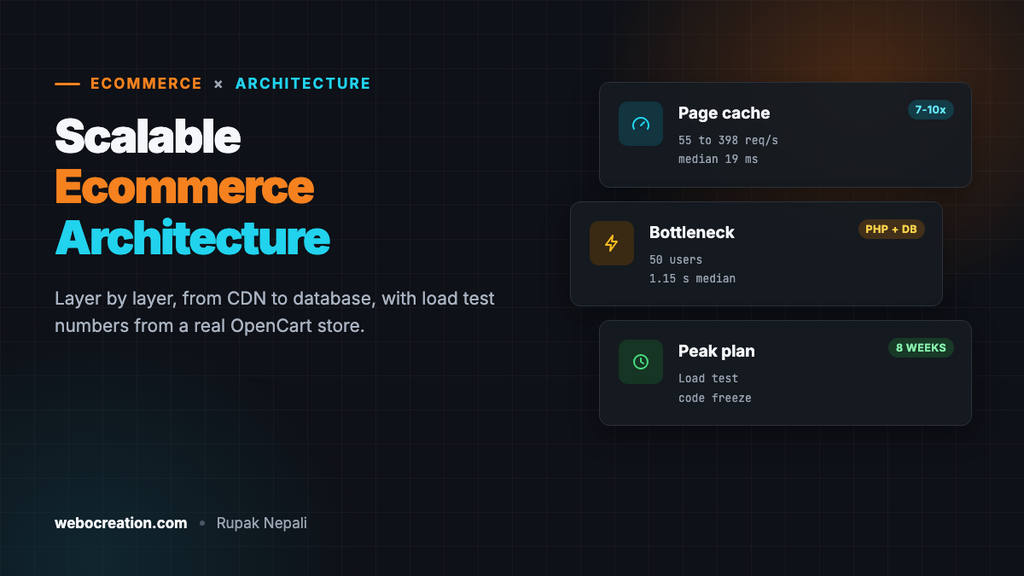
From 10 to 50 users, throughput didn’t rise; each visitor just waited longer. That’s a saturated server: every extra visitor joins a queue. A full-page cache, our Speed Booster extension here, handled 7 to 10 times as many requests. The architecture below applies the same idea at every layer: keep requests away from PHP and MySQL, and make the ones that reach them cheap and spread across servers.
The scalable ecommerce architecture on AWS
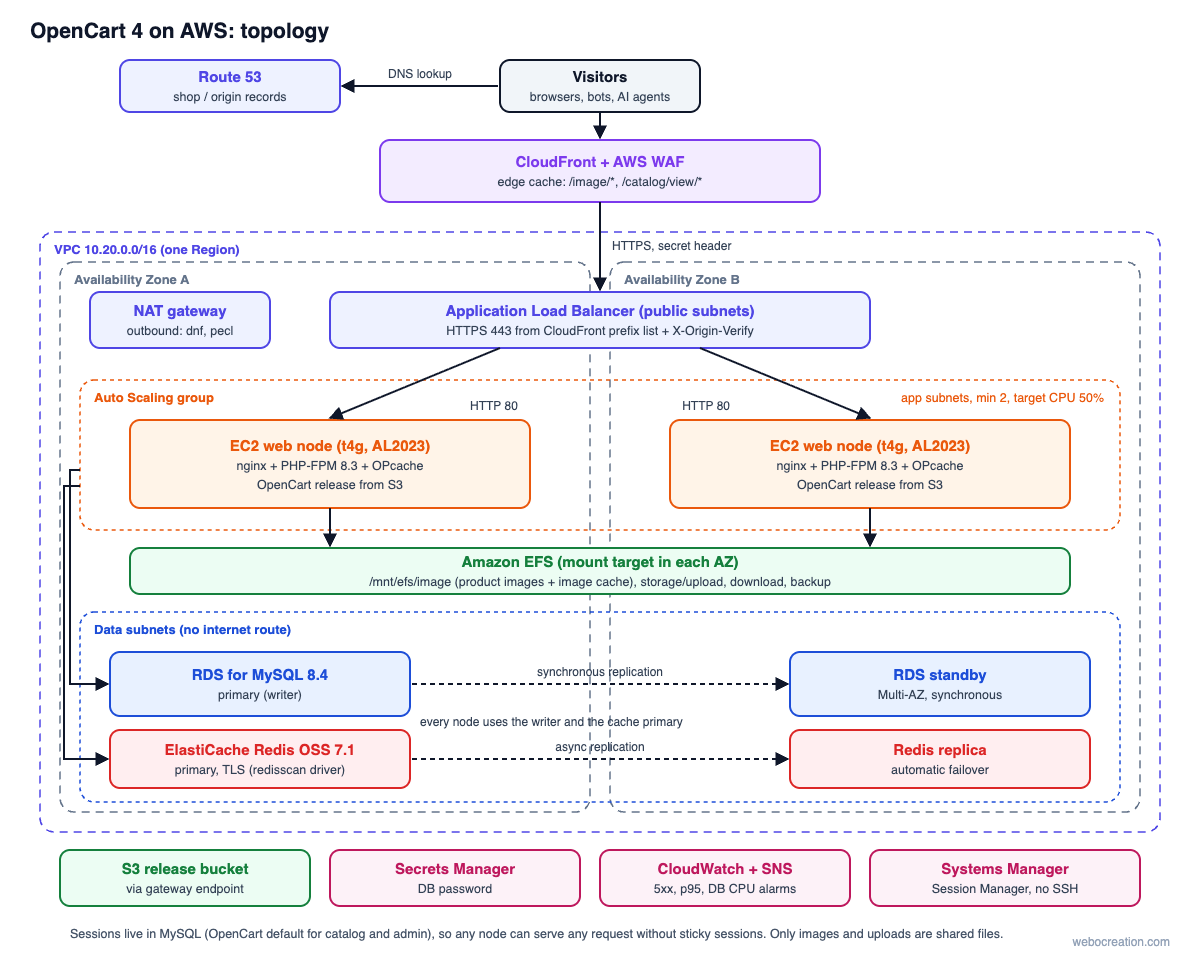
| Layer | AWS service | Configuration in the template |
|---|---|---|
| DNS | Route 53 | shop.example.com to CloudFront, origin.shop.example.com to the ALB |
| Edge | CloudFront | HTTP/2 and HTTP/3, TLS 1.2+, caches /image/*, /catalog/view/* and extension assets; everything else passes through |
| Load balancing | Application Load Balancer | HTTPS only, from the CloudFront origin-facing prefix list, forwards only requests with the secret X-Origin-Verify header |
| Web | EC2 Auto Scaling, Amazon Linux 2023, t4g (Graviton) | Minimum 2, maximum 6, target 50% CPU, IMDSv2 only, no SSH (Session Manager) |
| Database | RDS for MySQL 8.4 | Multi-AZ, gp3 with storage autoscaling, encrypted, slow query log to CloudWatch, deletion protection |
| Data cache | ElastiCache (Redis OSS 7.1) | Primary and replica, automatic failover, TLS in transit, encryption at rest |
| Shared files | Amazon EFS | Elastic throughput, encrypted, mounted over TLS, AWS Backup enabled |
| Releases | S3 | One tarball per release, read through a gateway endpoint |
| Secrets | Secrets Manager | Generated database password, read by each node at boot |
| Monitoring | CloudWatch and SNS | Alarms for target 5xx, p95 response time and database CPU |
Request flow: what each request touches
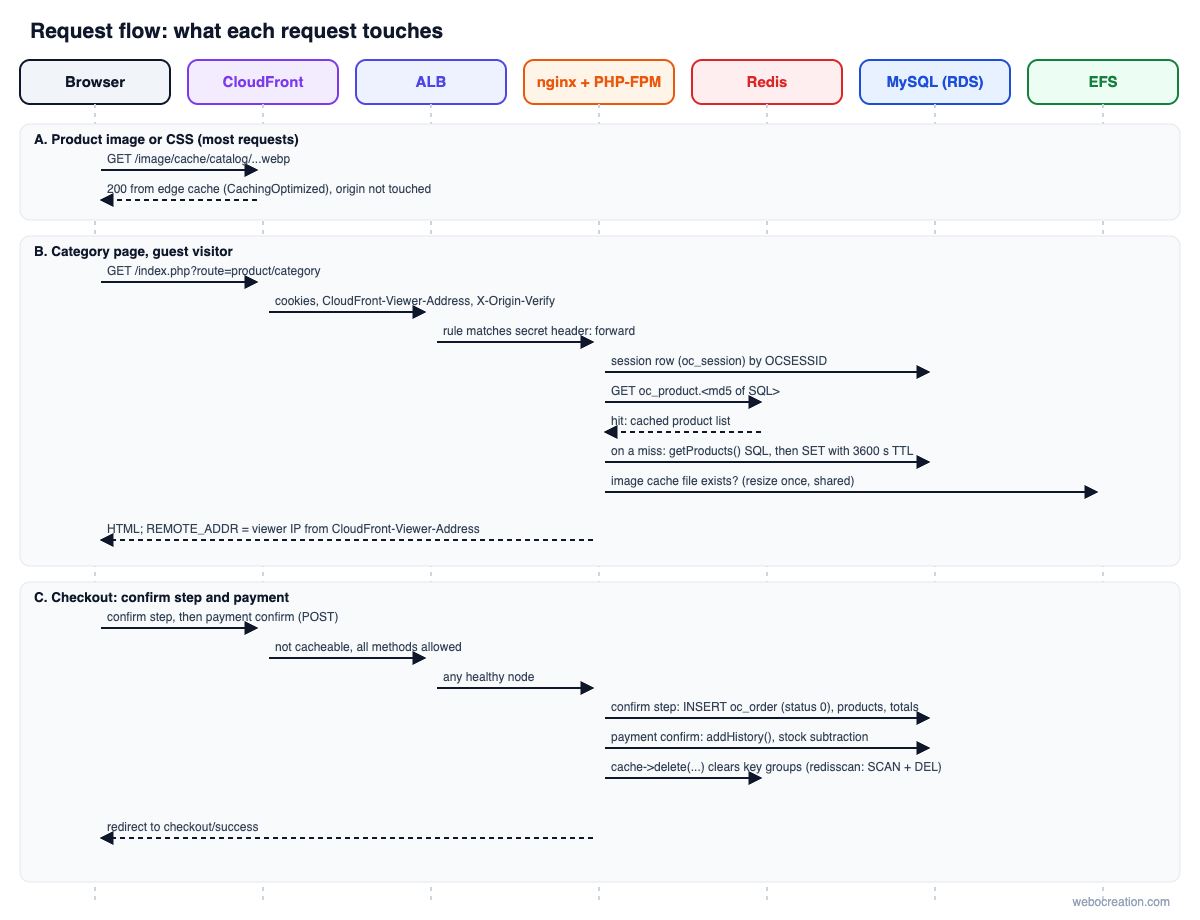
- Static files use the managed CachingOptimized policy, so most requests never reach your servers. OpenCart’s resized images have the size in the file name, so they can be cached for a long time.
- Pages use CachingDisabled with the AllViewerAndCloudFrontHeaders-2022-06 origin request policy, which forwards cookies, query strings, the
Hostheader andCloudFront-Viewer-Address. Caching OpenCart pages at the edge isn’t safe by default: every response sets theOCSESSIDcookie, and cart totals, currencies and logged-in prices differ per visitor. Page caching stays at the origin, where a cache like Speed Booster knows which pages are personal. - The secret header stops anyone from bypassing CloudFront by calling the ALB directly. The security group only allows CloudFront’s IP ranges, and the listener answers 403 unless
X-Origin-Verifymatches:
  FromCloudFrontRule:
    Type: AWS::ElasticLoadBalancingV2::ListenerRule
    Properties:
      ListenerArn: !Ref HttpsListener
      Priority: 1
      Conditions:
        - Field: http-header
          HttpHeaderConfig:
            HttpHeaderName: X-Origin-Verify
            Values: [!Ref OriginVerifySecret]
      Actions:
        - Type: forward
          TargetGroupArn: !Ref TargetGroup
DefaultCacheBehavior:
TargetOriginId: alb
ViewerProtocolPolicy: redirect-to-https
AllowedMethods: [GET, HEAD, OPTIONS, PUT, POST, PATCH, DELETE]
CachedMethods: [GET, HEAD]
Compress: true
# CachingDisabled + AllViewerAndCloudFrontHeaders-2022-06 (forwards cookies, query strings, Host and CloudFront-Viewer-Address)
CachePolicyId: 4135ea2d-6df8-44a3-9df3-4b5a84be39ad
OriginRequestPolicyId: 33f36d7e-f396-46d9-90e0-52428a34d9dc
CacheBehaviors:
# CachingOptimized for files that never depend on the visitor
- PathPattern: /image/*
TargetOriginId: alb
ViewerProtocolPolicy: redirect-to-https
Compress: true
CachePolicyId: 658327ea-f89d-4fab-a63d-7e88639e58f6
- PathPattern: /catalog/view/*
TargetOriginId: alb
ViewerProtocolPolicy: redirect-to-https
Compress: true
CachePolicyId: 658327ea-f89d-4fab-a63d-7e88639e58f6
- PathPattern: /extension/*/catalog/view/*
TargetOriginId: alb
ViewerProtocolPolicy: redirect-to-https
Compress: true
CachePolicyId: 658327ea-f89d-4fab-a63d-7e88639e58f6What OpenCart needs to run on several servers
We built the multi-server setup locally first: two OpenCart 4.1.0.4 containers with their own copy of the code, an nginx load balancer alternating between them, one database, Redis, and a shared folder in place of EFS. The response header showed which node answered each request.
Sessions: already in the database
OpenCart 4.1 stores both storefront and admin sessions in the database (session_engine is db in system/config/catalog.php and admin.php). We added a product to the cart through one node and loaded the cart page eight times; the requests alternated between the nodes and every one showed the product. Admin login worked the same way. No sticky sessions needed.
Files: put DIR_IMAGE on the real EFS path
Product images, the image cache and customer uploads must be shared, so they go on EFS. Our first attempt replaced the image folder with a symlink to /mnt/efs/image, and every product image on the storefront came back with an empty src. The cause is a security check in catalog/model/tool/image.php (and the admin file manager): OpenCart resolves the file with realpath() and refuses it unless the result starts with DIR_IMAGE. A symlink resolves to /mnt/efs/image/..., which doesn’t. The bootstrap script sets DIR_IMAGE, DIR_UPLOAD and DIR_DOWNLOAD to the EFS paths and keeps the symlink only so nginx can serve /image/ URLs:
# Seed EFS on the first boot only. OpenCart checks realpath() against DIR_IMAGE, so config.php
# points DIR_IMAGE, DIR_UPLOAD and DIR_DOWNLOAD at the real EFS paths; the image symlink is only
# there so nginx can serve /image/ URLs.
cp -an $WEB/image/. $EFS/image/
rm -rf $WEB/image && ln -s $EFS/image $WEB/image
for d in upload download backup; do
  cp -an $STORAGE/$d/. $EFS/storage/$d/ 2>/dev/null || true
  rm -rf $STORAGE/$d
done
ln -s $EFS/storage/backup $STORAGE/backup
Everything else in storage/ (the Composer vendor folder, logs, local cache) stays on each instance’s own disk, so PHP never loads code over NFS.
Cache: OpenCart’s Redis adaptor serves stale prices
With several servers, the default file cache would give each node its own copy of cached product lists. Redis (ElastiCache) shares one cache, and OpenCart 4 includes a Redis adaptor. We switched to it and edited a product price in the admin: the database had the new price ($19.99), the product page showed it, but the category page kept the old price on every reload.
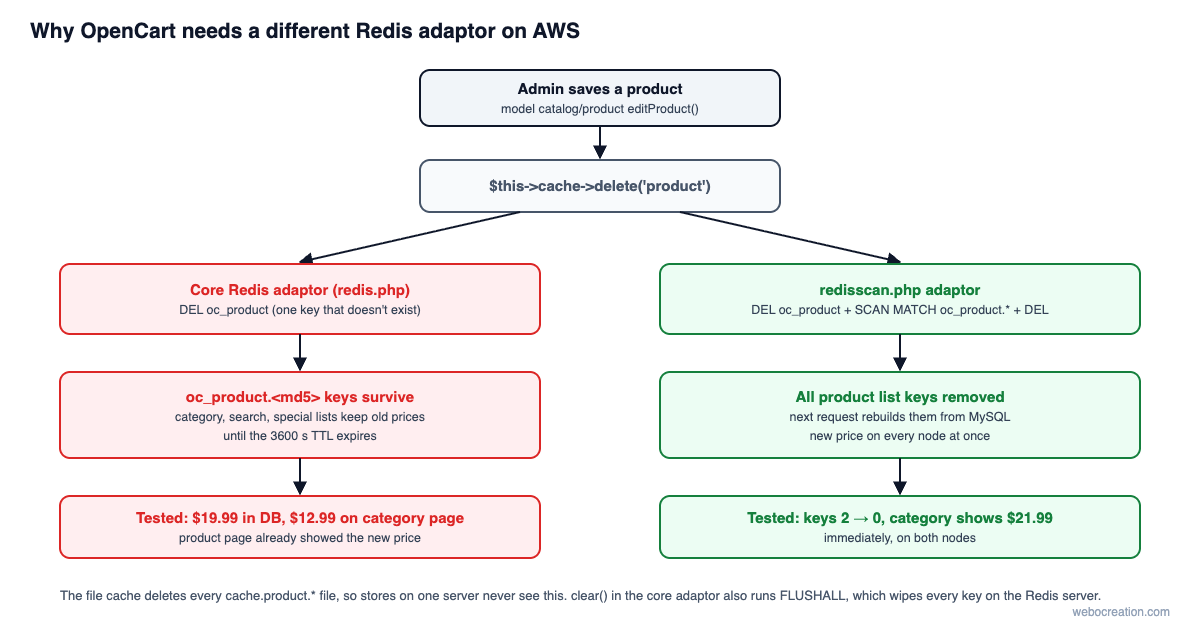
OpenCart clears whole groups with $this->cache->delete('product'). The file adaptor deletes every cache.product.* file. The Redis adaptor (system/library/cache/redis.php) deletes the single key product, which doesn’t exist; the actual list keys are named product.<md5 of the SQL> and live for an hour. Its clear() runs FLUSHALL, which in our test also deleted a key belonging to another application on the same Redis server.
The fix is a new adaptor file, no core edits: it deletes the key and every key under it with SCAN, and clear() only removes keys with your prefix. With it, the same price edit removed the cached lists (2 keys to 0) and the category page showed the new price immediately on both nodes:
<?php
namespace Opencart\System\Library\Cache;
/**
 * Redis cache for OpenCart 4 that clears key groups the way the file cache does.
 *
 * OpenCart clears whole groups with $this->cache->delete('product'). The file cache deletes every
 * cache.product.* file; the core Redis adaptor only deletes the single key "product", so cached
 * product lists stay stale until they expire. This adaptor also deletes "product.*" keys, and
 * clear() removes only keys with this store's CACHE_PREFIX instead of flushing the whole server.
 *
 * Install: save as system/library/cache/redisscan.php and set CACHE_ENGINE to 'redisscan'.
 * For TLS (ElastiCache in-transit encryption) use CACHE_HOSTNAME 'tls://your-endpoint'.
 */
class Redisscan {
    private \Redis $redis;
    private int $expire;
    private string $prefix;

    public function __construct(int $expire = 3600) {
        $this->expire = $expire;
        $this->prefix = defined('CACHE_PREFIX') ? CACHE_PREFIX : '';
        $this->redis = new \Redis();

        $host = defined('CACHE_HOSTNAME') ? CACHE_HOSTNAME : '127.0.0.1';
        $port = defined('CACHE_PORT') ? (int)CACHE_PORT : 6379;

        $this->redis->pconnect($host, $port, 2.0);

        if (defined('CACHE_PASSWORD') && CACHE_PASSWORD !== '') {
            $this->redis->auth(CACHE_PASSWORD);
        }

        // Let SCAN retry internally, so it only returns when it has keys or has finished.
        $this->redis->setOption(\Redis::OPT_SCAN, \Redis::SCAN_RETRY);
    }

    public function get(string $key): mixed {
        $data = $this->redis->get($this->prefix . $key);

        if ($data === false) {
            return [];
        }

        $decoded = json_decode($data, true);

        return $decoded !== null ? $decoded : [];
    }

    public function set(string $key, mixed $value, int $expire = 0): void {
        $this->redis->set($this->prefix . $key, json_encode($value), ['ex' => $expire ?: $this->expire]);
    }

    public function delete(string $key): void {
        $key = preg_replace('/[^A-Z0-9\._-]/i', '', $key);

        $this->redis->del($this->prefix . $key);
        $this->deletePattern($this->prefix . $key . '.*');
    }

    public function clear(): void {
        $this->deletePattern($this->prefix . '*');
    }

    private function deletePattern(string $pattern): void {
        $iterator = null;

        while (($keys = $this->redis->scan($iterator, $pattern, 500)) !== false) {
            if ($keys) {
                $this->redis->del($keys);
            }
        }
    }
}
Save it as system/library/cache/redisscan.php in your release and set CACHE_ENGINE to redisscan and CACHE_PREFIX to something like oc_. OpenCart’s adaptors require CACHE_PREFIX to be defined. For ElastiCache with encryption in transit, use tls:// in front of the endpoint. We tested this against a TLS-only Redis with our own certificate authority trusted by Amazon Linux: tls:// worked, and a plain connection to the TLS port failed with “RedisException: read error on connection”, the error you’ll see if you forget the prefix.
Cron: run it once, and fix the autoloader
OpenCart 4.1’s cron.php should run hourly. On several servers it must run on only one of them, so the bootstrap script takes a Redis lock first. Running it also exposed a second bug: on OpenCart 4.1.0.4, php cron.php stops with Class "Twig\Loader\FilesystemLoader" not found, on our normal single-server store too. The web front end loads storage/vendor/autoload.php in system/framework.php; cron.php has that line commented out. PHP’s auto_prepend_file loads it without editing the file:
cat > /usr/local/bin/oc-cron <<'CRON'
#!/bin/bash
cd /var/www/html
php -r 'require "config.php"; $r = new Redis(); $r->connect(CACHE_HOSTNAME, CACHE_PORT, 2.0); exit($r->set(CACHE_PREFIX . "cron_lock", gethostname(), ["nx", "ex" => 3300]) ? 0 : 1);' \
  && runuser -u apache -- php -d auto_prepend_file=/var/www/storage/vendor/autoload.php cron.php
CRON
On our test node the first run updated the currency and GDPR jobs; a second run on the same or another node exited without running, because the lock lasts 55 minutes.
Extensions and code: immutable releases
With an Auto Scaling group, every instance must run the same code. If you install an extension through Extensions > Installer on the live site, only the node that handled the request gets the files, while the database already lists the extension’s events for all nodes. Install and test extensions on a staging copy, then ship them in a new release. That’s also why OPcache is set to never re-check files (opcache.validate_timestamps = 0): code only changes when an instance is replaced.
Build it on AWS, step by step
We validated the template with cfn-lint 1.61.0 (no errors or warnings for us-east-1, eu-west-1 and ap-southeast-2) and ran the bootstrap script on Amazon Linux 2023 against our lab database and Redis, but we didn’t deploy the stack to an AWS account for this article. Deploy it to a test account first. It creates billable resources: two EC2 instances, a Multi-AZ database, two cache nodes, a NAT gateway, a load balancer, EFS and CloudFront. Use the AWS Pricing Calculator with your traffic before you start.
1. Prerequisites
- A Route 53 hosted zone for your domain.
- Two ACM certificates: one in us-east-1 for CloudFront covering
shop.example.com, and one in your stack’s Region for the ALB covering bothshop.example.comandorigin.shop.example.com. CloudFront forwards the viewer’sHostheader, so it validates the ALB’s certificate against the store domain. A certificate forexample.comand*.example.comcovers both. - The ID of the CloudFront origin-facing prefix list in your Region:
aws ec2 describe-managed-prefix-lists \
  --filters Name=prefix-list-name,Values=com.amazonaws.global.cloudfront.origin-facing \
  --query 'PrefixLists[0].PrefixListId' --output text
A rule that uses this list counts as many rules against the security group quota, so keep the ALB’s group to this one rule.
Finally, create a random secret for the origin header: openssl rand -hex 32.
2. Build a release
A release is a tarball with two folders: html/ (your OpenCart files, including your admin folder, extensions, theme and system/library/cache/redisscan.php) and storage/ (your storage folder, including vendor). Leave out the two config.php files; the bootstrap script writes them.
rsync -a --exclude '/config.php' --exclude '/admin/config.php' ./upload/ release/html/
rsync -a --exclude 'cache/*' --exclude 'session/*' --exclude 'logs/*' ./storage/ release/storage/
tar --no-xattrs -czf 2026-11-26.tar.gz -C release html storage
aws s3 cp 2026-11-26.tar.gz s3://my-store-releases/releases/2026-11-26.tar.gz
Anchor the excludes with a leading slash. Our first build used --exclude config.php, which also removed OpenCart’s system/engine/config.php, and every page returned a fatal error. Build on Linux, or add --no-xattrs (and COPYFILE_DISABLE=1) on a Mac, otherwise extracting prints warnings about Apple extended attributes.
3. Deploy the stack
aws cloudformation deploy \
  --stack-name opencart-prod \
  --template-file opencart-aws.yaml \
  --capabilities CAPABILITY_IAM \
  --parameter-overrides \
    DomainName=shop.example.com \
    HostedZoneId=Z0123456789ABCDEFGHIJ \
    CloudFrontCertificateArn=arn:aws:acm:us-east-1:111122223333:certificate/... \
    AlbCertificateArn=arn:aws:acm:eu-west-1:111122223333:certificate/... \
    CloudFrontPrefixListId=pl-... \
    OriginVerifySecret=... \
    CodeBucket=my-store-releases \
    CodeKey=releases/2026-11-26.tar.gz \
    AdminDir=admin \
    AlarmEmail=ops@example.com
Each new instance runs the bootstrap script as user data: packages, phpredis, PHP-FPM tuning, EFS mount, release download, password from Secrets Manager, config.php, nginx and the cron timer. In our arm64 Amazon Linux 2023 container the whole script took about 37 seconds; the Auto Scaling group allows 10 minutes before it judges a new instance by its health check.
4. Import your database and images
Connect to a web node with Session Manager (no SSH or bastion needed), install the MySQL client and import a dump of your store:
sudo dnf -y install mariadb1011-client-utils
SECRET=$(aws secretsmanager get-secret-value --secret-id <DatabaseSecretArn> --query SecretString --output text)
export MYSQL_PWD=$(echo "$SECRET" | jq -r .password)
mysql -h <DatabaseEndpoint> -u opencart opencart < store.sql
Our test store runs MariaDB 11. We imported its dump into MySQL 8.4.13 with the MariaDB 10.11 client from Amazon Linux 2023: the client logged in with MySQL 8.4’s default caching_sha2_password, all 190 tables imported, and the store, admin and a full guest checkout worked against MySQL 8.4 in strict SQL mode. Check your dump for MariaDB-only collations (utf8mb4_uca1400_*) first; MySQL doesn’t have them. Then copy your image/catalog folder to /mnt/efs/image/catalog on any node.
5. Smoke test
https://shop.example.com/loads; the ALB’s own DNS name returns 403.- Add to cart, refresh several times, check out.
- Change a price in the admin and check the category page right away.
- Order IPs in the admin show visitor addresses, not AWS addresses (nginx takes them from
CloudFront-Viewer-Address; in our test203.0.113.10:51234became203.0.113.10, and IPv6 worked too). /config.php,/system/and/storage/return 403.
The web node
The nginx configuration from the bootstrap script. TLS ends at the load balancer, OpenCart detects HTTPS from the X-Forwarded-Proto header the ALB adds (it checks it in system/startup.php), and the visitor’s IP comes from CloudFront:
map $http_cloudfront_viewer_address $viewer_ip {
    "~^(?<ip>.+):\d+$" $ip;
    default $remote_addr;
}
server {
    listen 80 default_server;
    root /var/www/html;
    index index.php;
    client_max_body_size 32m;

    location = /healthz { access_log off; include fastcgi_params; fastcgi_param SCRIPT_FILENAME $document_root/healthz.php; fastcgi_pass unix:/run/php-fpm/www.sock; }
    location ~ /\.(?!well-known) { deny all; }
    location ~* ^/(system|storage)/ { deny all; }
    location ~* \.(twig|tpl|ini|log|sql)$ { deny all; }
    location ~ (^|/)config\.php$ { deny all; }
    location ~* ^/image/.*\.(jpe?g|png|gif|webp|avif|svg)$ { expires 30d; add_header Cache-Control "public"; try_files $uri =404; }
    location ~* \.(css|js|woff2?)$ { expires 7d; add_header Cache-Control "public"; try_files $uri =404; }
    location / { try_files $uri $uri/ @opencart; }
    location @opencart { rewrite ^/(.+)$ /index.php?_route_=$1 last; }
    location ~ \.php$ {
        try_files $uri =404;
        include fastcgi_params;
        fastcgi_param SCRIPT_FILENAME $document_root$fastcgi_script_name;
        fastcgi_param REMOTE_ADDR $viewer_ip;
        fastcgi_pass unix:/run/php-fpm/www.sock;
        fastcgi_read_timeout 60s;
    }
}
Notes from testing on Amazon Linux 2023 (2023.12):
- PHP 8.1 to 8.5 are packaged (we use 8.3.37), and so is APCu, but phpredis isn’t, so the script builds it with
pecl. It’s built once at first boot; re-running pecl over an existing build crashed in our test, so treat the script as first-boot only. - PHP-FPM runs as
apacheon/run/php-fpm/www.sock. The release is owned by root and read-only for PHP; only storage and EFS are writable. pm.max_childrenis calculated from memory, about 80 MB per worker after 512 MB for the system. Check real usage withpsunder load and adjust.- There’s no cron daemon by default, so the script uses a systemd timer.
Deploying new code
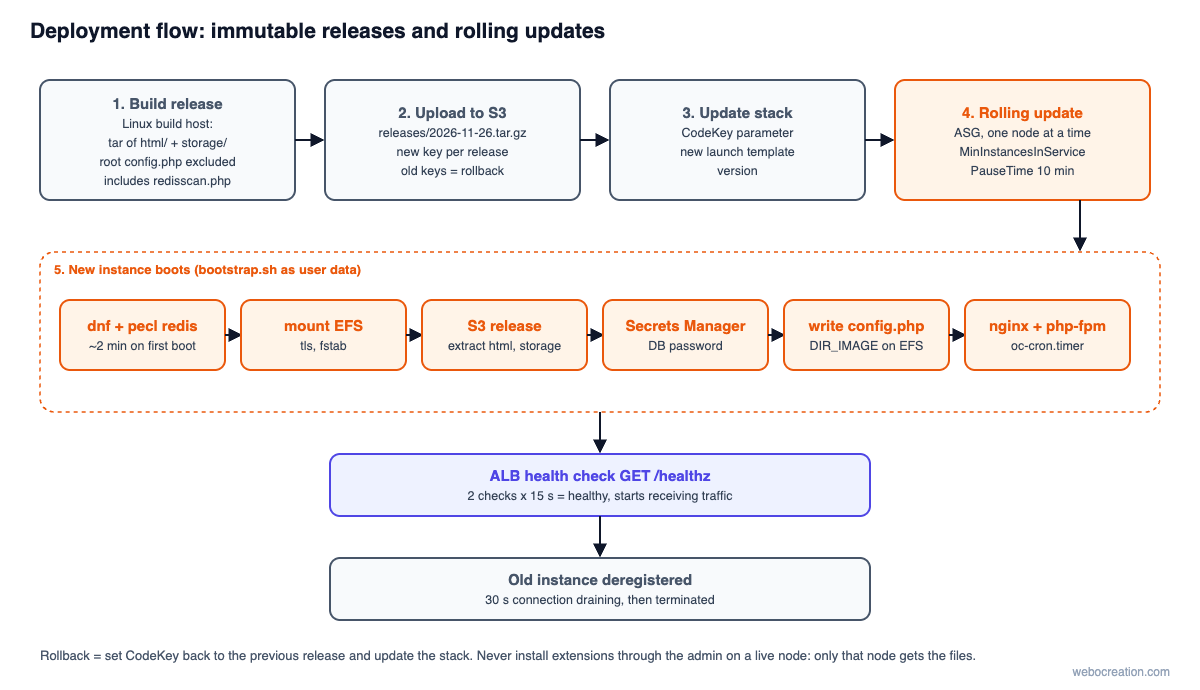
Upload the release under a new key and update the stack with the new CodeKey. The launch template gets a new version and the Auto Scaling group replaces instances one at a time; each must pass /healthz before the next is replaced. To roll back, deploy the previous key. Database changes from extensions or upgrades must work with both the old and the new code while instances are being replaced.
Scaling and tuning
- Web tier: target tracking at 50% average CPU, minimum 2 so one Availability Zone can fail. Before a known peak, raise the minimum the day before instead of waiting for scaling; new instances need a few minutes.
- Database: watch CPU, connections and the slow query log the template sends to CloudWatch; our post on slow queries in OpenCart covers the indexes. Scale the instance class up ahead of a sale. A read replica helps reports, but OpenCart sends every query to one connection, so it can’t split reads by itself.
- Cache: on failover ElastiCache promotes the replica behind the same primary endpoint name. If Redis is unreachable, OpenCart pages fail, so keep the replica, and run ElastiCache’s test failover on your test stack to see how long the store reports errors.
- Files: EFS with elastic throughput suits the image cache’s many small reads; CloudFront absorbs most image traffic anyway.
- Edge protection: attach an AWS WAF web ACL to the distribution (created in us-east-1) with rate limits on login, search and checkout. Our WAF and rate limiting guide lists rules worth copying.
Plan for the peak
| When | What |
|---|---|
| 6 to 8 weeks before | Estimate peak traffic; load test a copy of the stack; fix slow queries and pages |
| 4 weeks before | Page cache, CloudFront, WAF in place; backups and restore tested |
| 2 weeks before | Code freeze: no new extensions, theme changes or updates |
| 1 week before | Raise the Auto Scaling minimum and the database class; confirm payment and shipping provider limits |
| Sale day | Watch the alarms, p95 response time, database CPU and orders per minute; someone on call who can scale and roll back |
| After | Scale back down; keep the numbers for next year |
Load test a copy, not production, with the real mix of requests: mostly category and product pages, some searches, some add-to-carts and checkouts. Raise concurrency step by step and watch the median and 95th percentile, not just requests per second; in our test the throughput stayed flat while the median went from 177 ms to over a second. ApacheBench is fine for one page; k6, Locust or JMeter can script a customer journey.
Checklist
- CloudFront in front, ALB reachable only from CloudFront with the secret header.
- Two Availability Zones for web, database and cache.
- Sessions in MySQL (the OpenCart default), files on EFS with
DIR_IMAGEon the real path. - Redis with the
redisscanadaptor and aCACHE_PREFIX. - Cron with a lock and the autoloader preloaded.
- Immutable releases from S3; no extension installs on live nodes.
- Alarms on 5xx, p95 and database CPU; slow query log on.
- Load tested above the expected peak; code frozen two weeks before.
Related posts

Rupak Nepali is a web developer, manage Webocreation website and the author of six books:
Getting Started with OpenCart Module Development (Packt, 2013),
OpenCart Theme and Module Development (Packt, 2015),
OpenCart 4: Dev Guide for Themes & Extensions (2024),
OpenCart 4: User Manual (2025),
Cloudflare for the Enterprise Website (2026) and
The Technical Web Guide for Marketers (2026).
Rupak has built OpenCart stores and extensions since 2010, has published more than 600 tutorials on Webocreation, and shares free OpenCart extensions on GitHub.
Find Rupak on
GitHub | Amazon | LinkedIn | X | YouTube.