Full webpage screenshot chrome with two commands – easiest way
 Rupak NepaliPublished Nov 21, 2019
The easiest and fastest way to take the full webpage screenshot in chrome without the extension and just two commands is below:
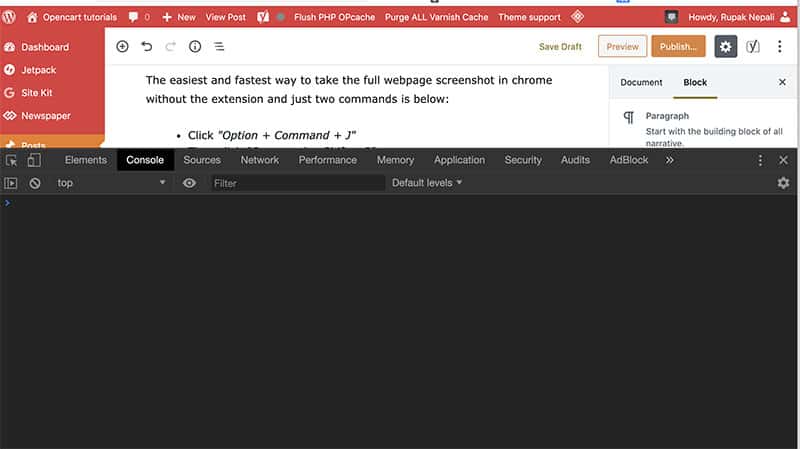
- Click “Option + Command + J”
- Then click “Command + Shift + P”
- Type “Capture full-size screenshot” and click it, your full screenshot will be captured and downloaded
Above is the Mac command, in Windows, it is similar just use Ctrl instead of Command and Alt instead of Option.
When you click the “Option + Command + J” it opens developer console:
Then click “Command + Shift + P” to open the input box and start to type full size to run command and you will see like below:
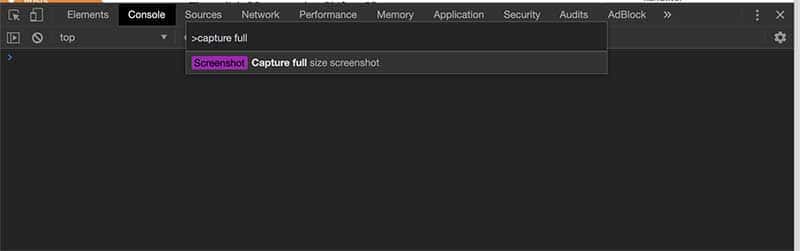
Click it and your fullscreen webpage is captured and downloaded.
We hope this help someone to take the full page screen capture in chrome easily. Please don’t forget to post your questions or comments so that we can add extra topics. You can follow us at our twitter account @rupaknpl and subscribe to our YouTube channel for opencart tutorials.

Rupak Nepali is a web developer, manage Webocreation website and the author of six books:
Getting Started with OpenCart Module Development (Packt, 2013),
OpenCart Theme and Module Development (Packt, 2015),
OpenCart 4: Dev Guide for Themes & Extensions (2024),
OpenCart 4: User Manual (2025),
Cloudflare for the Enterprise Website (2026) and
The Technical Web Guide for Marketers (2026).
Rupak has built OpenCart stores and extensions since 2010, has published more than 600 tutorials on Webocreation, and shares free OpenCart extensions on GitHub.
Find Rupak on
GitHub | Amazon | LinkedIn | X | YouTube.


Hi there Rupak,
greetings from a chilly Sweden. It sure is a neat trick, but there’s no way I will ever install Chrome again. Last time I had a Kafka- or 1984-similar experience. Google’s almost perverted presence made me extremely furious. Today I only use Firefox, (just love that they are blocking facebook and Twitter) and I’m searching with DuckDuckGo. I no longer use my Gmail-account and Google search only when I’m working with my wife’s web shop or when I need extended info. After using Google’s services I make sure to log out and keep it that way. One can’t minimize the value and felling of liberty not having this obtrusive predator hunting you down wherever you go in cyberspace. I lost all trust in Google long time ago and time seems to prove my attitude right. Something must have gone terribly wrong as search results, more than twenty days later, still are so to say up side down. Thanks and C U.