Chapter 20: Web Governance
Web governance is the set of rules that keeps a portfolio safe and consistent. Keep it short, easy to follow and alive.
 Rupak NepaliPublished Nov 26, 2026
This is Chapter 20 of The Web Delivery Manager’s Playbook, a free series on running enterprise websites from request to release. Web governance is the set of rules that keeps a portfolio safe and consistent. Keep it short, easy to follow and alive.
A routine performance check on the corporate site turned up something strange. The home page was loading 41 third-party scripts. Some were expected: analytics, the consent tool, the chat widget. Others nobody recognized. One was a heat-mapping tool from a trial two years earlier. Another was an advertising pixel for a campaign that had ended. A third was loaded by a plugin an agency had installed, sending visitor data to a service nobody at Webocreation Group had approved.
Each script had been added for a reason, by someone with access to the tag manager. Nobody had ever been responsible for deciding which scripts should be there. That is a governance problem.
Web governance for new sites and domains
What governance means
Web governance is the set of rules, roles and processes that keep a web portfolio consistent, safe and well run as many people make changes over time. It answers questions like:
- Who can create a new site or domain?
- What standards must every site meet?
- Who decides what content goes on a page, and how long it stays?
- Which tools and scripts are allowed on our sites?
- What happens when someone breaks the rules?
Governance has a bad reputation, because it is often done badly: long policy documents nobody reads, committees that slow everything down, and rules enforced only after something goes wrong. Good governance is the opposite. It is light, clear and built into the tools and processes people already use.
The building blocks
You have already built much of your governance framework in earlier chapters:
- Ownership and decision rights: the operating model and RACI (Chapter 2).
- Inventory: knowing what exists (Chapter 3).
- Intake and approvals: the front door and approval rules (Chapter 5 and Chapter 9).
- Change management: controlled releases (Chapter 11).
- Quality standards: the QA checklist and accessibility standard (Chapter 12).
- Tiers: different expectations for different sites (Chapter 19).
This chapter adds the remaining pieces: written standards, rules for new sites and domains, third-party script control, content lifecycle, and a way to keep it all working.
Standards every site must meet
Write a short set of web standards that every site in the portfolio must meet, regardless of who builds it. Group them by area and keep each standard specific enough to check.
| Area | Example standards |
|---|---|
| Brand | Uses approved logos, colors and fonts from the brand guidelines or design system |
| Accessibility | Meets WCAG 2.2 level AA; passes automated checks before release |
| Security | HTTPS only; behind the company CDN and firewall; editor access through SSO; non-production sites protected |
| Privacy | Approved consent tool; privacy notice linked from every page; only approved tags and scripts |
| Performance | Meets agreed page speed targets on key templates |
| SEO | Unique titles and descriptions; sitemap; no indexing of non-production sites |
| Domains | Registered by the company through the approved registrar; DNS managed by the web team |
| Platforms | Built on an approved standard platform unless an exception is approved |
| Ownership | Named business owner and technical owner recorded in the inventory and CMDB |
| Analytics | Uses the company analytics setup and naming conventions |
Publish the standards as part of your one-page operating model, and link them from your agency onboarding pack (Chapter 16). Build checks into your QA checklist so meeting the standards is part of normal work, not a separate audit.
New sites and domains
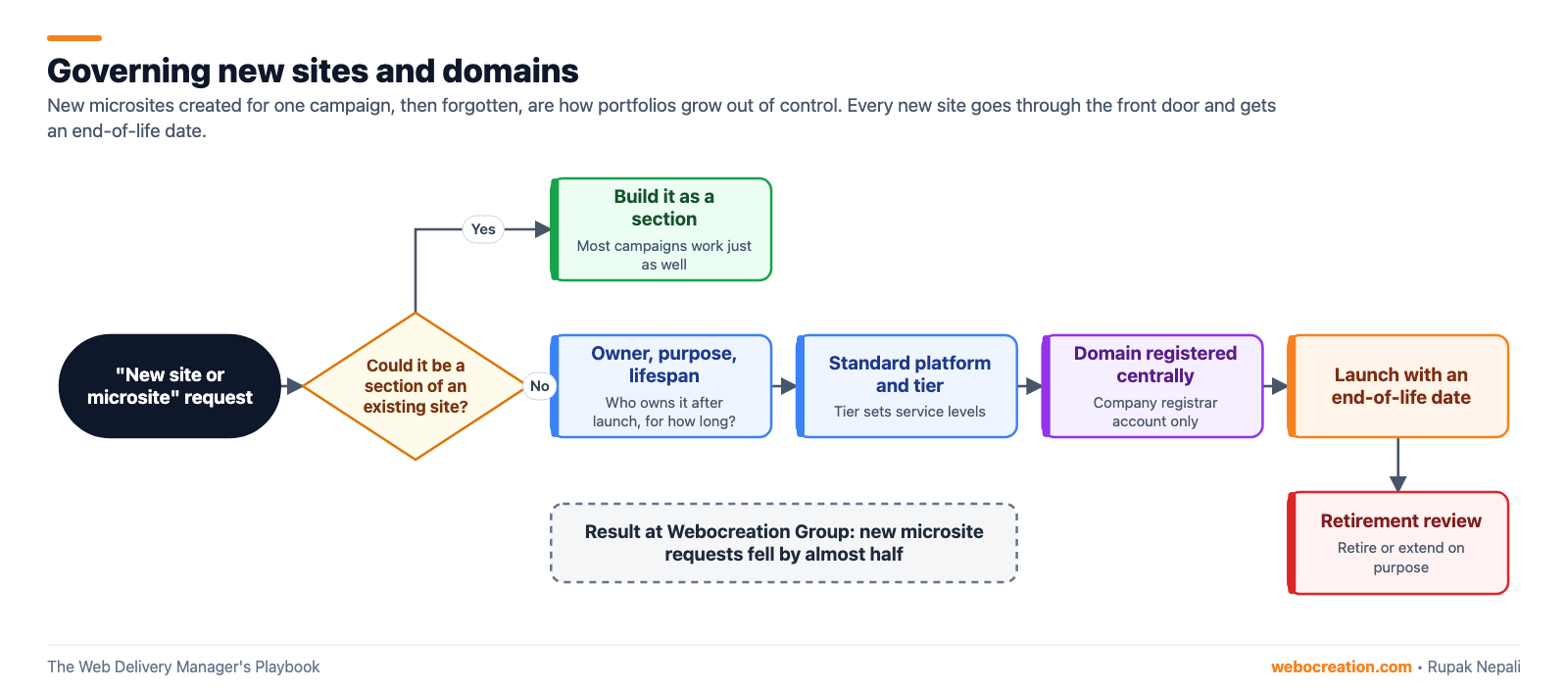
The fastest way for a portfolio to grow out of control is through new microsites and domains created for a campaign or product launch, then forgotten. Governance here is simple and effective.
All new sites go through the front door. The “new site or microsite” catalog item (Chapter 5) routes to the delivery manager for review. The review asks:
- What is the business purpose, and could it be a section of an existing site instead?
- Who will own it after launch, and for how long will it be needed?
- Which standard platform will it use?
- What tier will it be?
- When will it be reviewed for retirement?
All domains are registered centrally. Only the web team, or a named team in IT, can register domains, using the company’s registrar account. This prevents domains from being registered on personal accounts or agency accounts, which is how many companies lose control of their own names.
Every new site has an end-of-life date. Campaign and event sites should have a planned retirement date from the start. When the date comes, the site is retired or the owner justifies keeping it.
At Webocreation Group, these rules reduced new microsite requests by almost half. Most campaigns turned out to work just as well as a section of an existing site, launched faster and cost less.
Controlling third-party scripts
Third-party scripts include analytics tools, advertising pixels, chat widgets, heat-mapping tools, personalization services, social media embeds and A/B testing tools. Each one can affect page speed, privacy compliance and security. A compromised third-party script can capture everything visitors type into forms on your site.
Treat scripts as you would any other change to production:
- Approve before adding. New scripts go through the tracking or tag request in ServiceNow (Chapter 5), with privacy and security review.
- Keep an inventory. Record every script, which sites and pages it runs on, its purpose, owner, data collected, and approval date.
- Limit who can publish tags. Restrict publishing rights in the tag manager to a small group, with changes reviewed before going live.
- Respect consent. Configure scripts to load only when visitors have given the required consent.
- Review regularly. Once a quarter, scan your Tier 1 and Tier 2 sites for scripts and compare them with the inventory. Remove anything unapproved or no longer needed.
For high-risk pages, such as login or payment pages, consider stricter controls: limiting scripts to the essential minimum, using a content security policy to control which sources can load scripts, and monitoring for unexpected changes.
After the review of the 41 scripts, Webocreation Group’s corporate home page went down to 14. Page load time improved by more than a second, and the unapproved data-sharing plugin was removed.
Content ownership and lifecycle
Content goes out of date faster than code. Outdated content damages trust, hurts search performance, and in regulated industries can create legal risk.
Good content governance includes:
- An owner for every section. Each section of a site has a named content owner responsible for accuracy.
- Review cycles. Pages are reviewed on a schedule that matches their risk: quarterly for regulated content, annually for general content.
- Review reminders. Many CMSs can record a review date and notify the owner. If yours cannot, a scheduled report or ServiceNow task can do the job.
- Archiving and removal rules. Outdated content is updated, archived or removed, with redirects where needed.
- A content style guide covering voice, tone, formatting, accessibility and legal requirements.
Design systems as governance
A design system is one of the most effective governance tools you have, because it makes the right choice the easy choice. When every site uses the same accessible, on-brand components, standards are met by default. Editors cannot accidentally use the wrong color or an inaccessible pattern, because the components do not allow it.
For a design system to work as governance:
- It must be easy to use: well documented, available in the CMS and design tools.
- It must be owned: someone maintains it, accepts contributions and manages versions.
- It must be required for new sites and redesigns, with exceptions approved.
Keeping governance alive
Governance fails when it becomes a document on a shelf. Keep it alive with a few habits:
- A web governance group that meets quarterly, using the operating model review from Chapter 2. It reviews standards, exceptions and portfolio decisions.
- An exceptions log. When a site cannot meet a standard, record the exception, the reason, the risk and an expiry date. Exceptions without expiry dates become permanent.
- Automated checks wherever possible: accessibility and performance scans, script inventories, certificate monitoring, uptime checks.
- Regular reporting. Include governance indicators in the monthly report (Chapter 22), such as sites without owners, unapproved scripts and overdue content reviews.
- Enforcement with care. When standards are broken, start with a conversation. Escalate only for repeated or serious issues.
Template: Web governance policy
Keep the policy short. A two-page document with links to detailed standards is enough.
| Section | Contents |
|---|---|
| Purpose and scope | Why the policy exists; which sites, domains and tools it covers |
| Roles | Governance group, delivery manager, site owners, content owners, platform owners |
| New sites and domains | Request process; review criteria; central domain registration; end-of-life dates |
| Web standards | Link to the standards table: brand, accessibility, security, privacy, performance, SEO, platforms |
| Third-party scripts | Approval process, inventory, publishing rights, consent, quarterly review |
| Content lifecycle | Ownership, review cycles, archiving rules, style guide |
| Design system | Required use, ownership, contribution process |
| Exceptions | How to request one; required risk assessment; expiry dates |
| Monitoring and reporting | Automated checks; governance indicators in monthly reports |
| Review | Policy reviewed annually by the governance group |
Checklist
- Write a one-page set of web standards and link it from the operating model.
- Route all new sites through review, with an owner, tier and end-of-life date.
- Centralize domain registration in the company’s registrar account.
- Build a third-party script inventory and review it quarterly.
- Assign content owners and review cycles, starting with regulated pages.
- Make the design system the default for new sites and redesigns.
- Keep an exceptions log with expiry dates.
Common traps
- Policies nobody reads. Keep governance short and build it into everyday tools.
- Unlimited tag manager access. Every person who can publish tags can change what runs on your sites.
- Domains on personal or agency accounts. Register every domain centrally.
- Sites with no end date. Campaign sites should be planned for retirement from day one.
- Permanent exceptions. Every exception needs an expiry date and a review.
Related reading
- Loading third-party scripts in Webflow without wrecking Core Web Vitals
- How to secure a site with Content Security Policy
- Google Consent Mode v2 explained for marketers
- Chapter 19: Managing a Portfolio of Sites
- Chapter 21: Budgets and Cost Control

Rupak Nepali is a web developer, manage Webocreation website and the author of six books:
Getting Started with OpenCart Module Development (Packt, 2013),
OpenCart Theme and Module Development (Packt, 2015),
OpenCart 4: Dev Guide for Themes & Extensions (2024),
OpenCart 4: User Manual (2025),
Cloudflare for the Enterprise Website (2026) and
The Technical Web Guide for Marketers (2026).
Rupak has built OpenCart stores and extensions since 2010, has published more than 600 tutorials on Webocreation, and shares free OpenCart extensions on GitHub.
Find Rupak on
GitHub | Amazon | LinkedIn | X | YouTube.