Chapter 18: Building and Growing the Web Team
Building a web team: the roles you need, a skills matrix that exposes single points of failure, and documentation that survives people leaving.
 Rupak NepaliPublished Nov 26, 2026
This is Chapter 18 of The Web Delivery Manager’s Playbook, a free series on running enterprise websites from request to release. Building a web team: the roles you need, a skills matrix that exposes single points of failure, and documentation that survives people leaving.
In Maya’s eighth month, the web team’s most experienced developer, Sam, went on two weeks of leave. On his third day away, the corporate site’s search stopped returning results. Nobody else knew how the search integration worked. The documentation was a single page last updated four years earlier. The team spent a day and a half working it out, and finally called Sam on his vacation.
The fix took him ten minutes over the phone. The lesson took Maya much longer to act on. Her team was not short of skill. It was short of shared knowledge. Too much depended on too few people.
Building a web team without single points of failure
The roles a web team needs
A corporate web program needs a mix of skills. In a small team, one person may cover several roles. In a large one, each role may be a team. Either way, it helps to know which roles you need.
| Role | Main responsibilities | Can be combined with |
|---|---|---|
| Web delivery manager | Intake, planning, releases, stakeholders, vendors, risk | Product owner (small teams) |
| Technical lead or architect | Technical direction, standards, code review, platform decisions | Senior developer |
| Web developer | Building templates, features and integrations; fixing bugs | Platform administrator |
| Platform administrator | CMS, CDN, DNS, DAM and tool configuration; access; upgrades | Developer or DevOps |
| Content editor or manager | Publishing, editing, content quality, editor training | Content strategist |
| Designer (UX/UI) | Layouts, design system, user experience, accessibility in design | Front-end developer |
| QA analyst | Test planning, testing, automation, accessibility testing | Shared with other teams |
| Analytics specialist | Tracking, tag management, dashboards, reporting | Shared with marketing |
| SEO specialist | Technical SEO, content optimization, search performance | Content or analytics |
Small teams often lack dedicated QA, analytics and SEO roles. That is normal. What matters is that someone is clearly responsible for each area, even if it is a part-time responsibility or a shared resource.
In-house or outsourced?
Deciding which roles to keep in-house and which to outsource is one of the most important structural choices for a web program.
Keep in-house the roles that hold long-term knowledge and control: the delivery manager, the technical lead, platform administration, and at least one developer who knows each critical site. These people protect continuity, security and institutional memory.
Outsource or share the roles where demand is uneven or specialist: peak development capacity, creative design for campaigns, accessibility audits, specialist integrations, out-of-hours support.
A useful test: if this person left tomorrow, could the company keep its sites running safely? If the answer is no, the role should be in-house, or at least well documented and shared between more than one person.
Hiring for the web team
When you have the chance to hire, look beyond technical skills. The best web team members tend to share a few qualities:
- Ownership. They follow work through to the end, including testing, documentation and verification.
- Communication. They can explain technical issues to non-technical colleagues clearly and patiently.
- Curiosity across disciplines. Developers who care about content and accessibility, editors who are comfortable with basic HTML and analytics.
- Comfort with process. They see the value in change management, QA and documentation, rather than treating them as obstacles.
- Calm under pressure. Incidents and launches test character.
In interviews, use realistic scenarios rather than abstract questions. Ask a developer candidate how they would handle a request to make a “quick fix” directly on production. Ask a content editor candidate to review a page and find the problems, including an accessibility issue and an outdated claim. Their answers will tell you more than a list of technologies on a résumé.
Cross-training
Sam’s vacation showed the cost of single points of failure. Cross-training spreads knowledge so that more than one person can handle each critical area.
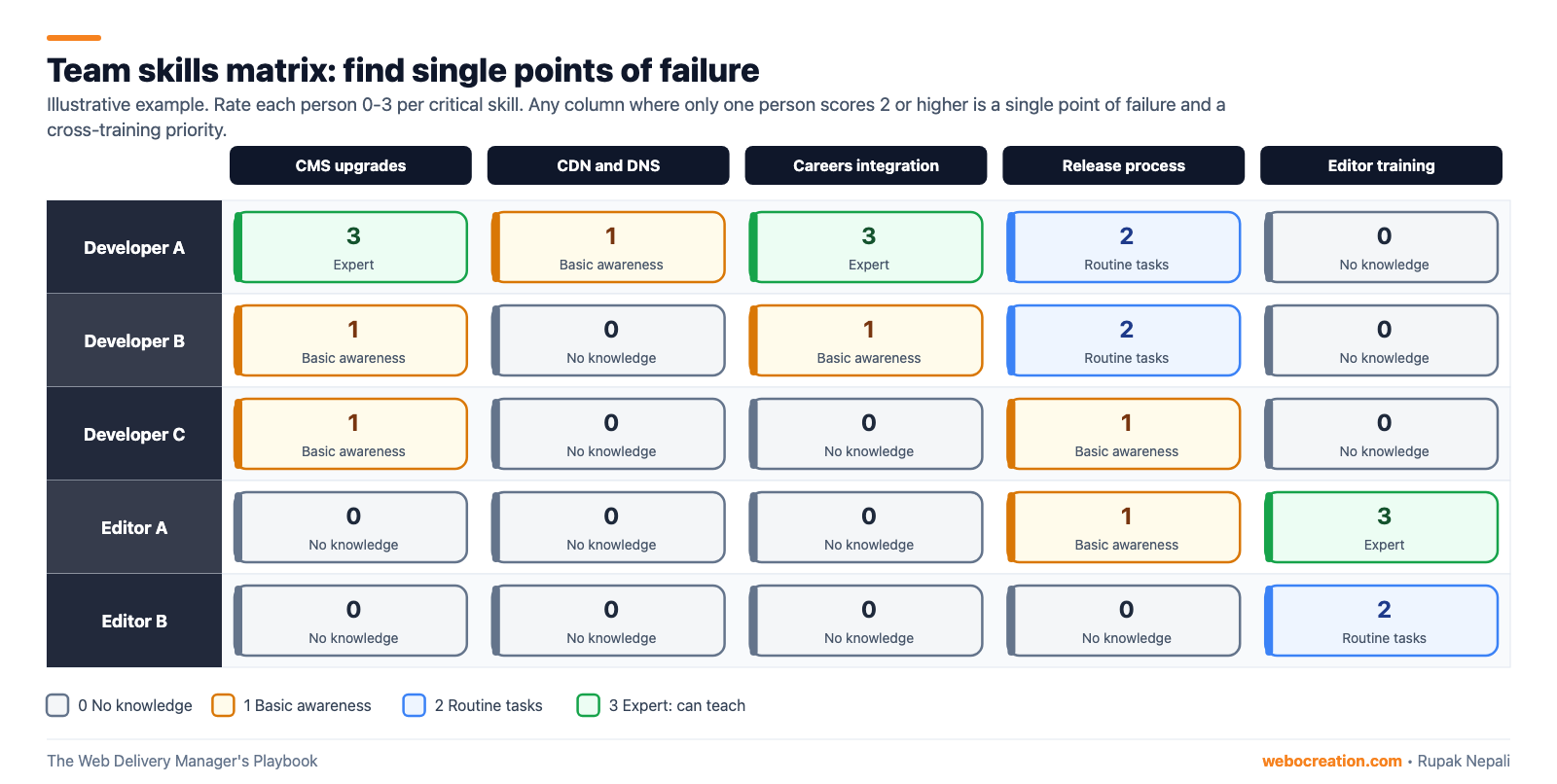
Build a skills matrix
List every critical skill and system, and rate each team member’s level. A simple scale works:
- 0: No knowledge
- 1: Basic awareness; can follow documentation
- 2: Can do routine tasks independently
- 3: Expert; can troubleshoot and teach others
Any critical area where only one person scores 2 or higher is a single point of failure. Those are your cross-training priorities.
Ways to cross-train
- Pairing. Two people work on a task together, with the less experienced person doing the hands-on work.
- Rotation. Flow duty (Chapter 10) naturally exposes team members to different sites and systems.
- Shadowing during incidents and releases. Let people observe, then lead with support.
- Teach-back sessions. The expert explains a system to the team in a short session, recorded for later.
- Deliberate assignment. Give the next task on a system to someone who does not yet know it, with the expert available to help.
Set a goal: every critical system should have at least two people at level 2 or higher within six months.
Documentation that lasts
Documentation is the other half of protecting knowledge. Most web teams have too little of it, and what exists is out of date. The goal is not to document everything. It is to document what someone would need in order to handle a situation without the expert.
What to document
- Runbooks for routine and emergency tasks: releasing a site, renewing a certificate, restoring a backup, clearing the CDN cache, handling a common incident.
- System overviews for each critical site and platform: what it is, how it is built, what it depends on, where the code and configuration live, who to contact.
- Editor guides for common content tasks, with screenshots.
- Decision records: short notes explaining why important technical decisions were made, so future team members do not undo them by accident.
Knowledge articles in ServiceNow
If your company uses ServiceNow, its knowledge base is a good home for much of this documentation, especially runbooks and guides that the service desk or other teams also need. Knowledge articles can be linked to incidents and configuration items, so when an incident is logged against the corporate site, the relevant runbook can appear alongside it.
Use two audiences:
- Internal knowledge base for the web team and IT: runbooks, system overviews, troubleshooting guides.
- Self-service articles for requesters and editors: how to submit a request, how to publish common content types, frequently asked questions.
Self-service articles also reduce tickets. If editors can find out how to add an image gallery on their own, they will not need to ask.
Keeping documentation current
Documentation goes out of date fast. A few habits help:
- Update documentation as part of the Definition of Done (Chapter 10) whenever a change affects it.
- Set a review date on every article, such as every six or twelve months, and assign an owner.
- Test runbooks by asking someone other than the author to follow them.
- Keep it short. Short, focused articles are easier to keep current than long manuals.
Growing people
Good people leave teams where they stop growing. As a delivery manager, you may or may not be the formal manager of the web team. Either way, you can help people develop:
- Give stretch assignments. Let a developer lead a launch, or an editor run a content audit.
- Make learning part of the job. Set aside time for training, conferences and certifications, and protect it like maintenance capacity.
- Share the context. Explain why decisions are made, how the business works and what stakeholders care about. People who understand the bigger picture make better decisions.
- Recognize good work publicly, especially the invisible work: the careful release, the thorough documentation, the incident handled calmly.
- Talk about careers. Ask each person where they want to be in two years, and look for ways to help them get there.
Team health
A team that is always firefighting burns out. Watch for signs: rising overtime, falling quality, people avoiding on-call, quiet retrospectives, sick days after launches. When you see them, act. Reduce work in progress, protect focus time, push back on unrealistic deadlines, and make sure on-call and launch work is recognized and compensated fairly.
Your job is not only to deliver work through the team. It is to keep the team able to deliver, year after year.
Webocreation Group: Fixing the single points of failure
After the search incident, Maya and the team built a skills matrix. It showed six critical areas where only one person scored 2 or higher, including search, the HR system integration on the careers site, and DNS. Over the next two quarters, each expert ran a recorded teach-back session, wrote or updated a runbook, and paired with a colleague on the next three tasks in their area.
When Sam went on leave again the following year, the search integration failed once more, this time because of a vendor change. A junior developer found the runbook in ServiceNow, followed it, and fixed the problem in under an hour. Nobody called Sam.
Template: Team skills matrix
Rate each person from 0 to 3. Highlight any row where fewer than two people score 2 or higher.
| Skill or system | Person A | Person B | Person C | Person D | People at 2 or higher |
|---|---|---|---|---|---|
| Corporate site CMS development | 3 | 2 | 1 | 0 | 2 |
| Webflow microsites | 2 | 0 | 3 | 1 | 2 |
| Site search integration | 3 | 1 | 0 | 0 | 1 (risk) |
| Careers site and HR integration | 0 | 3 | 1 | 0 | 1 (risk) |
| CDN and security rules | 2 | 2 | 0 | 0 | 2 |
| DNS and certificates | 3 | 0 | 0 | 1 | 1 (risk) |
| DAM administration | 0 | 0 | 2 | 3 | 2 |
| Release and change process | 3 | 2 | 2 | 1 | 3 |
| Accessibility testing | 1 | 1 | 2 | 2 | 2 |
| Analytics and tag management | 1 | 0 | 2 | 1 | 1 (risk) |
Checklist
- List the roles your web program needs and who covers each one today.
- Decide which roles must be in-house and which can be outsourced or shared.
- Build a skills matrix and identify every single point of failure.
- Plan cross-training so every critical system has two people at level 2 or higher.
- Write runbooks and system overviews for critical systems, and publish them as knowledge articles.
- Add documentation updates to the Definition of Done and set review dates.
- Have a career conversation with each team member at least twice a year.
Common traps
- Heroes. A team that depends on one expert is one resignation away from a crisis.
- Documentation nobody tests. Ask someone else to follow every runbook.
- Outsourcing control. Keep the roles that hold long-term knowledge in-house.
- Hiring only for technology. Ownership and communication matter as much as technical skill.
- Ignoring burnout. Constant firefighting wears teams down. Protect focus time and recognize hard work.
Part 4 covered the people side of the web program: stakeholders, agencies, vendors and your own team. Part 5 zooms out to the whole portfolio, starting with how to manage many sites at once.
Related reading
- Free automated testing and monitoring of websites
- Chapter 17: Vendor and License Management
- Chapter 19: Managing a Portfolio of Sites

Rupak Nepali is a web developer, manage Webocreation website and the author of six books:
Getting Started with OpenCart Module Development (Packt, 2013),
OpenCart Theme and Module Development (Packt, 2015),
OpenCart 4: Dev Guide for Themes & Extensions (2024),
OpenCart 4: User Manual (2025),
Cloudflare for the Enterprise Website (2026) and
The Technical Web Guide for Marketers (2026).
Rupak has built OpenCart stores and extensions since 2010, has published more than 600 tutorials on Webocreation, and shares free OpenCart extensions on GitHub.
Find Rupak on
GitHub | Amazon | LinkedIn | X | YouTube.