Chapter 11: Environments, Branching and Release Management
Website release management that makes releases boring: honest staging, identifiable releases, the right change type and a rollback plan for every change.
 Rupak NepaliPublished Nov 26, 2026
This is Chapter 11 of The Web Delivery Manager’s Playbook, a free series on running enterprise websites from request to release. Website release management that makes releases boring: honest staging, identifiable releases, the right change type and a rollback plan for every change.
On a Thursday afternoon, a developer at Webocreation Group deployed a small fix to the corporate site’s navigation menu. The fix had worked perfectly on his laptop and on the staging site. On production, it broke the menu on every page for mobile users. Nobody noticed for forty minutes, until a sales director tried to show the site to a customer on her phone.
The cause turned out to be simple. Staging was running a different version of a caching module than production, and nobody knew. The developer had not raised a change request, because “it was just a small CSS fix.” There was no rollback plan, because nobody expected it to go wrong. And because releases could happen at any time, nobody was watching the site when it went out.
Each of those gaps was small. Together, they turned a two-line fix into a visible outage.
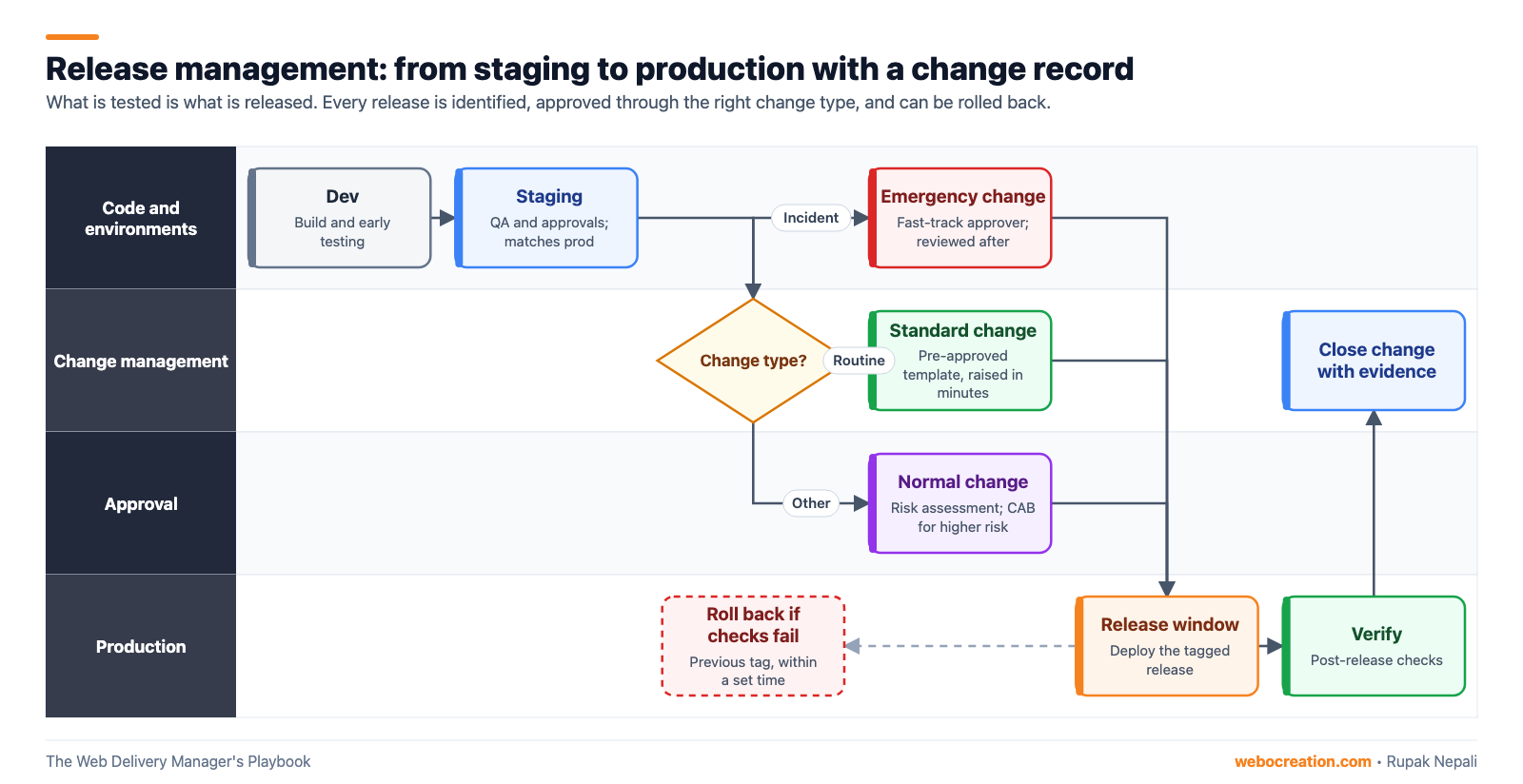
Website release management from staging to production
Why release management matters
Most website problems are caused by change. A release introduces a bug. A configuration update conflicts with something else. A plugin update breaks a form. Good release management does not stop change. It makes change safe, predictable and easy to undo.
The aim of this chapter is boring releases. A boring release goes out at a known time, after known checks, with a known way back. Nobody stays late, nobody panics, and requesters see their changes live when they expected.
Environments: Dev, stage and prod
An environment is a separate copy of a website where work can happen without affecting the live site. Most web teams use three.
| Environment | Purpose | Who uses it | Data and content |
|---|---|---|---|
| Development (dev) | Building and early testing of new code | Developers | Test data; may be out of date |
| Staging (stage, test or UAT) | Final testing and approval before release; should match production as closely as possible | Developers, QA, content approvers, stakeholders | Recent copy of production content |
| Production (prod or live) | The real site that visitors use | Everyone | Real content and data |
Some teams add more: a separate QA environment, a pre-production environment that exactly mirrors production, or short-lived preview environments for each feature. Managed platforms for Drupal, WordPress and other CMSs often provide these out of the box. More environments are not always better. Each one has to be kept up to date, and every extra environment is another place for differences to hide.
Keep staging honest
The navigation outage happened because staging did not match production. This is the most common environment problem, and it undermines everything else. If staging is different, testing on staging proves very little.
To keep staging close to production:
- Use the same versions of the CMS, modules, plugins, server software and configuration. Check this before every significant release.
- Refresh content regularly, for example weekly, by copying production content and files down to staging.
- Put staging behind the same CDN configuration, with the same caching and security rules, so you test what visitors will actually experience.
- Manage configuration as code wherever your platform allows, so the same settings are applied to every environment automatically.
Lock down non-production sites
Chapter 3 described the eleven public staging sites Maya found at Webocreation Group. Non-production sites must never be open to the public. They often contain unreleased content, test data, or debugging tools, and search engines will index them if they can find them.
Protect every non-production environment with at least one of the following: company single sign-on, an IP allow list limited to the office and VPN, or HTTP authentication with a password. Single sign-on is the strongest and easiest to manage. Also add a “noindex” header to non-production sites as a second line of defense, so that if protection fails, search engines still stay away.
Branching: Keeping code organized
If your team writes code, it needs a branching strategy: a set of rules for how code moves from a developer’s work to production in a version control system such as Git.
As a delivery manager, you do not need to design the strategy, but you should understand it well enough to plan releases. The two most common approaches for web teams are:
- Trunk-based development. Developers work in short-lived branches and merge into the main branch frequently, often daily. The main branch is always releasable. This suits teams with good automated testing and frequent releases.
- Release branches. Work is merged into a development branch. When a release is ready, a release branch is created, tested on staging and deployed to production. This suits teams with less frequent, scheduled releases and more manual testing.
Whatever the strategy, three rules matter for release management:
- What is tested is what is released. The exact code tested on staging must be the code deployed to production, with no last-minute additions.
- Every release can be identified. Use version numbers or tags so you always know what is on production.
- Every release can be rolled back. It must be possible to return to the previous version quickly.
The release calendar
Predictable release windows are one of the most effective tools a delivery manager has. They let requesters plan, let the team prepare, and make sure the right people are watching when changes go live.
When setting release windows, consider:
- Traffic patterns. Release when traffic is lower, but not when nobody is around to respond. Early morning on a weekday is common.
- Support coverage. Developers, QA and someone who can make decisions must be available for at least two hours afterwards.
- Avoid Fridays and the day before holidays. A problem found late on a Friday is a problem that ruins a weekend.
- Align with the change approval meeting, so changes can be approved before the window.
Maya set two weekly release windows at Webocreation Group: Tuesday and Thursday, 7 to 9 a.m. Routine content changes published by editors in the CMS did not need a window, but every code, configuration or platform change did.
Change freezes
A change freeze is a period when only emergency changes are allowed. Common freeze periods include major company events, product launches, end of financial quarters, peak shopping periods and holidays. Publish freezes on the release calendar at least a month ahead, so requesters can plan their work around them.
Change management in ServiceNow
In most enterprises, any modification to a production system requires a change request (CHG) in ServiceNow. Change management exists to make sure changes are planned, assessed for risk, approved by the right people, scheduled sensibly and recorded. For web teams, it can feel like heavy process for small changes. Set up well, it is light for routine work and careful for risky work.
The three change types
ServiceNow uses three standard change types, based on ITIL practice.
| Change type | What it is | Approval | Web examples |
|---|---|---|---|
| Standard | Pre-approved, low-risk, routine change that follows a documented procedure | Pre-approved through a template; no CAB needed each time | Weekly release of tested code to an existing site; adding a DNS record; clearing CDN cache; publishing a scheduled content release |
| Normal | Any change that is not standard or emergency; needs risk assessment and approval | Approval by change manager and, for higher risk, the change advisory board (CAB) | CMS major version upgrade; new site launch; DNS cutover; new firewall rule set; new integration |
| Emergency | Must be done urgently to fix an incident or prevent serious harm | Fast-track approval by an emergency approver; reviewed afterwards | Security patch for an actively exploited vulnerability; rollback of a broken release; fix for a site outage |
Risk assessment
When raising a normal change, ServiceNow usually asks a set of risk questions: How many users are affected? Has this change been done before? Can it be rolled back? Has it been tested? What happens if it fails? The answers produce a risk level (low, moderate or high), which decides who must approve it.
Answer these questions honestly. A change marked low risk to avoid CAB that then causes an outage will damage the web team’s credibility with IT for a long time.
The change advisory board
The change advisory board (CAB) is a group that reviews higher-risk changes, usually in a weekly meeting. Members typically include representatives from infrastructure, security, the service desk, application teams and the change manager.
To make CAB work for you:
- Submit changes early. Most companies require changes to be submitted several days before the CAB meeting. Build this into your estimates (Chapter 7).
- Attend when your change is reviewed. Be ready to explain what is changing, why, how it was tested and how you will roll back.
- Write for a non-web audience. CAB members may not know what a CDN rule or a CMS module is. Explain the business impact in plain language.
Getting routine releases pre-approved
The single most valuable thing a web team can do with change management is to get its routine releases approved as standard changes. Without this, every weekly release needs a normal change and a CAB review, which slows everything and wears out everyone.
To create a standard change, work with your change manager to build a standard change template. You will usually need to show:
- A clear, repeatable procedure for the release, written down step by step.
- A track record: for example, ten or more successful releases of this type with no failures.
- Low risk: the release only affects existing sites, is tested on staging, and can be rolled back within a set time.
- Defined limits: what the standard change covers and what it does not. Major upgrades, new sites, DNS cutovers and security rule changes usually fall outside.
Once approved, the template lets the team raise a pre-approved change for each release in a couple of minutes. The change is still recorded, so the audit trail is complete, but no meeting is needed.
At Webocreation Group, Maya ran twelve weekly releases as normal changes, with full documentation and no failures. She then presented the record to the change manager and got three standard change templates approved: weekly code release to existing sites, DNS record changes, and CDN cache purges. CAB time for the web team dropped from an hour a week to about ten minutes a month.
Rollback plans
Every change needs a way back. A rollback plan answers three questions:
- How will we know something is wrong? For example: specific pages failing, error rates rising, forms not submitting.
- How do we go back? For example: redeploy the previous tagged release; restore the configuration backup; revert the DNS record.
- How long will it take, and who decides? For example: rollback within 15 minutes; the delivery manager or technical lead makes the call.
Test your rollback method regularly, not just in theory. A rollback plan nobody has tried is a hope, not a plan.
Also remember that some changes are hard to undo. Database changes, content migrations and DNS changes with long cache times may not roll back cleanly. For these, plan extra testing, consider a staged rollout, and make sure the change is classed as normal, not standard.
Template: Release checklist and change request
Use this checklist for every code or configuration release. Copy it into the change request or attach it.
Before the release:
- All items in the release meet the Definition of Done on staging.
- Staging versions match production (CMS, modules, configuration).
- Content approver and business owner have signed off on staging.
- Change request raised (standard or normal) and approved.
- Release notes written in plain language.
- Rollback method confirmed and the previous release tagged.
- People on hand for the window and for two hours afterwards.
- Stakeholders told about any visible changes.
During the release:
- Deploy the tagged release to production.
- Clear caches as needed (CMS, CDN).
- Run smoke tests on key pages, forms and integrations.
After the release:
- Verify each item on production with its requester or approver.
- Watch monitoring for errors for at least one hour.
- Close the change request with evidence (test results, screenshots).
- Update ServiceNow requests and the delivery board.
- Update the inventory or CMDB if anything changed.
- Send release notes to stakeholders.
Key change request fields for web releases:
| Field | What to write |
|---|---|
| Short description | Plain summary, for example: Weekly release to corporate site, 6 items |
| Configuration item | The affected site from the CMDB |
| Justification | Why the change is needed; link to the requests it delivers |
| Implementation plan | Step-by-step release procedure |
| Test plan | How it was tested on staging; how it will be verified on production |
| Backout plan | Rollback method, time, and who decides |
| Risk and impact | Users affected; what could go wrong; risk level |
| Planned start and end | Within an agreed release window |
Checklist
- Check that staging matches production, and set up a regular content refresh.
- Protect every non-production environment with SSO, an IP allow list or a password, plus a noindex header.
- Understand your team’s branching strategy and confirm that every release can be identified and rolled back.
- Publish a release calendar with regular windows and planned freezes.
- Meet your change manager and learn the change process and CAB schedule.
- Build a track record of successful releases and apply for standard change templates.
- Add a rollback plan to every release, and test rollback at least once a quarter.
Common traps
- A staging site that does not match production. Testing on a different system proves little.
- “It’s just a small fix.” Small changes break things too. Every production change follows the process.
- Friday releases. A problem found late on Friday becomes a weekend outage.
- Gaming the risk assessment. Marking risky changes as low risk to skip CAB will eventually backfire.
- Untested rollback plans. If you have never rolled back, you do not know that you can.
- Normal changes for everything. Without standard changes, routine releases drown in approvals.
Related reading
- Git, CI/CD and staging: a deployment workflow that does not break the live site
- Cloudflare Rules for WordPress: security, redirect and cache rules
- Chapter 10: Choosing a Delivery Rhythm
- Chapter 12: QA, Accessibility and Content Review

Rupak Nepali is a web developer, manage Webocreation website and the author of six books:
Getting Started with OpenCart Module Development (Packt, 2013),
OpenCart Theme and Module Development (Packt, 2015),
OpenCart 4: Dev Guide for Themes & Extensions (2024),
OpenCart 4: User Manual (2025),
Cloudflare for the Enterprise Website (2026) and
The Technical Web Guide for Marketers (2026).
Rupak has built OpenCart stores and extensions since 2010, has published more than 600 tutorials on Webocreation, and shares free OpenCart extensions on GitHub.
Find Rupak on
GitHub | Amazon | LinkedIn | X | YouTube.