Chapter 9: Running Web Work Through ServiceNow
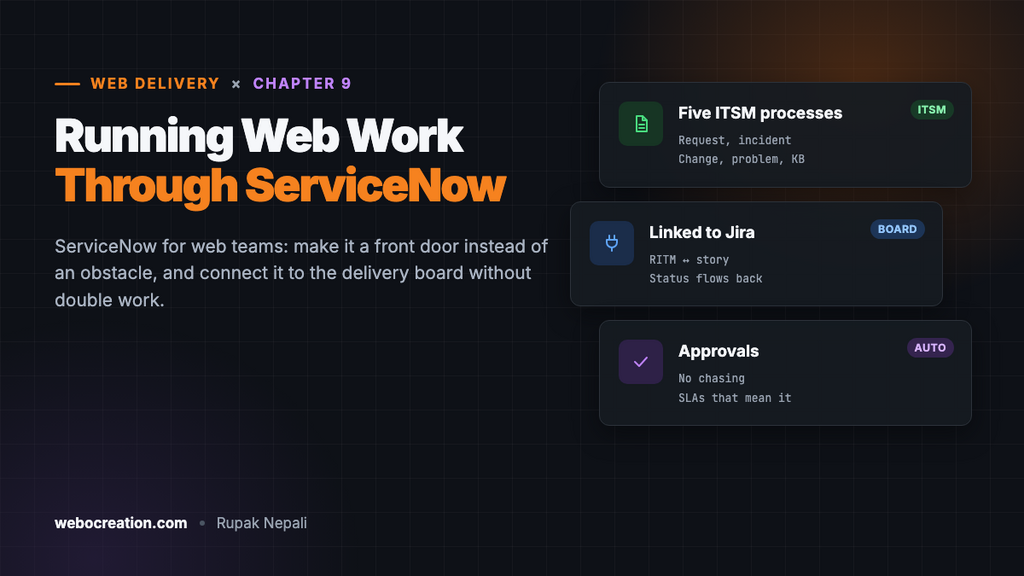
ServiceNow for web teams: make it a front door instead of an obstacle, and connect it to the delivery board without double work.
 Rupak NepaliPublished Nov 26, 2026
This is Chapter 9 of The Web Delivery Manager’s Playbook, a free series on running enterprise websites from request to release. ServiceNow for web teams: make it a front door instead of an obstacle, and connect it to the delivery board without double work.
When Maya first suggested putting all web requests into ServiceNow, one of the developers groaned. “ServiceNow is where tickets go to die,” he said. He was not entirely wrong. At Webocreation Group, web incidents were often assigned to the wrong team, requests sat in a generic IT queue for days before anyone noticed they were about websites, and every change required a long form that seemed designed for server upgrades, not content releases.
The developers had responded by working around ServiceNow wherever they could. Real work happened in Jira and chat. ServiceNow tickets were updated afterwards, if at all. This meant IT had no picture of web work, auditors found gaps in change records, and requesters had two places to check and trusted neither.
The problem was not ServiceNow. The problem was that nobody had set it up for web work.
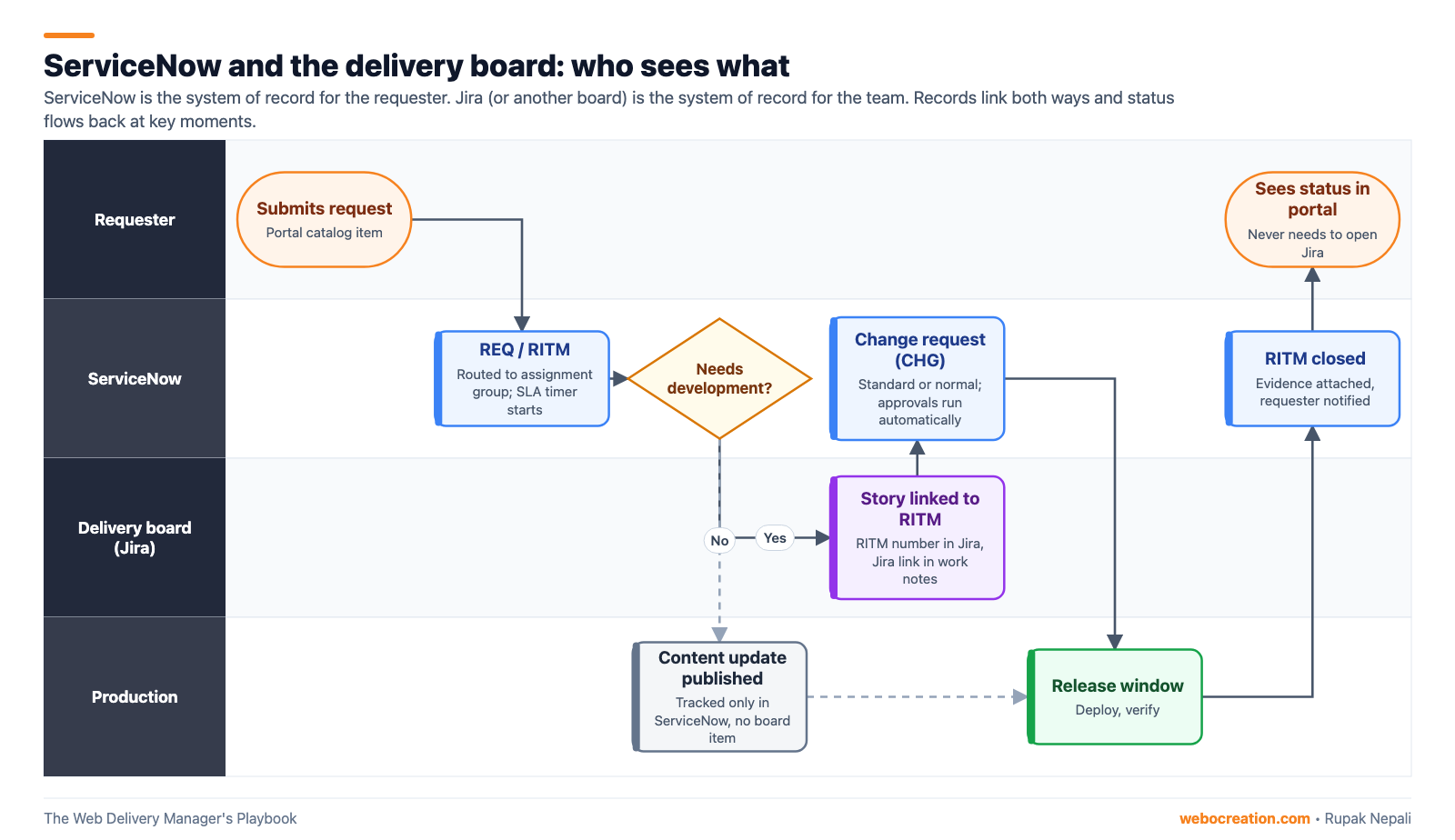
ServiceNow for web teams: who sees what
Why web teams should care about ITSM
IT service management (ITSM) is the set of practices a company uses to deliver and support IT services. ServiceNow is the platform most large companies use to run those practices. Web teams often see it as overhead, but a well-configured ITSM process gives you real advantages:
- A front door that already exists. Employees already know the ServiceNow portal. You do not have to teach them a new tool.
- Automatic routing and approvals. Requests reach the right team, and approvals happen without chasing.
- An audit trail. Every change, approval and incident is recorded. In regulated industries, this is not optional, and it protects you when something goes wrong.
- Shared visibility with IT. When a website depends on infrastructure, networks or identity systems, incidents and changes can be linked across teams.
- Reports that make your case. Ticket volumes, response times and change success rates give you data for budget and headcount discussions.
The goal of this chapter is to get those benefits without drowning your team in process.
The five ITSM processes a web team uses
ServiceNow supports many ITSM processes. A web team needs to understand five of them well.
| Process | ServiceNow record | What it is for | Web team’s role |
|---|---|---|---|
| Request fulfillment | Request (REQ), requested item (RITM), catalog task (SCTASK) | Delivering new or changed services that someone asks for | Owns web catalog items; fulfills web requests (Chapter 5) |
| Incident management | Incident (INC) | Restoring normal service when something breaks | Resolves web incidents; joins major incidents affecting websites (Chapter 14) |
| Problem management | Problem (PRB) | Finding and fixing the root cause of repeated incidents | Investigates recurring web issues |
| Change management | Change request (CHG) | Controlling modifications to production systems | Raises changes for releases, upgrades and configuration changes (Chapter 11) |
| Knowledge management | Knowledge article (KB) | Sharing how-to guides, runbooks and known fixes | Publishes editor guides, runbooks and FAQs (Chapter 18) |
Other ServiceNow modules, such as the CMDB (Chapter 3), asset and vendor management (Chapter 17), and Strategic Portfolio Management (Chapter 8), support these processes.
ServiceNow and your delivery board
Most web teams also use a delivery tool for day-to-day work: Jira, Azure DevOps, or ServiceNow’s own agile module. This is where developers plan sprints, break work into tasks, and track code.
Trying to run everything in one tool rarely works. ServiceNow’s request and incident forms are built for service delivery, not for breaking down a feature into development tasks. Jira is built for development, not for intake, approvals and audit.
The practical answer is to use each tool for what it does best, and connect them.
| Lives in ServiceNow | Lives in the delivery board |
|---|---|
| Requests from the business | User stories and development tasks |
| Incidents and problems | Sprint planning and backlog ranking |
| Change requests and approvals | Code reviews and technical subtasks |
| Knowledge articles | Technical design notes |
| SLAs and service reports | Velocity and burn-down charts |
The connection rules matter more than the tools:
- ServiceNow is the system of record for the requester. Requesters never need to look at Jira. Status updates they care about appear on their ServiceNow ticket.
- The delivery board is the system of record for the team. Developers plan and track their work there.
- Every board item that came from a request links back to it. Put the ServiceNow number in the Jira issue, and the Jira link in the ServiceNow work notes.
- Status flows one way at key moments. When the Jira work is done and released, the ServiceNow item is updated and closed. Many companies automate this with an integration. If yours does not, make it part of the release checklist.
- Not everything needs both. A simple content update can be done entirely in ServiceNow. Only work that needs development planning gets a board item.
Assignment groups and routing
Chapter 2 introduced assignment groups as the way your RACI becomes real in ServiceNow. Here are the practical details that make routing work.
Route from the catalog item, not from people. Each web catalog item should set the assignment group automatically. Nobody should have to read a request and decide where it goes for routine cases.
Route incidents using the CMDB. When someone reports an incident and selects the affected website, ServiceNow can assign it to that site’s support group from the CI record. This only works if your CMDB entries are accurate, which is one more reason to keep them current.
Have a fallback. Some tickets will land in the wrong place. Agree with the IT service desk that anything about websites goes to WEB-Delivery for triage, and give the service desk a short guide to recognize web issues.
Watch for ping-pong. If tickets bounce between groups more than once, the routing rules or the group definitions need fixing. ServiceNow can report on reassignment counts; review them monthly.
SLAs that mean something
A service level agreement (SLA) in ServiceNow is a timer attached to a record. It starts when a condition is met, can pause, and records whether the target was met.
For web requests, set up two SLAs per catalog item, matching the targets you published in Chapter 5:
- Response SLA: starts when the request is submitted; stops when the web team first responds or accepts it.
- Resolution SLA: starts on acceptance; stops when the request is fulfilled.
Configure both to pause when the request is waiting on the requester, for example while waiting for content or approval. Without pause conditions, SLAs punish the team for delays they cannot control, and people start gaming the timers.
For incidents, SLAs usually follow the company’s standard priority targets, which Chapter 14 covers.
Use SLA data carefully. It is a signal, not a scoreboard. If one request type keeps breaching its target, ask why: is the target unrealistic, is the work bigger than expected, or is something blocking it? Then fix the cause.
Approvals without chasing
Approvals are where web work most often stalls. Someone has to approve the content, the budget, the new vendor, the tracking pixel. Without a system, the delivery manager spends hours chasing.
ServiceNow can run approvals automatically as part of a catalog item’s workflow. Common web approvals include:
- Manager or budget approval for campaigns, new sites and paid tools.
- Legal approval when the requester indicates the content includes prices, rates, claims or legal text.
- Privacy or security approval for new tracking vendors and third-party scripts.
- Business owner approval for changes to a site owned by another team.
Keep approvals to the minimum the RACI requires. Every approval adds waiting time. Set reminders and escalation rules so approvals that sit for more than two business days are flagged automatically. And make sure every approver can approve from email or a mobile device, not only by logging into the portal.
Notifications that people read
ServiceNow can send an email for almost every event. Left at default settings, it often does, and people learn to ignore all of them.
For web requests, limit notifications to the moments a requester actually cares about:
- Request received, with a link to track it
- More information needed (with the specific question)
- Request accepted, with the expected delivery date
- Request completed, with a link to the live change
- Request closed without being done, with the reason
Write the notification text in plain language. “Your request RITM0012345 has transitioned to state Work in Progress” means little to a marketing manager. “We’ve started work on your request to update the Product A pricing page. Expected live date: March 14” means a lot.
Making ServiceNow work for people who hate forms
Marketing teams often resist ServiceNow because it feels like IT’s tool. A few changes make a big difference:
- Use their words. Name catalog items after what people want (“Update a web page,” “Launch a campaign”), not after IT processes.
- Put web requests in an obvious place. Ask the ServiceNow team for a “Website” category on the portal home page, with a recognizable icon.
- Keep forms short. Use the conditional fields described in Chapter 5.
- Offer email intake for simple requests, if your ServiceNow setup supports it.
- Show the value. In your monthly update, share how quickly requests are now completed. When people see faster results, resistance fades.
- Be human. Tickets are a tool for visibility, not a replacement for conversation. Pick up the phone when a request is complex or a requester is frustrated.
Common ServiceNow problems for web teams
| Symptom | Likely cause | Fix |
|---|---|---|
| Web tickets sit in the general IT queue | No web category or routing rule | Add web catalog items and route them to web assignment groups |
| Developers do not update ServiceNow | Real work happens elsewhere; double entry | Integrate with the delivery board or limit ServiceNow updates to key moments |
| SLAs always breached | Targets set without data, or no pause conditions | Reset targets from real data; pause when waiting on requester |
| Requesters keep emailing for status | Notifications are unclear or missing | Rewrite notifications in plain language at key moments only |
| Approvals take weeks | Too many approvers, no reminders | Reduce approvals to RACI minimum; add reminders and escalation |
| Change forms feel absurd for content releases | One change process for everything | Set up standard changes for routine web releases (Chapter 11) |
Webocreation Group: From graveyard to front door
Maya worked with the ServiceNow administrator for three weeks to set up the web catalog items, assignment groups, SLAs, approvals and notifications. The administrator was glad to help. Few teams had ever come to him with a clear RACI and a list of exactly what they needed.
The developer who had called ServiceNow a graveyard became its most effective user once the Jira integration was in place. He no longer had to update two systems. When he marked a Jira issue as released, the linked ServiceNow item updated automatically and the requester received a plain-language message with a link to the live page.
Three months later, the IT director used the web team’s ServiceNow reports as an example for other teams. The web team’s requests had the highest satisfaction scores in the company’s quarterly service survey.
Template: Web ticket-type decision tree and field guide
Share this guide with requesters, the IT service desk and the web team.
Which record do I need?
- Is something that used to work now broken or wrong on a live site? Raise an incident. If it involves wrong prices, rates or legal text, mark it high priority.
- Do you want something new or different on a website? Submit a request using the matching web catalog item.
- Do you need access to a web tool? Submit a platform access request.
- Is it a big initiative (new site, redesign, migration)? Submit a new site or project request; the delivery manager will contact you to plan it.
- Are you on the web team and about to change a production system? Raise a change request (Chapter 11).
Field guide for the web team:
| Field | How the web team uses it |
|---|---|
| Assignment group | Set automatically by catalog item or CI; only change it if the routing was wrong |
| Assigned to | The person doing the work; never leave a ticket unassigned after triage |
| State | Keep current; use “Awaiting requester” to pause the SLA when blocked on them |
| Work notes | Internal notes: estimate, priority score, Jira link, decisions |
| Additional comments | Messages the requester sees; write in plain language |
| Configuration item | The affected site, from the CMDB; always fill in |
| Close notes | What was done, with a link to the live change |
Checklist
- Agree which work lives in ServiceNow and which lives on your delivery board.
- Link every board item to its ServiceNow record, and automate status updates if you can.
- Confirm routing for every web catalog item and for incidents through the CMDB.
- Set response and resolution SLAs from real data, with pause conditions.
- Configure approvals to the RACI minimum, with reminders and escalation.
- Rewrite notifications in plain language and limit them to key moments.
- Publish the ticket-type decision tree for requesters and the service desk.
Common traps
- Two systems, no link. If developers must update both tools by hand, one of them will always be wrong.
- Default notifications. Too many emails train people to ignore all of them.
- SLAs without pause conditions. They punish the team for delays they cannot control.
- IT language on the portal. Requesters should see “Update a web page,” not “Content Modification Request.”
- Treating ServiceNow as the enemy. Set up well, it saves your team time and gives you data to argue for resources.
Related reading
- Incident lifecycle: from alert to postmortem
- Git, CI/CD and staging: a deployment workflow that does not break the live site
- Chapter 8: Roadmaps and Quarterly Planning
- Chapter 10: Choosing a Delivery Rhythm

Rupak Nepali is a web developer, manage Webocreation website and the author of six books:
Getting Started with OpenCart Module Development (Packt, 2013),
OpenCart Theme and Module Development (Packt, 2015),
OpenCart 4: Dev Guide for Themes & Extensions (2024),
OpenCart 4: User Manual (2025),
Cloudflare for the Enterprise Website (2026) and
The Technical Web Guide for Marketers (2026).
Rupak has built OpenCart stores and extensions since 2010, has published more than 600 tutorials on Webocreation, and shares free OpenCart extensions on GitHub.
Find Rupak on
GitHub | Amazon | LinkedIn | X | YouTube.